
 Texas Hill Country
Thanks,
You are doing great.
Trust the software. Varying from software is where people get into trouble.
You’re ignoring this member’s posts.
This topic is closed.
33 replies2.6k viewsLast reply
Thanks,
You are doing great.
Trust the software. Varying from software is where people get into trouble.
You’re ignoring this member’s posts.
Looking at your software something you might try is separating your left ear and right ear in the frequency compression.
Your left ear has better hearing in the upper frequencies. Getting a little more aggressive with frequency compression in your right ear might balance sounds some.
Try an experiment before doing this.
Take an aid out and walk around listening to everything. Remember this sounds you hear or don’t hear.
Now do the same thing with the other ear.
You are testing your programming in each ear. When you get each ear the best it can be then with both aids in it will just be better.
Welcome to self programming!
You’re ignoring this member’s posts.

The compression was set automatically by the software. Yes, there is an option to decouple both hearing aids and then set individually. I never understood compression fully though. When trying to improve compression on the right ear, what range would you recommend?
You’re ignoring this member’s posts.
The trick is the S sound.
Adjust towards more compression until the S sound starts sounding SHHH. Then back it off a little.
You’re ignoring this member’s posts.

I really like it when something positive comes from , @TallRobocop is doing pretty good considering his level of loss and just beginning down the DIY path, it can only get better over time.
You’re ignoring this member’s posts.
I totally agree.
He is doing great.
Understanding your hearing loss is so important.
You’re ignoring this member’s posts.
I am experimenting with the compression and I have a question - when I move compression towards lower frequency, should I move “f min” only, “f max” only, or both “f min and f max” together? For example, the software set compression to 2.50 f min and 3.75 f max. Should I move both sliders by small 0.25 digits or just the f min or the f max?
You’re ignoring this member’s posts.
Can you hear the turn signals, microwave beeps etc?
If you are hearing these things maybe you don’t need to adjust anything.
Have you tried the each ear test? That will tell you if you need to separate the aids tuning wise.
Do these things before making more changes.
As far as frequency compression my thoughts are to maintain the factory span between the high and low cut-offs. My understanding is you are setting the window to move the upper frequencies to. Does that make sense? The window should not be too narrow. That would really put a lot of sound in a small window. Might get really complicated to hear and understand. Phonak doesn’t give you the choice of this span so I can’t really say a lot about this.
Hopefully other members will chime in on this if I am saying something wrong or need to add something.
You’re ignoring this member’s posts.
I understand. I tried another thing which is to turn off the frequency compression just to check and for some reason, I am able to understand more clearly and more rich voice. How come? I also moved the frequency compression the other way around. The default was 2.50 - 3.75, I moved it to 2.75 - 4 and I can hear a richer voice. So strange, don’t you think? Or is this normal?
You’re ignoring this member’s posts.
I just realized that moving the compression slider is changing the master gain also so that gain getting louder is probably what’s causing increased clarity. 
I will continue to tweak it and experiment to see which compression gives me the best audio. Right now I have set 2.25 - 3.75 on the right ear and 2.50-3.75 on the left ear.
You’re ignoring this member’s posts.
I will continue to tweak it and experiment to see which compression gives me the best audio.
Definitely this is the way forward,as only you can tell what you hear and what works best for you, sometimes it’s unorthodox in .
I just realized that moving the compression slider is changing the master gain
Yeah it’s the same in the gain handles in fine tuning, so always make small changes to begin with.
You’re ignoring this member’s posts.
Your left ear has better hearing in the upper frequencies. Getting a little more aggressive with frequency compression in your right ear might balance sounds some.
I think you got left and right ears confused. The red graph on the left is the right ear and the blue graph on the right is the left ear. So I think you meant to say my right ear has better hearing in upper frequencies, correct?
You’re ignoring this member’s posts.
I have a follow-up question, what is the gray graph area going across the whole range? Should I try to keep the medium and soft sound lines inside this gray area? See attached screenshot:
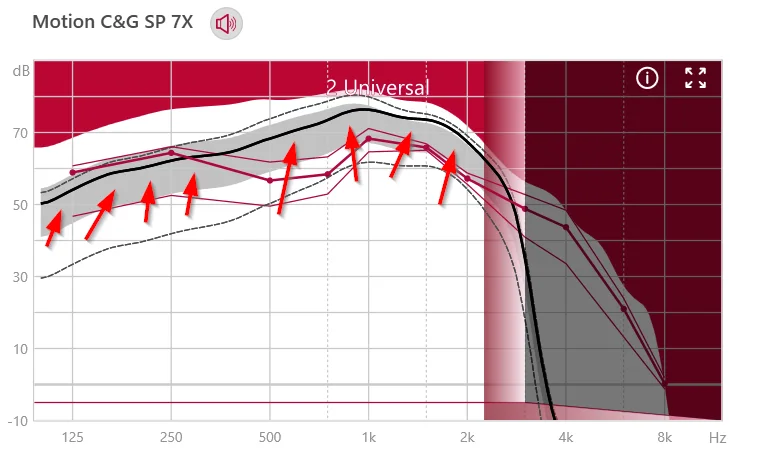
You’re ignoring this member’s posts.
I was able to configure my hearing aids very well, and now the voices are naturally sounding. I posted about this in this thread: https://forum.hearingtracker.com/t/switched-from-phonak-naida-b90-up-to-signia-motion-charge-go-sp-7x/62857/12?u=tallrobocop (member archive)
You’re ignoring this member’s posts.
What the forum has been talking about this week.
Fitting Software Requests894 replies
Uncategorized452 replies
Hearing Aids108 replies
Fitting Software Requests519 replies
Fitting Software Requests1.1k replies
 Pakistan