You’re ignoring this member’s posts.
Ultra/Super Power Hearing Aids with Semi-Linear option
This topic is closed.
92 replies5.3k viewsLast reply

That’s basically a severe hearing loss apart from two frequencies being in the profound range.
You’re ignoring this member’s posts.
You’re ignoring this member’s posts.

 Pakistan
Yes. I ordered a pair from this eBay seller. It will arrive after 1-2 weeks.
You’re ignoring this member’s posts.

 Texas Hill Country
Good luck with the new Exceed aids.
The forum has a few self programmers that are very good with Oticon and they are very helpful too.
Let us know how they work out for you.
You’re ignoring this member’s posts.
I hooked up the Oticon Xceed hearing aids to Genie 2 software and started the fitting process. I found that there’s no way to change the prescription/fitting formula, unfortunately. Let’s suppose I want to set it to DSLv5, there’s no way to do that. If I want to switch to Linear, again there’s no way to do that. The only way it seems is through a device.
By far, I have now tried three brands - Signia, Phonak, and Oticon. Signia’s software seems to be the easiest to configure.
Am I missing something in Oticon Genie 2 software that will allow me to quickly switch the prescription/fitting formula?
You’re ignoring this member’s posts.
I found that there’s no way to change the prescription/fitting formula, unfortunately. Let’s suppose I want to set it to DSLv5, there’s no way to do that.
I’ve got the software and can change fitting formulas. I don’t even have the Aids but set the software up as Xceed 1 and there is a way to change fitting formulas.
You can have different fitting formulas for each program. Thats an advantage to Oticon.
Not at home so can’t check the software to tell you how. Hopefully someone can help.
You’re ignoring this member’s posts.

First, my Sky V70 were issued by the hospital. I had no choice in them and the colour.
Oh wow. You lucked out! Colorful aids are still my holy grail. I look at the rainbow of choices on the Widex sign at my audi’s. And then resign myself to the BMW colors Phonak offers us fuddy-duddy oldsters.
You’re ignoring this member’s posts.
Thanks for showing me this. I will continue to configure my aids. I also wish there was an easy way to switch between linear, semi-linear, and compression-fitting formulas. Signia Connexx has an easy way to switch as you can see here:
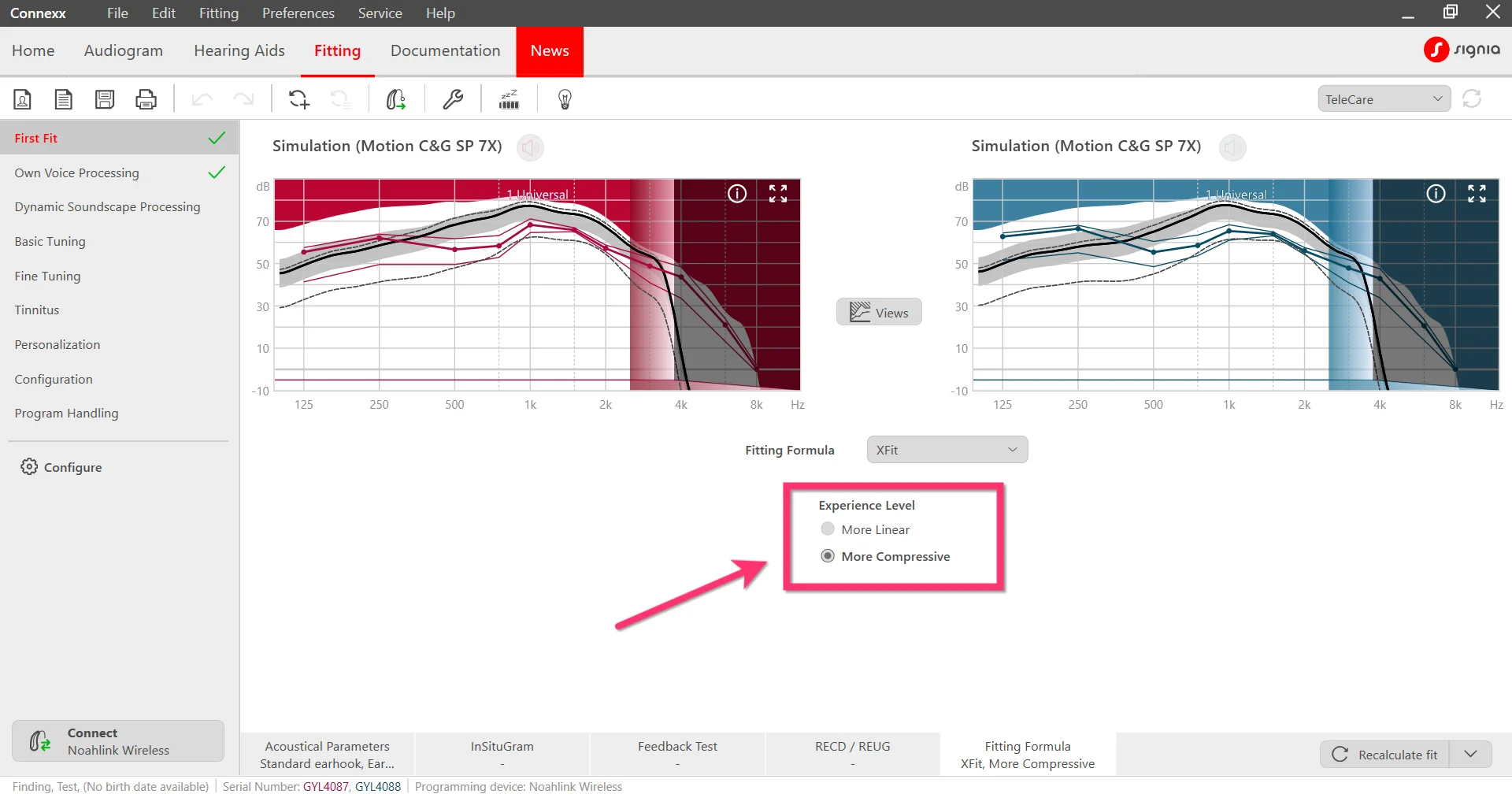
By the way, which aids do you wear? Your hearing loss seems to be in the severe to profound levels too.
You’re ignoring this member’s posts.

@TallRobocop The is my brother’s, he uses Phonak Naida Paradise UP; He was using Oticon before that.
I take it, you have received the Xceed you bought from Ebay, were they new or refurbished?
You’re ignoring this member’s posts.
Ah okay, got it. You’re a good brother who’s exploring this forum and helping others out here. The Oticon aids look brand new, complete with the box and color sticks to install as well.
You’re ignoring this member’s posts.
I’ve another question @Baltazard, in Signia and other aids, there’s an option called Frequency compression where you can switch frequency to those frequencies where the sound can be heard. I noticed Oticon calls this Sound Recover and their tab has an option to switch it on but it never saves. Is there a way to enable and then tweak this in Genie 2 software?
You’re ignoring this member’s posts.
Sound Recover
This is Phonak Sound Recover.
Oticon do have a version of their own tho.
You’re ignoring this member’s posts.
Yeah but the interface is so hard to understand. I work in the software industry and I cannot seem to find this option in Genie 2. 
You’re ignoring this member’s posts.
Yes man, this is it. Thank you so much! I am on a 13" laptop so I didn’t see this option. Had to scroll down. I really appreciate it.
You’re ignoring this member’s posts.
Let me know how your Xceeds work out. I will be ordering P90-UP aids and waiting for Xceeds replacements. Through my healthcare provider l can get Signia premium power aids for 699 dollars each.
You’re ignoring this member’s posts.
I have a 14 inch laptop with 1080p display. I usually set the display scaling at 125 percent. I see items easy to read in all fitting programs.
You’re ignoring this member’s posts.
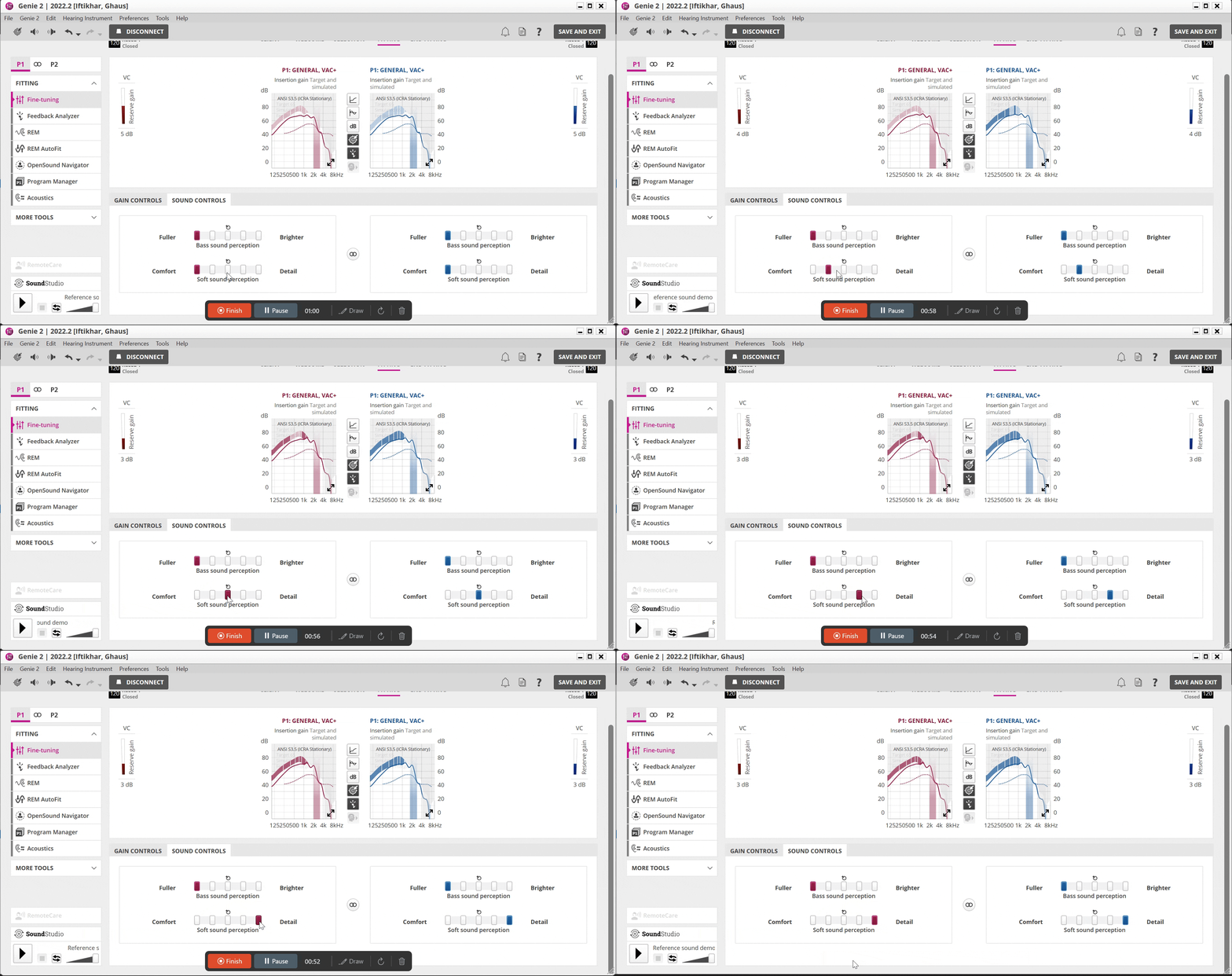
Hey @Baltazard and @Terost, after enabling Speech Rescue, the speech got so much better. But not just that, I am also playing around with Sound Controls and I can sense a big difference in speech and voice quality depending on where I move the slider. I have just one question. If I increase the gain or play around with the soft sound perception slider (see GIF below), then the feedback margin area gets colored. What is the feedback margin area for? Should I aim for a setting where the feedback margin should not get colored?
You’re ignoring this member’s posts.
@TallRobocop Not really sure, @cvkemp who uses oticon (I believe) perhaps can give you some tips.
My understanding, is what works best for you is where you should aim.
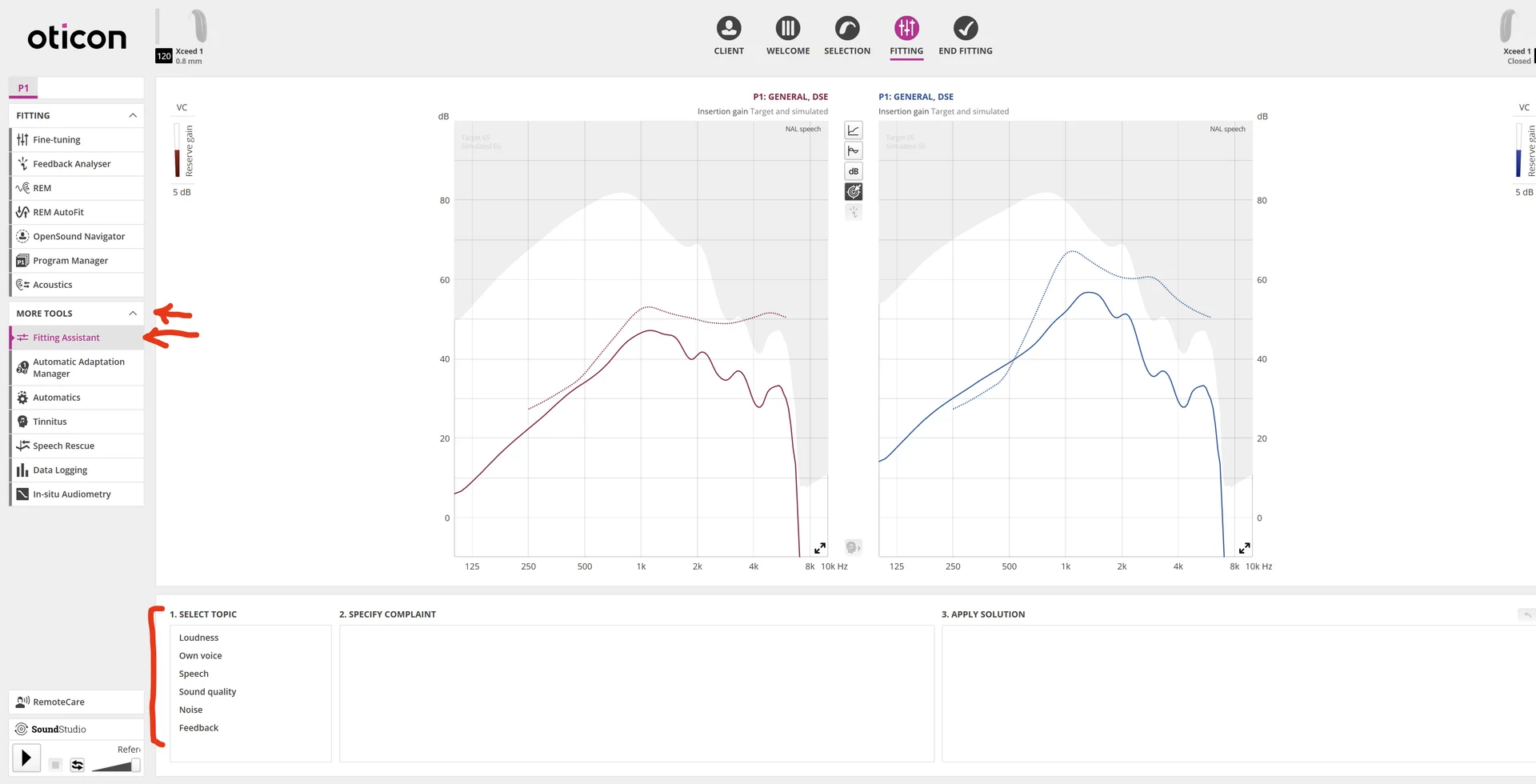
If I was you, I will start with the target fittings, then use the fitting assistant (under MORE TOOLS) to tweak them, bearing in mind that Feedback has got a different meaning.
+1 for the GIF
You’re ignoring this member’s posts.

You’re ignoring this member’s posts.
Related discussions
Hearing Aids8 replies
Fitting Software Requests1.1k replies
Hearing Aid Self-Fitting (DIY)302 replies
Fitting Software Requests513 replies
Fitting Software Requests419 replies