A moment ago the programmes shown on the app were Auto//TV Connx/ a 2nd TV Connx (I have 2 now)/then several progs for various situations.
The mike is paired to the aids
You’re ignoring this member’s posts.
This topic is closed.
230 replies7.1k viewsLast reply
A moment ago the programmes shown on the app were Auto//TV Connx/ a 2nd TV Connx (I have 2 now)/then several progs for various situations.
The mike is paired to the aids
You’re ignoring this member’s posts.

Get your wife to test it in another room, just to see.
There have been others in this group who have had 2 x TV Connector programs show up.
You’re ignoring this member’s posts.
You’re ignoring this member’s posts.
What can’t you control?
When you’re on a certain program, it’ll tell you in the App. I can see what programs I have in my App but it also tells me what program I’m currently in.
You’re ignoring this member’s posts.
I’ll do that. I have done that and I can’t asctually hear her at all. Before I am sure I could hear through the mike.but not now.
You’re ignoring this member’s posts.
Getting a bit out of sync there. Yes the app shows what prog I am in either when I change it using the app, or when I use the button. The Mike does not appear in the spp no matter what I do.
You’re ignoring this member’s posts.
Did you press the pairing button right next to one Aid? It’ll then pair to both Aids.
Sounds like it’s not been paired.

You’re ignoring this member’s posts.
They were paired earlier on. I’ll try that again. Don’t worry I’ll play around with it until I get something to work. I could reinstall the app?
You’re ignoring this member’s posts.
Reinstalling the App won’t help if you can’t hear through the Mic.
You definitely have the program already for Partner Mic as it can’t actually be deleted from the Aids, the program.
You’re ignoring this member’s posts.

The App will only see the Partner Mic when it’s on as well and paired to the Aids.
@Zebras: Is this is what you were referring to in Post 115?
You’re ignoring this member’s posts.
I’ll fool around with it all. Appreciate your time. When I’ve got something to report I’ll come back. Thanks.
You’re ignoring this member’s posts.
Yes.
It needs to be paired.
It might be that the connect button was held for too long and they deleted the pairing.
Repairing will solve the issue.
You’re ignoring this member’s posts.
I’ll fool around with it all
@rogerinshoreham: Rog, aren’t you worried that by working this approach, rather than letting @Zebras walk you through it, you’ll be none the wiser afterwards, whether you succeed or diddle something up?
You’re ignoring this member’s posts.
I found the pairing doesn’t work, if I hold the partner mic in front of my nose, it has to be right next to one Aid and then it pairs to both Aids.
Hope you get it sorted.
You’re ignoring this member’s posts.
Hi Zebras, Yes I got it sorted. Somehow when I started playing with iPad they must have become unpaired. Now I see the mike in the app on the iPad and I can set the volume more easily than with the button. I can also set the ambient balance just like the TV Connx. The quality of my wife’s voice is brilliant and I just heard her laughing at something on the TV even though I’m in the other room.
Great and a big thank you.
Roger
You’re ignoring this member’s posts.
Here’s what the software looks like for the P90.
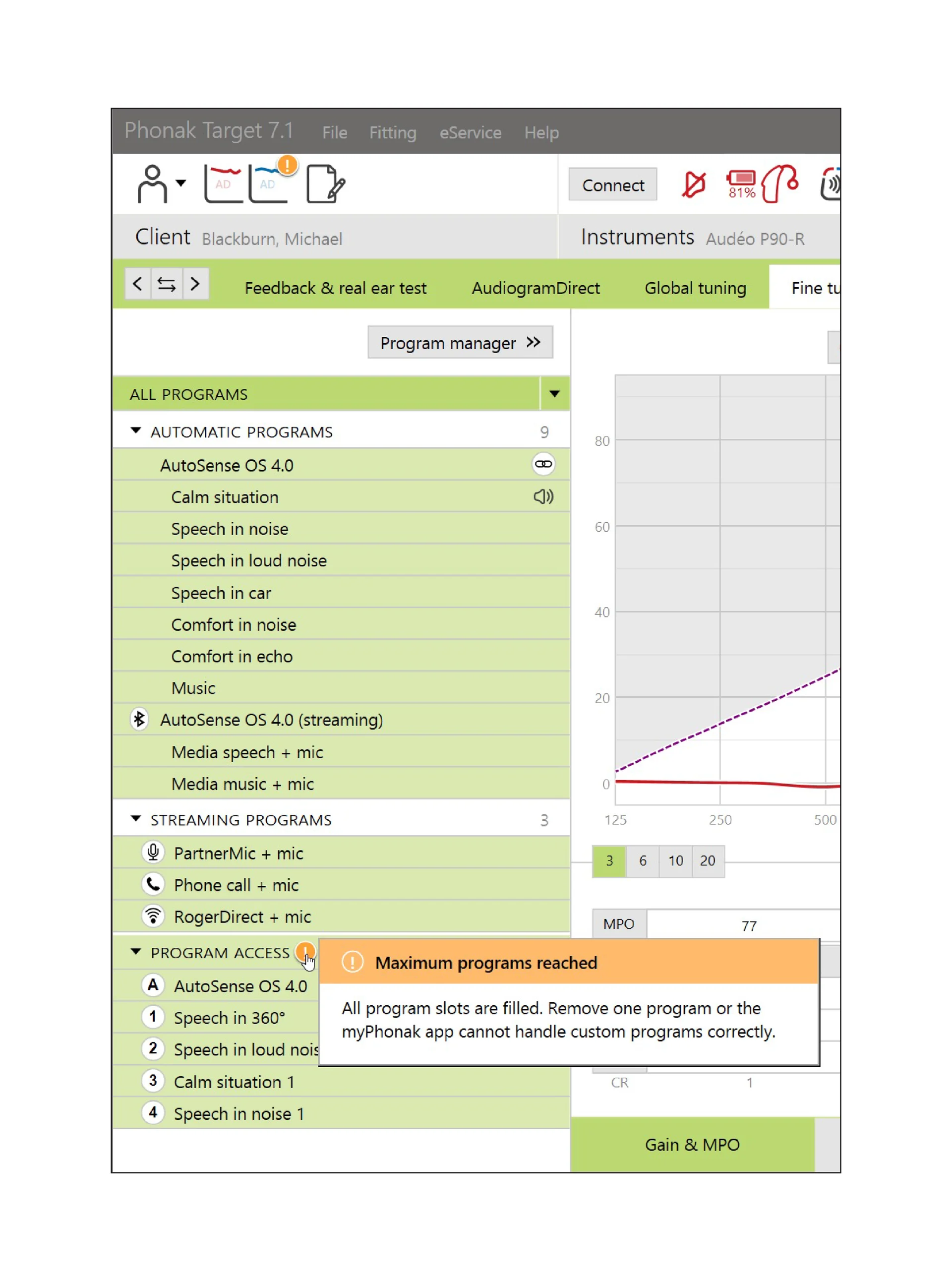
We have the M70 so less AutoSense programs and we have AutoSense 3.0 rather 4.0.
All the AutoSense programs and the streaming programs are automatically on the Aids and can’t be deleted.
Just a side note, we have the Roger program already on the Aids. Doesn’t mean it’ll work due to the licenses issue.
You’re ignoring this member’s posts.
The quality of my wife’s voice is brilliant and I just heard her laughing at something on the TV even though I’m in the other room.
Fab!
I’m pleased for you.
It’s a great piece of technology.
You’re ignoring this member’s posts.
It certainly is shaping up to be. The quality of her voice is so much better than through the aids but then now I know why!
No doubt we’ll talk again. I’ll keep popping in to the forum - there’s always something interesting to read about.
Have a great Christmas.
Rog
You’re ignoring this member’s posts.
Will that be because those pesky fellers will then have the chance to explain to Herself why Mr SpudGunner needs the $7,000 Oticon More1s instead of the totally unsuitable KirkWood Signatures at Costco for $2,200?
My patients don’t need $7000 More 1s, they need me and I don’t have the option of selling them Kirkwood Signatures.  They are welcome to purchase a hearing aid through costco that allows me programming options and then come and pay for my services a la carte.
Are you an NHS audiologist? Reading this must be a busman’s holiday for you!
No, I’m Canadian.
I learn a lot on these forums, I think I get to help people sometimes, and I also get to say whatever I want. (So I stick around.)
For those of you using the remote mics: There’s some nice research showing that use of remote mics increases neural synchrony and leads to lasting positive effects in the auditory system. It’s research in people with normal hearing thresholds, but I can’t see why it wouldn’t generalize to people with hearing loss. So you may be able to consider your remote mic use not just immediately assistive, but actually long-term rehabilitative.
You’re ignoring this member’s posts.
Just to add, the Audi can adjust the Partner Mic program if needed to make it sound better.
Default, your Mics are at -6 anyway before you adjust your Mics with the App, when using the Partner Mic.
You’re ignoring this member’s posts.
Hearing Aids19 replies
Hearing Aids28 replies
Hearing Aids5 replies
Uncategorized452 replies
Fitting Software Requests514 replies
 Oticonian/Disposablyte