faroccoAuthor
Thanks for sharing, I am seeing my aud tomorrow and hoping that she can help resolve this.
You’re ignoring this member’s posts.
This topic is closed.
53 replies4.1k viewsLast reply
Thanks for sharing, I am seeing my aud tomorrow and hoping that she can help resolve this.
You’re ignoring this member’s posts.

Did your audi run the feedback management when she changed to power domes? You will hear a loud strange noise and the software auto sets the feedback control. Each time you change to a different dome feedback management should be done.
Just to clarify, this is the old Feedback Analyzer feature that was part of the old Feedback Shield functionality. It introduces white noise into the and detects where the areas of the feedback might be, then suppress the gain margin to try to stave off the potential for feedback in that area. The disadvantage of this approach is that you lose some gain margin where the feedback areas are detected.
The new feedback prevention technology is called the Optimizer that was available starting with the OPN S onward until the Intent. It can be found in the Automatics section in Genie 2, and it’s labelled Feedback Management. It does not require the Feedback Analyzer to be run (scanned with white noise) like with the old traditional Feedback Shield functionality.
Usually the idea is to use the Optimizer feedback technology first, and if the user hears the fluttering sound, then reduce the value from Normal to Low. If the user still can hear the fluttering frequently enough to be an imposition, then it can be turned off.
And if the Optimizer Feedback Management works OK by itself, it’s not necessary nor is it desired to run the old Feedback Shield Analyzer and enable it because of the negative trade-off of losing some gain margin. But if the Optimizer feedback manager is not enough or has to be turned off completely, then the Feedback Shield functionality is still there to be used, either to supplement the Optimizer feedback management, or to be used as a stand-alone by itself (with the negative trade-offs).
You’re ignoring this member’s posts.

I have an upcoming appointment with my audiologist and am reaching out for any other suggestions you may have and for where my audi can find this older version of the feedback tool.
Thanks,
As @Volusiano pointed out, if the desired results are not met with Feedback Optimizer Off setting, than the last resort is the legacy Feedback Analyzer:
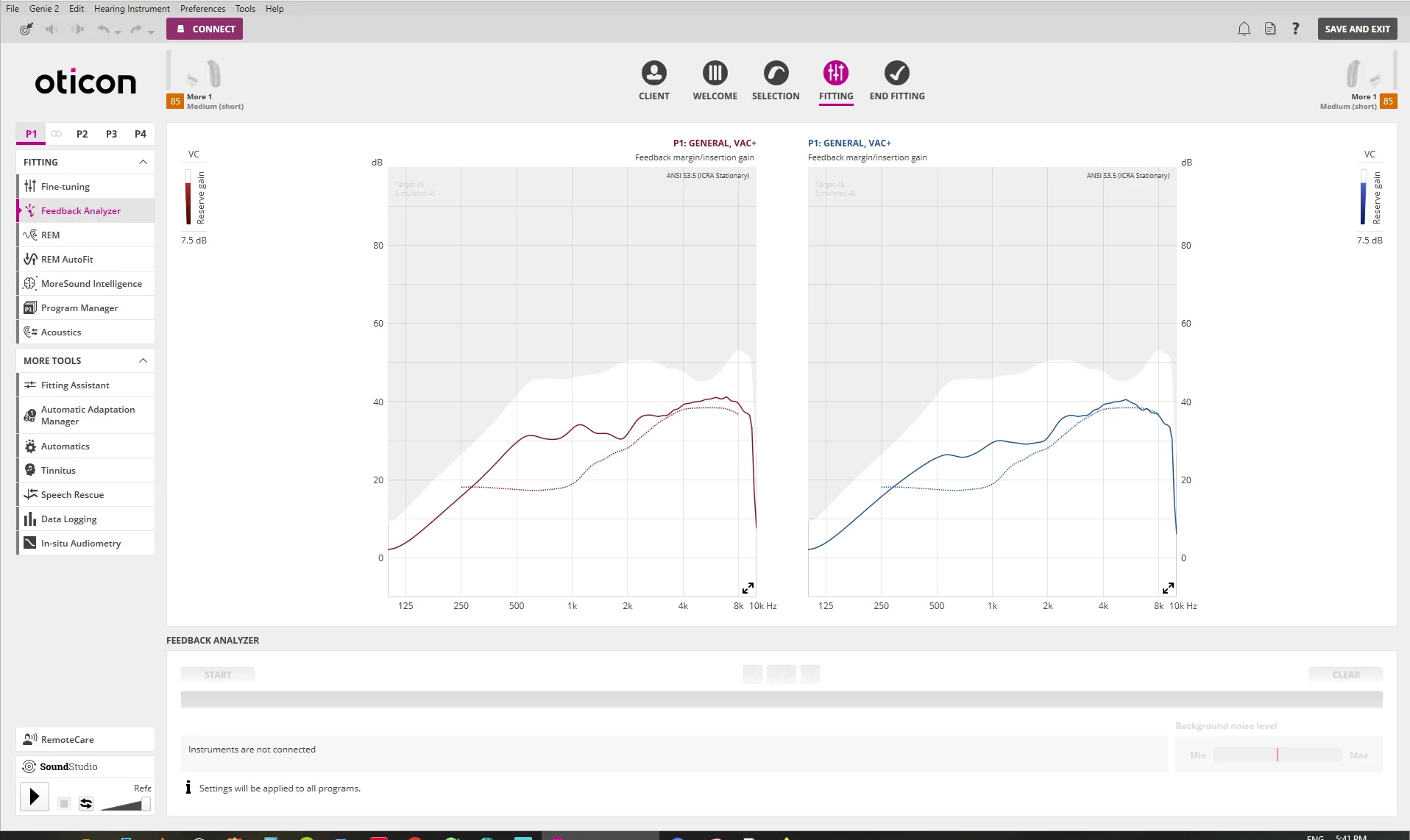
Beyond those tools, your audi may attempt to lower the gains at the offending frequencies in the Fitting Settings, or further check you acoustical fittings.
As I said in my earlier post, the older version of OPN did not use the same Feedback System, and TTTF was not an issue.
You’re ignoring this member’s posts.

I’m following. I don’t have your hearing aid. But I really care.
I feel for everyone as we share our experiences. Searching for that element in setup that needs to be changed.
I keep thinking. . DIY. DIY. Target. ‘Link and a PC. Not my ole iMac.
Shiny side up.
DaveL
You’re ignoring this member’s posts.
Had my visit yesterday and she set the feedback to low and so far it has been much better. I also was measured for custom molds and am waiting to hear from her when they are in.
You’re ignoring this member’s posts.
Hey @farocco - Facing same issues… I’m curious to hear if the custom molds helped you eventually. Thanks!
You’re ignoring this member’s posts.
Is there a way to modify this for the XCeed? I don’t seem to have off, low, or normal settings in my feedback management. I only have left and right.
You’re ignoring this member’s posts.

Feedback Analyzer
The new feedback prevention technology is called the Optimizer that was available starting with the OPN S onward until the Intent.
@codergeek2015 I’m wondering if the new feedback Optimizer came in after the Opn S as even tho the Xceed is the Opn S in technology, mine is called Analyzer rather then Optimizer and I just have an on / off as well.
You’re ignoring this member’s posts.
You’re ignoring this member’s posts.
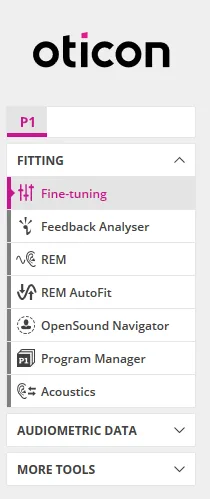
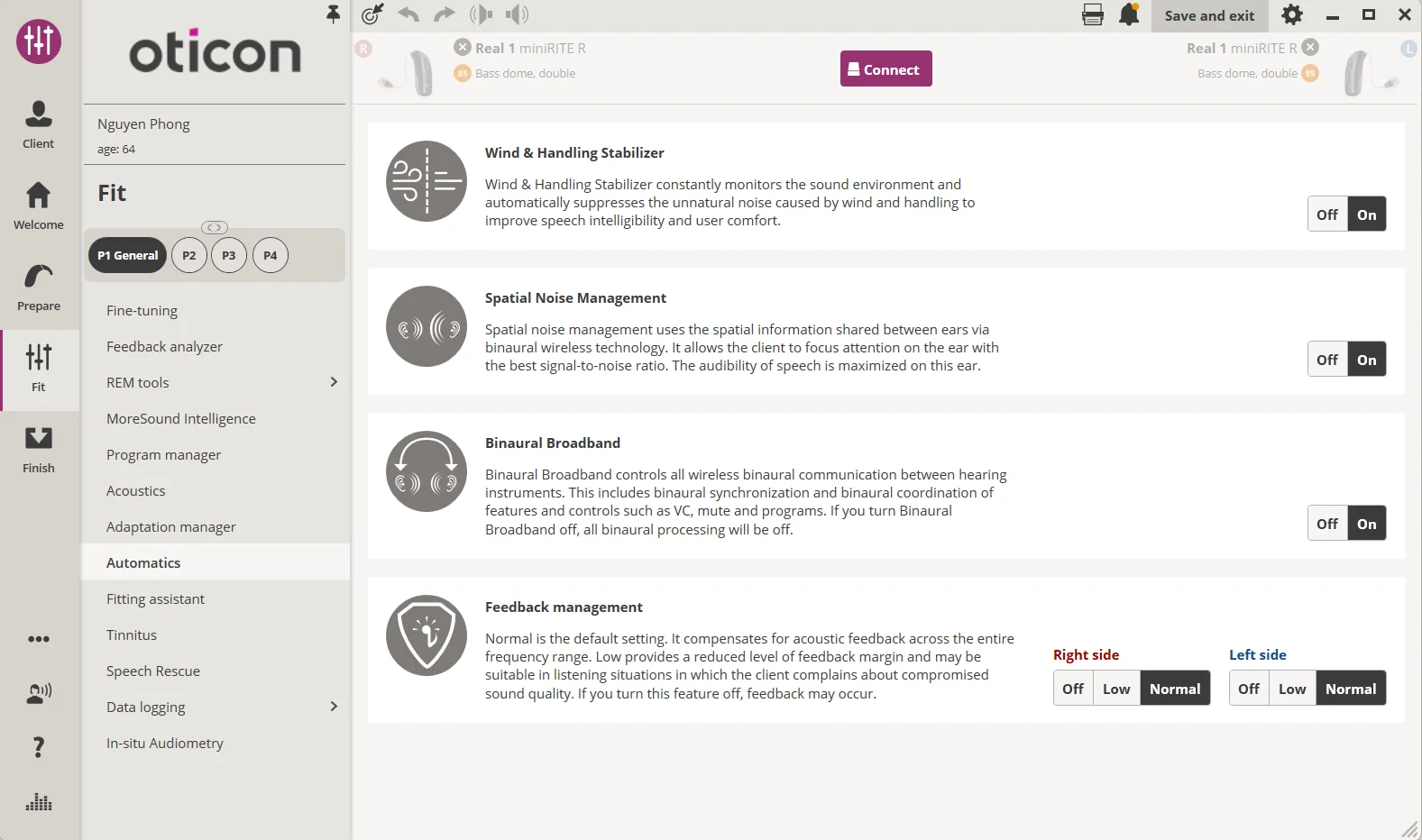
@codergeek2015 You can verify if you have the Optimizer by looking in the Automatics page as seen in the screenshot below. In Genie they don’ call it the Optimizer per se. They only use the name Optimizer in their whitepaper. In Genie, it’s simply called Feedback Management.
But the Feedback Analyzer as seen in the Fitting page is the old Feedback Shield technology.
You’re ignoring this member’s posts.
You’re ignoring this member’s posts.
If it’s the Feedback Management (not the Feedback Analyzer), but it only has the ON/OFF instead of Normal/Low/Off, then that means that it doesn’t have the firmware “tweak” to allow the Optimizer to operate in between ON or OFF. It used to be just ON/OFF, but people that require aggressive feedback had the fluttering issue and they either had to live with it to be able to use the Optimizer, or turn it OFF altogether and lose that functionality. So Oticon put in a Low mode as a compromise to have a weaker Optimizer, but at least still have something which is better than nothing, and out of this compromise, at least the fluttering is eliminated.
It looks like the OPN S and Xceed don’t benefit from that firmware update on the Optimizer that applied to the More and up. I wonder if it might be hardware limitations that might be preventing the update to work on the S and Xceed.
You’re ignoring this member’s posts.
@Volusiano - Yeah my Xceed doesn’t have that either it’s still on/off. No access to High, Medium, or Low feedback adjustments.
You’re ignoring this member’s posts.
It looks like the OPN S and Xceed don’t benefit from that firmware update on the Optimizer that applied to the More and up. I wonder if it might be hardware limitations that might be preventing the update to work on the S and Xceed.
Yeah, the FB Manager was implemented on the Polaris chip.
My audi at the spoke to Oticon support about the flutter or TTTF issue when I had the OPN S, and they acknowledged the issue, but stated that I’d have to get the More with Polaris, because they couldn’t upgrade the Velox S.
Lucky me, I use the VA, so they accommodated me.
Sorry @codergeek2015 & @Zebras .
You’re ignoring this member’s posts.
Hearing Aids70 replies
Tinnitus0 replies
Hearing Aids29 replies
Uncategorized451 replies
Hearing Aids104 replies
 SoCal
SoCal Canada (Toronto) YYZ