 SoCal
SoCal

You’re ignoring this member’s posts.
Getting Started in the Upgraded Forum
This topic is closed.
86 replies2.5k viewsLast reply

Previous version had a dark setting. Is white and default the only ones available now. Reason I ask is my eyes are sensitive to bright screens.
I use Dark Reader extension on firefox for that issue.
You’re ignoring this member’s posts.
Can a dark setting option be enabled as a user option on the backend?
Try Dark Reader extension. I use firefox.
You’re ignoring this member’s posts.

The one thing about Dark Reader, which I use, too, is that it “reads” the contents of the web pages you’re viewing in order to intelligently convert them to Dark Mode.
On the Dark Reader website, under FAQ, the devs say, “The extension needs these permissions to be able to analyze and modify website’s appearance and apply site-specific settings. We do not insert ads and do not collect any data or send it anywhere.” Dark Reader code is open-source and available on GitHub, allowing it to be reviewed by security experts and others. There have been no significant reports of security flaws and it’s a popular browser extension although it may have trouble converting some sites to dark mode. As with any extension, it’s something extra you’re adding to your browser, and just like they say for computer add-ons, it extends the attack surface…  . But just like @flashb1024, I’m likely to be turning my copy of Dark Reader on for HT until it gets its own built-in dark mode again.
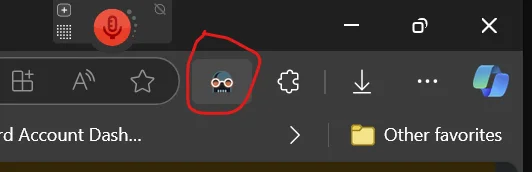
There’s a toggle switch in your browser to the right of the URL locator by which you can turn dark mode on or off:
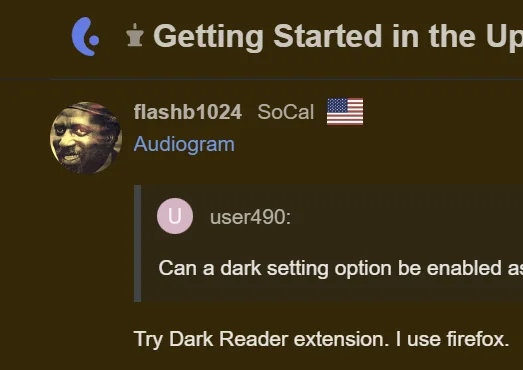
Unfortunately, with the default cream background of the site, instead of getting a BLACK background with Dark Reader, you get a muddy brown.
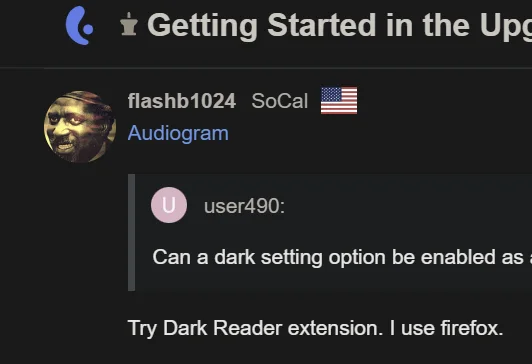
If I go to my account profile (Preferences, the Interface, then switch the Theme from Default to White Background, the Dark Reader-converted screen is then a more pleasant dark blue background like the following (YMMV):
Give it a try. It’s a handy extension to have around when you get tired of looking at a blazing white (or cream) screen!
P.S. The original “dark blue” obtained by going to a white background now looks blacker after toggling Dark Reader off and on again. Again, YMMV.
You’re ignoring this member’s posts.

 Wales, UK
@AbramBaileyAuD Hey, any chance you could turn off the notifications or at least run a reset so they don’t clock all the legacy ones you might not have viewed.
It’s getting a bit like the film Zulu…
How many are there Chard?
Farzhans (Thousands) of them, Sir.
You’re ignoring this member’s posts.

You’re ignoring this member’s posts.
Anyone else who is having trouble understanding how to reset their password because they don’t see a link to do it, just click on the paragraph of text under the password box… the one that starts, “We recently changed to a new login system…” Just click anywhere on the paragraph, and you’ll be able to enter your account email address and reset your password. No it doesn’t look like a link, but it is. That took me about 10 minutes to figure out, and confusion over this is probably one reason why there are members giving up on resetting their password and just creating new accounts instead. I’m already up to “hamjor1” after being unable to resurrect “hamjor” years ago when I no longer had access to an old email account. I didn’t want to go to “hamjor2.”
You’re ignoring this member’s posts.
Yes I have over 200 notifications telling me all the posts I didn’t answer.
Shame on you!!! gotta get 20 characters to post.
You’re ignoring this member’s posts.
Thanks SO much for this! I was going nuts.
People having trouble: Listen to Hamjor!
Click anywhere on the blue text paragraph. There is no obvious graphic device to suggest a link. Turns out the whole paragraph is the link. Just put in your address in the previous box and you’ll receive a reset email.
You’re ignoring this member’s posts.
If I go to my account profile (Preferences, the Interface, then switch the Theme from Default to White Background, the Dark Reader-converted screen is then a more pleasant dark blue background like the following (YMMV):
Jim, thanks for the detailed report on Dark Reader, and especially getting rid of the diarrhea background!!
You’re ignoring this member’s posts.
You’re ignoring this member’s posts.
You’d be wise to read the previous comments before posting this, but 'caus I’mma nice guy, check out Post 22, and 23, which describe how to use Dark Reader until they fix the dark theme.
You’re ignoring this member’s posts.

 Auckland, New Zealand
Anyone else who is having trouble understanding how to reset their password because they don’t see a link to do it, just click on the paragraph of text under the password box… the one that starts, “We recently changed to a new login system…” Just click anywhere on the paragraph, and you’ll be able to enter your account email address and reset your password. No it doesn’t look like a link, but it is. That took me about 10 minutes to figure out, and confusion over this is probably one reason why there are members giving up on resetting their password and just creating new accounts instead. I’m already up to “hamjor1” after being unable to resurrect “hamjor” years ago when I no longer had access to an old email account. I didn’t want to go to “hamjor2.”
Funny, I tried to make that link unmissable…
You’re ignoring this member’s posts.
Hey, any chance you could turn off the notifications or at least run a reset so they don’t clock all the legacy ones you might not have viewed.
Will look into how, might be tomorrow. Just got back from a short trip with family.
You’re ignoring this member’s posts.

 Switzerland
@AbramBaileyAuD
Some of the older seem to be mixed up. for example this one:
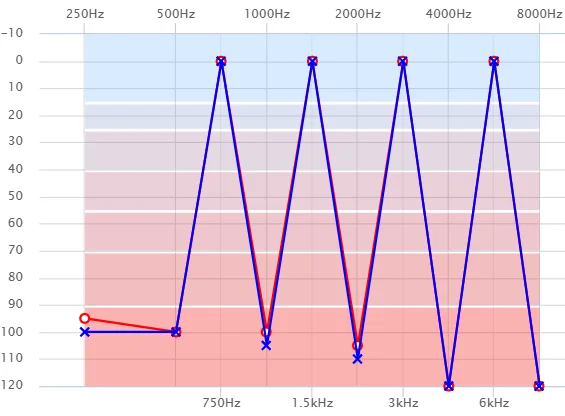
(I don’t think this is for real!)
You’re ignoring this member’s posts.

 Croatia
There is an of a cookie bite. This in the picture is an audiogram of a dinosaur bite.
I am joking.
You’re ignoring this member’s posts.

You’re ignoring this member’s posts.
@AbramBaileyAuD , I think what’s happening is that the HT grapher expects certain frequency values. If the user didn’t provide them, then the grapher helpfully substitutes a “0.” The audiogram values I submitted some time ago had no data for 750 Hz, but the grapher has given me a “0” for both ears at that frequency. Everything else looks OK for my audiogram.
You’re ignoring this member’s posts.
 Northern Ireland
You’re ignoring this member’s posts.
 Poland
 < joke >
You’re ignoring this member’s posts.
Related discussions
Uncategorized21 replies
Hearing Aids44 replies
Cochlear Implants113 replies
Fitting Software Requests1.1k replies
Fitting Software Requests513 replies