You’re ignoring this member’s posts.
Installing a "Avantalk C82 LEA "on a "2020 M1 MacBook Air" which lacks a "USB audio port"
34 replies1.4k viewsLast reply
I asked GPTChat about my frustration after numerous attempts to install this dongle on my standard issue Mac, never being able to get a green flashing light, and being unable to find any confirmed reports of a successful installation on my factory standard model -
2020 MacBook Air M1
Here is it said:
" Here’s what’s known about using the Avantalk C82 LEA (USB-C Bluetooth
dongle) with a 2020 M1 MacBook Air (which only has USB-C/Thunderbolt ports) and no traditional USB-A or 3.5 mm audio port):
Avantalk C82 LEA Compatibility 2.pdf (94.3 KB)
You’re ignoring this member’s posts.

 Geneva, Switzerland
You will probably hate me for this comment: If this were a PC I would say: slot in a 10$ soundcard with all the useful standard connections (like 3.5" audio), but you are locked up in Apple’s walled garden…
You’re ignoring this member’s posts.

 San Francisco
this Mac does have a 3.5 mm audio jack and USB-C ports (you can use an adapter if you want to use an USB-A).
The USB-C ports can be used for audio devices that have an usb cable .
the link you showed does say that the device is compatible . @PhoebeY has provided good support and information on this forum for that family of devices
You’re ignoring this member’s posts.

just to make sure , you need to triple press the button for green light to enter LE audio pairing.
this isn’t a software thing. and blue light is classic .
You’re ignoring this member’s posts.
I agree that Avantree has given me excellent support and Phoebe is still working with me, I believe that what has inadvertently been overlooked in the earlier discussion is that later models of the MacBook Air are NOT representative of the 2020 M1 introductory model, which sold like hotcakes when introduced and is still selling new from 3rd party outlets like Walmart with the apparent approval of Apple.
I attempted to attach the whole report created by ChatGPT but it got truncated. I’m not complaining about Avantree’s support in any way and I assume they will perhaps work with me to exchange my Avantalk C82 LEA for what they recommend in their report. I tried to attach a link to my download. of it but it seems to get severely truncated. If I have permission and instructions how to do that for the benefit and/or curiosity of fellow members here I will do so. In the meantime I will try to quote their conclusion and suggestion for an alternative if anyone is interested in their whys and wherefores.
You’re ignoring this member’s posts.
I’m using a 2020 M1 MacBoook Air right now, and it most definitely has a 3.5mm audio jack, as well as 2 USB-C ports which I use with a USB-A adapter when necessary. Never had any problems using the adapter to access the USB-C from any device. Must be some other problem…
You’re ignoring this member’s posts.
To add, my Phonak-clone (KS10) hearing aids connect natively with the computer without any dongle, clip or other add on. The bluetooth is solid and clear.
You’re ignoring this member’s posts.
You’re ignoring this member’s posts.
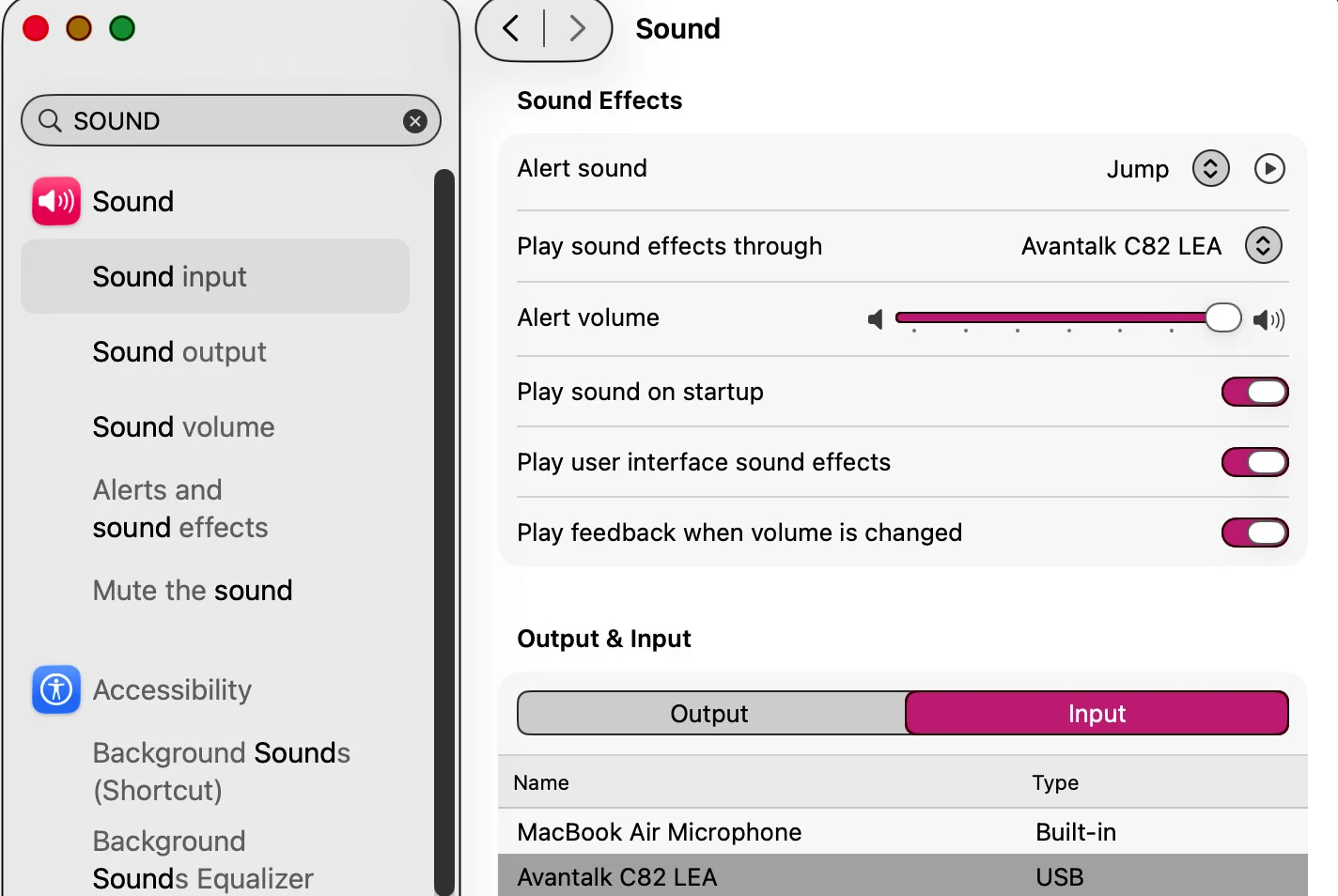
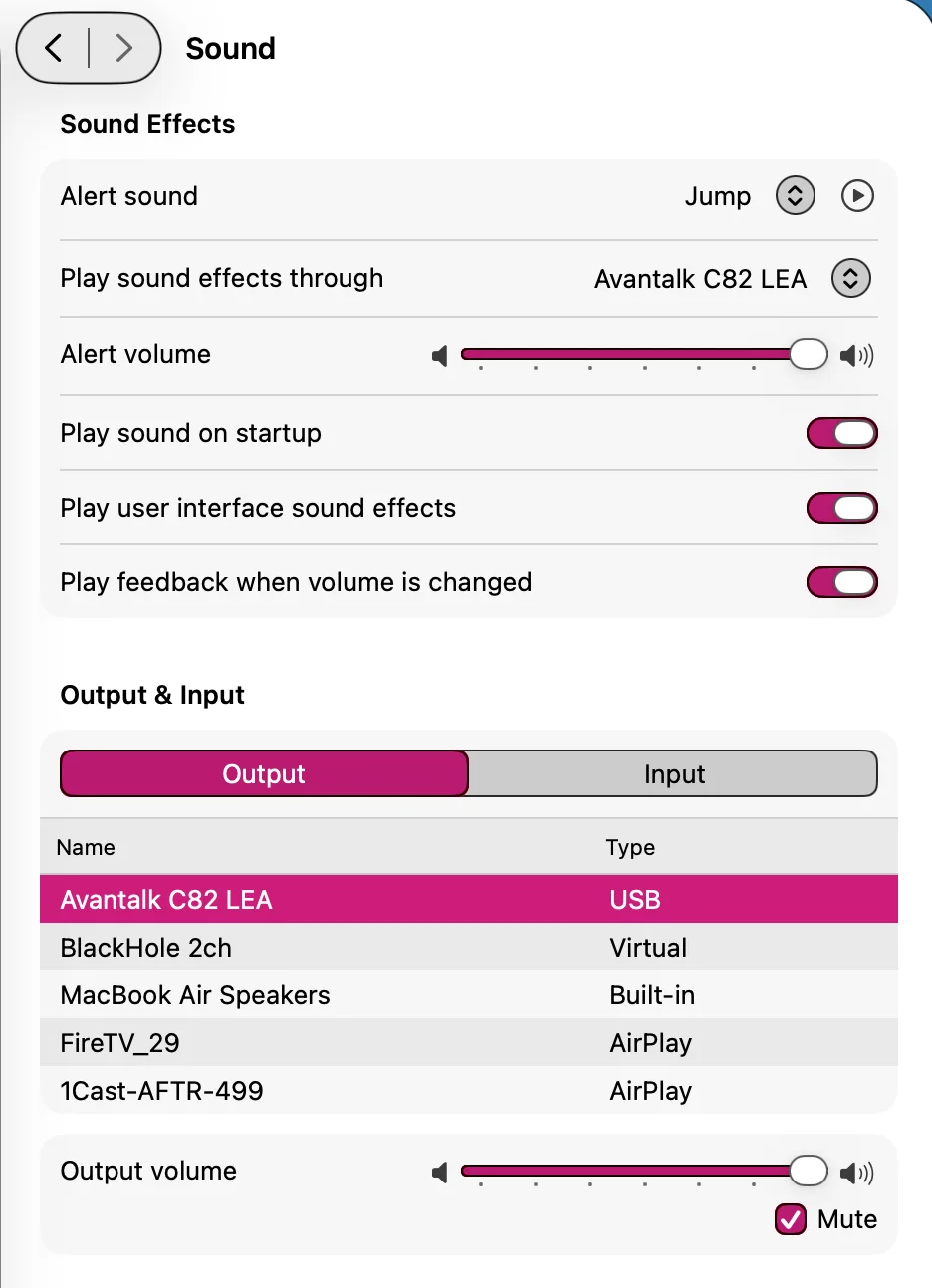
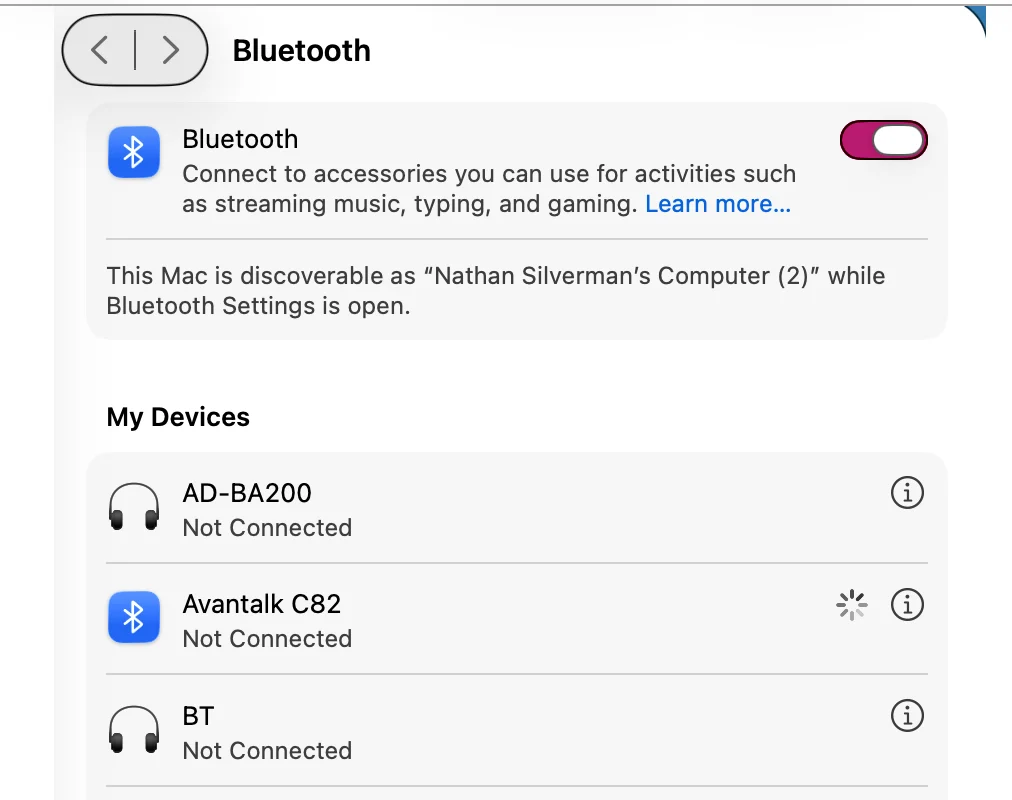
To turn your question around, can you take a quick look at these screens on my Mac and suggest why my C82 LEA refuses to flash green and only flashes blue, despite numerous triple clicks after installation of the software?
i’m certainly not denying that the installation works for some; I’m seeking an assistance solution for why it doesn’t work for me? I’m not trying to disparage the co. or the product - I’m trying to get assistance to make it work for me.
You’re ignoring this member’s posts.
You will probably hate me for this comment:
On the contrary I have always been kind of a cameleon when it comes to electronics: bought the first 3 Macs found up in Michigan a month after the Super Bowl adv “When 1984 will not be like 1984…” member in the early days of BMUG and the Boston Computer Society; networked my office with phone wire before ethernet; carried the original floppy-eared Palm Handspring and stylus when it was introduced and was amused to discover that its Palm alphabet was almost identical to the “Minimum Stroke Alphabet” I cooked up during breaks in fifth grade; learned and used MS-DOS in order to run state child support calculations, and all phones after Handspring gave out have been Androids - currently a Pixel 10.
What I lack in disciplined electronics ed I try to make up for with intense curiosity; and I was fascinated to read your biography.
i
You’re ignoring this member’s posts.
Ah yes, the Palm… loved them… and you could stick in an SD card, with one entire Gb… can’t do that anymore in many phones and tablets…The original 750 kb floppies…
Youngsters don’t even know anymore that “pod-casts” have their roots in the first mp3-players (“pods”) and “broad-casting”, which before radio and TV only referred to the way farmers threw out seeds over their land, or that “blogs”, or weblogs, go back to the time that sailors threw out logs on a rope off their ships to measure speed, recording this in a “log-book”…
You’re ignoring this member’s posts.
my Phonak-clone (KS10) hearing aids connect natively with the computer without any dongle, clip or other add on. The bluetooth is solid and clear.
That’s nice. That’s what worked for me with my (Phonak) KS9s too. But now I wear Rexton Reach hearing aids and am trying to install the C82 LEA so that I can once again get Mac audio in my ears, so the blue flashing doesn’t solve the problem. I’ve been online live support with Avantalk but I/they need a green flash which so far we haven’t gotten.
You’re ignoring this member’s posts.


I don’t have the C82 dongle. The following steps come from the Avantree C82 guide:
For connecting Rexton Reach you must switch C82 LEA to pairing mode indicated by a flashing green/white LED.
First step:
Switch C82 LEA to LE Audio (green LED)
❶ Plug in C82 LEA.
❷ Quickly press PAIR 3 times. The LED blinks white & green. → Ready to pair the Rexton Reach.
If not working, hold PAIR button for 2seconds to reset the C82 dongle.
steps for Reset
❶ Plug in, then hold PAIR for 2 seconds.
❷ Double-press PAIR.
→ LED stays white,
then blinks white & blue for classic Bluetooth or blinks white & green for LE Audio
Note: This resets pairings in both modes and puts C82 LEA into pairing, regardless of current mode.
You’re ignoring this member’s posts.
To put Rexton Reach hearing aids in pairing mode, you power both hearing aids Off and then back On and place them next to the C82 LEA dongle.
-
Turn off your hearing aids:
• For battery-powered models, open the battery doors
• For rechargeable models, place them in the charger. -
Put C82 dongle into LEA pairing mode (flashing green/white LED)
-
Turn your hearing aids back on by closing the battery doors or removing them from the charger. Then place them next to the C82 dongle.
A steady green LED light indicates that the pairing process were successfuly performed.
You’re ignoring this member’s posts.
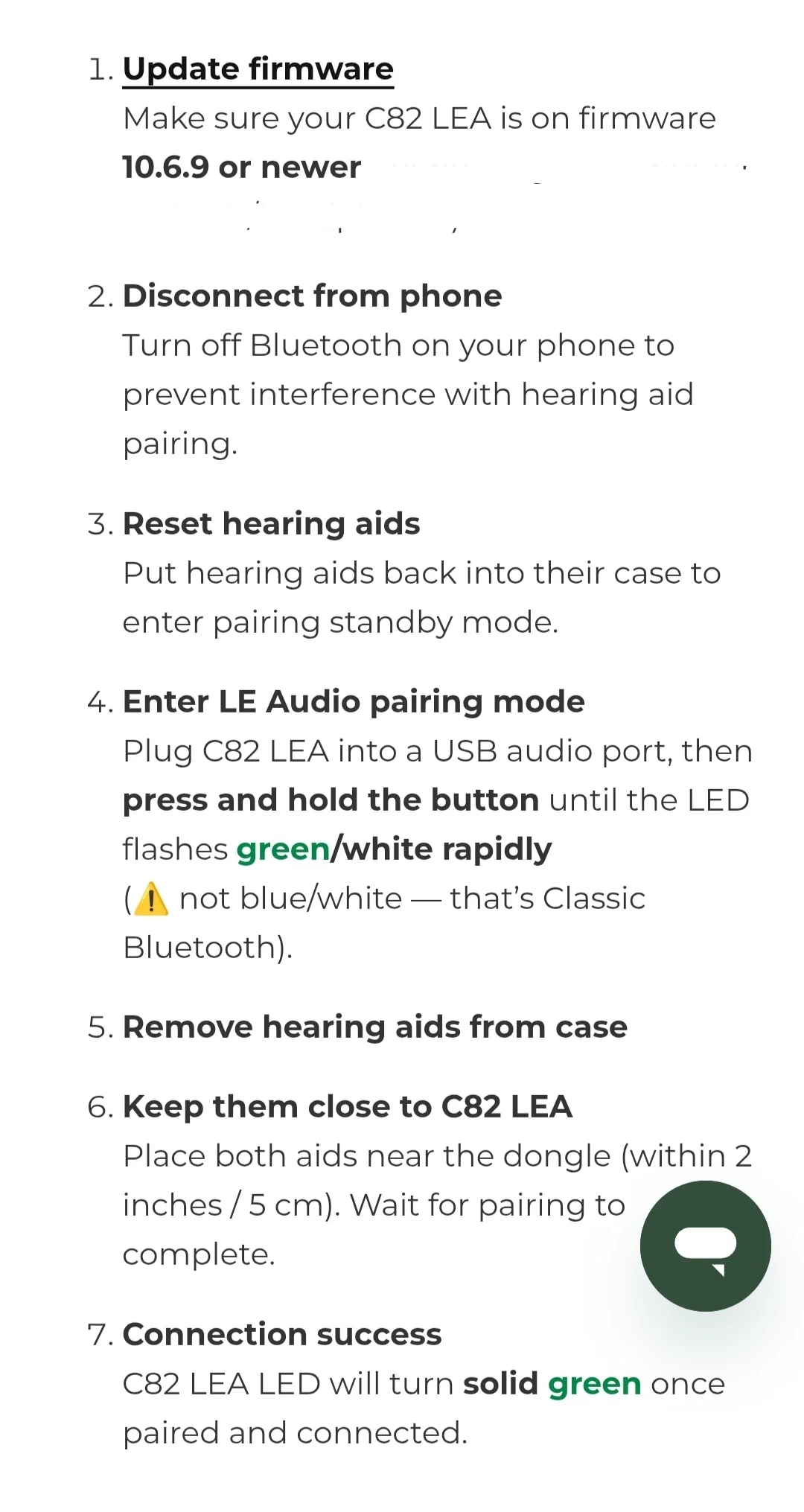
This page is from the Avantree FAQ support website.
So if you watch closely there is a discrepancy in the steps to toggle the C82 into pairing mode.
In the former steps they stated that you need to quickly press Pair button 3 times, but in the FAQ steps they talk about “press and hold” the Pair button until the LED flashes green/white. @PhoebeY could you please have a look at this? Why is this discrepancy?
I would suggest that you try both different styles.
You’re ignoring this member’s posts.

You’re ignoring this member’s posts.

Hi @Nate, this is Danny from Avantree. I’m here to help with troubleshooting the C82 LEA device.
I’ve reviewed the discussion history in this topic, and it appears that the main issue is that the C82 LEA has not been successfully put into pairing mode, which should be indicated by green/white LED flashing.
I noticed that you tried the triple-click, but it didn’t work. You may need to do it more quickly—three clicks within about one second.
This action is used to switch the C82 LEA to LE Audio (Unicast) mode.
Thanks to @Firenzel for clarifying the pairing guide. Regarding your question about the operations “quickly press 3 times” vs “press and hold”, these are used for different purposes:
-
Quickly press 3 times → Switch between Classic Bluetooth mode and LE Audio mode
-
Press and hold → Enter pairing mode
Yes, we agree that this needs to be made clearer in the documentation.
@Nate, please try the steps below. Based on my testing - with re-sound hearing aids, this sequence may make pairing easier by swapping steps 4 and 5 from the capture that Firenzel shared:
4. Remove the hearing aids from the case
Please wait until you see or hear a prompt or indicator confirming that both the Left and Right hearing aids are connected.
5. Plug the C82 LEA into a USB audio port
If it does not enter pairing mode automatically (indicated by green/white LED flashing), please press and hold the button until the LED flashes green/white rapidly, indicating LE Audio pairing mode.
Thanks again to @Firenzel for the clarification—we will update our guidance accordingly.
Thank you everyone. If you have any further questions, please post them here, and I’ll do my best to help.
You’re ignoring this member’s posts.
Thanks, DannyLee but I tried 3 more times using the methods you suggest, but no success.
- But I can’t seem to get anyone to comment on the menubar screenshots I keep posting. Are they or are they not indicating what they should be indicating?
- Is the input set right? Is the output set right?
- Did your installer put your software in the right place in the dropdown menu? If it is in the right place, why does it respond to selection/click by first turning red as selected for only a few seconds but then turning off again?
- What does that mean to tech support?
- If you are intending to get it off Bluetooth, why did your installer put it under a menubar named “Bluetooth?”
- Lastly, is there any credence to ChatGPT’s assertion that not all 2020 MacBook Air M1s came with USB ports that can be used as audio ports but instead relied on the audio in/out port installed on the right side of the laptop?
- And if so, why can’t this be solved by sending me an adapter/transmitter for the right round audio port if that would work with my Rextons?
These are issues nobody has yet addressed, at least not to me.
You’re ignoring this member’s posts.
I think I made some progress at last! I went into my Pixel 9’s System and found and turned off Developer options which I think had been turned on by my fitter, and the long list of obscurely labeled options disappeared and shrunk down to a list which included an LE option, then I ran the prescribed steps again and briefly a green flash appeared only momentarily and then nothing. Crossing my fingers I pulled the aids out of the damn (I hate this finicky “travel” charger which came with the Rextons) and quickly proximated them to the dongle. My phone then reported for the first time that was on but R was 100% and L 0%. I restarted a test video on the Mac and then pressed the Avantalk C82 entry in the Mac’s pulldown menu and I hit the Volume slider on my Mac to 100% and it reported, for the first time that the source was Avantalk C82! But there was no actual sound in my right ear and of course nothing in the 0% left ear.
I told the fitter at last visit I wanted to replace this charger, maybe with the larger perhaps less finicky model but was persuaded that it just needed cleaned contacts. I think they are very difficult to keep each aid in place, especially with my custom molds pulling them this way and that.
So I haven’t got to “Go!” yet but I think I’m headed in the right direction!
And any additional suggestions will be gratefully received.
You’re ignoring this member’s posts.
Log in to reply to this topic.
Related discussions
Question and Answer12 replies
Fitting Software Requests1.1k replies
Hearing Aid Self-Fitting (DIY)302 replies
Fitting Software Requests513 replies
Fitting Software Requests419 replies