You’re ignoring this member’s posts.
NAL-NL3 Fittings
50 replies1.8k viewsLast reply

Good luck. Adjusting that rise to a steeper rise in the 500 to 1.5 kHz region can be tricky, as a few can really affect loudness perception. In someone like me, who has less hearing loss at those frequencies, it’s not as touchy. But the absolute numbers are much larger in your targets at those frequencies!
You’re ignoring this member’s posts.
You’re ignoring this member’s posts.
 Poland
You can play around with it in simulation mode without actually having the hardware: MedRx, Inc.
@Bruno_Marques, you can try tinkering with it in that simulator (I haven’t use it yet).
You’re ignoring this member’s posts.
There is some difference with cookie bite. I will try bringing a printout of this to my audiologist but the person probably will want to wait until NAL-NL3 is in the system for them. Can we use this as part of without your setup?
You’re ignoring this member’s posts.
Yes you could program the modifications into your fitting software. You could download the MedRx and run it as a simulation. Note press “H” to enter audiometer threshold values.
You’re ignoring this member’s posts.
NL2:
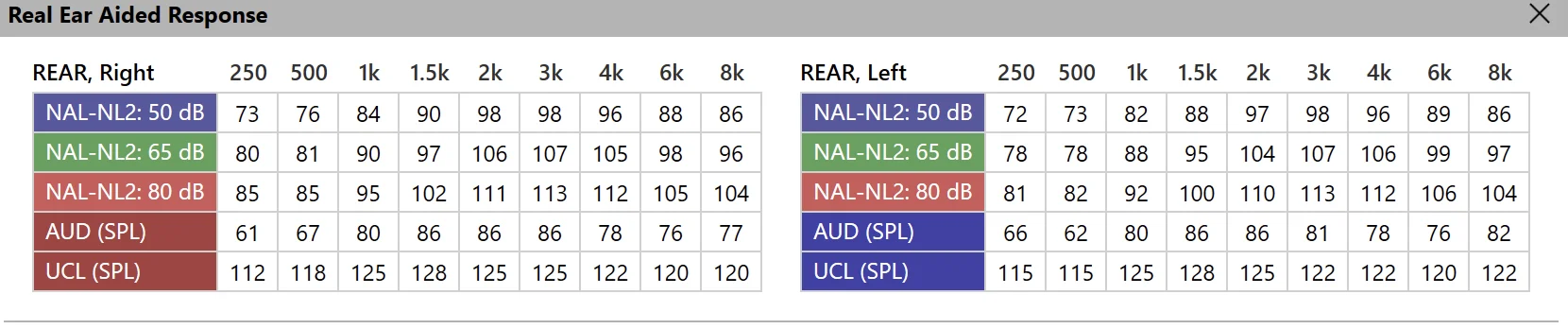
“, Right”,250,500,1000,1500,2000,3000,4000,6000,8000
“: 50 ”,73,76,84,90,98,98,96,88,86
“NAL-NL2: 65 dB”,80,81,90,97,106,107,105,98,96
“NAL-NL2: 80 dB”,85,85,95,102,111,113,112,105,104
“AUD ()”,61,67,80,86,86,86,78,76,77
“ (SPL)”,112,118,125,128,125,125,122,120,120
“REAR, Left”,250,500,1000,1500,2000,3000,4000,6000,8000
“NAL-NL2: 50 dB”,72,73,82,88,97,98,96,89,86
“NAL-NL2: 65 dB”,78,78,88,95,104,107,106,99,97
“NAL-NL2: 80 dB”,81,82,92,100,110,113,112,106,104
“AUD (SPL)”,66,62,80,86,86,81,78,76,82
“UCL (SPL)”,115,115,125,128,125,122,122,120,122
NL3 Base program:
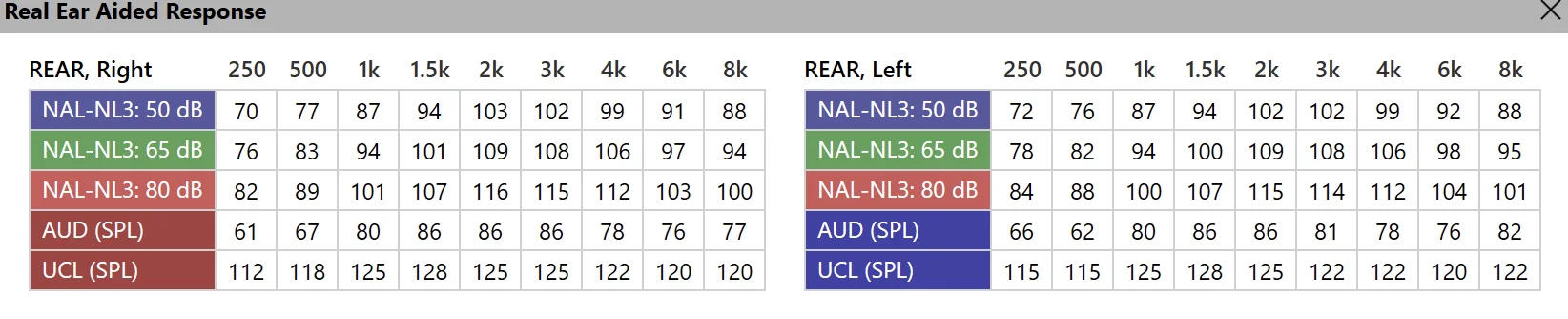
“REAR, Right”,250,500,1000,1500,2000,3000,4000,6000,8000
“NAL-NL3: 50 dB”,70,77,87,94,103,102,99,91,88
“NAL-NL3: 65 dB”,76,83,94,101,109,108,106,97,94
“NAL-NL3: 80 dB”,82,89,101,107,116,115,112,103,100
“AUD (SPL)”,61,67,80,86,86,86,78,76,77
“UCL (SPL)”,112,118,125,128,125,125,122,120,120
“REAR, Left”,250,500,1000,1500,2000,3000,4000,6000,8000
“NAL-NL3: 50 dB”,72,76,87,94,102,102,99,92,88
“NAL-NL3: 65 dB”,78,82,94,100,109,108,106,98,95
“NAL-NL3: 80 dB”,84,88,100,107,115,114,112,104,101
“AUD (SPL)”,66,62,80,86,86,81,78,76,82
“UCL (SPL)”,115,115,125,128,125,122,122,120,122
NL3 speech in noise:
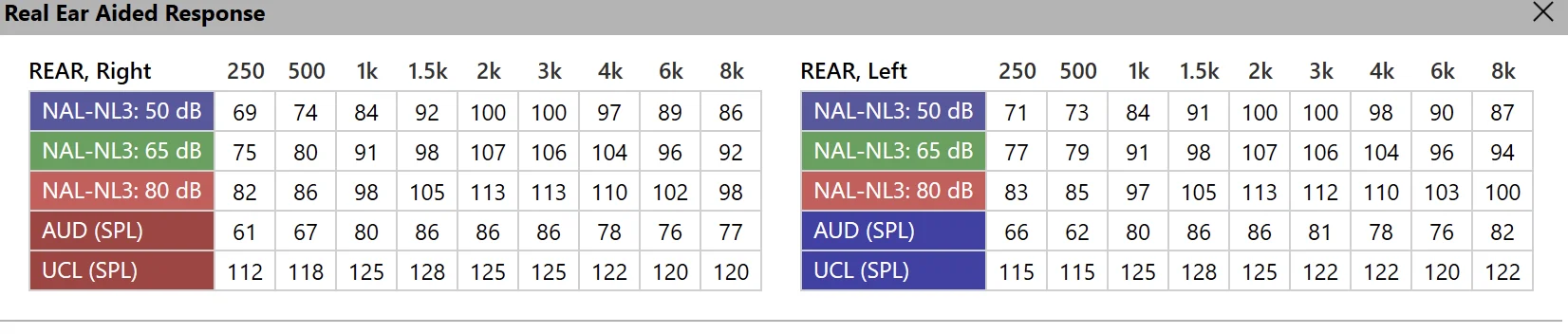
“REAR, Right”,250,500,1000,1500,2000,3000,4000,6000,8000
“NAL-NL3: 50 dB”,69,74,84,92,100,100,97,89,86
“NAL-NL3: 65 dB”,75,80,91,98,107,106,104,96,92
“NAL-NL3: 80 dB”,82,86,98,105,113,113,110,102,98
“AUD (SPL)”,61,67,80,86,86,86,78,76,77
“UCL (SPL)”,112,118,125,128,125,125,122,120,120
“REAR, Left”,250,500,1000,1500,2000,3000,4000,6000,8000
“NAL-NL3: 50 dB”,71,73,84,91,100,100,98,90,87
“NAL-NL3: 65 dB”,77,79,91,98,107,106,104,96,94
“NAL-NL3: 80 dB”,83,85,97,105,113,112,110,103,100
“AUD (SPL)”,66,62,80,86,86,81,78,76,82
“UCL (SPL)”,115,115,125,128,125,122,122,120,122
You’re ignoring this member’s posts.
Could you give bit more detail? I take the modifications from which tab in MedRx Studio and then use the gain handles in the fitting software to make the curves visually similar?
Is there a way to see the exact curve value at each frequency in a MedRx Studio simulation?
You’re ignoring this member’s posts.
Not that I can find. You could download it and explore it. But this is the only output it gave me.
You’re ignoring this member’s posts.
I’m exploring but I just see the various curves. The tables you made above were from visually reading the curves? NAL-NL3 Fittings - #27 by DrJimmyJoeJimbob
You’re ignoring this member’s posts.
You’re ignoring this member’s posts.
If you have no problem with privacy issues, you can ask bot for extracting the valies and make csv table.
You’re ignoring this member’s posts.

 Taiwan
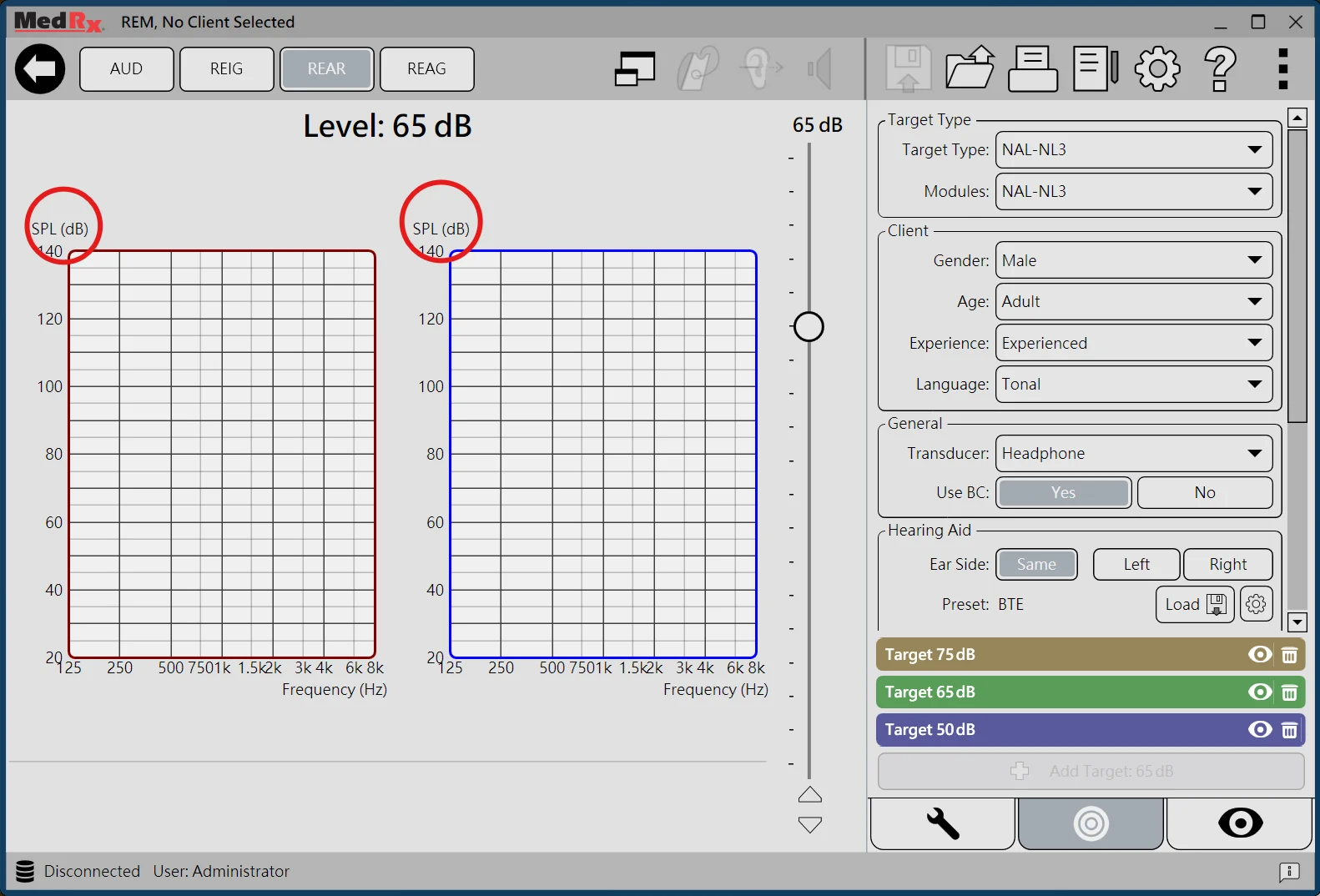
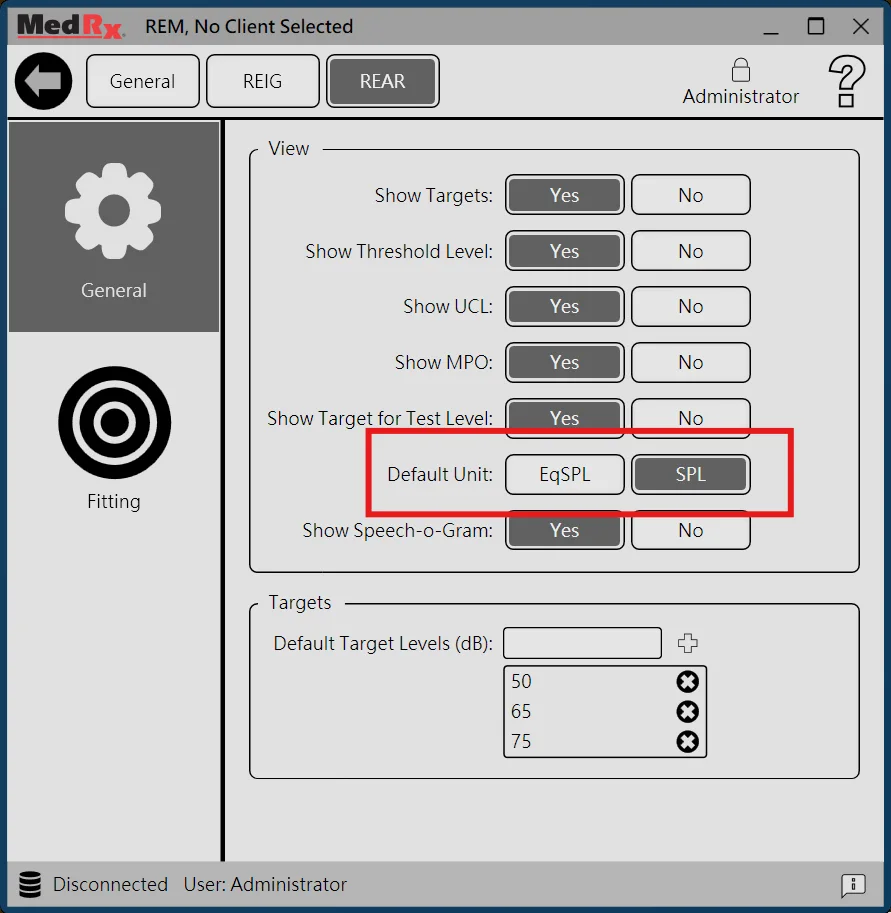
I noticed that you’re using EqSPL yet most hearing aid software using . You can click “EqSPL ()” to switch to “SPL (dB)” unit and get quite different results (because of the unit difference).
Also I’d like to point out that options in “Hearing Aid” panel will change targets.
You’re ignoring this member’s posts.
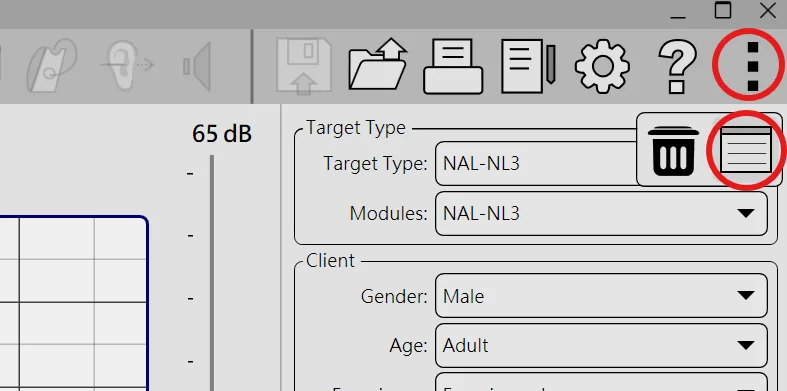
It’s an option up in the upper right corner. I believe there are 3 dots then you can generate a table. I’m on mobile right now so can’t check
You’re ignoring this member’s posts.
In the graph on MedRx Studio (and my older MedRx program) only has EqSPL for the vertical axis and it’s not able to be modified. The setting has the option to change it. Moreover, we could just view the REAG in and do away with the all together.
When I searched the help menu I got this:
Output SPL () mode versus Transfer (eq. dB SPL) mode
Some SPL measurement screens have an option of displaying the measured curve in Output SPL or equivalent (Transfer) SPL. The program defaults all other measurements to the appropriate measurement display mode.
The Output dB SPL mode displays the actual measured dB SPL at the probe tube microphone. This mode is useful when verifying patient complaints of loudness discomfort, and in identifying hearing instrument “feedback”.
Transfer, or equivalent dB SPL, mode displays an output curve by adding the total input dB SPL to the gain curve from the measurement. Each point on an output curve at a frequency (f) can be expressed as the input SPL(f) + gain(f). This mode looks at what happens between the location where the input signal is measured and the point at the eardrum where the output is measured.
You’re ignoring this member’s posts.
You’re ignoring this member’s posts.
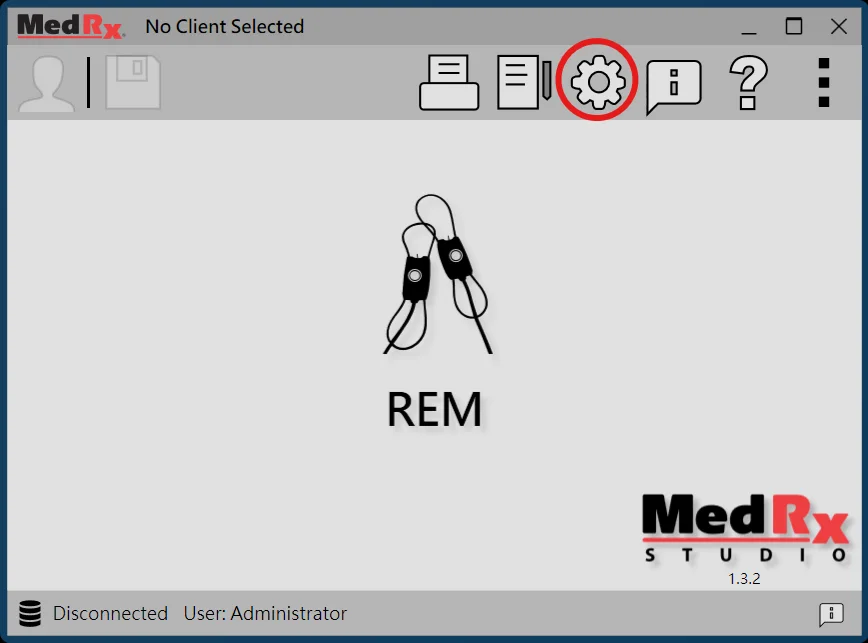
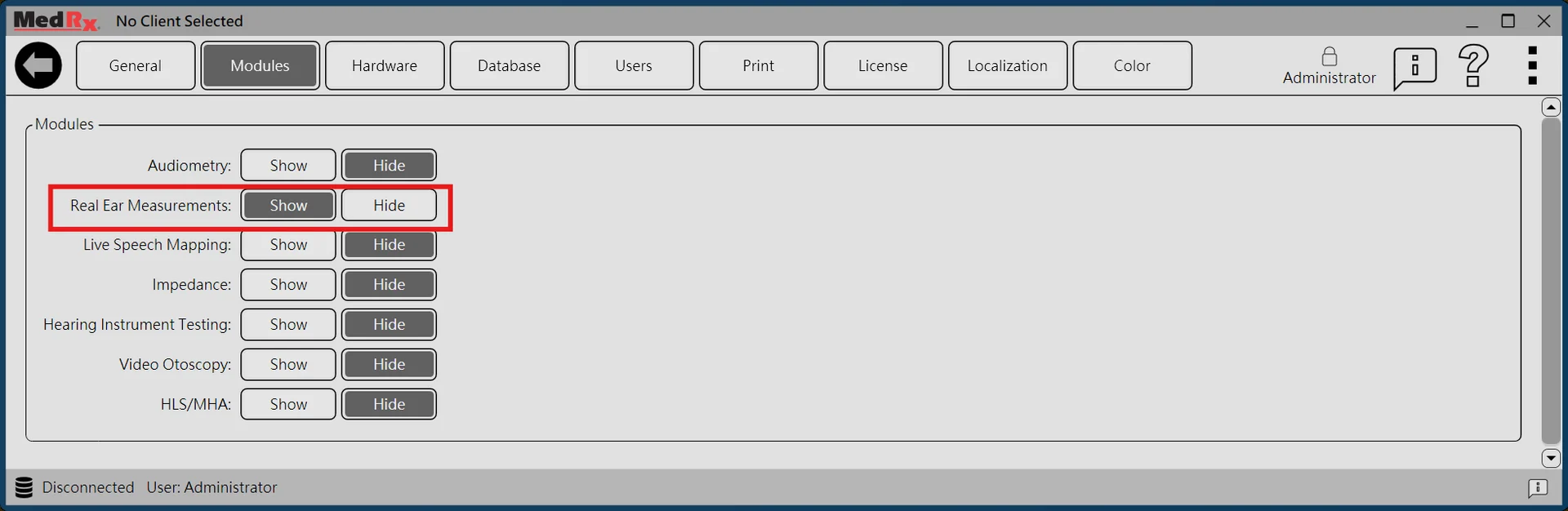
How do you get to those screens where you can choose the target types? I’ve tried to mess around with the application, but I can only see the AUD, VO and , but no way to see those fittings
You’re ignoring this member’s posts.
In the REAR graph on MedRx Studio (and my older MedRx REM program) only has EqSPL for the vertical axis and it’s not able to be modified.
No, graph on MedRx Studio can use unit. Just “click” on the unit text (EqSPL or SPL) at the vertical axis to change.
Also, a related option is available.
You’re ignoring this member’s posts.
You’re ignoring this member’s posts.
Oh, I see. The actually gives a lower value than the input level at some frequencies. I’ve never used that. You should use EqSPL for . It’s just showing you the gain plus input value (ie if you have 20 gain at 4 khz in the 50 dB input, you get an EqSPL of 70.) SPL would not be mentally useful for me. Maybe we have different ways of computing things in our brains lol.
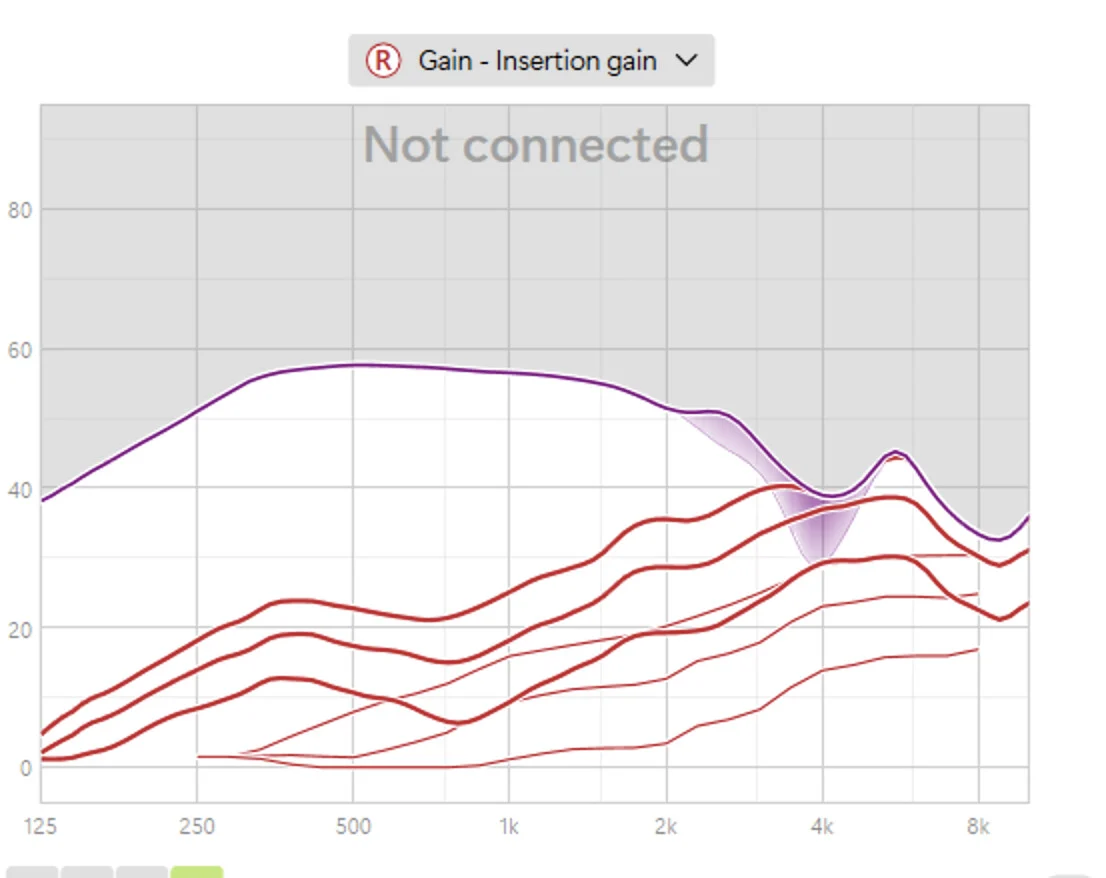
That said, just use REAG to program your hearing aid settings to avoid all confusion.
It doesn’t matter anyway because when you have the probe tube in the ear, and you are doing , you’ll hit the target curves regardless of the relative values. I use REAG at that point because I use insertion gain values to fit hearing aids using Phonak Target or Signia Connexx, but am when I’m using REM, I’m just adjusting up or down to fit the curves and not considering the absolute units on the fitting software.
(I’m not trying to come off as flippant but I think the mental process of doing actual REM vs simulated REM is different and we are just arguing whether something is green vs a combination of blue and yellow LOL!)
You’re ignoring this member’s posts.
Log in to reply to this topic.
Related discussions
Hearing Aids23 replies
Hearing Aid Self-Fitting (DIY)8 replies
Hearing Aids25 replies
Fitting Software Requests1.1k replies
Hearing Aids104 replies