 Poland
You’re ignoring this member’s posts.
Question On REM
71 replies1.5k viewsLast reply

 Orange County, California
Went to get my ears tested and pick up my Oticon Intent 1’s yesterday. Small office with all testing done while sitting at desk. First hearing test I’ve had that was not performed in a booth. Very similar to when I do In-Situ except the H.I.S. used headphones connected to his laptop.
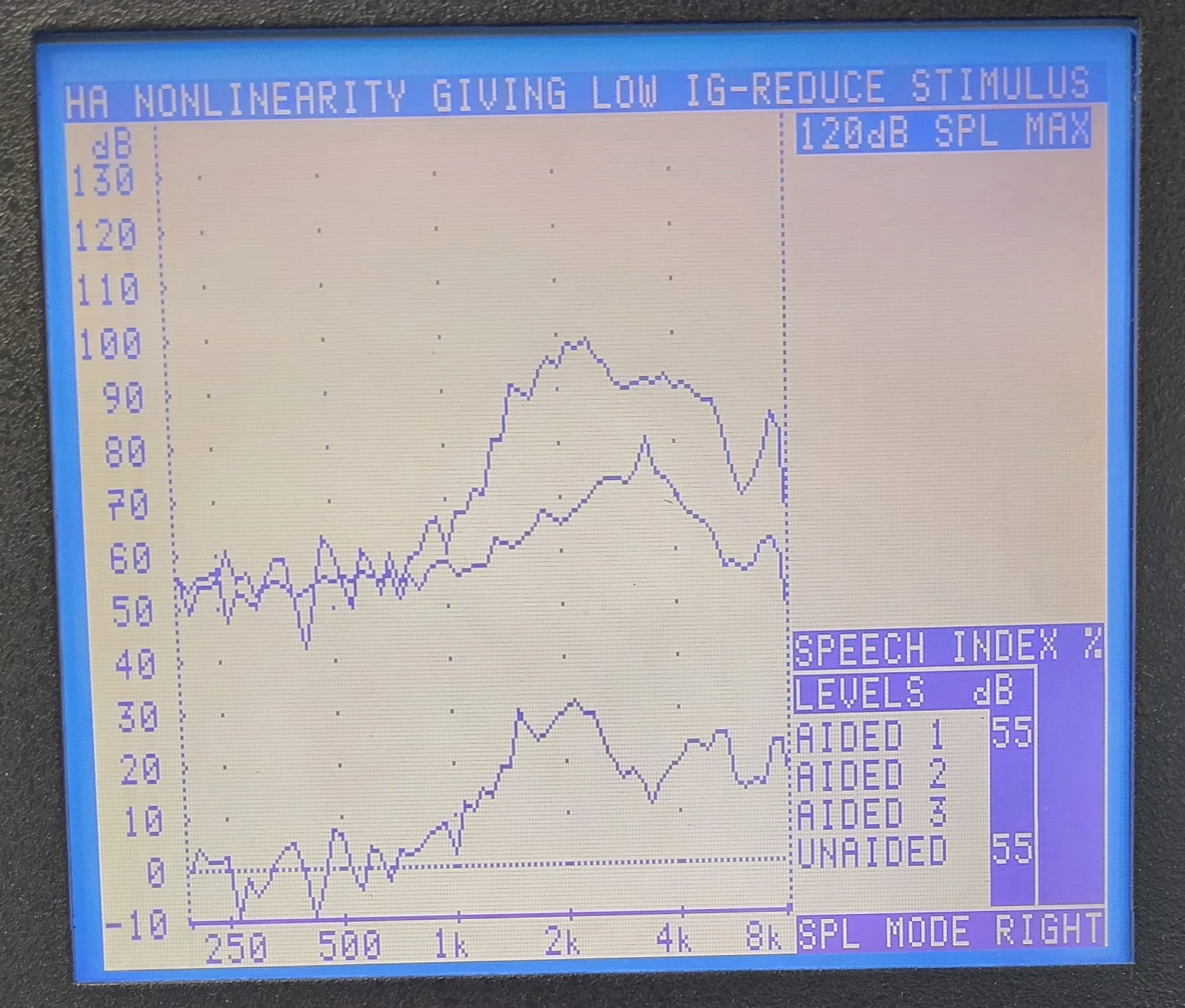
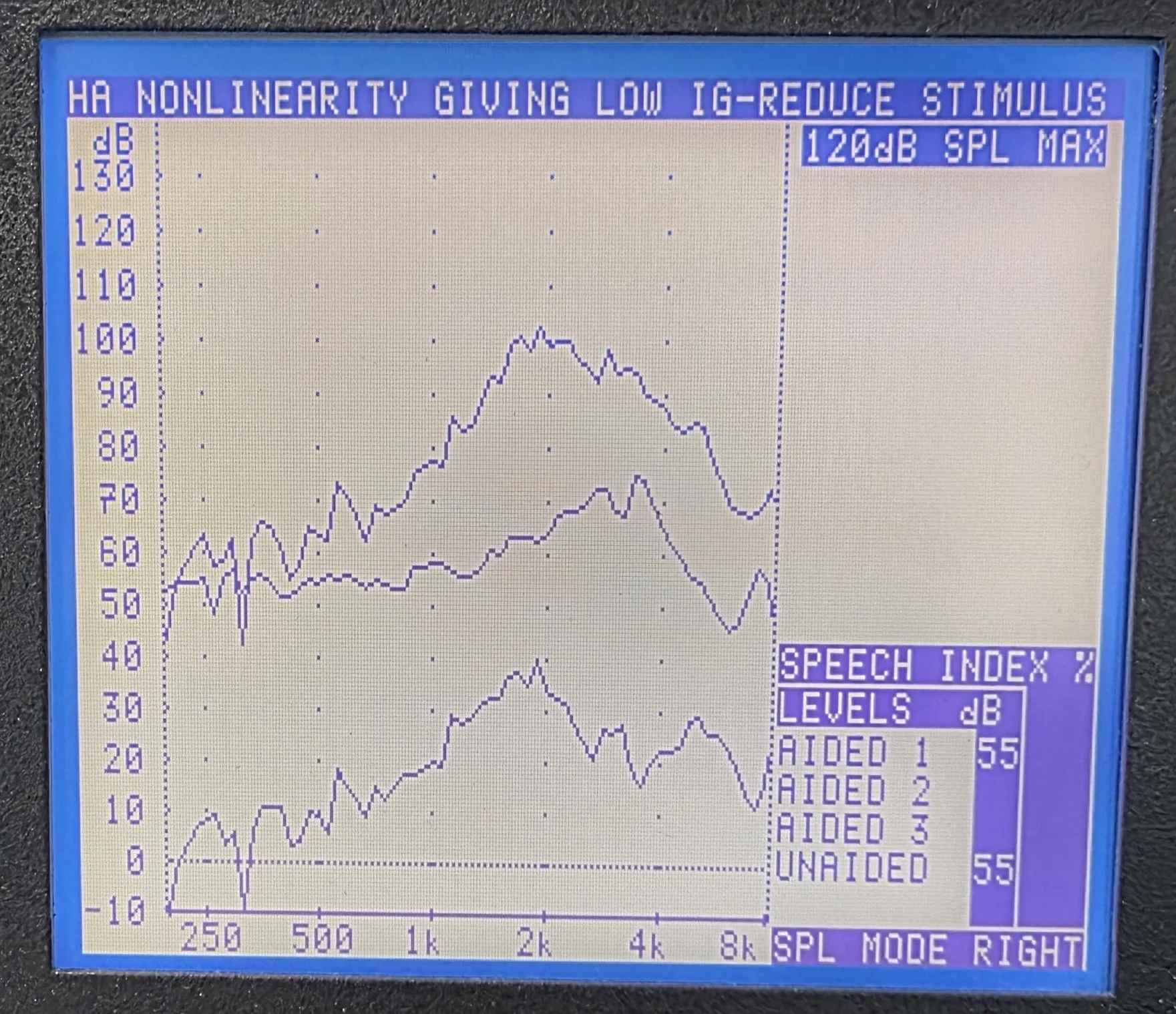
After configuring the aids and asking a few questions he saved the settings in my hearing aids. He then grabbed his portable machine and hooked them up to my ears. I took pictures of the results.
– Top line of the graph is results of both the REM probe and aids.
– Middle Line is results with just the REM probe.
– I’m not sure what the bottom line signifies.
I have no clue what I’m looking at. The H.I.S. indicated the REM results are for information and had no intention of incorporating the results into my hearing aid settings.
Can someone knowledgeable let me know what these graph’s indicate about my hearing?
Right ear:
Left Ear:
You’re ignoring this member’s posts.
– I’m not sure what the bottom line signifies
That was when you have worn hearing aid, but didn’t turned it on? That could be REOG (Real Ear Occluded Respose) “earplug effect”. However I’m not sure, because that effect is very large in your case.
Perhaps it is - Real-Ear Insertion Gain? That says about additional gain from compared to being with no HA.
It would be top line minus middle line:
REIG = - REUG
where:
REAR = Real Ear Aided Response(with HA turned on) = top line = what you have near the eardrum after HA amplification
= Real Ear Unaided Response = middle line = what you have near the eardrum without putting HA in your ear.
Strange that didn’t use it for adjustment. You should see also lines with necessary gain with e. g. , or NAL-NL3 or 5.0 algorithm.
Seeing your flat and shap of the lines, your hearing aid is probably fitted with NAL-NL2 algorithm, but without adjustment after verification.
I see little amplification for low frequency - what diameter of vent do you have in your earmolds? And what is the receiver power? 65?
Can someone knowledgeable let me know what these graph’s indicate about my hearing?
Only the middle line (Real Ear Unaided Response) says a bit about your acoustic properties of your auricle and ear canal anatomy. You can see that you have natural amplification in 1.5-4.5 kHz range, like majority of people.
Probably left probe was placed too shallow, because of the dip in the 6 kHz below 55 input in the middle (REUR) line.
Perhaps @Um_bongo or @Neville could chime in if they have time.
You’re ignoring this member’s posts.
Seeing your flat audiogram and shap of the lines, your hearing aid is probably fitted with NAL-NL2 algorithm, but without adjustment after verification.
I see little amplification for low frequency - what diameter of vent do you have in your earmolds? And what is the receiver power? 65?
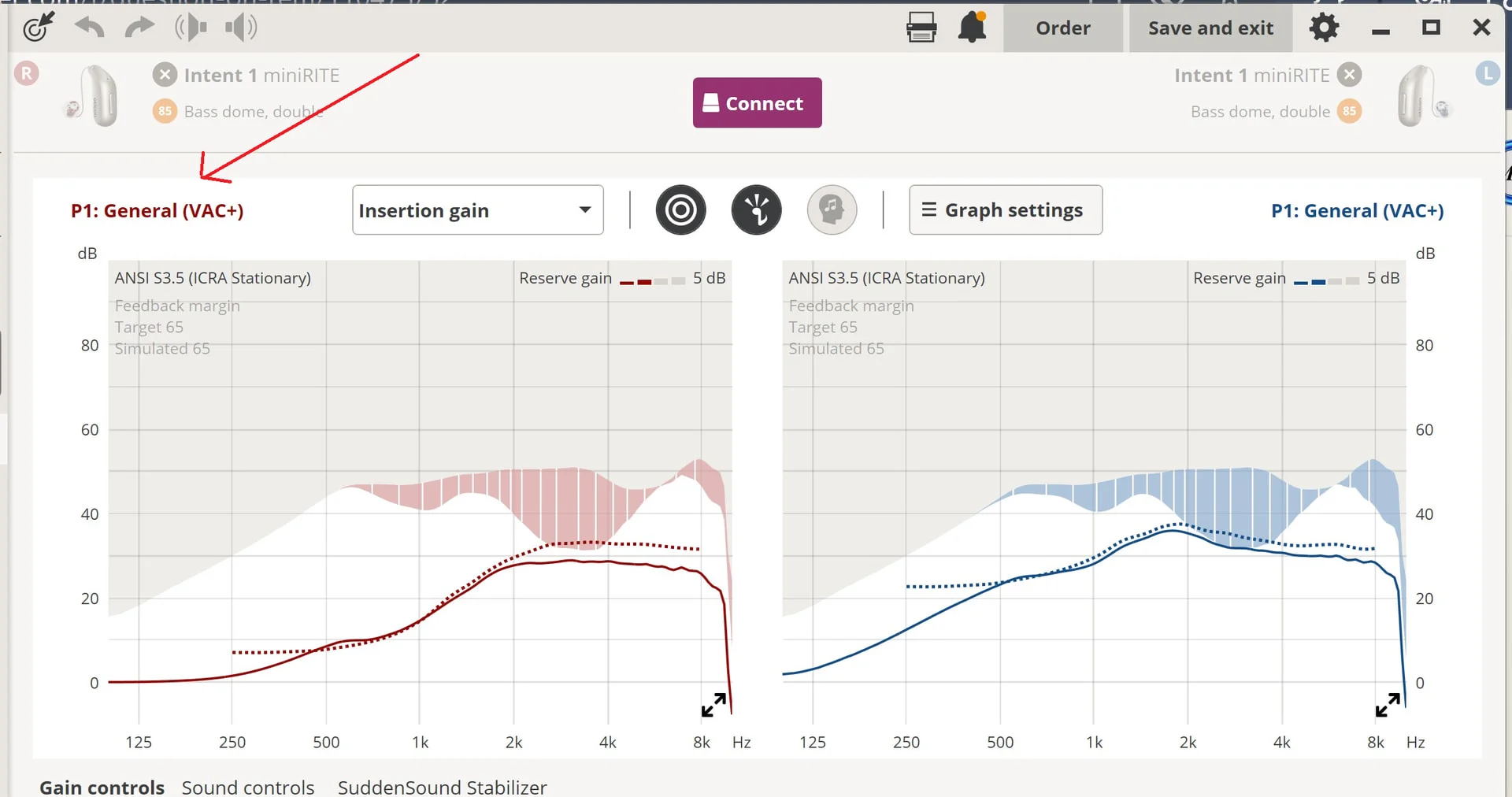
I pulled the fitting into my Genie 2 when I got home. It says it was fitted with VAC+.
I use Bass Domes, Double Vent. Receivers are 85.
I’m pretty sure the hearing test wasn’t accurate at all. In past hearing tests, my In-situ was always fairly close to the .
My confidence level wasn’t high, so I didn’t push the H.I.S to making any adjustments since I can do my own adjustments with Genie 2.
After running In-Situ myself and reprogramming the aids, I’m happy with these Intent 1 aids so far. I haven’t tested in a noisy situation yet though.
You’re ignoring this member’s posts.
I’m pretty sure the hearing test wasn’t accurate at all. In past hearing tests, my In-situ was always fairly close to the audiogram.
Just for clarification: the lines above aren’t yiur hearing test like (bone + air conduction) or Word Recognition Score.
There are lines which tell us about what is near the eadrum at different conditions (aided and unaided). And what’s difference in between aided and unaided.
Glad to read about improvements with hearing with Intent 1.
You’re ignoring this member’s posts.
Just for clarification: the lines above aren’t yiur hearing test like audiogram (bone + air conduction) or Word Recognition Score.
No the above was from his portable machine. There was no Word Recognition test performed. He did do bone conduction immediately after the hearing test. I wasn’t given a copy of any of performed testing. Testing totaled a hearing and bone test. Both ran from his computer.
I’m not confident of the results of either test as I have been in the past. With that said, I got the hearing aids I wanted with a 3 year warranty and a place to take them in if I need warranty repair or replacement.
I’ve gotten pretty good at self programming in the last 10 years, so I can live with the rest.
You’re ignoring this member’s posts.

 Wales, UK
Did that machine have a slot to put coal in to get it fired-up? 
I haven’t seen a non-pc based bit of kit for years. We must be on third or fourth generation PC Audiometers/Rem units by now.
You’re ignoring this member’s posts.

You’re ignoring this member’s posts.
No slot for coal, but he did have to turn a crank to get it to start. 
You’re ignoring this member’s posts.

I’m not familiar with that system. It’s…not a Frye I don’t think. It’s not an rm500. I think is correct that that is probably aided line at the top, unaided line, and then insertion gain at the bottom. There are no prescriptive targets to compare against so unless the clinician has calculated them by hand and is comparing against a chart all this tells you is what the hearing aid is doing in the ear. The fact that the clinician said “it’s just information, I don’t use it for the fitting" suggests that they are NOT doing that. But if they don’t use it for the fitting it’s not really information, just documentation. Zero insertion gain at the lows is certainly underfit for the hearing loss. Too much venting maybe.
You’re ignoring this member’s posts.
He told me over the phone that he would rather not do , but would do it if I had wanted it performed. I wouldn’t have bothered if I had know he didn’t have a system that was tied into Genie 2 on his computer.
This H.I.S is running what I would classify as a budget operation. The whole business is operating in an 8’ x 10’ office space with the office administrator, H.I.S., and client all squeezed in together.
You enter the office and immediately to the right is the wall that runs adjacent to the next door office. To the left is a small desk area for his administrative assistant. A few feet ahead is a narrow table facing his desk. His desk faced the right wall and held his laptop, a couple of headphones, a wireless Noah Link and some odds and ends.
Behind and to the left was a small short cabinet that hugged the far left corner of the office. On top of the cabinet were what I believe were various hearing aid accessories along with my hearing aid box and charger. Sitting on the floor next to the cabinet was a old black case, which I found out later was his REM device. I was getting decent price for the Intent 1’s plus a free set of extra receivers and a smart charger. So it worked out for me.
I would have preferred to have REM incorporated into the Genie 2 settings like my last Audiologist did, but she retired a couple of years back.
You’re ignoring this member’s posts.
Was his advertising on a match strip? ‘Better Call Paul’ or something?
I’m all for low rent solutions, but……
As to sorting out you hearing, you might want to make sure he’s programmed the default on Genie to NAL 2/3 not Vac+ - at least he would potentially be headed the right way in terms of the initial fit of you’ve got an average canal.
I find that having fitting kit that didn’t originate in the late 1900s is benefits my practice too.
You’re ignoring this member’s posts.
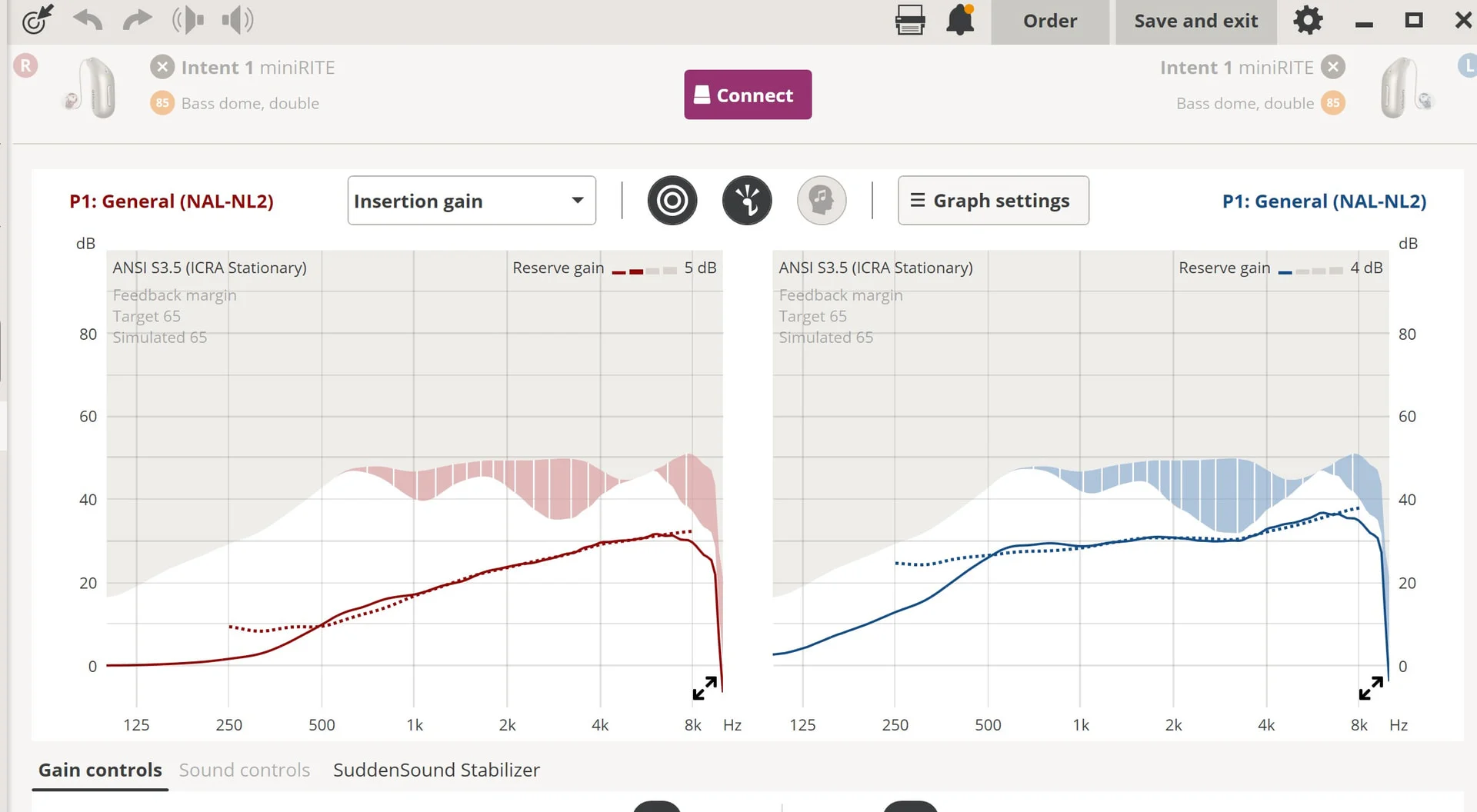
I thought Vac+ was the default in Genie 2. I’ve never changed that option when self programming. Here is a screenshot of his settings as pulled them from the hearing aids when I got home after his did his fitting.
So is it possible that he did use NAL 2/3 and my local version of Geni 2 changed it to Vac+?
You’re ignoring this member’s posts.
I just found this in the Genie 2 help section. I looks like Vac+ is the default Rational option available for Intent 1.
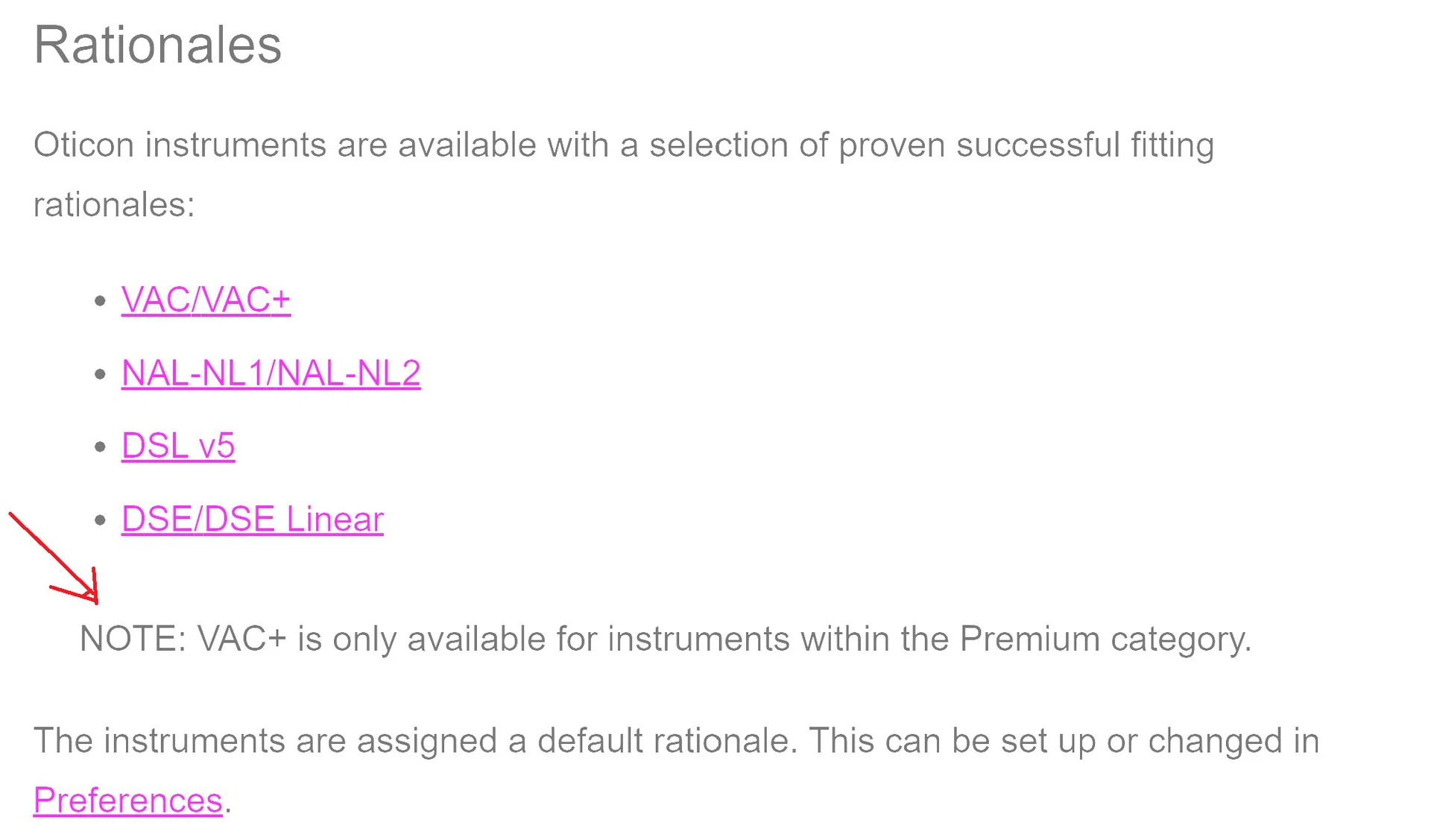
You’re ignoring this member’s posts.
It is the default, but usually under-prescribes by a degree vs NAL.
That doesn’t mean he didn’t subsequently alter the settings though. Looking at that fitting screen, it would appear that you’re a bit under amplified, but I can’t can’t confirm that without a proper result.
You’re ignoring this member’s posts.
I change the Rational to NAL-NAL2 using my current self-fitted settings. Here is what the graph looks like with that change:
You’re ignoring this member’s posts.

tenkanProvider
I thought Vac+ was the default in Genie 2.
Yeah but this can be changed in references I believe.
You’re ignoring this member’s posts.
Which is what they’ve been set to, by the looks of things.
If you were to get an actual done on them by Slipping Johnny or whatever his name is, using a bit of newer kit that he could borrow from his brother’s firm (probably called Simpson, Simpson and McCleod: Audiologists at Large), you might find your settings need to deviate from the standard prescription, by a little or a lot……
You’re ignoring this member’s posts.
The compression doesn’t bother these patients?
Apparently not? Ironically, the more hearing loss you have the less tolerable compression gets which is too bad because you simultaneously need more compression to fit sound into the remaining dynamic range.
Could a similar approach be used in the highs and lows for cookie bite to overcome some of the loss from the hearing aid itself or do the fitting prescriptions account for this? NAL-NL3 seems to boost the curve a little versus NAL-NL2 possibly to get at some of this.
With an appropriate fit to prescriptive targets you should overcome the insertion loss with the gain, and a good clinician will look at that specifically. However, depending on the cookie bite–if low/mids are poor and highs are very good then hearing aids will not be able to compensate for the high frequency insertion loss to the degree that the hearing is still good out there.
You’re ignoring this member’s posts.
You’re ignoring this member’s posts.
Log in to reply to this topic.
Related discussions
Hearing Aids15 replies
Hearing Aids4 replies
Hearing Aids37 replies
Hearing Aids104 replies
Hearing Aids20 replies