@JohnD said:
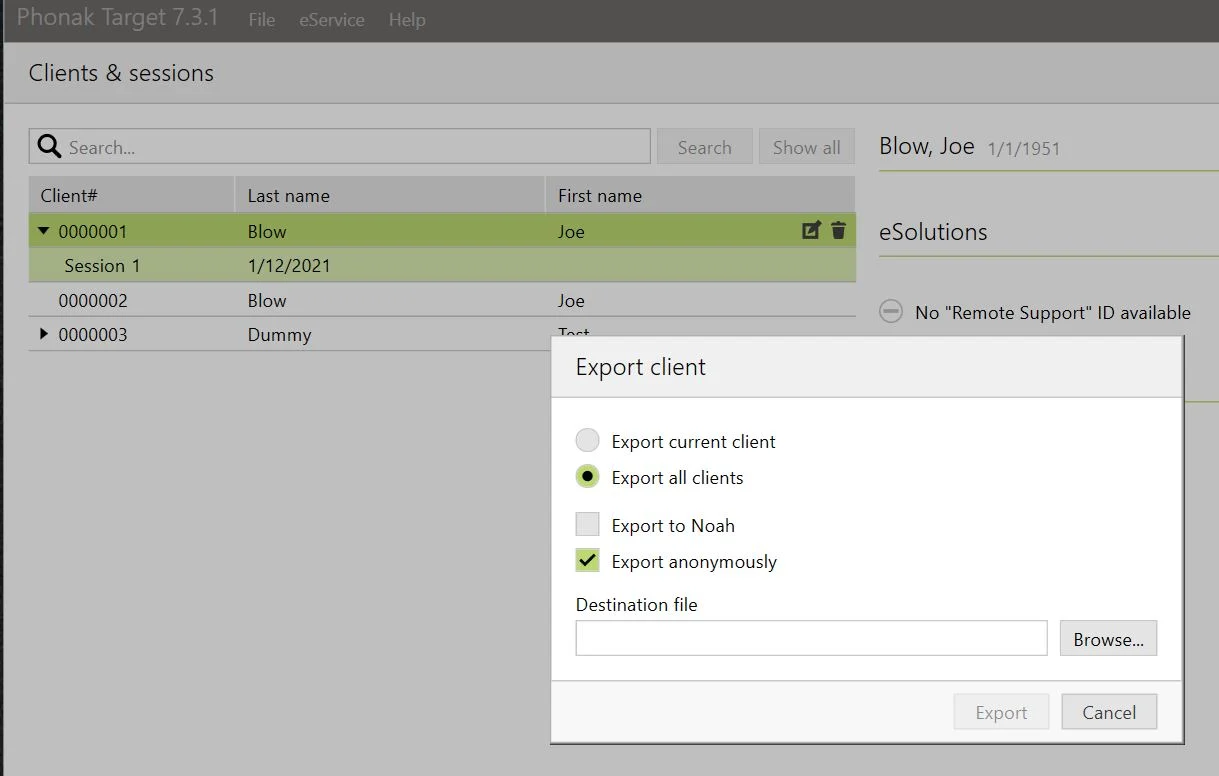
I need to transfer all my Target sessions to a new PC. I have read the Phonak guides, but I still cannot find some basic instructions.
Target will not import settings from a file, unlike iPFG which made the job a simple one. I cannot see where the “Transfer settings” are helpful at all.
Any help much appreciated.
I have had a look at what you want to do and I played around in Target v4.1.0.9913 with Windows 7 Professional 32/64bit.
I think that there may be a couple of ways to do it (leaving aside other processes of direct transfer of data - computer to computer, that may be available). There is a lot of information so I will do separate posts. (Offered on all care/no responsibility basis).
Option A
Based on the information in Phonak’s Target 5 Booklet (Aug 2016) which states:
“Client data backup
In the Phonak Target stand-alone version, all data is stored in the DB folder. We recommend backing up this folder and all files it contains regularly onto a separate data storage medium.”
“You might have to configure your Windows Explorer to ‘Show hidden files and folders’ in order to be able to browse to these locations.
The default DB folder is located here:
Microsoft Windows Vista (32 and 64 bit) Home/Business/Enterprise/Ultimate:
C:\ProgramData\Phonak\Phonak Target\Phonak Target\Data
Microsoft Windows 7 (32 and 64 bit) Home/Professional/Enterprise/Ultimate:
C:\ProgramData\Phonak\Phonak Target\Phonak Target\Data
Microsoft Windows 8 (32 and 64 bit) Pro/Enterprise:
C:\ProgramData\Phonak\Phonak Target\Phonak Target\Data” end quote.
(Be aware of the two ‘Phonak Target’ references in the folder name).
Windows 10 would probably be a similar file structure.
(I have done this backup from time to time, but not yet needed to use it. However, I cannot see the individual files related to the Target sessions. An .sdf file reader is probably needed. But maybe I don’t need to get in there anyway).
Assuming that you are using the same Target version on both computers - it may be possible to substitute the Data folder on the NEW computer with the copied Data folder from the OLD computer. You would only substitute IF there is no new Target sessions on the NEW computer that you want to keep. You could try by doing this:
On the OLD computer – COPY the relevant Data folder to separate storage (eg 1[SUP]ST[/SUP] flashdrive).
On the NEW computer – MOVE the ‘Data’ folder that is in Target on the C: drive to a separate place for safekeeping (eg 2[SUP]ND[/SUP] flashdrive and/or another folder. Remember the folder’s name).
COPY the Data folder from the 1[SUP]st[/SUP] flashdrive to the C: drive on the NEW computer in the relevant Target folder.
On the NEW computer open Target and see what is there under clients.
If it is not what you want – delete the Data folder on the C: drive then copy the Data folder from the 2[SUP]nd[/SUP] flashdrive back into the relevant Target folder.
In my experimenting, I found that when I moved the Data folder to separate storage I could not work in Target. (ie: there’s no data base). Then I moved the Data folder back to its position on the C: drive and I was back in business.
If Phonak recommends that the DB folder is backed up from time to time then it seems logical to me that this is the critical folder. Why else am I copying it? I haven’t had to use it yet, but this is what I will try first if my files become corrupted.
Remember this experiment was done using the same version of Target. The question is – does it work with different versions of Target software – only experimenting will answer that question.
The key is to make safe copies so everything can be put back together.
If you have sessions on the NEW computer that you want to keep – look at the other options that might work before you try substituting the DB folder.
Cheers


 Midlands UK