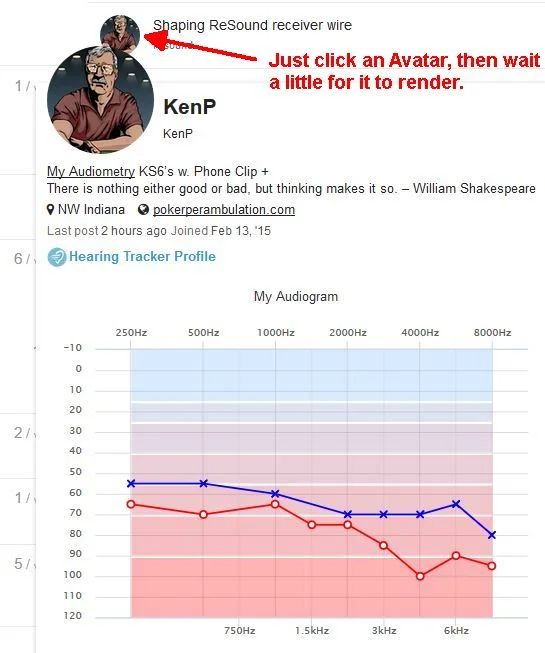
Old forum, our if we included in our signatrue showed up in our posts. This doesn’t seem to happen here. Is this something that can be incorporated, or can you suggest another way to readily include audiograms?
You’re ignoring this member’s posts.
This topic is closed.
107 replies14k viewsLast reply
Old forum, our if we included in our signatrue showed up in our posts. This doesn’t seem to happen here. Is this something that can be incorporated, or can you suggest another way to readily include audiograms?
You’re ignoring this member’s posts.

can you suggest another way to readily include audiograms?
Sure, right now you can click on your profile pic (the M) and see your audio from the old system. The formatting isn’t perfect, so you might need to click on the profile pic that opens up in that popup to get to your actual profile page, where you will see:
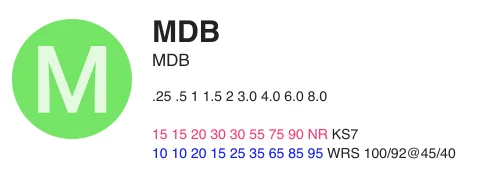
We are working on bringing over from our normal audiogram display on Hearing Tracker, which look like this:
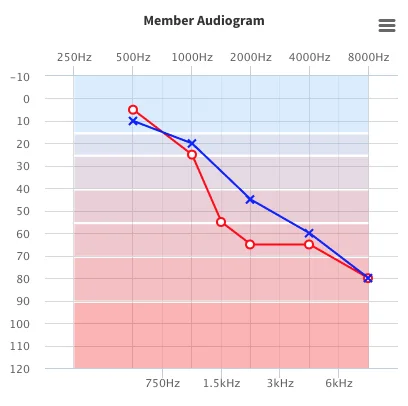
Once we have those live, we’ll send out an announcement so you can update yours.
You’re ignoring this member’s posts.
@pvc said: (unavailable)You’ve reached the maximum number of topics a new user can create on their first day.
Just increased the limit. Hopefully that is fixed.
@pvc said: (unavailable)Some links that go something like this (ftp://some-file-to-download) doesn’t work on the new forum. Any suggestions?
Please link to a post with an issue so we can take a look. Thanks!
You’re ignoring this member’s posts.

It would be nice to do that as a thumbnail that can pop up. Lot less scrolling and waste.
You’re ignoring this member’s posts.

I hope we will get an email when the feature can be enabled. I found the number grid folks used pretty useful, but of course an actual, visual audiogram is INSTANT recognition! I would definitely add mine here. Meanwhile, there is no way to put our old number grid up that I can detect?
You’re ignoring this member’s posts.
Yep, and we’re going to be making those appear in the mini profile popup soon. Sorry that we haven’t launched this yet… but @pvc found the place where we’ll pull those from.
You’re ignoring this member’s posts.
PVC,
Thanks. Yeah, I figured that out too, and it sounds like it will eventually link to our signature.
Thanks again.
You’re ignoring this member’s posts.

Thanks for those steps, but I don’t have any trouble getting to the blank chart. It’s just that wherever I click on the blank chart, nothing happens! I am unable to chart my numbers.
You’re ignoring this member’s posts.

Thanks for those steps, but I don’t have any trouble getting to the blank chart. It’s just that wherever I click on the blank chart, nothing happens! I am unable to chart my numbers.
Click on the Enter your link.
You’re ignoring this member’s posts.
To that point I figured out that we can add markdown tables to those “about me” sections. While they don’t seem to display on the user card, they do display on the user profile:
This code generates the following table:
 ||**250Hz**|**500Hz**|**750Hz**|**1000Hz**|**1500Hz**|**2000Hz**|**3000Hz**|**4000Hz**|**6000Hz**|**8000Hz**
:-----:|:-----:|:-----:|:-----:|:-----:|:-----:|:-----:|:-----:|:-----:|:-----:|:-----:
Right Ear|5dB|5dB|5dB|5dB|5dB|5dB|5dB|5dB|5dB|5dB
Left Ear|5dB|5dB|5dB|5dB|5dB|5dB|5dB|5dB|5dB|5dB
| 250Hz | 500Hz | 750Hz | 1000Hz | 1500Hz | 2000Hz | 3000Hz | 4000Hz | 6000Hz | 8000Hz | |
|---|---|---|---|---|---|---|---|---|---|---|
| Right Ear | 5dB | 5dB | 5dB | 5dB | 5dB | 5dB | 5dB | 5dB | 5dB | 5dB |
| Left Ear | 5dB | 5dB | 5dB | 5dB | 5dB | 5dB | 5dB | 5dB | 5dB | 5dB |
You’re ignoring this member’s posts.
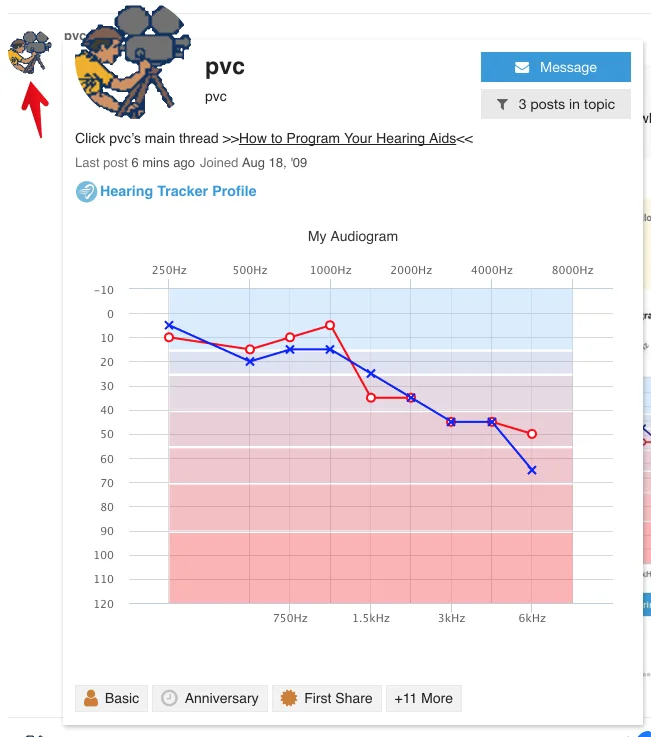
now display whenever you click on someone’s avatar. If you want to show your audiogram, please follow the helpful instructions provided by @pvc above.
You’re ignoring this member’s posts.

To see that block allowing the entry of the you have to sign on to Hearingtracker itself not just the forum. When on that page with the blank graph go to the top of the page and log in using your forum credentials.
You’re ignoring this member’s posts.
Mine is currently displaying to 4000 with 8000 clipped off. You need to expand the display box for the .
You’re ignoring this member’s posts.
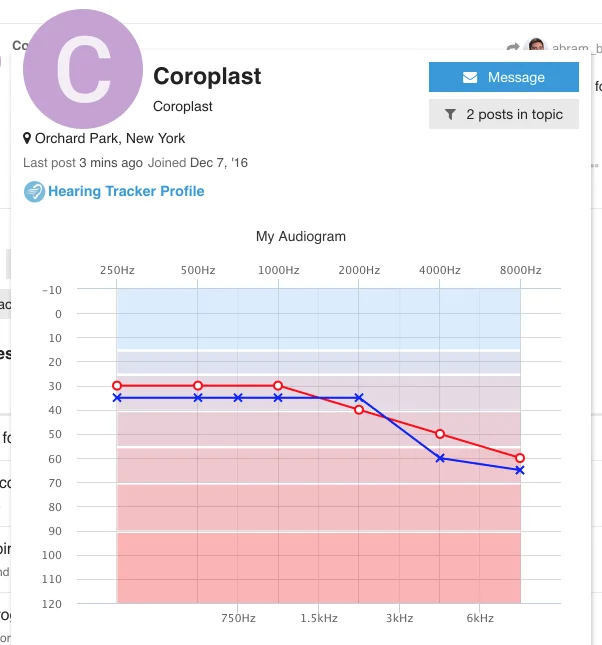
What browser and operating system are you using. This is what I’m seeing when I click on you:
You’re ignoring this member’s posts.
You’re ignoring this member’s posts.
What browser and operating system are you using. This is what I’m seeing when I click on you:
I see the same as @AbramBaileyAuD with Firefox on Windows 10
You’re ignoring this member’s posts.
KB
I’m using iPad Pro 9.6 with safari. I logged out and back in, problem remains. Same issue vertical or horizontal.
You’re ignoring this member’s posts.
Undoubtedly you have logged on to Hearing Tracker before. Some of us never have. Doing the login when confronted with the blank graph solves the problem of no edit option.
You’re ignoring this member’s posts.
You’re ignoring this member’s posts.
Clicking on other people’s profile displays the whole graph. Trying to display my own, it remains clipped.
You’re ignoring this member’s posts.
Announcements4 replies
Fitting Software Requests892 replies
Hearing Aids144 replies
Fitting Software Requests869 replies
Scholarly Articles, News, and Other Resources74 replies


 Auckland, New Zealand
 NW Indiana