Hi Members,
Need few advice from Marvel 30 R, phonak remote app showing only one auto sense 3.0 program. But i did check other people have 3 to more programs…
You’re ignoring this member’s posts.
This topic is closed.
9 replies2.6k viewsLast reply
Hi Members,
Need few advice from Marvel 30 R, phonak remote app showing only one auto sense 3.0 program. But i did check other people have 3 to more programs…
You’re ignoring this member’s posts.

Unclear exactly what you’re asking. I think you’re asking why your hearing aids have only Autosense and no other programs? Programs need to be installed by the hearing aid fitter. The default is just Autosense.
You’re ignoring this member’s posts.
You’re ignoring this member’s posts.
There are some default pre set program available in target software. Additional three custome program can be added by audi.
You’re ignoring this member’s posts.
Yes you are correct, i just confirmed,
Only Autosense 3.0 is the program showing.
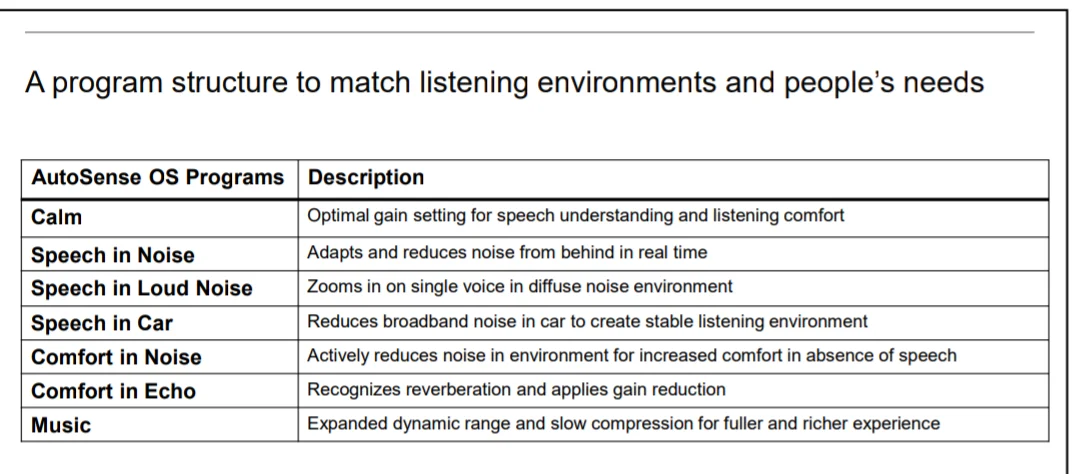
No program selection option in Phonak remote app : calm, speech in noise, Stream music, stream speech. Which I think sould be there.
You’re ignoring this member’s posts.
Somebody would need a programming device (like NoahLink Wireless) and Target 6 software to place the programs there. Talk about it with your hearing aid fitter or audiologist.
You’re ignoring this member’s posts.

You won’t get all of those programs in Auto Sense because you have the lowest version of that aid (M30 is the lowest, then M50, M70, and M90 is the top level). You can add some in separately for manual use, but unfortunately because you have the low-end one, you can only do them manually, after your dispenser or audiologist has given you access to them. Since this is your first fit, they probably just want you to adjust to the sound before giving you the option to play with the settings.
You’re ignoring this member’s posts.
Ok, thats what i was looking for.
Just one more thing is if you use marvel can you tell me how efficient is autosense os. Some noise like kitchen chimney or fan sound seems a problem.
You’re ignoring this member’s posts.
You can change how aggressively it switches from calm to speech in noise, but that’s about it as far as automatic changes.
You’re ignoring this member’s posts.
Step 1: Did your service provider complete ? If not, switch providers.
Step 2. If REM completed, allow your brain to adapt to your new Hearing Levels for at least 3 months of daily use.
Step 3: If Hearing deficits persist, make a list of when and where you struggle.
Step 4: Discuss these issues with your provider. Insist they do not deviate from REM targets more than 5dB in your main setting. All additional adjustments/changes based on your list should be done as additional Programs.
You’re ignoring this member’s posts.
Hearing Aids2 replies
Fitting Software Requests1.1k replies
Uncategorized451 replies
Hearing Aids168 replies
Fitting Software Requests511 replies

