Yes, you need to get the 02 receivers to work with all of your stuff. The are dumb-expensive to purchase privately, and when your clinician orders them they should also order a roger installer for their clinic if they do not have one already.
Both 02 and 03 receivers can be installed into the same Marvel or Paradise hearing aid. The use-case for this is typically a child who has a personal at home (using the cheaper adult line) and uses the educational line in school (with 02 receivers installed by the school).
There is now only one Roger program, but you can mute the microphones at will with the multi function button. The multi function button does volume, program change, mute, pick up/hang up phone, end streaming. The tap function on the rechargeables is a bit lame and finicky but can also access your phone assisstant, answer the phone, and start and stop streaming.
If you go with the 03 receivers, not only will you lose access to all your non-roger devices, but also all of your educational roger devices which include the touch screen mic and the wall pilot which you apparently have.
If your clinicians are so roger-clueless, keep in mind that once you have your receivers installed on the hearing aid, every time you send them for repair remind the clinic that they have roger receivers installed and remind them to mark it on the repair form. Otherwise, there’s a good chance the receivers will be lost during the repair and then it becomes a whole thing.
There is now only one Roger program, but you can mute the microphones at will with the multi function button.
Oh wow, that’s not good.
Would you know if that one Roger program is EasyRoger / RogerReady? I find when I’m listening to my portable DAB radio, I can mute my Mics but if I loose DAB reception, the program will unmute itself and I have to re-mute the dam thing. I think that’s down to it being RogetReady.
You’re ignoring this member’s posts.
BlackyZürich, CH 2021-now // Berlin, DE 2017-2021 // HR origin
Wow that’s great to know! It took a lot of effort to kill off Soundflow so I didn’t really imagine that Auto would be vulnerable to any murder attempts!
If I’m not mistaken, only on Paradise you can kill autosense, but on marvels not.
Hearing aids come with capability or not to add the Roger inside it, but there isn’t any receiver actually inside it and that’s what they mean by RogerDirect
Roger iN things come with two, for want of a better description, virtual receivers which are Roger 03
Roger 02 receivers of the right type can only be added using the round tray device thingie
Do I have it figured out now?
Yes. I know Zebras had answered, I’m just confirming so that you can be double sure
I just call this ‘virtual receivers’ licences. Since they’re literarly a number.
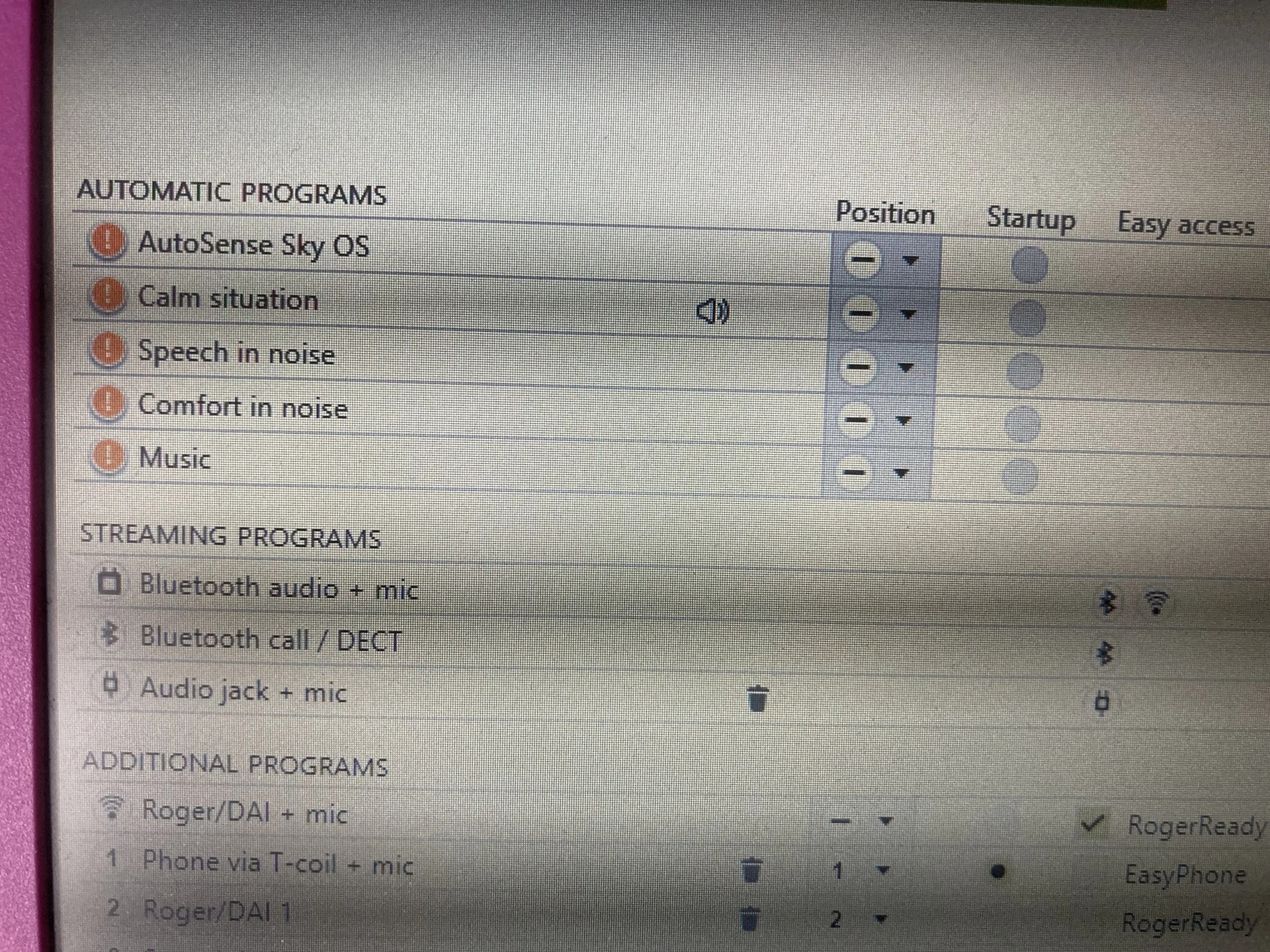
Then there’s some confusion over the programming, as they seem to indicate you can only have one Roger program on these (Paradise and Nathos Nova) and that’s Roger with a microphone.
Exactly, there’s only one roger program, but you can mute mic directly on the aid button.
About aid button, it’s a up/down button, and if your fitter sets it up, it can work like this:
short click up or down - volume control
long click up - program change
long click down - mute HA mics (in any program except call)
Also, when call is coming short click up should accept it if I’m not mistaken. I always forget which combo it is to test it and I think I’ve never succeeded in accepting the call yet
Also, if you have set up roger device to not connect automatically but just to chime when it’s in range, then you can short click on HA to connect to the mic. I have that because it’s more convenient for me. Same can be done for TV connector.
Altho I’m not 100% of how you connect the Nova / Marvel / Paradise to the Roger Mics now.
If HAs have licences in them, or in other words, initial licence transfer is done, then connecting is done with that ‘link’ button and just bringing the mic near the aids.
I started writing my post before I saw Neville’s, so I’ll just leave this here
Would you know if that one Roger program is EasyRoger / RogerReady? I find when I’m listening to my portable DAB radio, I can mute my Mics but if I loose DAB reception, the program will unmute itself and I have to re-mute the dam thing. I think that’s down to it being RogetReady.
HAs are RogerReady, with which Phonak implies that you only need licence.
In Target I can’t recall that I’ve ever seen rogerready around that roger program.
I don’t know what’s DAB reception. Would testing for this example give you some information:
I use mic, then I mute HA mic, then I go out of range of the mic, then I go back, and then I check if HA mics are muted or unmuted?
Or you need something else?
Would you know if that one Roger program is EasyRoger / RogerReady?
Yes, but you can switch it to be manual if you prefer with both the Marvel and the Paradise. You can no longer have both. There is a new setting for Roger that reduces the background noise a bit when the volume gets too lound, which I like but you have to flip on (it defaults to the old standard).
Wow that’s great to know! It took a lot of effort to kill off Soundflow so I didn’t really imagine that Auto would be vulnerable to any murder attempts!
If I’m not mistaken, only on Paradise you can kill autosense, but on marvels not.
Not true. I can kill AutoSense on both my V70 and B90. It still shows up on the list of programs on Target but if you select the right buttons, you can’t access it via your program button.
EDIT - This is what it looks like when you’ve killed AutoSense on the V70. Can you see the position is (-) and not A?!
DAB radio is listening to the radio via digital rather then old . Maybe it’s a UK thing.
If I’m walking around, some places don’t have very good signal so my Aids go back to my main program / AutoSense and then when the signal gets better, my Aids transfer back to the Roger program on it’s own.
You’re ignoring this member’s posts.
BlackyZürich, CH 2021-now // Berlin, DE 2017-2021 // HR origin
Not true. I can kill AutoSense on both my V70 and B90. It still shows up on the list of programs on Target but if you select the right buttons, you can’t access it via your program button.
I was positive that I couldn’t remove autosense with Marvels, which I’ve mentioned, but granted, I didn’t check before writing the post.
DAB radio is listening to the radio via digital rather then old FM. Maybe it’s a UK thing.
If I’m walking around, some places don’t have very good signal so my Aids go back to my main program / AutoSense and then when the signal gets better, my Aids transfer back to the Roger program on it’s own.
I still don’t comprehend how roger program comes into play with it?
But more importantly, is there any test I can do with roger mic alone to help you decipher/confirm the behavior?
I still don’t comprehend how roger program comes into play with it?
But more importantly, is there any test I can do with roger mic alone to help you decipher/confirm the behavior?
I listen to the radio with my Roger. When there is no signal / music / talking playing, the Roger program reverts back to AutoSense or main program that you are using. That’s because I’m using RogerReady as I’m lazy about having to change programs all the time.
I’m guessing you don’t use RogerReady?
Same idea applies when I finish using my Roger / listening to the radio, the program reverts back to AutoSense as I’ve turned the radio off.
You’re ignoring this member’s posts.
BlackyZürich, CH 2021-now // Berlin, DE 2017-2021 // HR origin
I have tone when roger mic is in the range, I click it, it connects with . If I walk around out of the range of my mic it disconnects, and when I come back, it again beeps. However I didn’t pay attention on how HA mics behave after I reconnect, but if it’d help you to decihper the behavior, I can, you just have to tell me what’s that we’re testing now
Btw In target > streaming progs > roger mic > under program activation there’s only automatic, manual, manual with beep (that last one I have), and nowhere it says roger ready for that, that’s what misled me
Under info box it mentions only ‘when roger direct is detected’.
You just have to love phonak’s naming and writing abilities
Btw In target > streaming progs > roger mic > under program activation there’s only automatic, manual, manual with beep (that last one I have), and nowhere it says roger ready for that, that’s what misled me
Oh maybe RogerReady is only in the Sky models.
It’s basically an automatic Roger program.
Yes, when I go into range, it reconnects but it doesn’t leave the Mics turned off, I then have to turn the Mics off again.
My automatic Roger program is Roger + Mic so that’s why I have to hold the button down on my Aid, to turn the Mic off.
That’s the downside to having an automatic Roger program and listening to a portable radio.
Same would happen if you were using the Roger as a Microphone and you’re in really noisy places, if you went out of range, you would then having to turn the Mics off again
You’re ignoring this member’s posts.
BlackyZürich, CH 2021-now // Berlin, DE 2017-2021 // HR origin
My automatic Roger program is Roger + Mic so that’s why I have to hold the button down on my Aid, to turn the Mic off.
Mine as well, however, if in Target I choose ‘no mics’, then they’re totally muted. If I keep them on, then I can mute them using HA button (after I’ve connected to mics with my short click, or full cycle to get to the latest program), as you described.
However, without testing, I cannot confirm if it remembers that HAs stay muted when I reconnect or not.
So do you use your roger mic to plug into the radio, and then you leave mic+radio on the table and go out of the range of them or what happens exactly?
Or your radio connects directly to your aids without mic as an intermediary?
Or you’re using roger mylink?
So do you use your roger mic to plug into the radio, and then you leave mic+radio on the table and go out of the range of them or what happens exactly?
As I stated before, it reconnects BUT as I said, if I’ve long pressed the button to turn off Mics, if I go out of range, and then back in range, it goes back to Roger + Mic and I have to long press the button to tune off Mics again.
Does that not make sense to you?
I would rather not have a Roger only program as 99% of the time, I want to hear through my Mics.