You’re ignoring this member’s posts.
Hearing Aid Fitting DIY School and Fitting Software
This topic is closed.
322 replies26.8k viewsLast reply


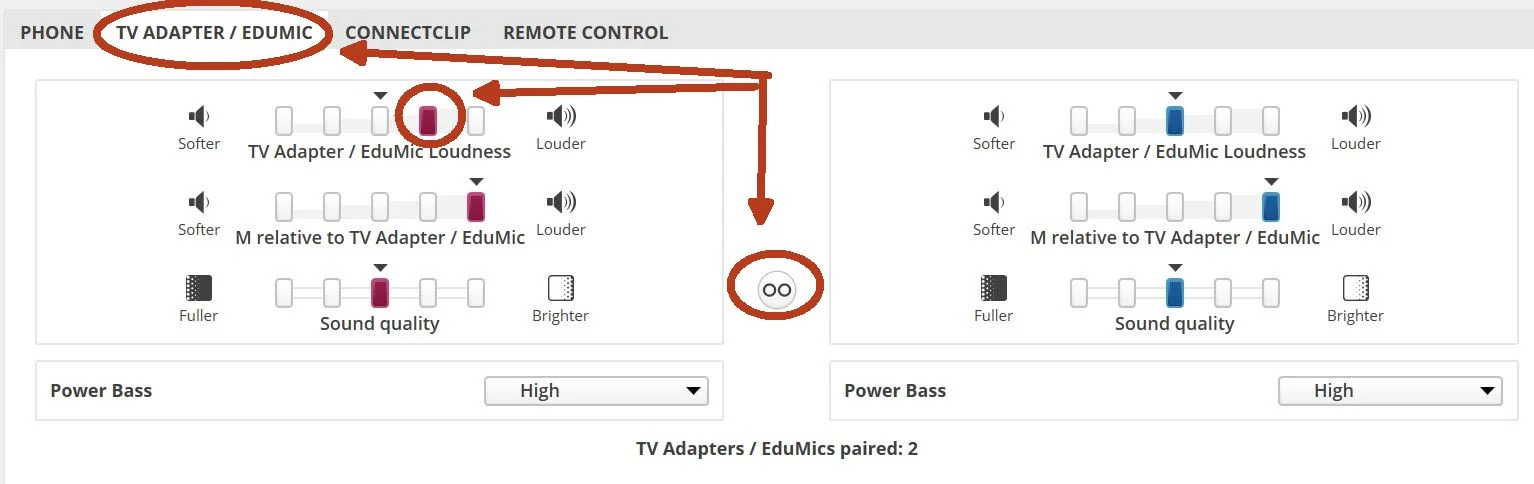
I was sitting at my computer and she walked over to tell me that her TV Streaming seemed louder in her left ear.
Voila! Now the TV Streaming sounds the same in both of her ears;
You’re ignoring this member’s posts.
udaynihProvider
Hello, I’m looking for Legacy Genie, 2018 or older, can anyone help me with a download link?
your help is so appreciated friends
You’re ignoring this member’s posts.
You’re ignoring this member’s posts.
Hi, would somebody be able to help me out with a link to Genie 2 software. Thanks 
Edit: Sorted, thank you
You’re ignoring this member’s posts.
You’re ignoring this member’s posts.
You’re ignoring this member’s posts.
I’ve played around a bit in simulation mode with the HearSuite software and have the latest version load. I did create myself as a client and loaded my as well and did a couple of “fake” adjustments while I’ve been waiting for the my NoahLink. I deleted all but one adjustment. Today I hooked up the Noahlink started Hearsuite and Hearsuite said the Noahlink needed a firmware update which it did successfully. But when I use the tools/detect it will not find my hearing aids. They are on the bench out of my ears but currently on inches away from the NoahLink. The message is not detectable devices found. I’m running an I7 HP laptop, latest version of windows and HearSuite and sort of stuck right now. I’ll do some additional looking around for more guidance unless someone can point me in the right direction. Thanks
You’re ignoring this member’s posts.

tenkanProvider
It seems a few people have ran into this after doing this firmware update, a driver issue, you can get it from here.
https://www.himsa.com/himsa_download/noahlink-wireless-downloads/8
It may or may not be the only issue, but try it and let us know.
Oh and one other thing, seems ARM based PC’s aren’t supported as well, bummer they couldn’t work that one out.
You’re ignoring this member’s posts.
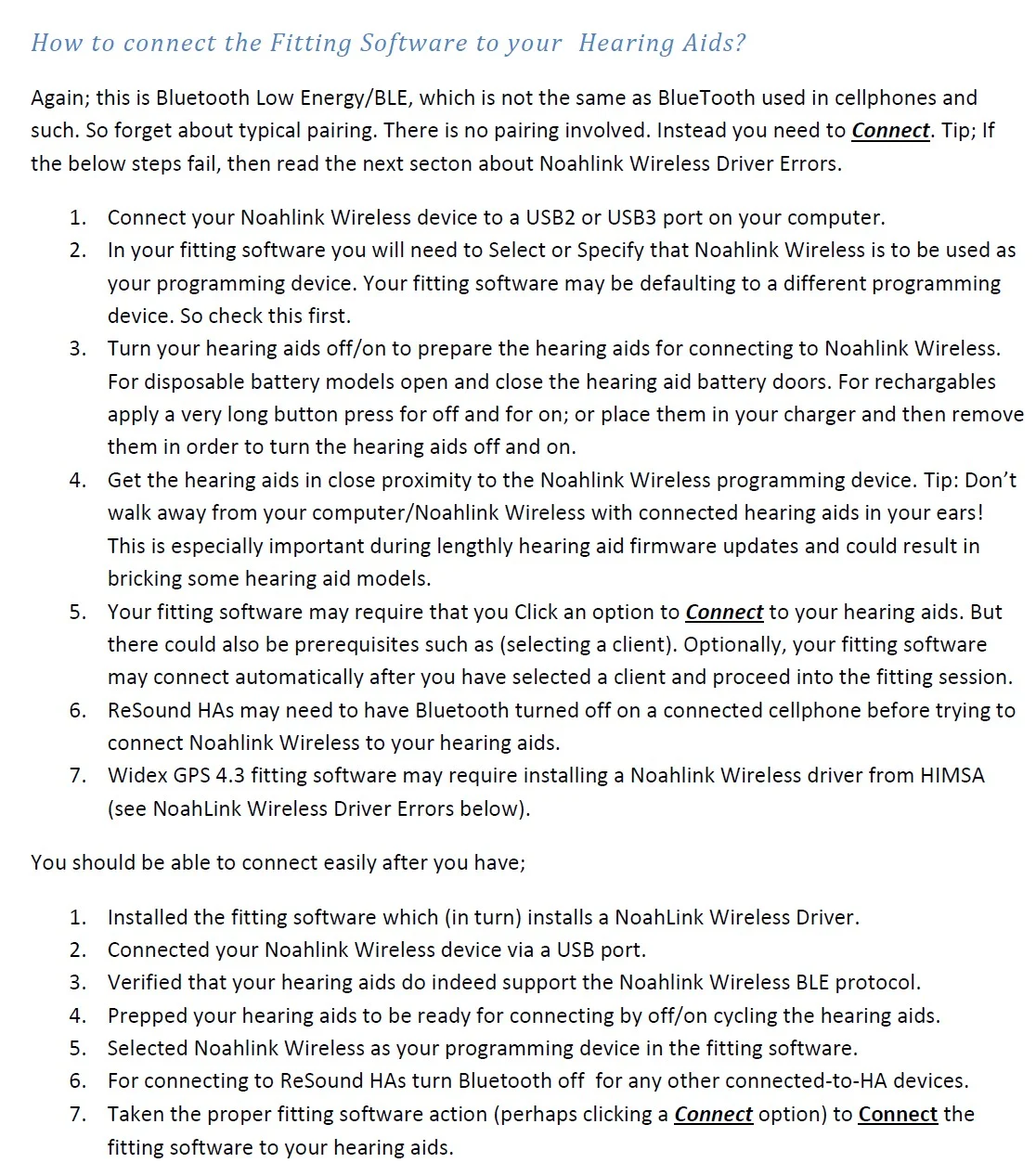
You need to prep your for connection.
Did you off/on cycle your hearing aids by placing them in the charger and removing them?
Or, holding the lower buttons for four seconds (or so) until you see a yellow light and then repeat the hold lower buttons for four seconds until you see green lights?
Here’s an excerpt from a School PDF document named
(04 Noahlink Wireless Instructions For Use)
You’re ignoring this member’s posts.
Thanks. I figured that I might need to kill the bluetooth connection to my nearby phone and as an added measure had the software ready to detect and put the in the charger and then brought them back to the Noahlink and hit detect again and they were found instantly. I will pay better attention to how what my fitter does on Monday. For now I am letting her do the adjustment but I might venture into the hearsuite program by just swapping out the programs so I can try all of them on my own between appointments. Eventually I’ll probably do more than that since I don’t want to interfere or compete with her efforts right now. Thanks for making all of this information available.
You’re ignoring this member’s posts.
You’re ignoring this member’s posts.
This Topic is obsolete and has been replaced by a new/updated version! I apologize for leaving this old/obsolete/boneyard set of instructions here. But I have no choice. The forum has a time limit for revisions (90 days) and unfortunately the instructions for -self-fitting-your-hearing-aids is constantly changing (even after 90 days).
In the past, (when edit capability was available) I would just erase the latest top/versions. But action like that would get my trolls excited and cause them to resurrect my old/obsolete content and repost it causing even more confusion for future readers. That was even worse than just leaving the old obsolete stuff active.
So try to ignore this old obsolete topic and use my new updated topic. It’s simple;
For DIY Help 24/7; Click any PVC Avatar; and then click PVC’s Featured Topic;
which will help you find download links to (Free Fitting Software) and other DIY School Help.
Someone should arrive soon to refute everything I just said. 
You’re ignoring this member’s posts.

You’re ignoring this member’s posts.

hi everyone . I have a Vista hearing aid. a subsidiary of Unitron now I need a program for Vista called Vista , please share with me if you have it
( I tried target for Tree - failed )
( (I tried unitron for unitron - failed
regard
Boea
You’re ignoring this member’s posts.
tenkanProvider
Yeah that Vista:fit NovaSense is a hard one to get, it’s unlikely without an account unfortunately.
You’re ignoring this member’s posts.
tenkanProvider
Another thing is that version of Vista:fit NovaSense is quite old 3.5 I think, @andreanboea have you considered updating your , if you like Unitron you can get some pretty cheap deals on eBay, this would be easier for as well.
You’re ignoring this member’s posts.
at my place Vista is brand new, and the tool is not an old version. It’s a shame if you can’t get the program
You’re ignoring this member’s posts.
Review of Vista hearing aids by Unitron - Gardner Audiology5
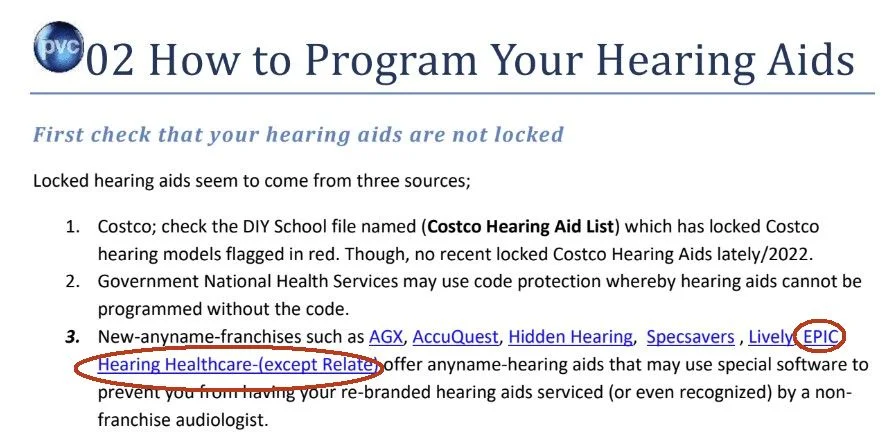
Through select United Health Care insurance plans, you may be eligible for hearing aid benefits. Some insurance plans utilize EPIC, which is a third-party provider. This means EPIC partners with your insurance company as well as our Audiologists at...
From DIY School;
You’re ignoring this member’s posts.
hi everyone . I have a Vista hearing aid. a subsidiary of Unitron now I need a program for Vista called Vista , please share with me if you have it
Your hearing aid model named Vista, distributed by a New-anyname-franchise named EPIC Hearing Healthcare9 is likely locked and maybe not even be recognized by Unitron’s fitting software.
You’re ignoring this member’s posts.
Related discussions
Question and Answer3 replies
Hearing Aid Self-Fitting (DIY)390 replies
Hearing Aid Self-Fitting (DIY)3 replies
Fitting Software Requests1.1k replies
Fitting Software Requests513 replies