If I had Lumity life I’d be afraid they’d become dislodged and washed away in ocean or pool so I probably wouldn’t try it anyway. But thats just my one opinion. Maybe there’s a way to prevent that?
Phonak Lumity Life Update - Well I had my new Lumity Life UP with custom moulds fitted last Wednesday,
When first fitted I asked my SpecSavers AUD to perform which he did.
In the consulting room I was blown away with what I could hear, computer fan, everything was so loud…
Now I am half of week in, I have to say I am really disappointed…
A few observations.
Yesterday I went to the coast, it was really windy, my left kept cutting out, it felt like it was turning off and then back on again, do you think its a fault with the HA or normal operation?
Also yesterday I couldn’t get my HA’s to connect with the My Phonak app, I got it connected in the end but it took several on/off of HA’s, closed down the app and restarted it, turned off my iPhone (14 Pro Max), this only thing I can think it may have been were to many Bluetooth signals (it was in a Cafe).
But the worse thing is that I don’t feel like I can understand speech, don’t get me wrong its loud, but its like I am not hearing anyone speaking properly without really concentrating, I wondering if it is my first UP receiver and I have just got to let my brain learn stuff again, OR, what I am worried about is this AUD when I had my Hearing test used a type of testing that I have not done before, all it was really is that he told me when I heard the sound was to keep the button held until I could not longer hear the sound, but it was not like that I had the button held down long.
Anyway by now you probably all think I am a raving lunatic, I would appreciate any comments/advice, it may be just first fit problems and some new tweeks need to be made OR maybe I just need to keep wearing the aids and be patient with what I have…
Oh BTW how do I upload my Prescription, now I have it?
I suggest you should go back and explain all of the problems you have. It may take several visits before they get things adjusted properly. Don’t be fobbed off with explanations and excuses. They are paid to sort these things out.
The hearing test method you describe is unusual and probably does understate your loss that they need to adjust to, but they should understand that. But it shouldn’t be night and day different.
@david.hendon Many thanks for your support, I have been back and the Specsavers Audi redone the test using the normal test method, i.e. you just do the test by pressing the button when you hear the sound. He said there was a 10% difference (worse) between this and the original test taken.
He also turned off the voice masker (or something like that), which when turned on removes sounds in the 4k to 8k region.
He has made changes and although I can now hear voices better.
The Aud also increased the gain on the windblocker function which should help prevent the disconcerting turning off function (which he said was normal and was not a fault) when really windy.
I am still highly underwhelmed by these ’s Phonak Life Lumity 90’s but realise there is a process to be followed.
The power keeps fading in and out. The speech in noise is wholly inadequate, the HA’s still seem to amplify the noise rather then voices.
Although I can hear voices better the softer voices are still hard to hear/interpret.
What I would like to know is why they can’t (especially if it is from the same make), just use the settings from the old HA’s as baseline.
But from the narrative provided by the OP @JordanK I know that these aids can do better so will persevere.
I think you need write down detailed notes in a notebook describing what your issues are and then go back in to your audiologist and carefully go through the list item by item. Keep going back until you are satisfied. Don’t be discouraged if it takes a few visits.
@JordanK Many thanks for the advice, I had been trying to do that and continuing to make notes.
I visited the Aud again on Tuesday and we had another good session, I think the changes he has made have improved things although still not fantastic but getting there.
He commented that because I had tried so many ’s models (Starkey Evolv , Resound Omnia, Specsavers own brand equiv of Phonak Paradise) over the past 6 weeks, I was picking the best bits from each model and trying to get the same performance on the Lumity, which to be fair is probably true…
I think that I am not helping myself because I am on holiday in a couple of days and want to be able to hear well in crowds of people, in other words I have an agenda to hear great asap
What is meant is that the Lumity also has a rocker function (which is really is also used as a “push button”) whereas the Omnia only has a push button - but does the Omnia really have no volume control?
Changed “volume control” to “volume rocker” to be more clear…
Omnia actually can mix in the streaming audio into any environment program
Is this possible on the device itself or only through the app? In our system audio stream mixer is a feature that is available through the hearing aid unit. We have Omnia’s app down as a remote control, and admittedly don’t document every single app feature currently.
Same for Automatic Acclimatization and Automatic Phone Program. The Omnia has both these features, but nothing is listed for either category. (For the ReSound Phone Now program you do have to tape a magnet to the receiver of any phone for which you want the phone program to be active if the receiver does not have a sufficient telecoil function to induce an HA response)
Actually, further down the page, there’s another category entitled New User Adaption where an entry is provided for the Omnia but none for the Lumity. Seems like the same category as the Automatic Acclimatization further up in the Lumity/Omnia comparison. The two categories ought to be fused and show no difference in gradually accommodating new users.
On Ear Simulation, none is listed for the Omnia whereas the Lumity is described as compensating for the pinna effect of natural hearing.
It’s not simulation in Omnia, it’s actually picking up real pinna effects with mic placement. Omnia has a special hardware feature called “Mic + Speaker In Ear”
Under Expansion, nothing is listed for the Lumity. In Target, under Program Options, Soft Noise Reduction is listed as one of the options. So, lack of an Expansion listing for the Lumity seems to be another error.
I will need to know exactly how it’s handled across form factors and technology levels. This is not documented anywhere that I found. Please share more details if you have them.
Similarly for Spatial Noise Cancellation, an entry for Lumity, none for the Omnia. But in the 360 All-Around mode on the Omnia, the HA that detects better speech is favored and shares the audio with better speech with the other HA.
360 all around is not spatial noise cancellation… It’s setting omni in one ear and directional in the other… Kinda the opposite of spatial noise cancellation…
Under Telecoil, the Multi Mic is listed as an accessory for the Omnia but since I’m comparing the Omnia to the L90 R, not the L90 RT, there is no Lumity telecoil reference.
Well, this is specifically the listing under the accessories tab, so I should hope this is clear enough. I think if we start creating cross references between hardware features and accessories things will quickly become confusing.
Thanks for the update, @AbramBaileyAuD. I’m busy with other things right now, so it will take me a while to answer the parts of your commentary that request further information from me since some research is involved.
Thought I would post another update on my ongoing experiences with my Phonak Lumity L90 RT’s. If you have read through this very long discussion thread, you will know I was fitted with Lumity last October and I have no been wearing them continuously for 8 months.
I’m still very satisfied with these hearing aids. I guess I was lucky in that my audiologist did an incredible job fitting and adjusting these hearing aids. I have had zero adjustments since they were first fitted. In fact, I have had zero issues with these hearing aids and I still believe that these hearing aids (when fitted properly) are a step above anything any other hearing aids that I have tried. I know some people have grumbled about Autosense but in all honesty, the main differentiator between Lumity and other hearing aids (that I have tried) is Autosense 5.0. These hearing aids adapt so quickly and to changing sound environments and you almost never have to go into the myPhonak app to change programs. The only time that I seem to have issues is in a noisy restaurant that has either live or recorded music playing at the same time that you are having conversations at the table. Sometimes (not always), Autosense can’t decide whether you want to focus on speech or the music and the hearing aids switch back and forth between speech in loud noise and music mode. This is the only issue with Autosense so far but I suspect other brands of hearing aids would struggle with this situation too.
After 8 months in, I can honestly say my rechargeable batteries have never left me stranded (despite all the negative comments about rechargeable batteries). Heavy streaming days (5+ hours of streaming) do require me to pop the hearing aids into the charger for 20-30 minutes at some point in the day. I usually charge them when I am showering after a walk or workout and a quick 20 min charge is all it takes to get through the worst streaming day.
I’ve had ZERO issues with Bluetooth. I would even argue that the Bluetooth Classic connection on these hearing aids is way more reliable than what I experienced wearing Resound Quattro and Omnia with . I personally believe the signal strength with Bluetooth Classic is a stronger signal and the net effect is that I have almost never had an issue with one or both hearing aids losing the connection to my iPhone or laptop, etc. This was an annoying and intermittent problem with Resound Quattro and I can’t tell you how annoying it was to lose the signal to one or more hearing aids during important business meetings. This doesn’t happen at all with Lumity. The real trick with Bluetooth on Lumity is to make sure you TURN OFF Bluetooth on devices when you are not streaming. As long as you never leave Bluetooth on for more than 2 devices, you won’t have issues.
Are these hearing aids perfect? No…but I will say that they provide me with a superior hearing experience and this is all that matters to me. Between work, volunteer work, a busy social life and heavy streaming (work and leisure), I am constantly moving in and out of very complex hearing environments and I really depend on these hearing aids to adapt quickly. My biggest (and only) complaint is rechargeable battery life. It works for me but it would be nice to have another 4-5 hours of battery capacity per day. This would get me through the worst streaming days without having to top up the batteries but after 8 months, I’ve had no issues living with the current 18 hours of battery life.
The only other comment I wanted to make relates to the myPhonak App. When I first got the hearing aids in October of last year, the myPhonak app was a bit buggy and did suffer from connection issues. These issues have been sorted out and the app now connects very reliably. Connection isn’t as fast as my previous MFi hearing aids but it works fine. That being said, I rarely use the app other than to occasionally monitor battery life a few times a day. I almost never use the app to change programs with Autosense 5.0 and I also have setup a battery widget on my iPhone’s home screen which shows the battery life in real time. Basically means there are days when I never need to use the app.
That’s my update. No…I don’t work for Phonak…I’m an exec at an IT services company and Lumity is my first Phonak product in quite some time (Audeo Q’s were the last time I had Phonak aids). And of course…these are phenomenal hearing aids for me based on my own hearing loss and personal experience. They may not work the same way for others.
@JordanK
I’m so pleased to read your summary of the 8 months you’ve used your hearing aids. Please help. Please PM me the name and contact information for your audiologist. It’s time for me to try another good audiologist.
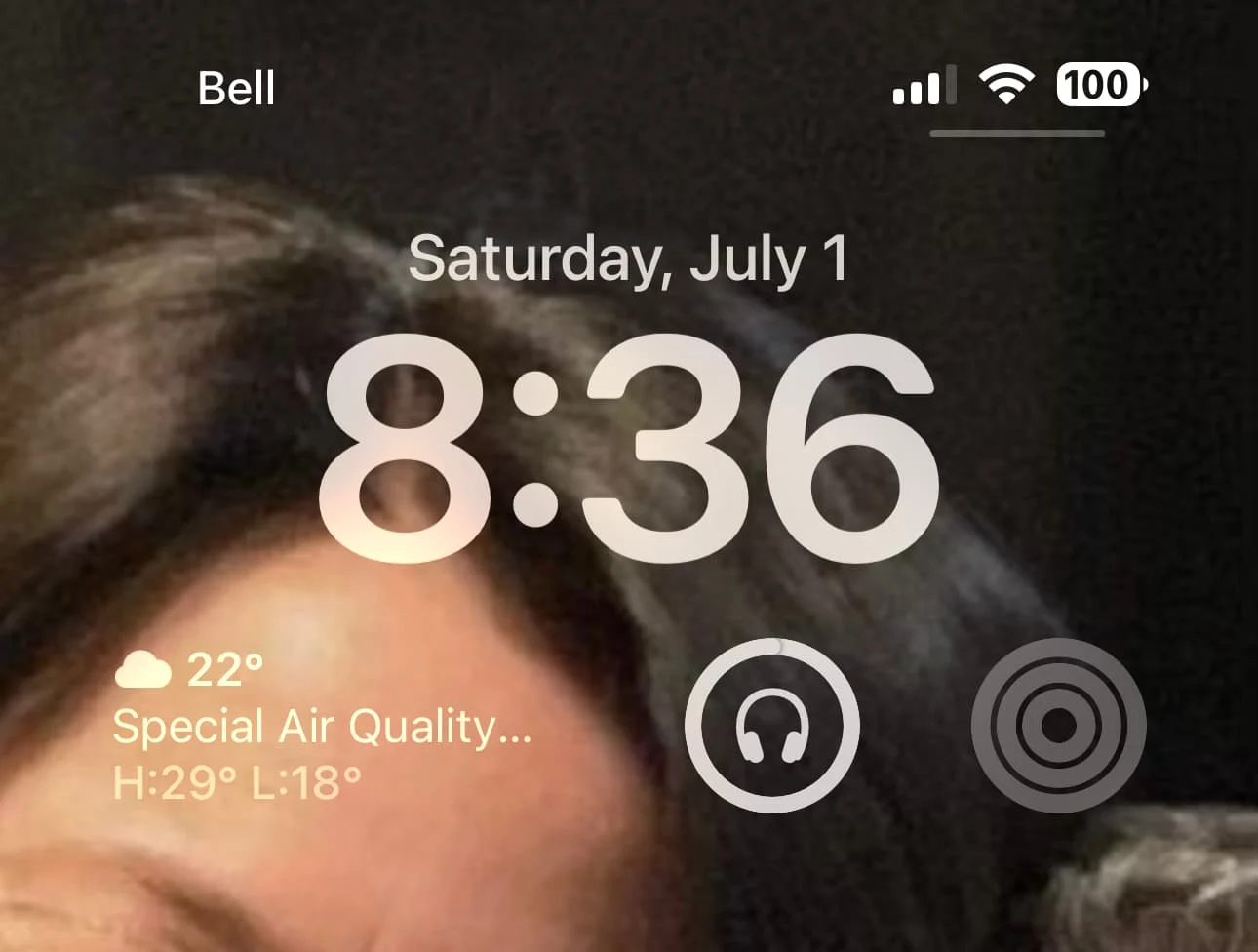
Can you say how you set up the widget to monitor the Lumity batteries? The My Phonak app doesn’t seem to have a widget on my iPhone.
Edit your Home Screen by holding your finger on it and then hitting the Customize button. Add the battery widget. When the hearing aids are connected it will show as an icon that looks like headphones. That is your battery life for the Phonak hearing aids using Bluetooth classic. Here is a photo from my iPhone.
I wish Phonak would provide a widget for their app. At worst, it would be one less step in the program change tango. At best, it might keep the LE Bluetooth connection alive without hurting battery life, so current program indication and change would work without hassles, at last.
After wearing the Quattro’s for a number of years, I also felt that Resound was always a bit too aggressive with noise reduction in the automatic mode and you would often be in an environment where speech was a bit muffled. Going into the app and turning off noise reduction usually fixed it but I always got the feeling that Resound’s software was heavily biased towards comfort (for older users) vs taking in the full sound environment (which is what I want).
I’m a little late to the Omnia/Lumity party. Didn’t go through the entire thread as the posts at the beginning of the thread are those I’m totally in agreement with.
Currently, I’m trialing both the Omnia 9 tech level and the Lumity Life L90 tech. I found out recently my insurance covers new aids every 3 years not the 4 I had thought. Met my out of pocket for the year so the only copay was the difference between the and the max coverage amount. I am a cochlear implant recipient using a Cochlear implant.
I have a Quattro 9 and a KS9 hearing aid. I had trialed a Marvel 90 before I found out I qualified for the . Since Cochlear syncs with Cochlear, I ended up returning the Marvel and bought the Quattro. Right away I noticed how much “quieter” the Quattro’s were. Didn’t like it. This is why several months after I bought the ReSound aid, I decided to get a back-up HA and bout tge KS 9. Ks 9, a Phonak product was much clearer and I loved it just I did the Marvel. Sure, it doesn’t stream to my Kanso2, but that didn’t matter to me. I stopped using the Quattro and made it my back-up. Absolutely love the KS9.
Fast forward to now, I know ReSound just came out with the Nexia, but audi doesn’t have it yet. The Omnia is better than the Quattro, but I was fitted last week for the Lumity Life 90. It was an oh my gosh, awesome first impression. In my ipinion, much better than the Onnia. Phonak has always improved my hearing and I wasn’t disappointed with the Lumity.
As Jordan states the sound is alive in fthe Lumity and the Omnia sounds muffled. No latency between the Lumity and the Kanso. I only need streaming to my left HA. I’ve decided on the Lumity. I agree with Jordan on the Lumity. I just need the streaming going to my left ear, not both, but that’s just me.

 Kansas




 Toronto, Canada

 Auckland, New Zealand



 Poland