BTW, if you’re interested in helping someone and decide, “You know, I wrote up the answer to this problem a while back and posted it on the forum, but where is it? I want to read my old post before offering a new poster any advice…”
I discovered it’s easy to download every post you ever made on this forum, at least back to 2018 (the start here for me). If you click on your avatar, then click on the DOWN arrow button at the bottom left of the listing of replies, reactions, and mentions to your posts that come up, you’ll be taken to your profile page Summary, Activity, Notifications, Messages, …, . Click on the Activity button. Then you’ll see over in the left navigation column the option to DOWNLOAD ALL (see image below).
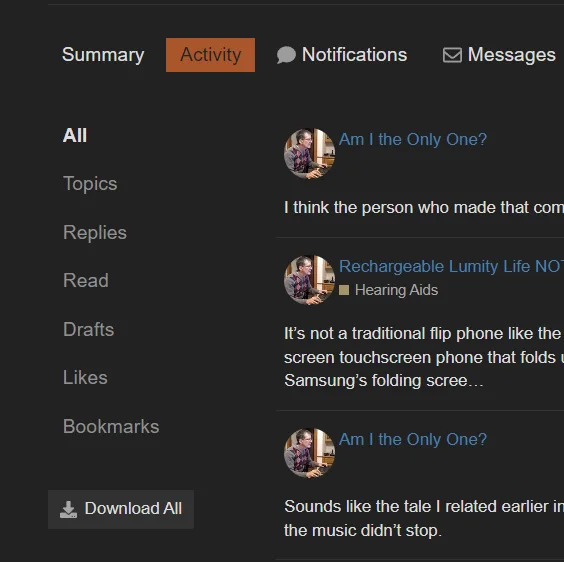
When you click on the DOWNLOAD ALL button, you’ll get a forum notification with a link to a zipped file of all your posts. The link to the compressed archive of your posts is only good for 48 hours. I thought my download archive would likely be in at least the tens of Mb, if not hundreds! My archive of everything since 2018 is only 1.76 Mb. The reason is that the archive doesn’t include any images you uploaded into your posts.
In the Zip file, you’ll find the following . CSV files and a . JSON file:
-
auth_token_logs.csv
-
auth_tokens.csv
-
badges.csv
-
bookmarks.csv
-
category_preferences.csv
-
flags.csv
-
likes.csv
-
preferences.json
-
queued_posts.csv
-
user_archive.csv
-
visits.csv
All your posts (and PMs) will be found in the user_archive.csv file, which you can open in Excel or a similar spreadsheet (or open it as a text file but then the fields will not be cleanly separated).
When you open the user_archive.csv in Excel, it will look something like the following (I’ve made the column headings bold and underlined so that they stand out):

Using Excel’s (or another spreadsheet’s) filtering or search functions, you could find your old posts that contain specific words. You can double-click on a post cell to see the full text of your old post. You can follow the URL link for a post to find the original post here on HearingTracker with any embedded images, then download the images separately if you want to archive them, too.
The forum support software is called Discourse. I’ve asked @AbramBaileyAuD and @rasmus_braun whether there is any viewer available from Discourse (or a third party) to better view post archives than using Excel. If I imported the .CSV file into a database table, I could probably use a database form to display each post better, but that is not an easy everyday solution for anyone to implement.
I’ve also asked those folks if there is any way to easily capture all the images that I’ve used in my posts with links to the posts that they were used in. Probably not, but it never hurts to ask. (Abram just replied to me via PM and suggested that for an answer to my question, I check the meta.discourse.com forum).
Abram’s answer is prescient as last night I was exploring the media download problem at meta.discourse.com and found the following intriguing post thread about the media used on a Discourse forum. The whole media shebang for everyone’s posts is just sitting out there, available (as of the thread’s beginning, which starts in 2015) to a clever downloader, and the media is not explicitly tied to any post. Discourse software tries to avoid duplicating the storage of any posted image by identifying an upload by its hash value and only storing one copy of an image, etc.
Files/Download Manager For Discourse - feature - Discourse Meta
At any rate, if you ever want to find a previous post of your own as reference material for answering a new query, it’s straightforward to get a hold of the text of all your previous posts and PMs and search through those posts via a spreadsheet program on your computer to find what you want.
BTW, one might ask, “Why bother doing this? Just use the forum search function.” As has been mentioned earlier in this thread, the forum search function is not the greatest, even with the advanced options. Also, with your own personal store of messages on your own computer, you could add additional columns to a spreadsheet file to tag specific posts of yours, such as “my standard answer to occlusion…” so that in looking for background material to a post you want to compose, you could go straight to your “source” material, rather than trying to find such material again on the forum. The forum does have BOOKMARKS and a search function on the bookmarks page that will specifically search posts you’ve bookmarked but as far as one’s own posts go, searching and filtering in Excel is likely to be far more powerful than the forum bookmarks search, which doesn’t have any advanced options.


 Switzerland
 Central Virginia
 Toronto, Canada
 Auckland, New Zealand