I may be wrong on this, as I’m just going by the Genie2 definition:
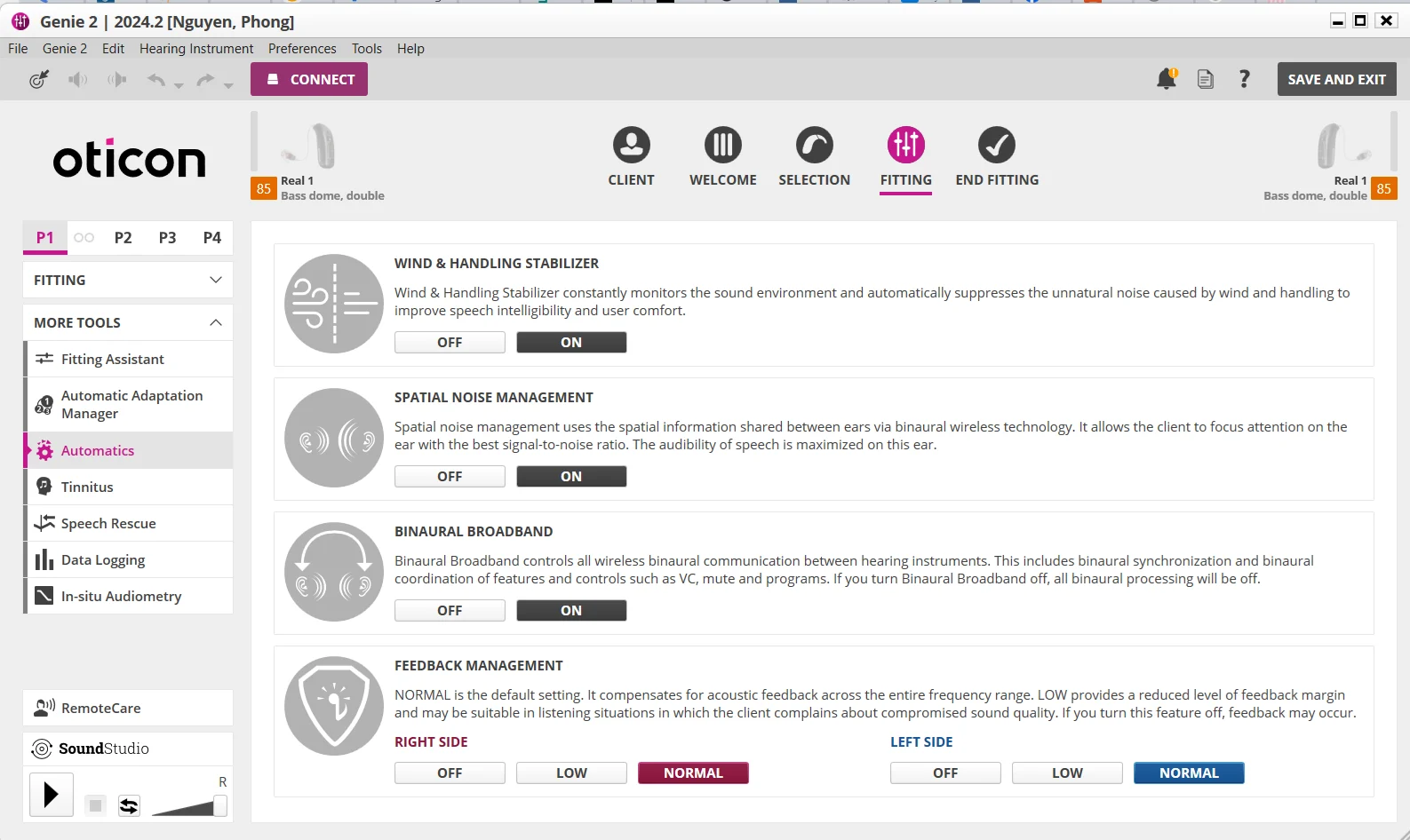
Broadband controls all wireless binaural communication between a pair of instruments. This includes binaural synchronization, and binaural coordination of features such as VC, mute and programs.
So yes, @Volusiano it does that, but I was looking more at the synchronization aspect, which I interpreted (maybe erroneously) that it would allow for that.
So, if you take @tenkan’s idea, and than turn off bb on a separate program?
I’m prolly going out of my depth, here! I’d better quit b4 I sink any further.
Usually they use the word synchronization to denote synchronizing control signals and such, to change things in concert. But if you really want to send the actual sound stream received from the right aid’s mics and have the left aid to accept this sound stream and either replace it or combine it with the sound stream picked up by the left aid’s mics, then I think we’re starting to look at some “bi cross” functionality, and it would have been a very deliberate action that the user would have been given a clear option to make, because this would change the perception of the sound very differently and you would probably lose all of the clues that would give you the directionality.
By the way, I’m not aware of any specific control of directionality given to the user to tell the aids to point the mic toward this direction or that direction in the first place. Oticon really just gives you either Neural Automatic, Fully Directional (probably aimed toward the front), and Fixed Omni. I don’t remember seeing any other options except these 3 anywhere else.
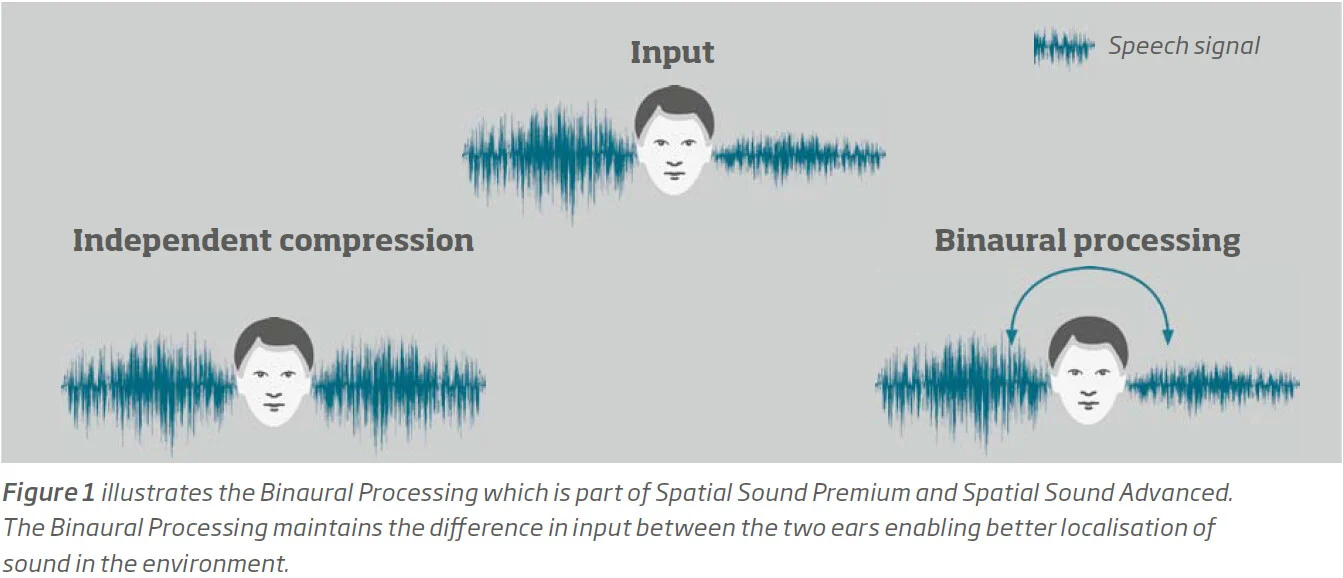
I believe it also includes compression (Alta2 remember) which is done via binaural processing in order to preserve intramural level differences. This is under the hood option.
Faster and better binaural processing through a 200% increase in communication capacity
Richer and more accurate spatial sound experience
Supports the brain in orienting, enabling users to precisely locate sounds
This was from an Oticon article on the Velox and Velox S platform which points to the definition of Binaural Broadband from Genie2 help on Automatics.
So, it goes beyond just syncing control signals.
As @user246 pointed out, this was also present back in the Alta days.
Well if you want to be correct, this goes back to EPOQ XW- if I recall correctly it was a feature call processing. This was 2007-2008 around that time. The leap between Sincro a Epoq was quite big .
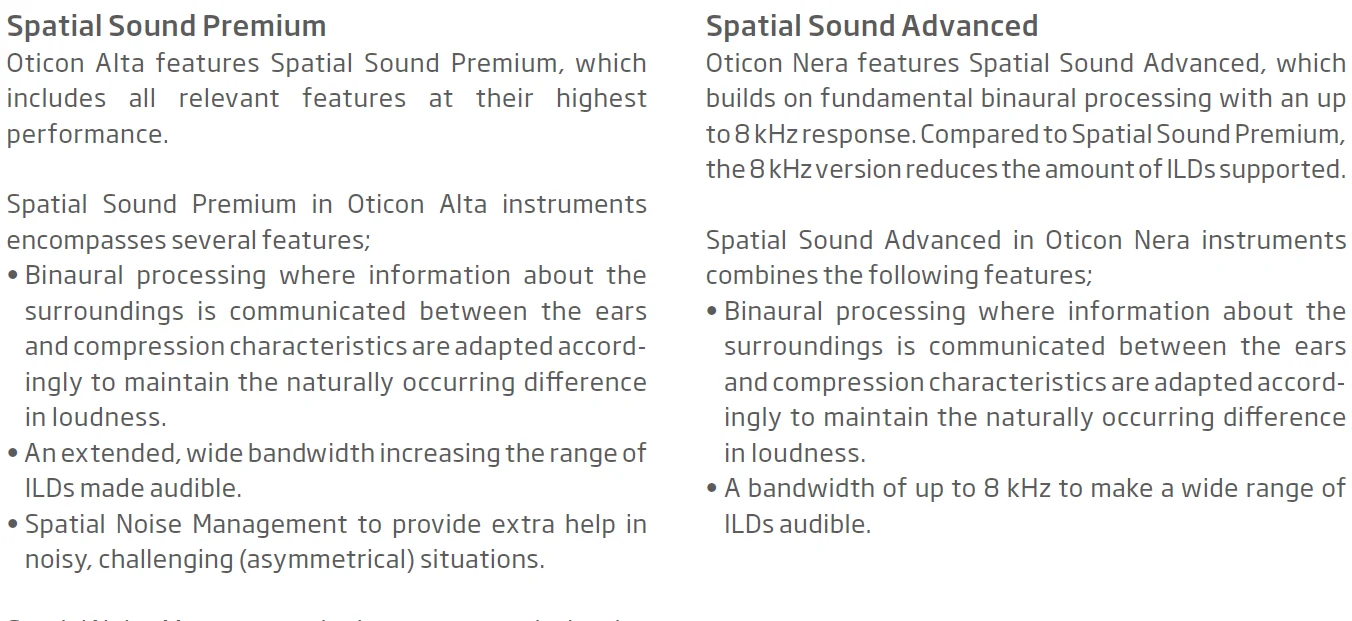
I definitely agree that there is a Spatial sound management feature in the Oticon hearing aids, and it goes way back to the Alta and Nera days. The first screenshot below shows that.
And it’s still “baked” into the Oticon modern hearing aids like the OPN through the Intent, no doubt about it. But it doesn’t have to be “turned on” per se, it’s just baked in because it’s essential to the processing. They call it Spatial Sound Premium in the Alta, and Spatial Sound Advanced in the Nera, as seen in the screenshot. One specific feature of the Spatial Sound Premium is Spatial Noise Management, and this feature is not “baked in”, but they make it an option that can be turned ON or OFF in Genie 2. But it’s a different feature than Binaural Broadband that you mentioned. In fact, if you look at the 2nd screenshot below (or the same screenshot you were showing in your post), the Spatial Noise Management is shown right above the Binaural Broadband feature.
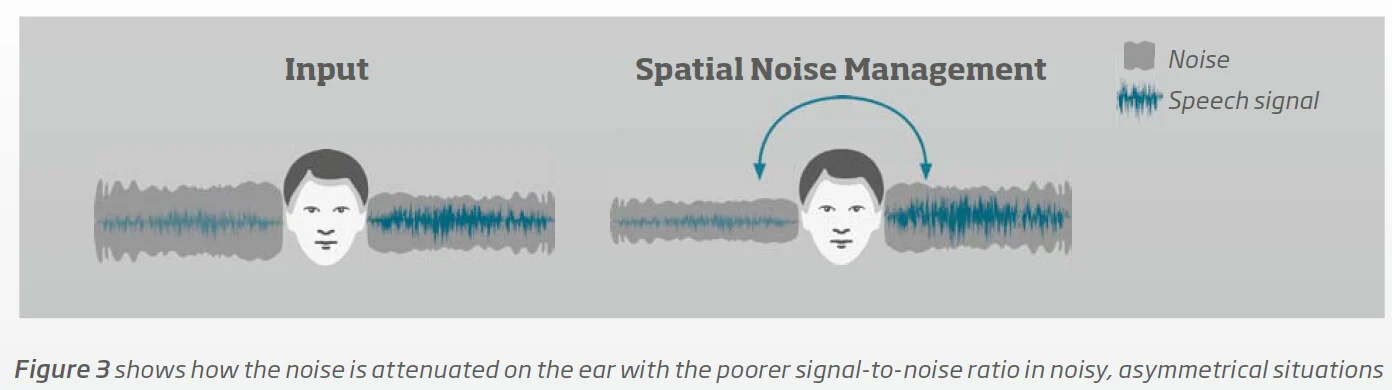
Anyway, it’s not the Binaural Broadband option being turned on that will help the user hear one side better than the other anyway. It’s the Spatial Noise Management that might do this. The third screenshot below shows how it’s done.
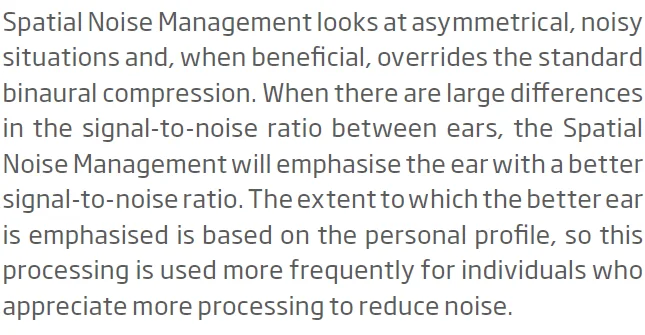
But neither Spatial Noise Management nor Binaural Broadband will copy the actual sound input from the right side (the speech by the passenger sitting on the right side) over to the left aid so that you can hear that speech sound on the left aid. @mstrmac 's audi is correct to say that nothing will do this, like the way @mstrmac was asking if it can be done → it can’t be done. With Spatial Noise Management, if enabled, the sound content as picked up by the left aid (which is maybe mostly road noise coming through the closed window) is still the same and presented to the user, albeit now its whole sound is suppressed, including the noise that accompanies the sound heard. On the other hand, the sound content on the right side (speech from the passenger) will be amplified a little more to help emphasize its content. But what you hear on the right aid cannot be transferred over to the left aid. The 4th screenshot below has the verbal explanation of what Spatial Noise Management does.
In summary, the answer should have been “Check and make sure that your Spatial Noise Management” option is set to ON. And if this still doesn’t help, maybe do the suggestion that @tenkan proposed, to come up with a dedicated program and maybe call it “Conversation in Car” where the overall gain in the right ear is increased a few more , and maybe the left ear is decreased by a few dBs, might help further. This is what Spatial Noise Management does, but taken to another level, and also no longer automatically done when warranted and goes away when not warranted, but has to be taken there manually by going in and out of that custom program.
That’s weird. I can see the images OK right now on my end.
I was wondering if it’s a new forum or if they just updated the passwords. But the login interface and the forum interface does have a new look to it, except with existing contents. I notice though that many folks’ are all whacky when I review them.
Yes, I observe the same thing that turning off Broadband will disable Spatial Noise Management. But if both of them are on, turning off SNM does not disable BB. So it’s as if SNM is classified as a sub set of BNM.
If you look at the Spatial Sound Premium in the literature bit that I show screenshot a few posts back, they listed out Binaural Processing, Wide Range ILDs (Interaural Level Differences), and Spatial Noise Management as the 3 key sub technologies under Spatial Sound LX. The first screenshot below is an illustration of what the Binaural Processing does. It preserves the level differences between the 2 sides when it does compression, rather than equalizing the compression on both sides, to help preserve the localization of the cues.
The second feature is the Wide Range ILDs (aka localization cues). It boasts that the Oticon aids provides both a high output and an extended bandwidth without having to sacrifice one to get the other, and this in turn supports the localization cues better.
I was under the impression that all binaural processing features are baked in except for the Spatial Noise Management, but upon reading the Binaural Broadband option more closely, in the end, it says that “if you turn Binaural Broadband OFF, all binaural processing will be off.”
This leads me to believe that at least, the Binaural Processing feature explained in the first screenshot will be turned off and you will get independent equalized compression on both aids if Binaural Broadband is turned off, along with the other mundane stuff like volume control and mute and program changes, etc.
I don’t know if the wide range ILDs for localization cues can be turned on or off or not. Maybe this one is the baked-in one, because it’s not clear to me how such a thing can be toggled.

 SoCal
SoCal