
I think in my case I have to increase to 100%.
Where’s the option to increase it to 100%?
I can’t see it.
I do have older tho which might explain it.
You’re ignoring this member’s posts.
This topic is closed.
61 replies5.2k viewsLast reply
I think in my case I have to increase to 100%.
Where’s the option to increase it to 100%?
I can’t see it.
I do have older tho which might explain it.
You’re ignoring this member’s posts.

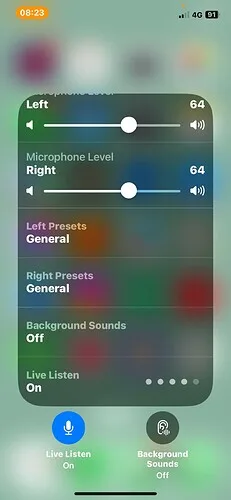
The top 2 lines. Left & Right - Does that control the volume of live listen?
You’re ignoring this member’s posts.
You’re ignoring this member’s posts.
The sound is bit louder but not loud enough to hear better. The volume control the iphone or the ’s ?
You’re ignoring this member’s posts.
You’re ignoring this member’s posts.
Hope it works better for Xceed. You are 1 step ahead of me in the purchase of that model (Xceed Desc). Good luck and take care.
You’re ignoring this member’s posts.
You’re ignoring this member’s posts.
I use Live Listen often. My iPhone is older, but I find for optimal speech clarity, I use the Speech in Noise program (Oticon More1), Mute the hearing aid mics - now with Mores, I have to mute using the ON App - I control the volume streaming into my aids with the volume control on the iPhone. Getting the iPhone mic close to the sound is important.
I used it this way this morning on an important call that 2 of us had to hear - other person’s iPhone was on Speaker and my iPhone - Live Listen was next to the speaker streaming into my aids. Works great this way without transmitting too much noise from in the room.
It will work in a pinch next to the TV speaker - not as great as the TV Adapter - but suitable.
You’re ignoring this member’s posts.
You are right about adding this feature to a manufacturer’s iPhone app would cut into the sales of separate sold by the manufacturer.
I imagine that Phonak won’t do it for their iPhone app as it would cut into the sales of ROGER devices.
Generally there is pressure on Apple to add Mic Mode to their Live Listen function so hopefully Apple will do this in a future iOS release.
You’re ignoring this member’s posts.
It will come one day where iPhone will improve on their phone speaker & Live Listen. We have news reporter using iPhone as a recorder for their news report. Some are good and some are poor in the sound quality. Those who produced vlog have some good quality sound and minimum interference from ambient sound. Saw some of the microphones online for iPhone. If these type of mini microphone plug into the iPhone lightning port and transmit good quality sound to the ’s then it would helps a lot.
[ In terms of audio, the Apple iPhone 13 delivers a highly similar performance to that of its bigger brother, the flagship 13 Pro Max , as evidenced by its identical Audio score of 75. ]
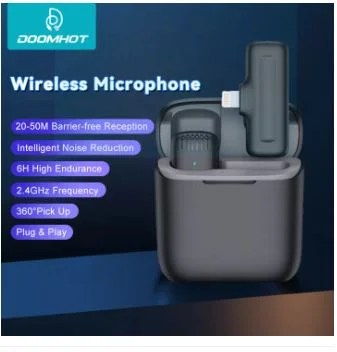
The following wireless microphone found onlne:-
You’re ignoring this member’s posts.

@dankailo That looks an interesting gadget. But for me I don’t want to have ’s hanging around my neck or in my pocket. I’m not in the least IT savvy, so less for me is best. I’m one of the lucky ones live listen works perfectly for me.
You’re ignoring this member’s posts.
I don’t want to have ALD’s hanging around my neck or in my pocket.
Looks like it plugs into the phone but with no cable so would be quite easily controlled when moving around etc when out and about.
You’re ignoring this member’s posts.
The 2.4 GHz RF spectrum is so crowded with many devices and the radios are so inexpensive I suspect sound quality and minimal dropouts were not design considerations.
You’re ignoring this member’s posts.
It is a wireless gadget. The receiver is plug into the iPhone and the sound transmitter on the table transmitting the sound wirelessly to the receiver attached to the iPhone. Live Listen is then switched on , thus the sound goes to the ’s.
You’re ignoring this member’s posts.
Maybe the version will be available soon. Better sound would ideal.
You’re ignoring this member’s posts.

Does not the Oticon Companion App have a mic switch to turn your iPhone into a remote mic? I don’t think it’s the same as Live Listen but I may be mistaken
You’re ignoring this member’s posts.
Press the right side ON Button of the iPhone 3 times and the “live Listen” will shown on the iPhone 13 screen. Tap on it to switch it on and adjust the volume if necessary.
I do not have Oticon Companion.
You’re ignoring this member’s posts.
Live Listen for iPhone and iPad is fantastic. It not only works with Made for iPhone hearing aids, but also with Apple Bluetooth headphones like AirPods. When using Live Listen, the iPhone/iPad volume control buttons increase the gain for the microphone, making everything louder, so make sure you adjust that if you’re having trouble hearing when using that feature before turning up the Microphone Levels on the hearing devices page. Take a look at this page for more information.
Use iPhone as a remote microphone with Live Listen12
On iPhone, stream sound from the microphone to your hearing devices or AirPods.
Mike
You’re ignoring this member’s posts.
Live listen is very useful for those who have mild to moderate hearing loss. For those with severe hearing - maybe. Those with severe to profound - not very useful (maybe 10-20% improvement). Live Listen activated phone must be place near the speaker - with the phone microphone (bottom of the phone) facing the speaker.
Live Listen is also useful as an assisted device for watching TV. Place the phone near the back of the TV (this is where the TV speaker is located)
If the ambient sound is interfering or noisy, used the phone apps (Companion in Oticon) to mute the ’s microphone. When the HA’s mic is mute, the live listen in the phone will pick up the TV sound. Quite clear and sharp voice. If the sound is still soft, adjust the mic volume in the iPhone (left & right).
Good Luck,
You’re ignoring this member’s posts.
@dankailo
Live listen works perfectly for me, in restaurants with a noisy ambience and on a round table of 6. I put my phone in the middle of the table, I don’t pass my phone to any individual. I have severe profound hearing loss (l check my ) I do not have any problems with live listen, it works extremely well for me. So well I don’t need any other ’s to help me hear in noisy situations.
But on a rectangular table for more than 6 people, I can still hear but not as well as the round table.
You’re ignoring this member’s posts.
Hearing Aids2 replies
Hearing Assistive Technology24 replies
Hearing Aids6 replies
Fitting Software Requests511 replies
Hearing Aids22 replies
 Malaysia
 Melbourne
 Central Virginia