
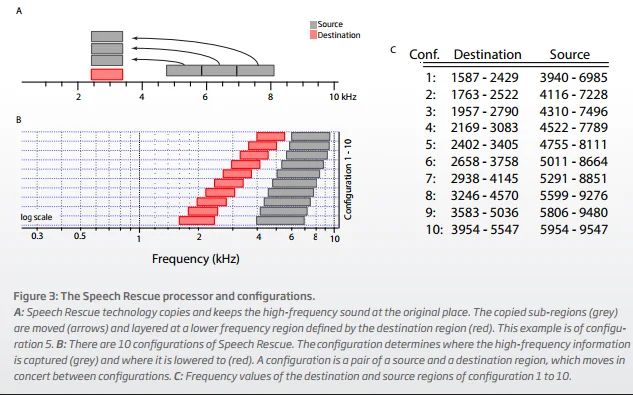
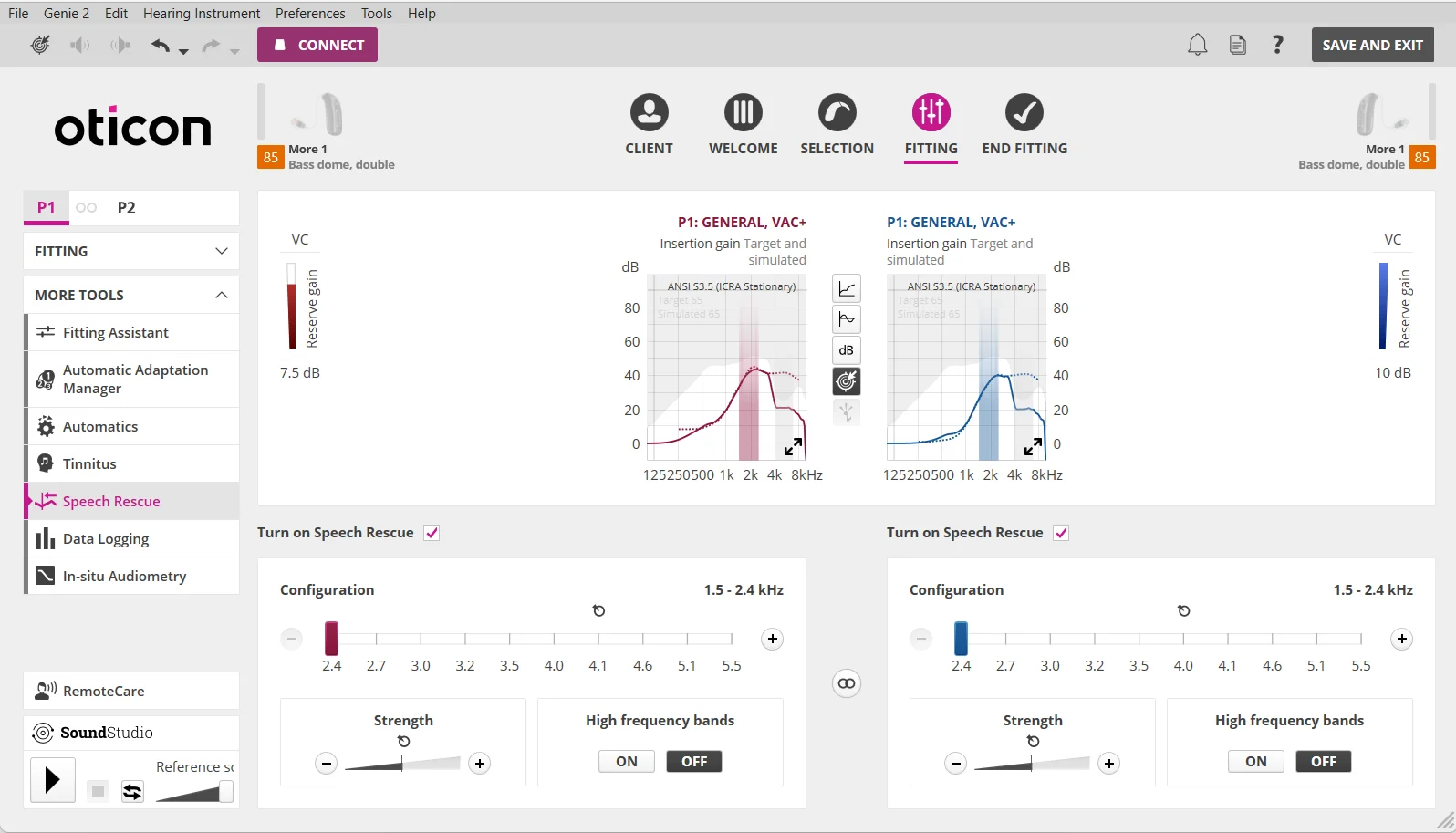
Below is the synopsis of the Oticon Speech Rescue . The second screenshot is the Genie 2 setup page for Speech Rescue.
As you can see, the lowest destination region (the red boxes) is between 1.6 - 2.4 KHz. So I’m not sure if it’s low enough for your hearing loss or not, maybe barely, but I think it’s still worth trying. There’s nothing to lose to try it, and you can always turn it back OFF if you don’t like it or find it helpful. You can have it added to a P2 program if you want, so you can switch between P1 and P2 for A/B comparison. But for SURE you want to set to that lowest destination configuration (the 2.4 leftmost one the the Genie 2 setup). In your case, because you already have pretty bad/profound loss in that destination region, you’ll probably want to set the Strength to maximum (fill black that whole bar). If you find it too much, you can always back off from the max, but I’d start from the max since your hearing loss is already pretty bad even in the destination region.
I’d also want to turn OFF the High Frequency Bands setting. If this setting is ON, you’ll get BOTH the original amplification in the high frequency region like you normally would get without Speech Rescue on, in addition to hearing the same sounds moved into the lowered destination region. Otherwise, with it OFF, Oticon won’t give you the original normal amplification in the highs. Because you most likely can’t hear the normal original amplification in the highs anyway with your kind of loss, leaving it OFF has the benefit of preventing possible feedback in the high frequency range that you may not be able to hear to even be aware of (although others around you will most likely hear it and look at you funny). But you can try it with the ON setting if you want (maybe in a third P3 program) to see if you can hear any difference or not. If not, then I’d set it to OFF.
If you were a new user trying out different brands, then Phonak’s Sound Recover 2 would probably be a better candidate for frequency lowering because its destination (lowered) region can be set to go as low as 700 Hz if I recall correctly. So if the Oticon Speech Rescue destination is not low enough in the more audible range where your loss is, to be impactful enough for you, perhaps the Phonak Sound Recover 2 may be more impactful than the Oticon Speech Rescue for you since your hearing loss is not as bad in the 700 Hz range compared to the Oticon 1.6-2.4 KHz destination range. However, Phonak’s frequency lowering is primarily based on frequency compression, while Oticon’s is based on transposition and composition. One is not necessarily better than the other, it all depends on the user’s preference. But either can be helpful, and it’s better to have it and be able to use it than not have anything at all.
You’re ignoring this member’s posts.

 Hertfordshire, UK


 Wales, UK
 Malaysia
 Oticonian/Disposablyte
 Central Virginia