
 Scotland
Just had a look - in the app, try Roger On settings. Should be a multi beam 2.0 and a range extender option.
You’re ignoring this member’s posts.
This topic is closed.
41 replies2.7k viewsLast reply
Just had a look - in the app, try Roger On settings. Should be a multi beam 2.0 and a range extender option.
You’re ignoring this member’s posts.
I was wondering about this. My Roger On is mostly plugged into either my laptop or iPad for work. Both of which…have mics.
Perhaps superior mics then with some clever algorithms to optimise speech?
You’re ignoring this member’s posts.

Just had a look - in the app, try Roger On settings. Should be a multi beam 2.0 and a range extender option.
I guess you are special  I just tried it with two different Roger On IN’s with updated software but couldn’t see that. We are talking about the myRogerMic app, right?
You’re ignoring this member’s posts.
Has anyone tested if the 2.0 firmware update makes the v1 a V2 ?
The 2.0 firmware can be used on the V1 Roger On, but it won’t make it a V2 according to the Sales Manager of Phonak Denmark Eastern Region. There is a hardware difference.
You’re ignoring this member’s posts.
I have several that I have updated … not sure how to test.
When USB-connected to a Windows PC, the V2 will appear in Sound Settings as a microphone. The V1 should not.
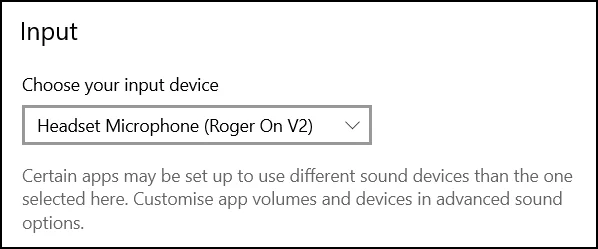
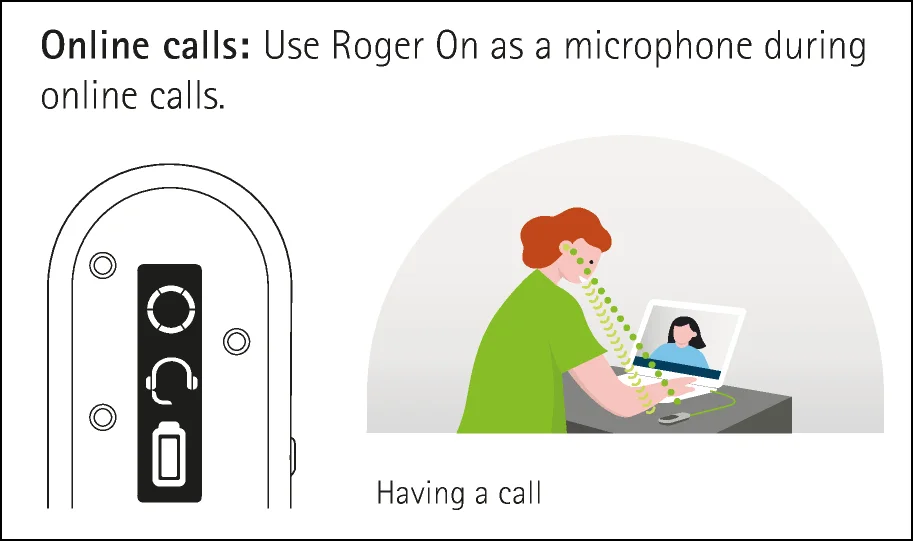
… and the “headset” pictogram will be shown in the display.
You’re ignoring this member’s posts.
Playing with settings this morning, I found options to activate Range Extension and Multibeam 2.0 in my Roger On iN (v1) which now has Phonak’s latest firmware (installed by them
I see these options are shown in the myRogermic users guide. For some reason they are not available in my app. I have downloaded and reinstalled the app on both apple and android devices but the settings page is blank except for the option to rename the device for to forget the device. Is anybody else seeing the options to activate Range Extension and use Multibeam 2.0?
You’re ignoring this member’s posts.

Multibeam 2.0
https://product-support.phonak.com/s/article/Roger-On-MultiBeam-2-0-Technology?language=en_US11
This might help?
It only works with RogerDirect and only when placed on a table.
You’re ignoring this member’s posts.
Thanks @Zebras. I have Roger Direct in my L90’s but the options shown under settings in the users guide are not present in my myPhonakmic app (i.e. the settings page is mostly just a blank page). I have updated to the latest myPhonakmic app. Do you see these settings in your myPhonakic app?
You’re ignoring this member’s posts.
The myRogerMic I am using is Version 1.0.3 which seems to be the latest available from the Play Store. Can someone confirm that this is the most current version. Thanks.
You’re ignoring this member’s posts.
You’re ignoring this member’s posts.
This is super helpful and says to me there’s additional tech in the V2 units. I had a moment’s fantasy that Phonak sent me a V2 unit in return with I had my V1 serviced (funnily enough…they didn’t).
Be interesting to know what the V2 does better than a laptop/desktop/tablet built in mic. I can imagine that it will be superior to cheap(er) computing devices but many workplace computers are generally good enough.
You’re ignoring this member’s posts.
You’re ignoring this member’s posts.
June 1st was latest update
Might be the issue. Latest version from US Playstore seems to be 5/02/23
Thanks
You’re ignoring this member’s posts.
You’re ignoring this member’s posts.
Thanks. I give up  I have tried both android and ios and in neither case does that functionally appear in the settings menu. The app is dated 5/2/23 but the Play Store description shows 6/01/23. I guess it is not really that important but it is a puzzle. Maybe someone in the US can confirm whether that functionally is present or not in their app. Thanks for the responses.
You’re ignoring this member’s posts.
Is your phone up to date?
Sometimes Apps won’t update if phone is too old.
Like Apple won’t update the iOS on older phones. I assume Android is the same?
You’re ignoring this member’s posts.
Is your phone up to date?
Everything up to date. It’s a continuing puzzle. I am hoping that someone in the US will report having or not having that functionally.
You’re ignoring this member’s posts.

I have the Phonak Roger On, live in Pennsylvania and running version 1.0.3 myRogerMic app.
When app is running and paired I go to Roger On settings page and have a right arrow beside the “Roger On Connected” which takes me to a page the states “Configure your device” and Toggle for “MultiBeam 2.0” and below that toggle for “Range Extender” and I can activate either or both.
Hope this helps…
You’re ignoring this member’s posts.
Very confusing. When I navigate to that page my only options are to change the name of the device and to forget the device. I have sent an inquiry to Phonak. Thanks for the response.
You’re ignoring this member’s posts.
Wonder if your On need a firmware update?
Software available to you from the Phonak website and all you need is a USB cable.
Name - Phonak Roger Upgrader
You’re ignoring this member’s posts.
Hearing Aid Self-Fitting (DIY)3 replies
Manufacturer Support63 replies
Fitting Software Requests892 replies
Hearing Aids144 replies
Fitting Software Requests869 replies
 New Jersey
 North Springfield, Pennsylvania