I just updated the firmware of my Real 1, so far no issues.
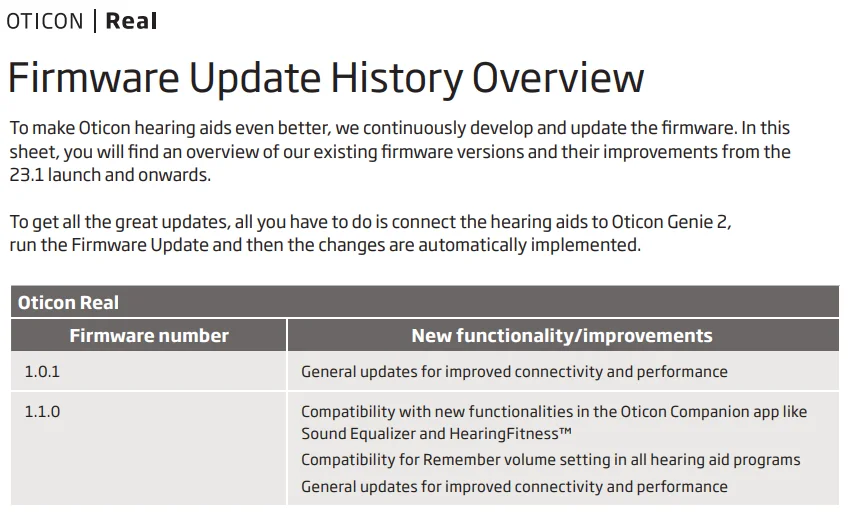
This seems to be the first update from firmware 1.0
You’re ignoring this member’s posts.
This topic is closed.
30 replies3.8k viewsLast reply
I just updated the firmware of my Real 1, so far no issues.
This seems to be the first update from firmware 1.0
You’re ignoring this member’s posts.
You’re ignoring this member’s posts.

Is this the new firmware to fix the ConnectClip issue? Is there an update note on what all the issues the new firmware fixes?
You’re ignoring this member’s posts.
You’re ignoring this member’s posts.
You’re ignoring this member’s posts.
I was notified directly by Oticon that the 1.1.0 firmware is supposed to address the ConnectClip issue. I got it installed several days ago and so far, the audio drop-outs have not returned. It’s too early to say that this firmware definitely fixes the problem, but so far so good.
You’re ignoring this member’s posts.
You’re ignoring this member’s posts.
You’re ignoring this member’s posts.
You’re ignoring this member’s posts.

I just got my real 1 last month, I’m not sure what version I had before but I will say 1.1.0 seems a little more natural sounding with this version than whatever I had before, although my Dr. said the firmware update was just to fix the connectivity. I’m not sure what ver I had before, either they made it sound slightly better, or more likely it’s just that I am getting more used to them, and they seem to sound more natural to me now. Are there firmware release notes from v1.0?
You’re ignoring this member’s posts.
You’re ignoring this member’s posts.
hi, am on ver 1.0.1 but for some reason my genie 2 stays on ver 2022.1.0 is there a trick to update genie?
You’re ignoring this member’s posts.
There should be an updater in the lower right section of your screen where you also can remove usb sticks for example. Isn’t there also an option directly in Genie?
You’re ignoring this member’s posts.

my genie 2 stays on ver 2022.1.0 is there a trick to update genie?
You use the Genie updater, this can be found in the system tray, right click on it and you get a pop up for some options.
It usually alerts you to any updates, after closing genie and then close and restart your PC
You’re ignoring this member’s posts.
The updater icon is present. When I click on it I select “check for update” then after few seconds replies with “no update found”. I have restarted the computer the router and no luck. Is there a way to download the update manually?
You’re ignoring this member’s posts.
You’re ignoring this member’s posts.
When updating Genie says under What Is New that 1.1.1 provides “General updates for improved connectivity and performance.”
You’re ignoring this member’s posts.
The Oticon page does not provide any info on the present update so far.
Maybe Bluetooth connection improvements?
You have to update via the genie software. After updating the software to 2024.1, the firmware update will become available.
You’re ignoring this member’s posts.
A new firmware (1.1.2) is available together with an all new user interface in the Genie 2 software.
Looks stunning.
You’re ignoring this member’s posts.
I checked with the Companion app and it says that I’m on 1.1.1 and that there’s no new update available. I haven’t had a chance to run Genie 2 and check it there yet. But I wonder why the Companion app says there’s no new firmware version. Did you update it via Genie 2. I’m not aware that there’s a new update for Genie 2 either. I ran check for update on Genie 2 and it also said that there’s no new update found. I’m on Genie 2 2024.2 currently.
You’re ignoring this member’s posts.
Hearing Aids9 replies
Hearing Aids115 replies
Fitting Software Requests1.1k replies
Hearing Aids9 replies
Hearing Aids175 replies