Hello Everyone. I have been a lurker for some time but just joined the forum and I’m unfamiliar with the protocol. Apologies in advance  I have Audeo Lumity P90-RTs for moderate age related hearing loss. I, too, am having battery problems with my 6 month old HA’s. I love the ease of streaming phone calls and listening to audiobooks and music. These activities comprise several hours each day. I get only about 12 hours battery life (or less) each day and have to charge one or more times to take me from 6am to 9:30pm. I have noticed that the HA’s default to Bluetooth mic streaming even when I’ve manually switched to Auto and I think it is consuming my batteries when I’m not streaming. It is a pain to keep checking that I am in auto. Your thoughts and experience would be welcome. Thanks so much!
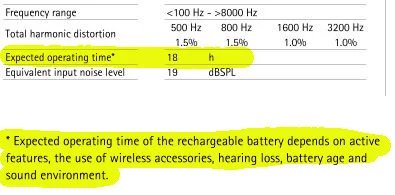
Congrats on your first post. You should get at least 18 hours of battery per day. My biggest tip to maximize your battery life on Lumity (which uses power hungry Bluetooth Classic) is to turn off Bluetooth on devices when you are not using them. The only device that is allowed to always have Bluetooth on is my iPhone.
For every other device (work laptop, MacBook, Peloton, Phonak TV Connector), I turn on Bluetooth when I am using that device and then turn off Bluetooth when I am done. What I have found is that leaving Bluetooth on all the time on multiple devices seems to chew the right hearing aid battery much faster than usual. You will know this is happening because there will be a big difference between the remaining battery on the Master (usually the right) hearing aid vs the other hearing aid at the end of the day. In other words, at 8 pm, the right hearing aid will show 25% and the left will show 45%. This only happens when I forget to turn off Bluetooth on something down in my home office.
Try that and see if your battery life improves.
Jordan






 Toronto, Canada



 Rural New England