 Montreal
You’re ignoring this member’s posts.
OPN S1 to Intent 1 - My first review
This topic is closed.
29 replies2.2k viewsLast reply

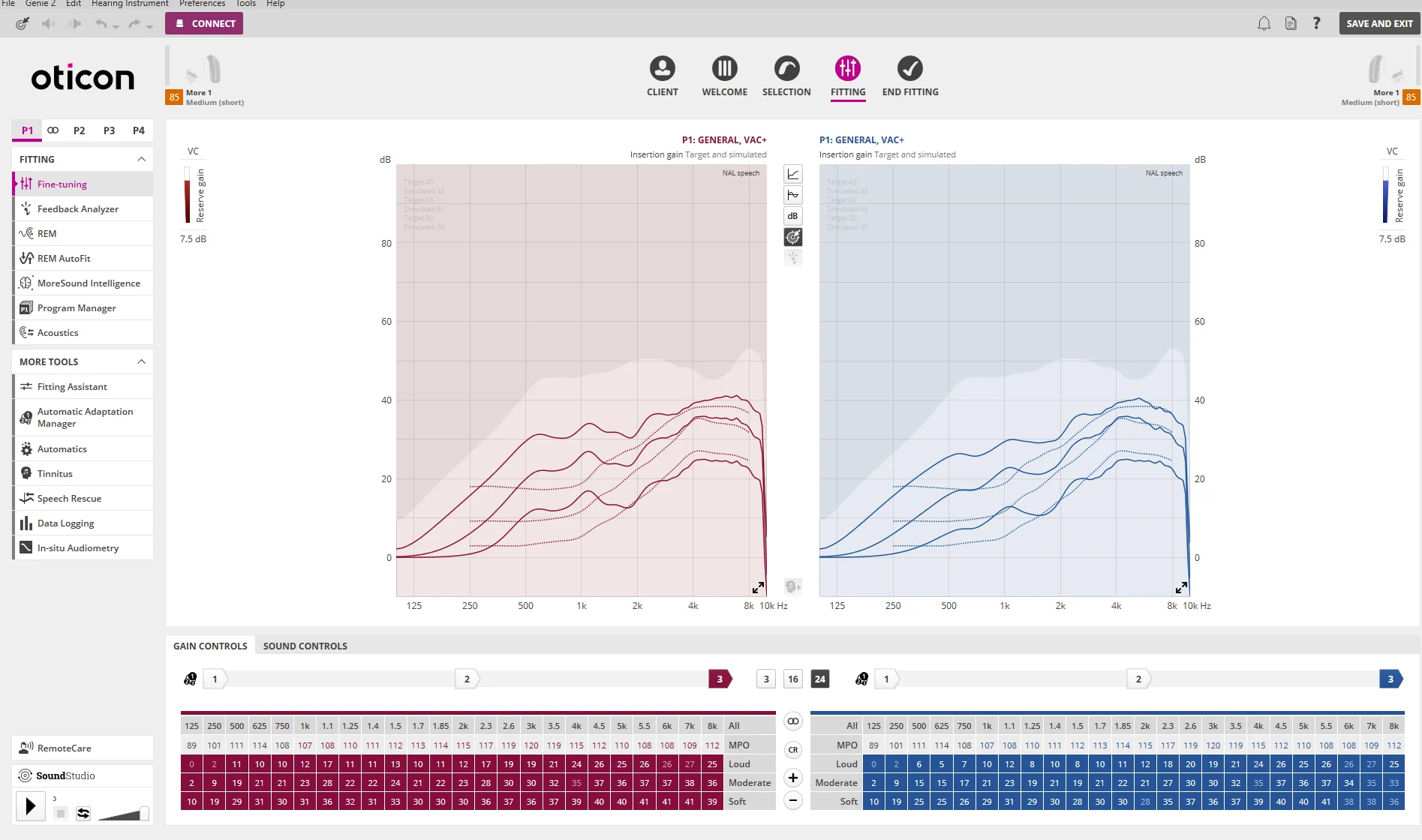
You can highlight Soft/Medium/Loud together rather than 1 at a time.
Might be easier to use the Fitting Assistant to change the gains.
Thanks for pointing that out. Yes, I believe by clicking All instead of each of the row level, everything can be highlighted so that your + or - click will be applied to everything. However, note that the (Max Power Output) row is also selected, and the values in there will also be affected the same way. This may not be desirable because if you just increase the volume through the hard buttons or the Companion app or the iOS MFI menu, it doesn’t make any changes to the MPO gain values.
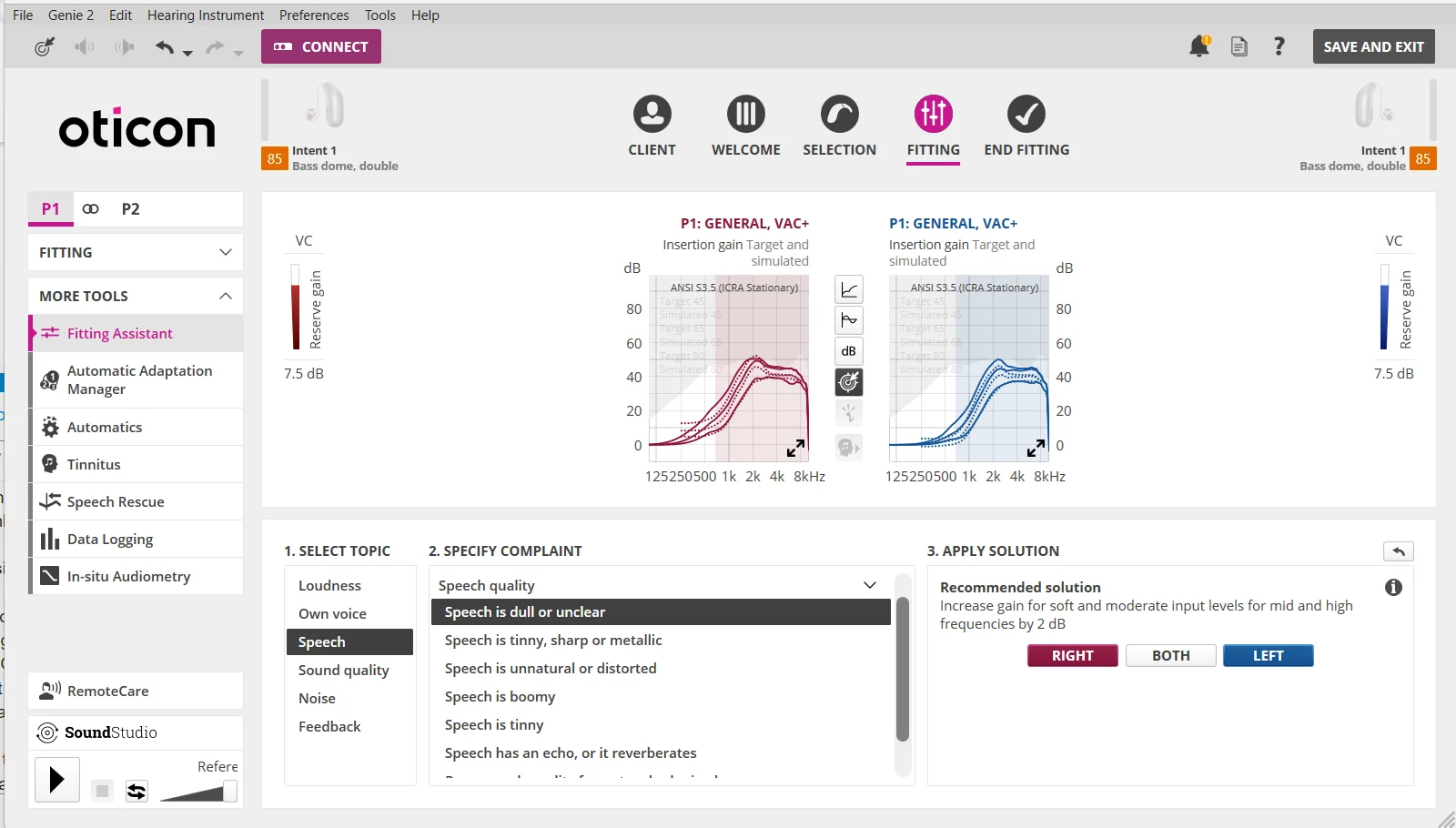
Also, having the Fitting Assistant apply the changes is definitely easier if you agree with what its proposed changes are. For example, if you complain that speech is dull and unclear, and it proposes to increase the Soft and Medium input level rows by 2 (see example below) for mid and high frequencies, then it’s easier to just click on it to have it applied. But that’s not the same action if all you want is just increasing 1 or 2 dB of gain across the board in all frequency handles and for all input levels (Soft, Medium, Loud), but not on the MPO.
But often what the Fitting Assistant suggests you do is probably more accurate and effective than what you think you want to do to using your own way of making the adjustment to solve the problem you have.
You’re ignoring this member’s posts.
I just did the changes in my speech in noise program. I’ll find a “noisy” place in the next few days to test it out!
You’re ignoring this member’s posts.

 SoCal
SoCalHowever, note that the MPO (Max Power Output) row is also selected, and the values in there will also be affected the same way. This may not be desirable because if you just increase the volume through the hard buttons or the Companion app or the iOS MFI menu, it doesn’t make any changes to the MPO gain values.
You don’t select :
You’re ignoring this member’s posts.
Ah, thanks for the clarification. I was not able to add the rows to my selection with a click for one row, then either Ctrl Click or Shift Click to add the other rows, so I assumed that it’s not doable unless I click on the All button.
But since you’ve demonstrated that it’s doable, I tried one last thing, which is Click and Drag, and it works!!! Thanks again!
You’re ignoring this member’s posts.
But since you’ve demonstrated that it’s doable, I tried one last thing, which is Click and Drag, and it works!!!
Yes!! Da Click & Drag move is a game changer
You’re ignoring this member’s posts.

 Geneva, Switzerland
I am amazed at how similar this Oticon software is to Target (Phonak), yet Oticon appears far more willing than Phonak to put its programming tools (and good instructions) in the hands of us users. Since it also uses Noah wireless (I believe), makes it easy to switch brands…
You’re ignoring this member’s posts.
Not sure why you said that Oticon is more open to making Genie 2 available to users compared to Phonak with Target. I don’t know how hard Target is to access, but Oticon used to make Genie 2 available for download by anyone before, but now you need to register as a hearing care provider in order to get access. Fortunately, those already with access can continue to indirectly get access with the Update option to obtain newer version. Not a completely new stand-alone version, just a software update to get a new version installed on top of an already installed older version.
Fortunately, there are folks on hearing aid forums who have access for some reason who are willing to share them with new commers who don’t have access yet.
I think the NoahLink Wireless is kind of a new universal interface standard for most programming softwares nowadays, so having to deal with a proprietary interface has never really been an issue to begin with.
You’re ignoring this member’s posts.

You’re ignoring this member’s posts.
Ah, same awkward access to self-programming as Phonak, then. On the positive side- software looks very similar, and same hardware to talk to , as you said.
You’re ignoring this member’s posts.
Related discussions
Hearing Aids8 replies
Hearing Aids57 replies
Hearing Aids14 replies
Fitting Software Requests1.1k replies
Uncategorized451 replies