
 Atlanta GA
Thanks for the tips and sharing your personal experience!
You’re ignoring this member’s posts.
This topic is closed.
52 replies2.8k viewsLast reply
Thanks for the tips and sharing your personal experience!
You’re ignoring this member’s posts.

I’m quite surprised they were willing to mess with it since it’s not “theirs” but on the good side if you educate yourself you can probably direct them to make appropriate changes without having to go the route.
You’re ignoring this member’s posts.
Thanks for your reply! My last round with Costco was a disaster.
I’m now leaning towards tweaking. And will read-up on the topic here.
You’re ignoring this member’s posts.
You’re ignoring this member’s posts.
By useless, do you mean the PartnerMic doesnt connect to your hearing aids, or it just sounds different?
If you need to reconnect it, you just need to short press the little chain link icon on the partnermic when it is switched on close to your hearing aids, and it should re-establish a connection.
If unsatisfied with the sound quality they can always roll back your settings, but yes, it requires another appointment.
You’re ignoring this member’s posts.
I tend to default to dual mode, though it’s not the software default you have to switch into it.
But also, she jacked-up (overwrote) the perfectly working PartnerMic program
That’s odd. What else did you ask them to do? If they aren’t careful, changes they make in the other programs can proliferate into the partner mic program.
Was it Costco who set them previously? It would be very quick to roll you back to previous settings if so. Just call and see if you can drop by and have them do that.
Lots of good suggestions here for tweaking the Roger settings. Try to elevate it on the table too, on a cup or napkin holder. But presenter>pointing>table. Depending on the level of noise in the restaurant, table mode might not cut it. But it does sound like there are still adjustments that could be made. Would be useful to know what your was. Are you ? Was there ?
You’re ignoring this member’s posts.

(4) like all streaming programs, Rogerdirect has a low frequency boost which can result in the perception of more noise when using the Roger microphone. It may benefit you to have them reduce that low frequency boost manually, but reducing the gain on the lower frequency channels for that roger direct program only.
I shall look into this. The Roger I have do tend to “honk” a bit with mid range.
I’ve done the PRO reports, which show all the gain settings for Autosense elements, and all streaming settings.
When using a “streaming plus mic”, do the aids usually use “calm situation” as the mic element?
Peter
You’re ignoring this member’s posts.
You’re ignoring this member’s posts.
You’re ignoring this member’s posts.
The PartnerMic is still connected. But the speaker’s voice cuts in and out. Wide swings in both volume and clarity on a second-by-second basis.
I don’t know if there’s an original PartnerMic program to roll-back to. I just self-paired the PartnerMic to my hearing aids. And it was amazing! It just worked. Beautifully, straight out of the box!
And now, it’s an 18 gram object of contempt.

You’re ignoring this member’s posts.
You’re welcome. Maybe that info will help you:
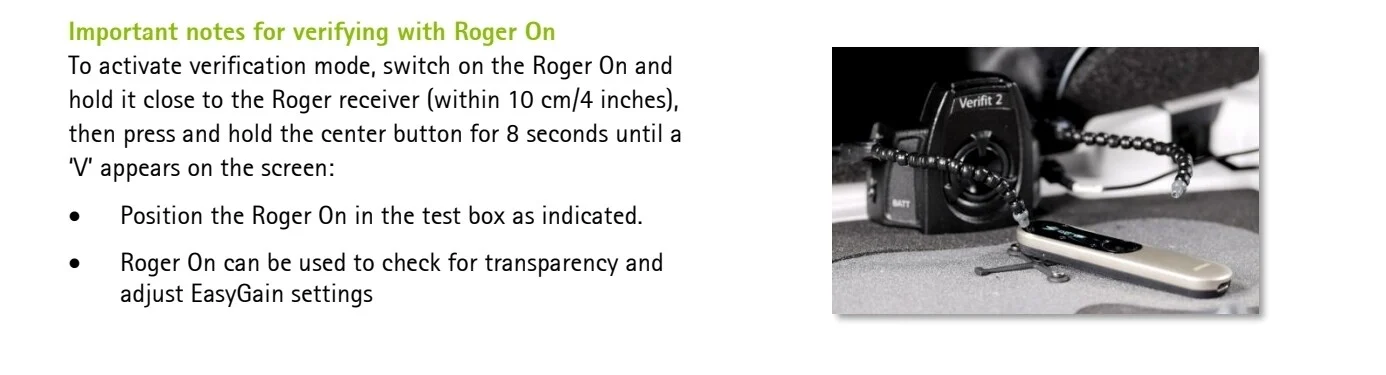
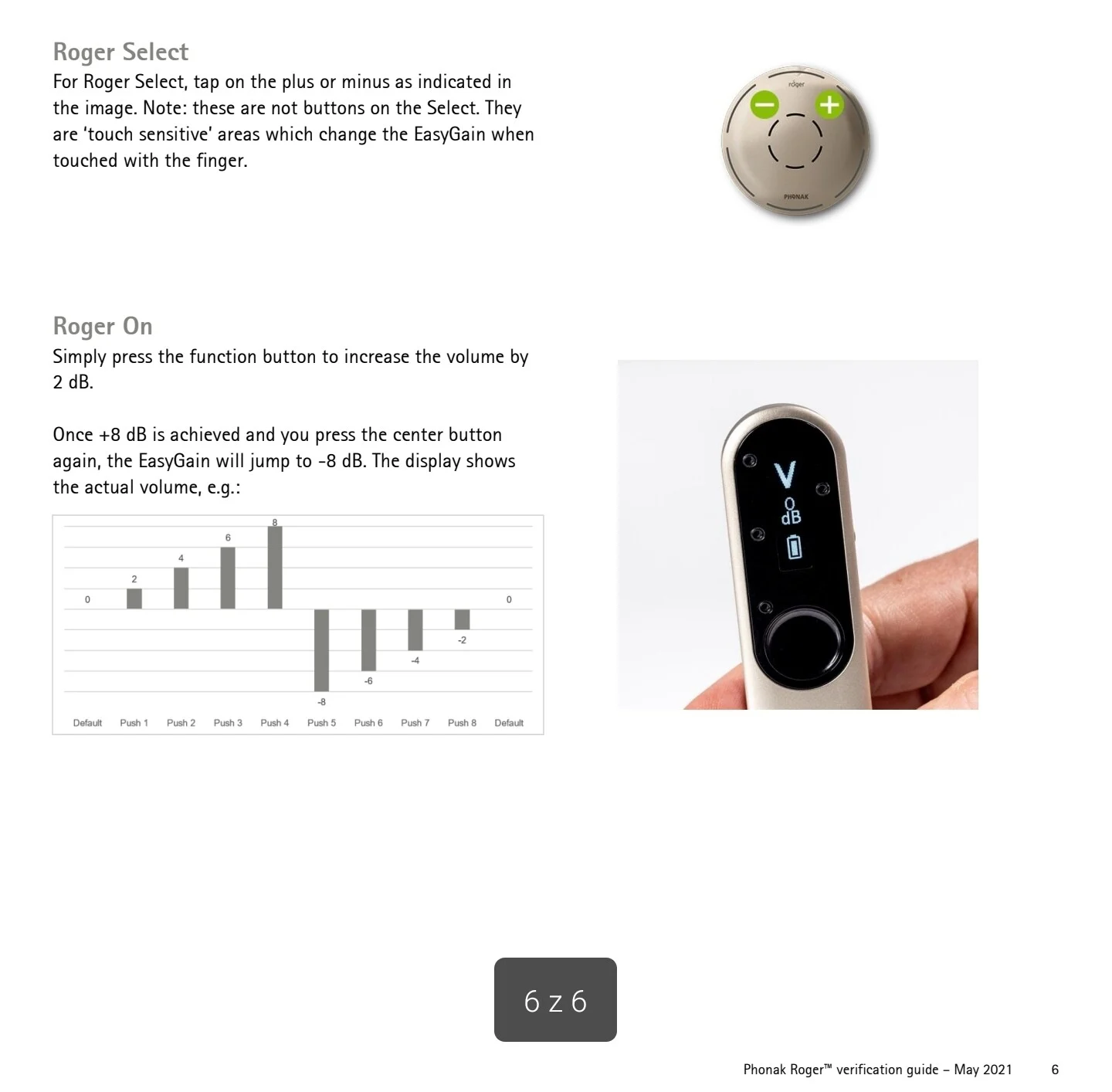
On the forum there was thread about above:
I came across this yesterday and after trying to find more info on google, it wasn’t really coming up with anything. Does adaptive gain happen on 02 receivers as that’s what I’ve got? Also what’s the difference between adaptive gain and the easy gain feature? [image]
You’re ignoring this member’s posts.
But the speaker’s voice cuts in and out. Wide swings in both volume and clarity on a second-by-second basis.
Oh that’s odd. Have you tried just reconnecting?
You’re ignoring this member’s posts.
That’s actually a great question which I don’t have a firm answer for.
My assumption is that the PartnerMic program is limited to using an omnidirectional setting for the mic element, which has historically been the default microphone element mode for streaming programs in previous Phonak hearing aid generations.
You’re ignoring this member’s posts.
But the speaker’s voice cuts in and out. Wide swings in both volume and clarity on a second-by-second basis.
Oh that’s odd. Have you tried just reconnecting?
Thank you for suggesting! I just re-paired the PartnerMic with my hearing aids.
I’ll know more after using the PartnerMic again this Sunday in a public speaking venue.
Perhaps that re-pairing will return the PartnerMic to its default settings that worked so well previously.
You’re ignoring this member’s posts.

I have experienced issues with Roger on several times where a number of odd things were happening, the most obvious to me being that the audio went to mono. These were fixed by resetting the Roger and then connecting the hearing aids again like the Roger was new. You press the function button and the connect pairing button together for about 10 seconds. Then after it wakes up again you use the connect button again. I don’t know if this would apply or even how to reset your partner mic, but it might be worth a browse in the manual.
Best wishes.
WH
You’re ignoring this member’s posts.
Unpairing the PartnerMic appears to be an undocumented feature. Not mentioned in below docs anyway…
However, the following steps worked for me this morning. Perhaps the sequence was mentioned in a YouTube video. I can’t recall the exact source.
Phonak PartnerMic Technical Data.pdf (449.5 KB)
Phonak PartnerMic User Guide (2022).pdf (3.9 MB)
Phonak PartnerMic Quick setup guide (2019).pdf (588.4 KB)
You’re ignoring this member’s posts.

You got a lot of great suggestions here, and I just want to add that I TOTALLY empathize with your experience. I have TWO (redundant) Roger V2 mics which I was forced to buy cuz I have TWO (redundant) rechargeable Phonak Lumity Life aids. I only get about 15 hrs/day on a single charge, so that’s why I needed the TWO pairs of all this stuff.
Well, flash forward and now I have the Phonak Lumity Life 312 battery aids. I’ve got that paired + connected to the V2 mic and like you, have found on numerous occasions in a variety of environments that the V2 seems to just amplify noise in a crappy sound quality. It DOES indeed help to MUTE the aids and just have the Roger supplying the sound. But! It’s even better to shut the V2 off completely, put it in my purse and put my aids into “Speech in Loud Noise”. Not only that, but without even changing the program on my aids, they do a very good job of muting down the distracting ambient sound and letting me hear speech better.
It’s trial and error. I think a patient and very talented audiologist is KEY to getting the most out of our Phonak aids + accessories. Good luck to you as you implement some suggestions and return to Costco to get things re-set the way you want them. It’s too bad that even as aids become more powerful and improve speech comprehension, they become SO MUCH more complicated to set up and actually use. When to use the mic, when to use a dedicated program. That’s the question!
You’re ignoring this member’s posts.
Thank you! Given my degree of hearing loss (severe to profound), I really have NO business dinking around with Costco anyway.
Time to find a real and bite the financial bullet, I suppose!
You’re ignoring this member’s posts.
Time to find a real AuD and bite the financial bullet, I suppose!
I higly recommend Dr Cliff channel on YouTube and HearingUp website to find audiologist in your country.
And… There will be probably announcement of new Phonak platform in 3 days.
You’re ignoring this member’s posts.
You’re ignoring this member’s posts.
Question and Answer19 replies
Hearing Aids28 replies
Question and Answer4 replies
Manufacturer Support28 replies
Hearing Aid Self-Fitting (DIY)5 replies
 Poland

 North West UK
![[image]](/uploads/original/1bdc9c3a617424abec9b7617c017e94114ad8bbb.jpeg)