My guess is it doesn’t, but I’m not an audi… Been trying to break in new hearing aids since Oct/23; have tried 5 pair and 3 companies and it’s getting old.
Appreciate your thoughts, Nick
You’re ignoring this member’s posts.
This topic is closed.
16 replies747 viewsLast reply
My guess is it doesn’t, but I’m not an audi… Been trying to break in new hearing aids since Oct/23; have tried 5 pair and 3 companies and it’s getting old.
Appreciate your thoughts, Nick
You’re ignoring this member’s posts.

What problems are you having?
I have been wearing aids 20 years and never had any issues adapting to my aids.
Your audiologist should be explaining all of this too you.
You’re ignoring this member’s posts.
The issue is that most voices are not understandable and I’m having to do my own investigating. Phonak support is non-existent and I have spent too much time and $ trying to get to the bottom of this. On the surface the audi appears to make corrections, but no cigar. It does appear that the results are the basis for the issue… I’m attempting to confirm that thought here on this forum…
Appreciate your interest here.
Many thanks, Nick
Sign me frustrated…
You’re ignoring this member’s posts.
The key at least for me has always been an audiologist that is willing to listen to my frustration and my suggestions. Not saying which brand of aids will work for you but I have found that Oticon is my best choice. My audiologist preforms the testing to ensure my aids can meet the needs of my hearing loss. But my aids are set to my needs and not what REM suggests. And most audiologist and hearing aid suggest that I need a lower level of power in my receivers than I am using. Most audiologist and hearing aid software set aids to a 'comfortable ’ settings which is worthless for me to be able to understand speech. Comfortable settings is typically 80% of prescription for your hearing loss. My aids have to be at least 100% prescription for me to understand speech. Most patients complain that at that level the aids are too loud. And i admit that my aids had to be stepped up over a 2 year time frame for me to have time to adapt to the louder sounds.
You’re ignoring this member’s posts.
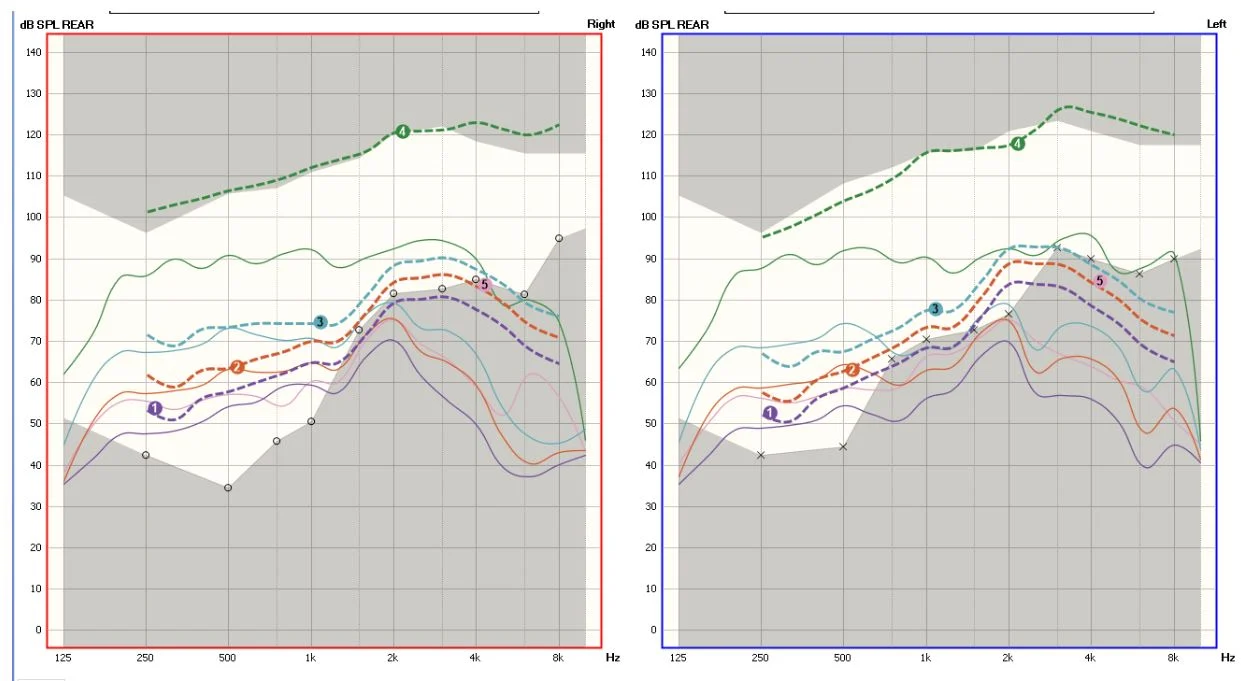
The solid lines show be closely following the dotted lines. It’s not always possible but in this case, it should be simple to match them pretty close. And the solid green line is the maximum output that the hearing aid can put out. It appears very limited and I would expect the mid frequencies and above to have the maximum be higher.
The exception to this would be that the probe measurement tubes need to be properly calibrated and then placed properly in your ear canal, and an unaided gain curve measured. If these are not done or , worse, they are done incorrectly , the readings will be complete gibberish because they are calculated using those measures.
It appears your provider is not comfortable with real ear measurement. Hopefully it could be a learning opportunity for them, or possibly a different provider can assist you. It’s likely that they could use target match to assist with the real ear measurements. It’s in the global menu at the bottom menu ribbon and it says TargetMatch.
You’re ignoring this member’s posts.
No decent audiologist should let you walk out of their clinic with that bad unless you have repeatedly asked them to turn the volume on your aids down significantly and they are just measuring your preferred listening levels. According to your REM you are significantly under-amplified and your maximum power output (green line) is far too low and likely causing peak-clipping/distortion… it’s no wonder you can’t hear speech clearly.
You’re ignoring this member’s posts.
After much consternation, a few months ago, I created this comparison, which I only submitted to the audi yesterday. I don’t believe anything ever came of my previous more subtle attempts to convey the implications associated with the graphs. But I would be willing to bet that settings reflecting that graph would have beneficial effects.
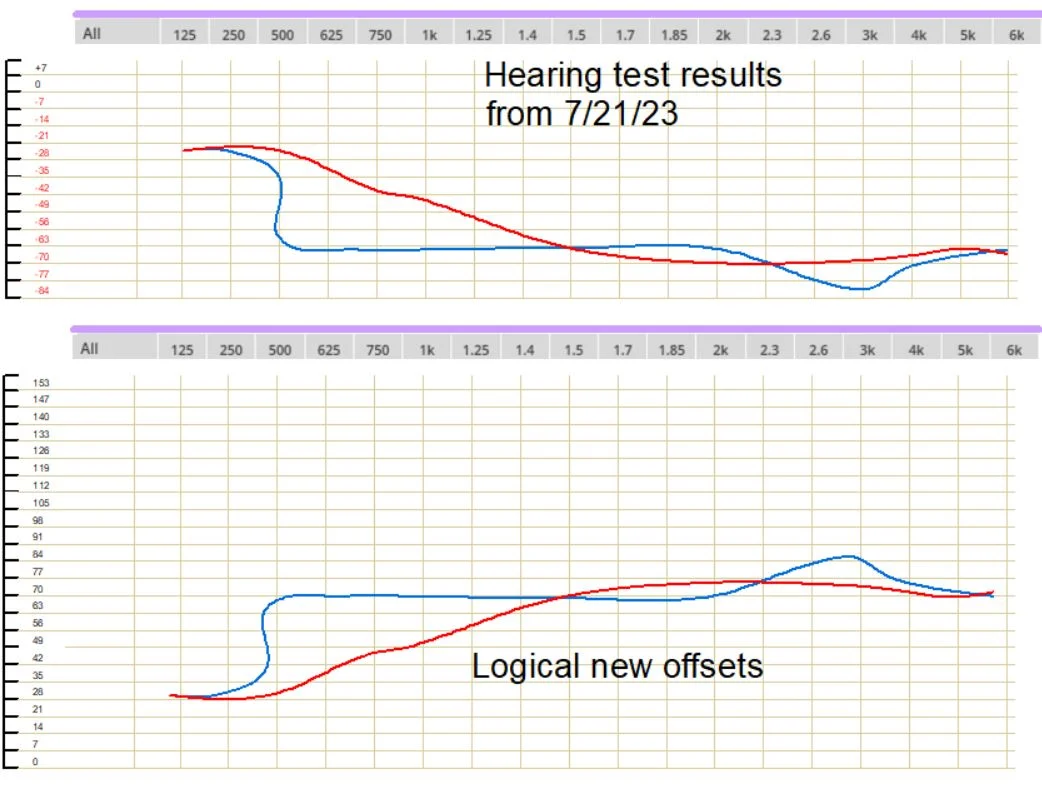
BTW, I’m a 50+ year computer geek and have written hundred of thousands of lines of code over the years.
You’re ignoring this member’s posts.
One other thing on this; I bothered to overlay the left and right sides in Photoshop and was able to change the opacity of the top (left) graph so that one would be able to more readily discern the differences between them.
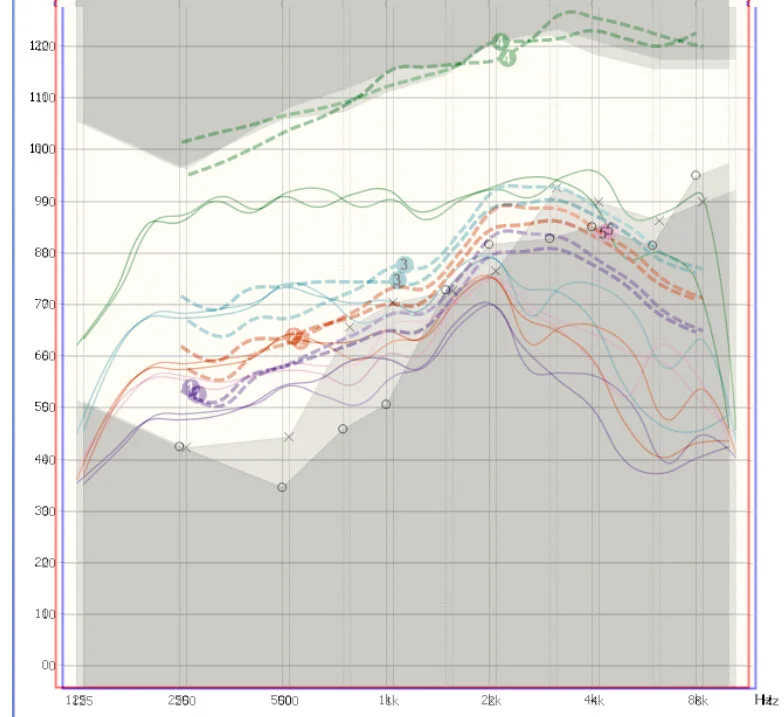
Ironically the REM readings are almost identical and don’t appear to reflect the obvious differences/necessary settings noted in the hearing test.
I’m no expert, so I need to understand that my above assumptions are grounds to move forward on. I’m guessing that this is going to come to a head very soon…
You’re ignoring this member’s posts.
What is totally confounding on all this is that 3 audiologists, making settings on 5 manufacturers products and 4 different models all rendered settings that sounded the same…
???
You’re ignoring this member’s posts.
You’re ignoring this member’s posts.
You’re ignoring this member’s posts.
Just occurred to me to let you know that I have stumbled on a change to a modified setup that makes a vast improvement overall, but is still not right. The only mode that I have created has default mid-tones, slightly increased bass and slightly more increased treble. Of course, those changes are applied to both right and left aids and when making any changes, the volume settings that you may have adjusted are lost.
The other change that I have noticed helps is to lower the Noise Cancellation to an acceptable level. It does affect the perception of voices to some extent and I guess that means the algorithm is not perfect???
You’re ignoring this member’s posts.

You’re significantly under aided in mid and high tones.
There’s really no point in people advertising that they offer services if they don’t know how to interpret the results and re-tune the aids accordingly.
You’re ignoring this member’s posts.
So you know, The software has a built-in mode view called On Target which would show you how far away the solid lines are from the dotted lines.
You’re ignoring this member’s posts.
That’s very different to . The screen you’re referring to is an estimate of your output based on the assumption that you have the average ear canal. I almost always have to make adjustments (often quite significantly) to meet targets effectively.
You’re ignoring this member’s posts.
Not sure if you were replying to me, but I’m speaking of the screen in the aurical software to show the difference between the targets and the measured response. Which could easily confused with Phonak “Target” software options, for sure, so I should be clear.
You’re ignoring this member’s posts.
Sorry, I misunderstood. Yes, the screen you’re referring to is a very helpful one which clearly shows where a is falling short
You’re ignoring this member’s posts.
Hearing Aids6 replies
Hearing Aids417 replies
Hearing Aids52 replies
Hearing Aids14 replies
Hearing Aids20 replies
 Hot Springs Village, Arkansas
 Wales, UK