Hi @DamonHill , for programming Starkey's multi-branded products aka Audibel version of legacy Halo 2 you install a older version of Starkey Inspire X and PatientBase.
Note: you must run the Starkey Inspire X fitting software with a "launch" parameter for Starkey's multi-branded products.
Below are the (3 steps) to run (Starkey Inspire or ProFit) for a multi-branded product: Install software: Starkey PatientBase, Starkey Inspire.
After installing the required modules; follow these 3 steps to run multi-brand.
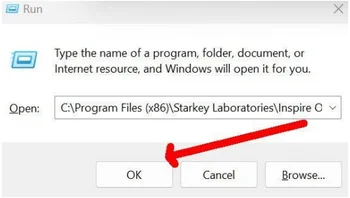
Step 1: Right-click the Windows Start button and select Run, or press (Win-Key + R)
STEP 2: Enter the run command string for the fitting software to be run as Audibel instance , "exactly" as follows from below , into the Windows Run Command: Tip: Use the cut-and-paste method. Typing is too cumbersome:
C:\Program Files (x86)\Starkey Laboratories\Inspire OS\Starkey.Inspire.Host.PatientBase.exe launchAudibelFitting
Step3: Click OK
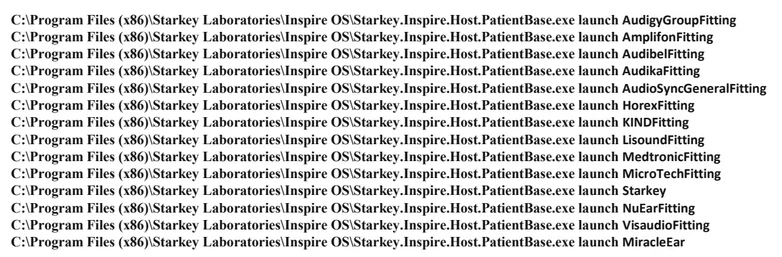
list for all legacy Starkey Multi-Brand products
check your PM

