
What’s the date at the bottom of that page? From what I can gather, the Pixel 7 was updated last October.
You’re ignoring this member’s posts.
This topic is closed.
117 replies5k viewsLast reply
What’s the date at the bottom of that page? From what I can gather, the Pixel 7 was updated last October.
You’re ignoring this member’s posts.
You’re ignoring this member’s posts.

Last updated: August 13, 2024
That’s it! Android 15 was released October 15, so they had announced updates to LEA support, and I guess the inclusion of the P7 series was part of it.
I think the Pixel 9 series isn’t on the Oticon “Tested” chart because it was just released on August 24, and Oticon probably hasn’t gotten around to it, but it is definitely HAP.
You’re ignoring this member’s posts.
You’re ignoring this member’s posts.

I was able to pair the FMA120 with my Philips 9050
Is your phone compatible? If so, how are you finding hand-off between the cdnnection via the dongle and connection to the phone.What kind of hoops do you have to jump though to connect to device A when you’re already connected to device B?
You’re ignoring this member’s posts.
I was able to pair the FMA120 with my Philips 9050
Is your phone LE Audio compatible? If so, how are you finding hand-off between the cdnnection via the dongle and connection to the phone.What kind of hoops do you have to jump though to connect to device A when you’re already connected to device B?
I have a Pixel 7a which used to have LE audio as a “developer option” but the latest update removed that option for some reason  When I was able to use LE audio on my phone, streaming was very good but talking on the phone was not great – choppy connection for both me and the person I was talking to – I assume they removed the option until they get more bugs worked out.
I use the FMA120 with Microsoft Teams and so far the connection had been very good I can hear well and have had no complaints from the person on the other end. (I need to remember to ask someone how their side of the connection sounds)
So I haven’t had on both my phone and the FMA120 at the same time so can’t really answer your question. In correspondence with Flairmesh (makers of the FMA120) they said:
“Currently, hearing aids do not support multiple simultaneous connections with more than one device.”
Which tracks with my experience so far. I need to make sure the hearings aids are not connected to the phone in order for it to connect to the FMA120. Kind of disappointing since the LE audio scheme can support multiple simultaneous connections.
You’re ignoring this member’s posts.

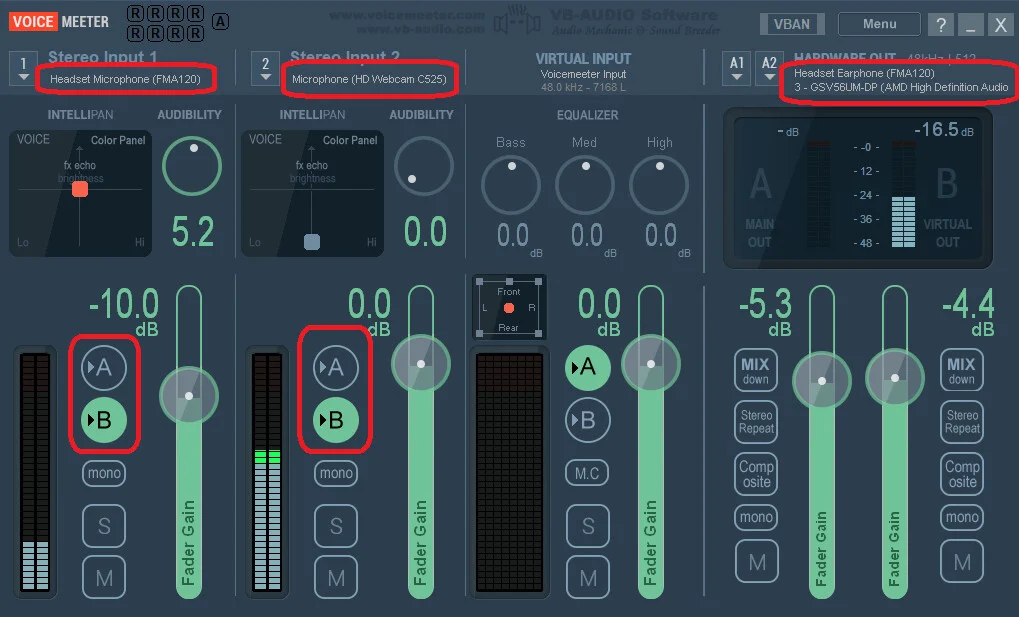
For anyone with a similar need, there’s an app called ‘VoiceMeeter’ for Windows that lets you combine two audio inputs and outputs in your Zoom call. This way, someone wearing hearing aids can access the same Zoom call, and others in the room can also hear and speak directly through the laptop/PC. I’ve come to understand this requirement since my mom wears hearing aids while my dad doesn’t. Whenever I call them, I usually find my mom talking away, while my dad just looks at the screen.
Here are the setup details:
You’re ignoring this member’s posts.

I have decided the FMA120 isn’t for me… after much experimenting - I must say FlooGoo support is awesome… very patient with me - after many emails back and forth - It turns out that the FMA120 dongle doesn’t play well with TV adapter … if I connect aids (Intent) to TV adapter, and then want to use dongle on laptop to stream audio, I have to re-pair the aids to the dongle every time… right now, the dongle doesn’t give me anything that the Connectclip does , so I’ll probably wait for the Oticon “easy LE adapter” to come out and depending how much it cost, may try that … again, my dream dongle is one that would enable audio to be stream to my hearing aids, as well as enabling other folks in the room with me to hear the audio without having to wear headphones,etc … like the TV adapter does…
You’re ignoring this member’s posts.
You’re ignoring this member’s posts.
Here’s a message from an Oticon Intent 4 user describing how they manage switching between their phone and the FMA120:
“When switching from phone to PC I turn off Bluetooth on the phone. When the PC has connected the hearing aids I can turn Bluetooth on again. The other way I usually pull out the dongle. Then turn Bluetooth on and off on the phone. It then connects fine to the phone again.”
You’re ignoring this member’s posts.
You’re ignoring this member’s posts.
It was so hard to tell since I had to keep re-pairing it and it was my first experience with one of these but I would say no ,not much latency
You’re ignoring this member’s posts.
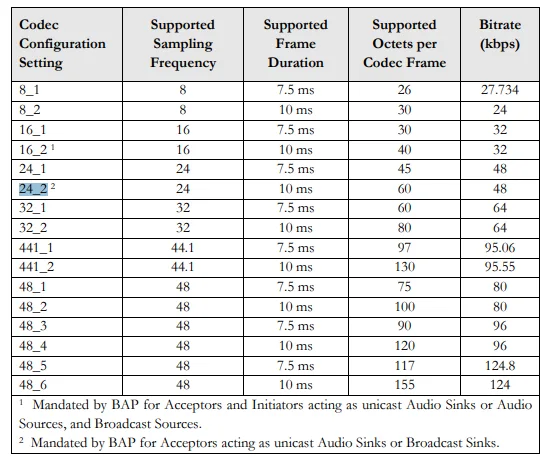
For the FMA120, the Resound Nexia 9 hearing aids work with the ‘24_2’ setting for streaming and ‘16_2’ for conversations (both speaker and mic enabled), as outlined in the table below (based on the LE audio spec). The latency is configured as around 20ms, as they use a 10ms frame. This latency is similar to what gamers experience when using the FMA120 with Samsung Buds 2 Pro, as both the hearing aids and the Samsung Buds adhere to the same LE audio spec.
For the Oticon Intent, the behavior may be different. Users can always reach out to the FMA120 manufacturer to get a debug firmware that prints out logs to show the latency for specific hearing aids.
When comparing the ~200ms delay of A2DP (SBC) in classic Bluetooth (used by Phonak) to the new LE audio, there’s a noticeable improvement. For conversations, if the Connect Clip uses Bluetooth HFP on a PC, the typical HFP delay (from PC to Connect Clip) is around 60ms, not factoring in the additional delay from the Connect Clip to the hearing aids.
You’re ignoring this member’s posts.
For anyone interested, the Samsung Buds 2 Pro can operate at 48k for speakers and 16k for the mic with LE audio. The reason hearing aids typically don’t use 48k is to conserve battery life. Hearing aids are designed to last a full day on a charge, while consumer earbuds typically last only 5-6 hours.
You’re ignoring this member’s posts.
Wow. Many thanks for the detailed response. Like nedunla I’d like to use something to connect my Intent1 to another device, in this case my Dell PC. I did not know about the FMA120 dongle until I read his posts. I can try the FMA120 dongle or wait for the Easy LE Adapter to be released. Right now I’m using AudioRelay software to send the PC audio to my phone (Pixel 9 Pro) then to my HAs (with the new firmware). Latency can be annoying but it works. I understand some Phonak HAs can link to two devices simultaneously (phone & PC) which is not the case with Intent HAs. Another poster seems to have dealt with that issue by turning the phone’s connection off then on. Do you have any recommendations?
You’re ignoring this member’s posts.
LE audio is still in its early stages, and I believe that over time, the Intent (and other hearing aids with LE audio support) will eventually support multiple source connections, just like classic Bluetooth. Until then, we’ll need to be patient and work within the current limitations.
For context, support for multiple connections in classic Bluetooth started around 2010 (I’m not entirely sure of the exact year), even though Bluetooth headsets became popular as early as 2003. So, it’s a feature that took time to develop, and we’re likely to see similar progress with LE audio as it matures.
The FlooGoo FMA120 was originally designed for audiophiles, gamers, and users. Recently, it expanded support for hearing aids, thanks to the valuable feedback and assistance from many hearing aid users (including those with Intent) who volunteered for early firmware testing. Users may choose to wait for the Easy LE Adapter from Oticon, it’s likely to provide a smoother switching experience, as it’s designed by a single vendor.
Tip: You can use a USB-C to USB-A adapter to connect the FMA120 to your phone, so you don’t need to switch between your PC and phone. This setup offers better range than your phone’s built-in Bluetooth. For example, a Starkey Edge user reported staying connected up to 100 feet away, even with one or two walls in between, in their office.
You’re ignoring this member’s posts.
Users may choose to wait for the Easy LE Adapter from Oticon, it’s likely to provide a smoother switching experience, as it’s designed by a single vendor.
All the searching I’ve done says it’s from “Minami Acoustics” (though I’m not sure if they have a relationship to Demant?).
Anyway, if it hasn’t been said already, welcome to the forums @Ranson and thanks for your insights.
You’re ignoring this member’s posts.
Thank you so much for the warm welcome! This forum is fantastic, and I’ve already learned a lot here, especially about hearing aids.
You’re ignoring this member’s posts.
Question and Answer9 replies
Social0 replies
Hearing Aids9 replies
Uncategorized451 replies
Hearing Aids104 replies
 SoCal
SoCal
