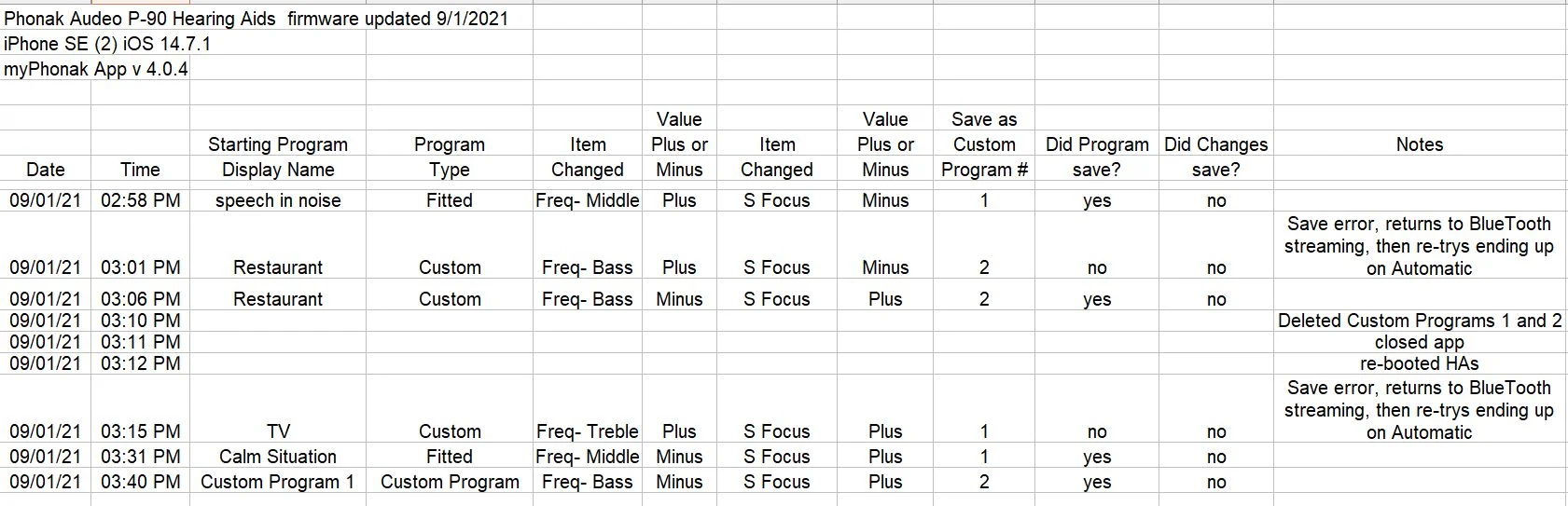
The results of some Phonak App testing this afternoon. Six different tries at saving a Custom Program. Four of the six resulted in a saved program. However, none of the changes I had made to the original program were saved in the Custom Program. Seems like poor results to me.
Brian,
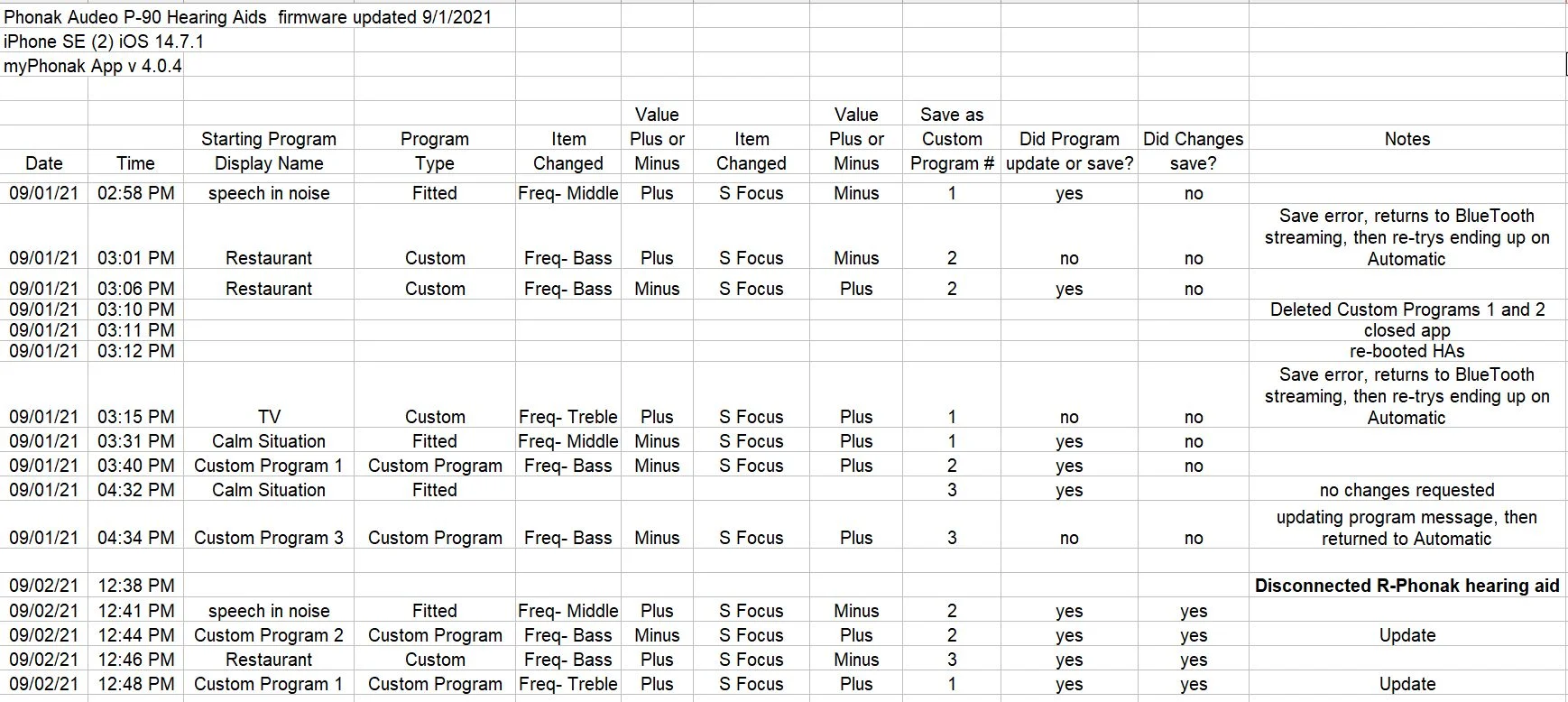
Your spreadsheet log says in the notes column that on error it returns to streaming. As I have mentioned in posts above, disconnect “R-Phonak hearing aid” which is not needed when saving custom programs to your hearing aids. I also got error messages while saving when “R-Phonak hearing aid” was connected.
R-Phonak hearing aid is used for streaming
LE_L-Phonak hearing aid is used by the myPhonak app
LE_R-Phonak hearing aid is used by the myPhonak app.
As per KeithL’s suggestion, I disabled the R-Phonak hearing aid. THAT WORKS! At least for iPhones.
I did the same changes I tried with no success yesterday. Today everything saved or updated as it should. Here is the table with today’s results included.
Congratulations on getting a positive outcome. Maybe only for some iPhones. I have an iPhone SE20 exhibiting the problem since the app update. My wife’s iPhone 8 doesn’t have the problem but she has the Phonak Marvel while I have Paradise.
My audiologist and I spent about 45 minutes today on the phone with Phonak support trying to make custom programs save. No luck. The tech didn’t acknowledge that it was a known problem if they even knew. Finally left it that they would register a complaint and so that an update to the app can fix it. I’m not holding my breath.
Congratulations on getting a positive outcome. Maybe only for some iPhones. I have an iPhone SE20 exhibiting the problem since the app update. My wife’s iPhone 8 doesn’t have the problem but she has the Phonak Marvel while I have Paradise.
I didn’t know custom programs could be saved to Marvel . I thought it was a new feature only for Paradise HAs.
To my surprise the ability to save custom programs was restored.
I don’t know if Phonak can make changes to the app that take effect without reinstalling or not. Pretty sure it wasn’t anything done on my end.
Unfortunately the myphonak app has a long history of much to be desired. Anytime you have problems with the app don’t be afraid to uninstall and reinstall the app. That includes after an update to the app.
Thanks to Hooby and KeithL for the information regarding the 3 distinct connections: LE_L-Phonak hearing aid, LE_R-Phonak hearing aid and R-Phonak hearing aid
My Paradise P90s work perfectly with my Motorola moto g7 (Android 10 and Bluetooth 4.2). The myphonak app works with both aids and they stream music and phone calls.
I am trying to use the aids with my old Motorola Moto G4 (Android 7 and Bluetooth 4.2). This worked perfectly a few months ago with my wife’s P90-R. The myphonak app works with both aids and music streams to both ears (after I re-paired “R-Phonak hearing aid”). Unfortunately, phone calls only stream to the left . Why would music stream to both ears but a phone call only stream to the left?
I have been told on more than one occasion that whenever the myphonak app updates you should seriously consider uninstall in the app and then reinstalling it. Apparently there have been enough people having problems whenever the app updates. Of course some will say I’ve never had a problem. But if you have then this is something to consider.

 Texas
Texas