
 London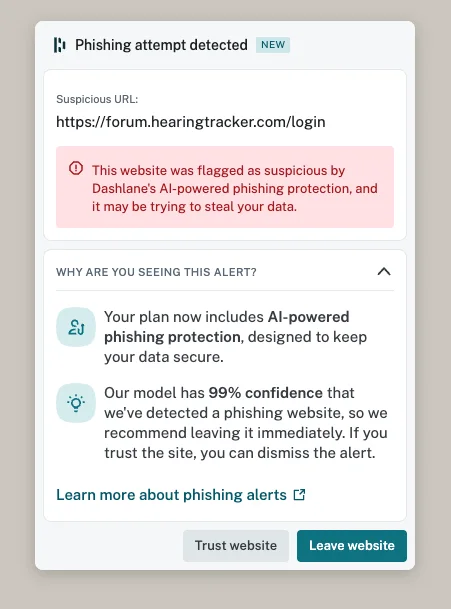
Is this something I should be worried about? A false positive? I’ve logged in anyway. The URL seemed legitimate. Maybe a false positive for , quite bold to say 99%
https://forum.hearingtracker.com/login
You’re ignoring this member’s posts.
9 replies405 viewsLast reply
Is this something I should be worried about? A false positive? I’ve logged in anyway. The URL seemed legitimate. Maybe a false positive for , quite bold to say 99%
https://forum.hearingtracker.com/login
You’re ignoring this member’s posts.
I would contact this company Dashlane and ask them to review why their program thinks there is a problem. It is most likely that the Hearing Tracker forum uses a 3rd party addon javascript or something that has triggered the Dashlane warning.
I use Ublock Origin (which is really good) as well as Firefox Strict Enhanced Tracking Protection without any issues on this website. Almost certainly Dashlane has a false positive. The simplest way to identify the underlying cause would be to contact Dashlane support.
You’re ignoring this member’s posts.
You’re ignoring this member’s posts.
When logging in here, I get a similar warning from Apple’s Safari (v 26.2) browser. “Site is not secure and may be trying to steal…”
The URL does not show HTTPS, so I don’t put anything private on this site.
(Whether or not this site is HTTPS, I don’t know.)
You’re ignoring this member’s posts.
You’re ignoring this member’s posts.

My iPad’s safari 26.2.1 links up securely. Any chance there’s a (broken) ssl proxy in the way at your end?
Those always gave me the creeps anyways. Decrypting my sessions and then logging everything? No, thanks.
WH
You’re ignoring this member’s posts.

I have a strict security guard on my network router wifi system. And other security on my phone and I haven’t had any issues. But my setup blocks all ads.
You’re ignoring this member’s posts.
Good idea to check WhiteHat! Thank You for this suggestion.
In my case (Safari 26.2), my guess is that it’s over protective.
My Android phone, using DuckDuckGo browser shows the HTTPS at the beginning of the URL for this site (and every https site). That tells me that this site is secure and Safari is wonky.
One can no longer see the “HTTPS” in the URL bar thanks to a Safari “improvement”. To check security of a site, one clicks on “Safari” - “Connection & Security Details” for a pop-up with details.
Every time Apple “improves” something, a useful item is lost. (Such as https in the URL bar.)
Such Is Life!
Paul
You’re ignoring this member’s posts.
If I tap twice on the url bar, it changes from site name to complete url, including the protocol. In this case, https.
WH
You’re ignoring this member’s posts.
You’re ignoring this member’s posts.
Log in to reply to this topic.
What the forum has been talking about this week.
Hearing Aids160 replies
Fitting Software Requests134 replies
Hearing Aids47 replies
Fitting Software Requests892 replies
Hearing Aids35 replies
 Rural New England