You’re ignoring this member’s posts.
DIY - Self Programming the Oticon Opn – How To
406 replies78.4k viewsLast reply

tenkanProvider
Hi there, hey great your doing projects, I believe you asked in another post as well, I’m sure you’ll be up and running in no time.
You’re ignoring this member’s posts.

Hi everyone, I have a question and I hope I’m putting it in the right spot. If not, I am very sorry!
I am going to attempt to make some (minor) programming adjustments to my Opn hearing aids. I just got the required hardware and software. However, I am wondering if I connect the hearing aids to a computer (and Genie 2 software) that has not programmed these hearing aids before, would it wipe the settings my audiologist put in there already and send it back to default settings? Or when I connect them and open it up in Genie 2 will I be able to basically pick up where my audi left off?
Since I can’t get an appointment for a couple months I don’t want to take any chances.
Thanks!
You’re ignoring this member’s posts.
tenkanProvider
No sweet, yeah what you do is make 2 clients up, one for your audiology settings and one for your projects, so connect first time and then save to database and , if you follow the user guide including the video guide it shows how this is done, much easier then you think really.
You’re ignoring this member’s posts.
Okay, awesome. I wanted to make sure there wasn’t a situation where I connected them and then boom it’s all reset. So I’ll connect them in a client then save and exit. Then create another client and make the changes.
You’re ignoring this member’s posts.
tenkanProvider
Yeah go ahead and do that, ask questions first is a good thing, I don’t use Oticon models myself, but there’s plenty of Oticonians doing projects to help you along with anything you may want to know.
You’re ignoring this member’s posts.
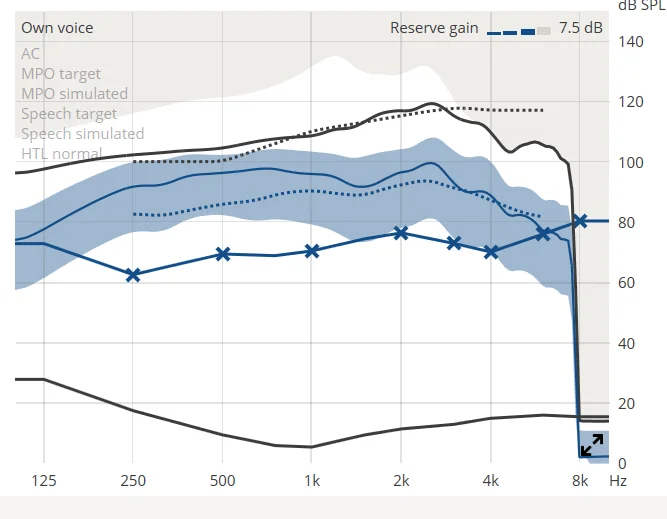
Hi guys, I had a question and I was hoping somebody would be able to better explain this to me. So, I have the genie software for my oticons and can make programming changes and all that. I discovered this page here, and I was hoping somebody knew what the different colors meant. I went into the oticon help page and didn’t quite understand what it was saying. For example, I understand the target and the simulated, but what does the dotted blue line and solid blue line mean? Thanks for your time!
You’re ignoring this member’s posts.
You’re ignoring this member’s posts.
tenkanProvider
Hi there @Abbyokin great your giving a go, I’m sure you’ll be up and running in no time.
You’re ignoring this member’s posts.
Log in to reply to this topic.
Related discussions
Hearing Aid Self-Fitting (DIY)41 replies
Hearing Aid Self-Fitting (DIY)918 replies
Hearing Aid Self-Fitting (DIY)0 replies
Hearing Aid Self-Fitting (DIY)18 replies
Fitting Software Requests13 replies