As OcramSagev says, streaming from a Bluetooth-enabled PC works, and it works well.
It is worth noting that streaming music (from phone or PC) is going to give you fairly (or even very) anemic bass if you’re using open domes; just as with regular earbuds, getting decent bass requires a tight seal in your ear canal.
In my (limited, so far) experience with hearing aids, bass with “normal” open domes is very anemic; switching to Oticon OpenBass domes will upgrade this to “fairly anemic”, at the cost of losing some of the natural ambient sound.
If you want to get real audiophile sound (especially if you’re a basshead), you’re probably going to have to give your aids a break and use audiophile buds for your “heavy” listening.
P.S. You don’t have your posted yet, so I don’t know what your hearing situation is. But to the extent that you do want to stream music with “real” earphones, I can recommend Neutron Player on Android as having extremely flexible and capable (and rather complicated) graphic equalization. On Windows, FxSound is a free app that gives you a pretty good graphic equalizer. Both of these offer the ability to create different profiles for different devices - which is important since your hearing aids are already configured for your hearing, and for them you won’t want to do anything drastic other than maybe a little bass boosting and a bit of extra “shine” in the treble.
If your PC does not do Bluetooth by itself you can buy a USB adapter for a few USDs.
Personally, when behind my desktop I prefer to take off my and put on regular headphones, connected to a cheap (20 USD) amplifier that connects to a 3.5" audio output of my PC.
I do not get good lipsync when watching videos on a late model ASUS and my Phonak Spheres, which use Classic. It is not a problem watching how to videos, but is for movies.
On many devices you can lipsync delayed audio (in my place that includes my Firestick and the excellent Dreambox for TV) but, sadly, Windows is totally ignorant of the problem, judging from a bit of reading on the net, and third-party programs generally cannot do this either.
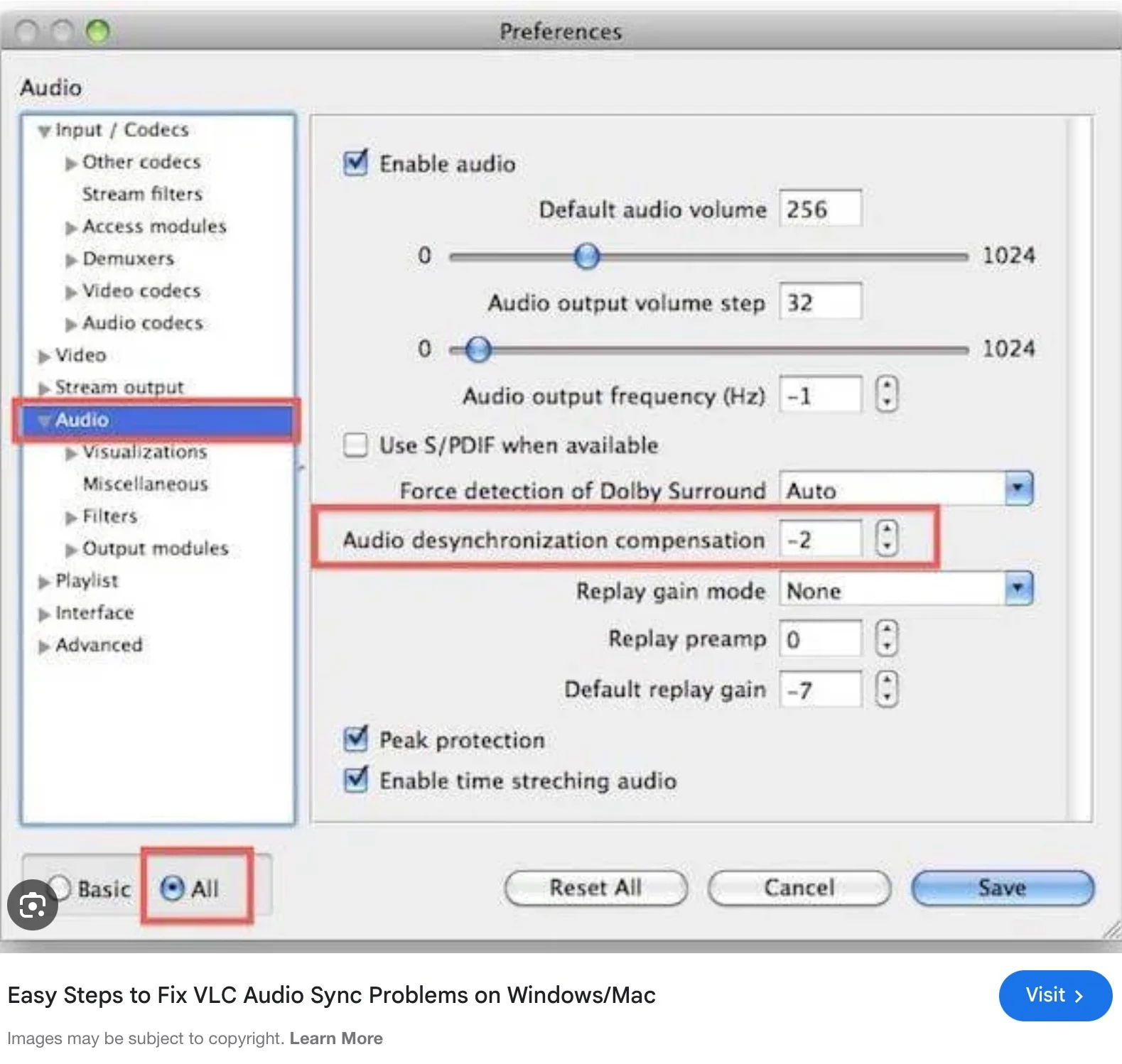
The exception I saw is VLC, so watching movies should not be a problem.
I do not get good lipsync when watching videos on a late model ASUS and my Phonak Spheres, which use BT Classic. It is not a problem watching how to videos, but is for movies.
This is pretty much normal for Classic Bluetooth. As RobHooft wrote, VLC helps on saved videos, both on Android and on PC. (I don’t know about Apple/iPhones.) The good news, such as it is, is that when comes out for the Infinios the latency should be much lower.
EXERCISE FOR THE STUDENT: Assuming a Bluetooth Classic latency of 350 milliseconds, calculate how many latency delays it will be before Phonak’s LE Audio update comes out.
both the sending device and the receiver need to support Qualcomm aptX for the benefits to be seen . As far as I know ,Phonak does not have aptX. Am I incorrect ?
In the iOS VLC app (on an iPad) you can adjust the audio delay, including for negative values (curiously, under “Audio speed”). I did not find this option on my Android device version, but it’s probably there, too, if you say so.
I did not find this option on my Android device version..
On PC it’s under Tools/Effects and Filters/Synchronization. On Android, it’s a drop-down in the Audio menu, accessed by pressing the icon in the lower-left corner of the playback screen. For some reason, I can’t find the setting anywhere in the Options menus when I run VLC on my phone without actually playing some media. Seems like a slight bug to me, but maybe someone at VLC thought it was a feature…
Indeed @LewBob classic A2DP for Earbuds and hearing aids adds some extra delay. Some Laptops / Tablets try to compensate for it (as this is intrinsic to the setup, not the hearing aids).
Low delay connection would be possible using the TV Connector interface, which cuts away the delay.
Ha, good to calculate, but then start from the correct value of roughly 150-210ms (the Jiiter is quite large due to TV-Internal synch between picture and Audio). BTW the pure Bluetooth delay is “only” around 120ms for A2DP. For true wireless earbuds and hearing aids it is longer, as the sound is not only transmitted to 1 headset, but the two headset also need to synchronize the “stereo” signal to for both ears.
True low latency ~25ms you only get with Roger or AirStream signals (proprietary format).
Interesting. I regularly connect my old Phonak Audeo P90’s to my computer by Bluetooth and never noticed the delay. While my TV’s are (probably classic) Bluetooth capable I rarely paired my ’s to them as I rarely watch TV.
I have the Infinios and I’ve haven’t had any issues.
Sound/Lip Sync issues can arise from various factors, including CPU/Memory, Bluetooth connection, browser settings, caching, and internet speed. To determine whether the problem is related to the aids, connect them to a phone or another computer and see if the issue persists. Alternatively, connect other Bluetooth headphones to the ASUS computer and observe if the issue persists.
One other option though expensive, get a roger device. I have a Roger On v3 and the delay is so minimal you can hardly hear it definitely can’t see it. It’s expensive but incredibly orth it IMHO. also means you can walk up to most computers, plug in the uSB and everything is already set up to listen.



 San Francisco
 Geneva, Switzerland