You’re ignoring this member’s posts.
Phonak Naida M70 & My Phonak app
This topic is closed.
64 replies3.7k viewsLast reply
leerich2004Author
I am guessing the programming of these are not easy to do at home? Do I still need a device to connect them to laptop and then the software?
It would be so good to be able to adjust more, as mine are NHS its taking a while to get to see anyone.
Previously with Resound, to Audiologist so did not know the software at all, and so many things could of tried.
Do hope one day users will get more control of these things.
You’re ignoring this member’s posts.

 Rural New England
I’d recommend taking questions and concerns to the DIY category. That location on the forums is a bit set apart and there are more folks there that will give your issues more attention.
WH
You’re ignoring this member’s posts.
Hi,
OK, is the NHS Phonak Nathos Nova M a version of the Marvin M for the NHS,
Try searching the net and some says it like the Marvin M30 or M50.
You’re ignoring this member’s posts.
leerich2004Author
Thanks all not sure what it all means and as NHS probably best off leaving well alone!
You’re ignoring this member’s posts.
leerich2004Author
Thanks have got some of these SD4 thin tubes and power domes and vented domes, both work ok and sound good power domes get a bit like suction/pressure by end of the day.
Got a selection of thin tubes from Connevans and the mid 0 size looks a good fit, and looks far better to, not that generally the looks bother me now but nice to have option to switch.
Will see if at next appointment if audiologist says need to adjust but cant tell much difference really.
You’re ignoring this member’s posts.

When streaming music or on a call is there anyway to lower volume of surrounding noise? or is it a case of lower volume of them before making a call or streaming music?
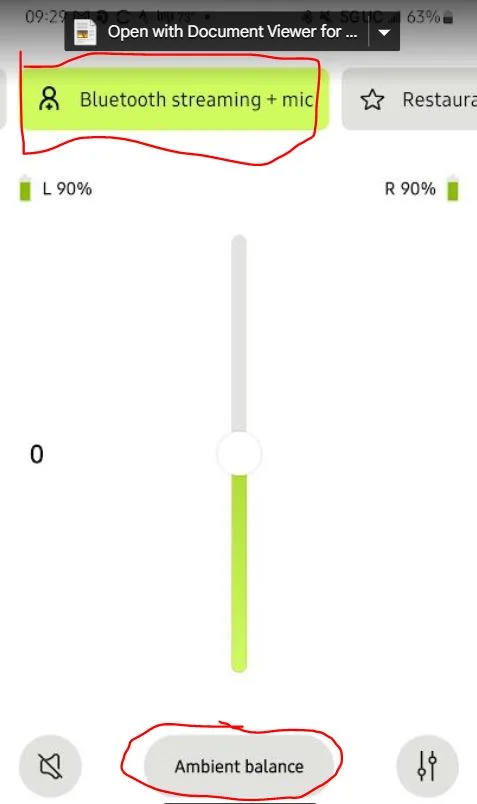
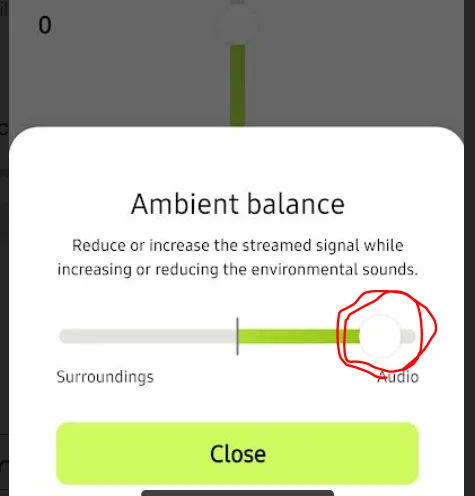
So this is quite some time back, but perhaps it might be helpful to you (or someone else searching). The extra sound while streaming bothered me too. You can adjust the surrounding/audio balance, however it seems to reset each time the are powered off/on. Also, not sure if this needs to be done for each streaming device separately. Be nice if this setting could be made permanent.
Just got my first HA, Phonak L 70-R this week.
You’re ignoring this member’s posts.

The symbol to the left of the ambient balance turns Mics off quicker then the way you’re doing it. 
You’re ignoring this member’s posts.
True, but I’m trying to keep a bit of mic still on … still experimenting though, I may just decide to turn off the mic all together down the line, then the way you mention definitely is the way to go. 
You’re ignoring this member’s posts.
The option is a max of -10 attenuation or OFF, that is it for audio, not Phone Calls.
Pre Marvel, technology, the Mics could be attenuated to a max of -30 dB.
Not sure why they changed it.
Default is -6 dB which is likely what yours are set as, now.
You’re ignoring this member’s posts.

 Croatia
I reduced it by -10db, and still press the volume UP on the hearing aid to make the sound balance 100% bluetooth stream. I was looking for the possibility to adjust the balance, but it is not available in the target software. I don’t want to turn off the microphone because sometimes I like to listen to music in combination with the microphone, for example when I’m in the store.
You’re ignoring this member’s posts.

 North West UK
Phonak Bolero Marvel M70 to be precise
They are very good hearing aids. It’s such a shame the NHS don’t spend the time to get the best out of them.
You’re ignoring this member’s posts.
leerich2004Author
My NHS audiologist, has pretty much said not much can do about, for me with mics on aids picking up sound in call its not much use in any noise situation, its better for streaming as mics go off, but it using for teams etc in work it uses mics so to loud for me and other users as the noise cancelling on them must not be very good compared to headsets or iPhone mics.
She asked Phonak to but no other options, an option use iphone mic would be good for calls, I can use laptop mic on teams but thats pretty poor for noise reduction.
You’re ignoring this member’s posts.
for me with mics on aids picking up sound in call its not much use in any noise situation
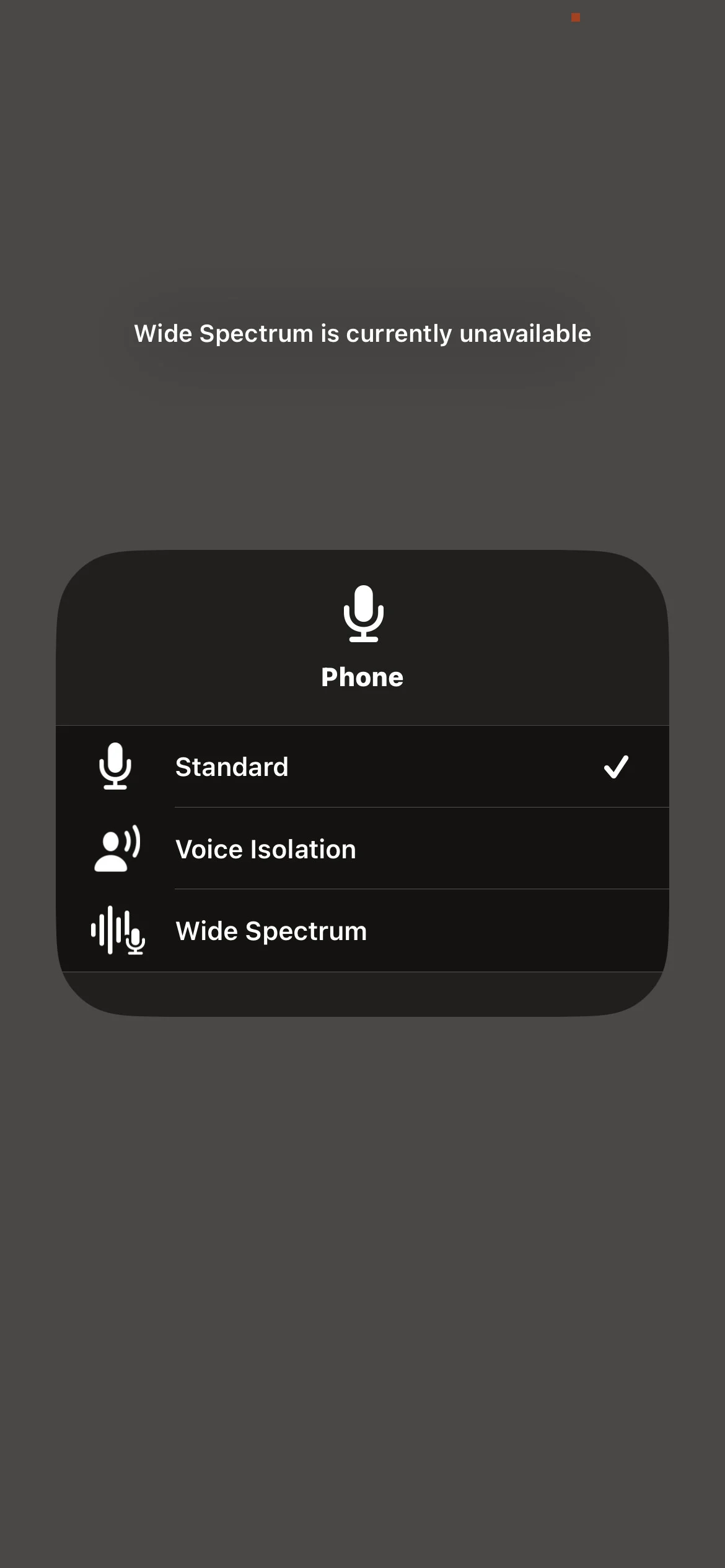
You can change to the iphone mic system. When on a call, drag down to open the control panel. You’ll see an item in there (on my phone top right) which gives me a menu of choices for the microphone to source the call. I can choose mics, iphone, or another item I can’t remember. You neeeed to be on a call to see this item in the panel to make the change. It is sticky, so once you make the change it stays until you change it again.
I read about it here recently, so there is another post floating around that describes it better (with probably a more accurate name for things than mine) to help you.
WH
You’re ignoring this member’s posts.
I can choose HA mics, iphone, or another item I can’t remember.
Is that on Phonak as that doesn’t work for me?
I can choose different Mic options on how they sound but actually the different options makes my hearing aids crackle so changed it back.
You’re ignoring this member’s posts.
Yes, I use audeo p90r . The voice isolation makes a big difference for me. My mom, ill in the hospital, called me yesterday while we were out shopping in a busy noisy grocery store. She is hard of hearing but refuses to consider treatment. The call went pretty well considering.
Sorry that you get crackling, I haven’t experienced that.
WH
You’re ignoring this member’s posts.
From what I was told, Voice Isolation is similar to Adaptive Bluetooth.
But Voice Isolation can be used without Bluetooth.
You’re ignoring this member’s posts.
Voice isolation uses a microphone at the top of the phone to sample noise, and the normal microphone for your voice. It then subtracts the noise from the voice. It is fully available when using the phone by itself.
WH
You’re ignoring this member’s posts.
leerich2004Author
Yeah I tried to say about the reduced - volume thing you mentioned but didnt get it I dont think at all.
I will have to print this off next time!
You’re ignoring this member’s posts.
leerich2004Author
Thanks I don’t get these options on an iphone 11 pro, I get same as zebras but the options don’t seem to make much difference.
Is this on an android phone maybe? as I have cheap one to try if this works.
You’re ignoring this member’s posts.
Related discussions
Hearing Aid Self-Fitting (DIY)7 replies
Hearing Aids2 replies
Hearing Aids1 reply
Fitting Software Requests1.1k replies
Uncategorized451 replies