Hi, Phonak target is blocking any movement above the 2 and 3 Khz…
How
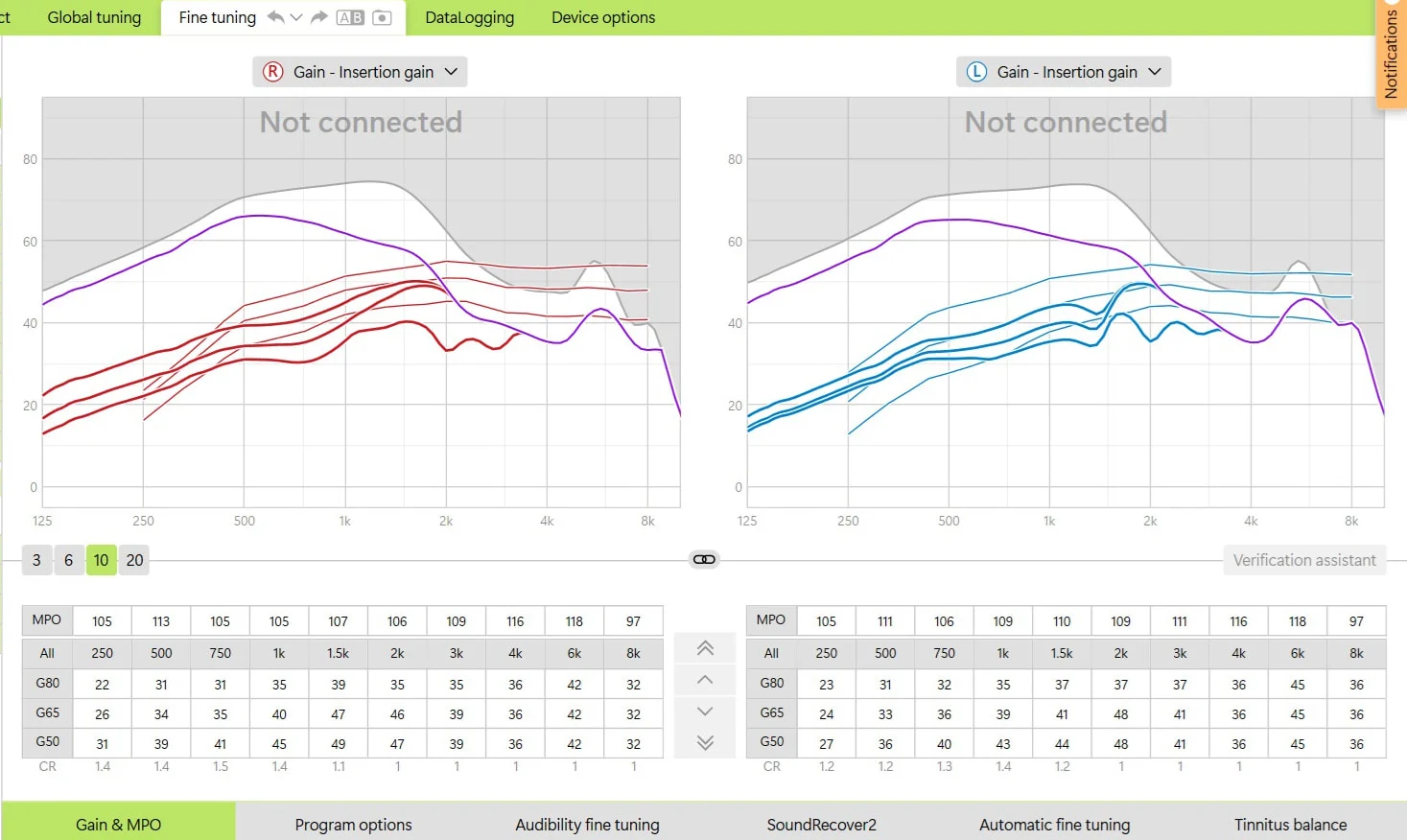
can I unblock this so I can change the G50 65 and 80 and the compression ratios? Thanks
You’re ignoring this member’s posts.
17 replies336 viewsLast reply
Hi, Phonak target is blocking any movement above the 2 and 3 Khz…
How
You’re ignoring this member’s posts.

I’m not surprised, one thing at a time, get your acoustics right and stop any leakage and then redo the feedback, then come back to fine tuning, I recommend you read the user guides before going any further as this could help you “gain” further insight, post your audogram as this would be helpful, cheers
You’re ignoring this member’s posts.
You’re ignoring this member’s posts.

In addition to what @tenkan said:
The diagram shows:
You are most likely using a Phonak I30 with UP receivers, NAL-NA2 fitting and, probably 1mm vents or no vents. The hardware, the sealing and feedback risks are limiting your gains above 2Khz. It is not that Target is limiting you, it’s your physical setup.
So yes, as @tenkan said, go back to the documentation and understand what each line and areas in the chart mean – you cannot go above the purple curve without the risk of feedback. Grey areas are outside of the capabilities of the aid.
Why do you want to change the CRs? CRs on the chart look good
You’re ignoring this member’s posts.
probably 1mm vents or no vents
I think there is even 2 mm vent or very shallow cShell. Not want to argue, just my feedback threshold (thick violet line) with 1mm is much better (closer to the limits of the UP receiver).
There is also a possibility that feedback test should be redone, perhaps previous one was performed in not quiet condition…
You’re ignoring this member’s posts.
I just ran a simulation and I got a match with 1mm.
That said, I’m not not familiar with molds — you have more knowledge about them than I do 
You’re ignoring this member’s posts.
I just ran a simulation and I got a match with 1mm.
Aaargh, indeed, in my case, simulations give too pessimistic outcomes regarding feedback threshold 
@JNelson you can add your im your profile settings. Click your avatar and then your nick and then “My audiogram”.
You’re ignoring this member’s posts.
You’re ignoring this member’s posts.
Hi,
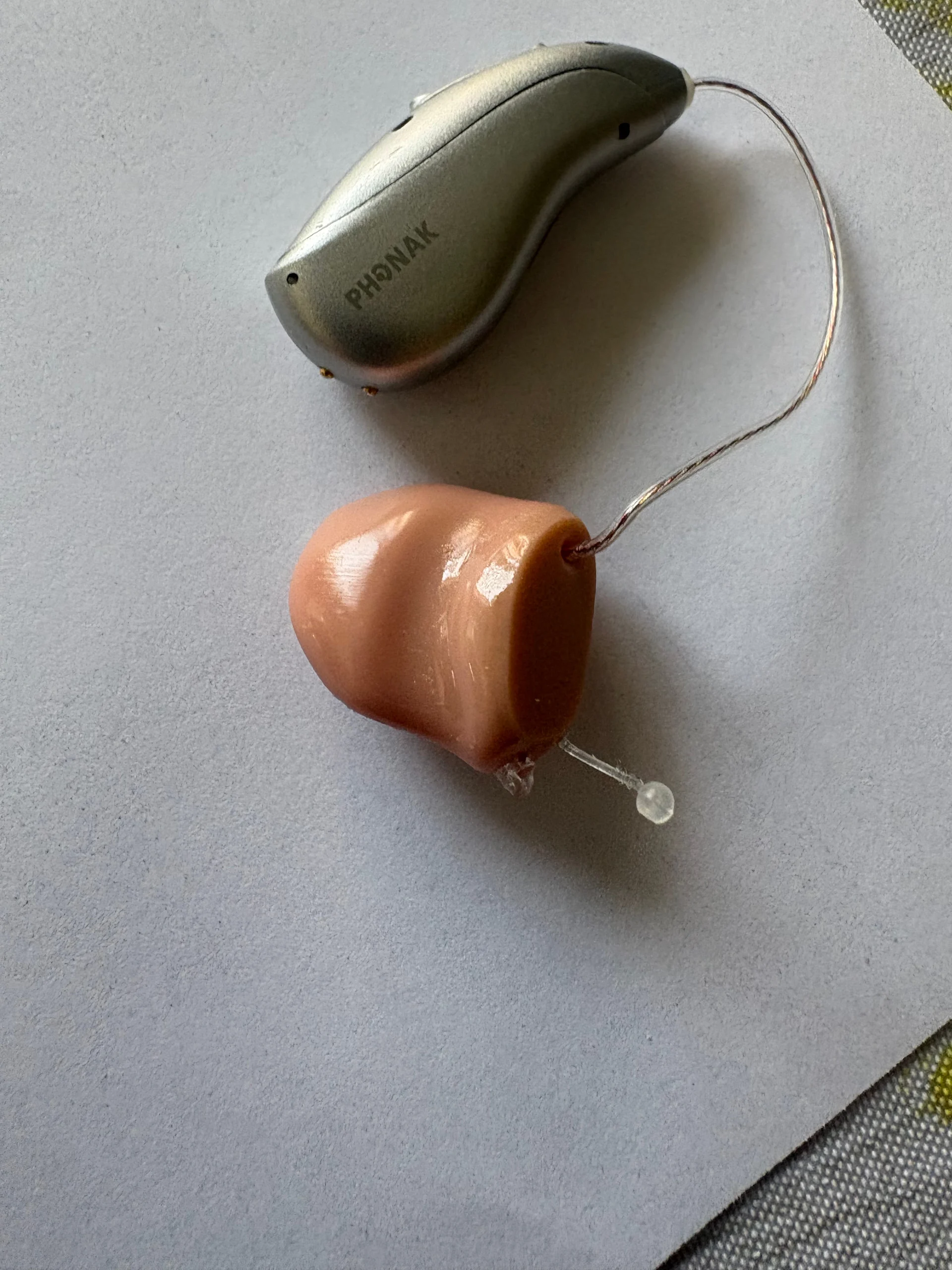
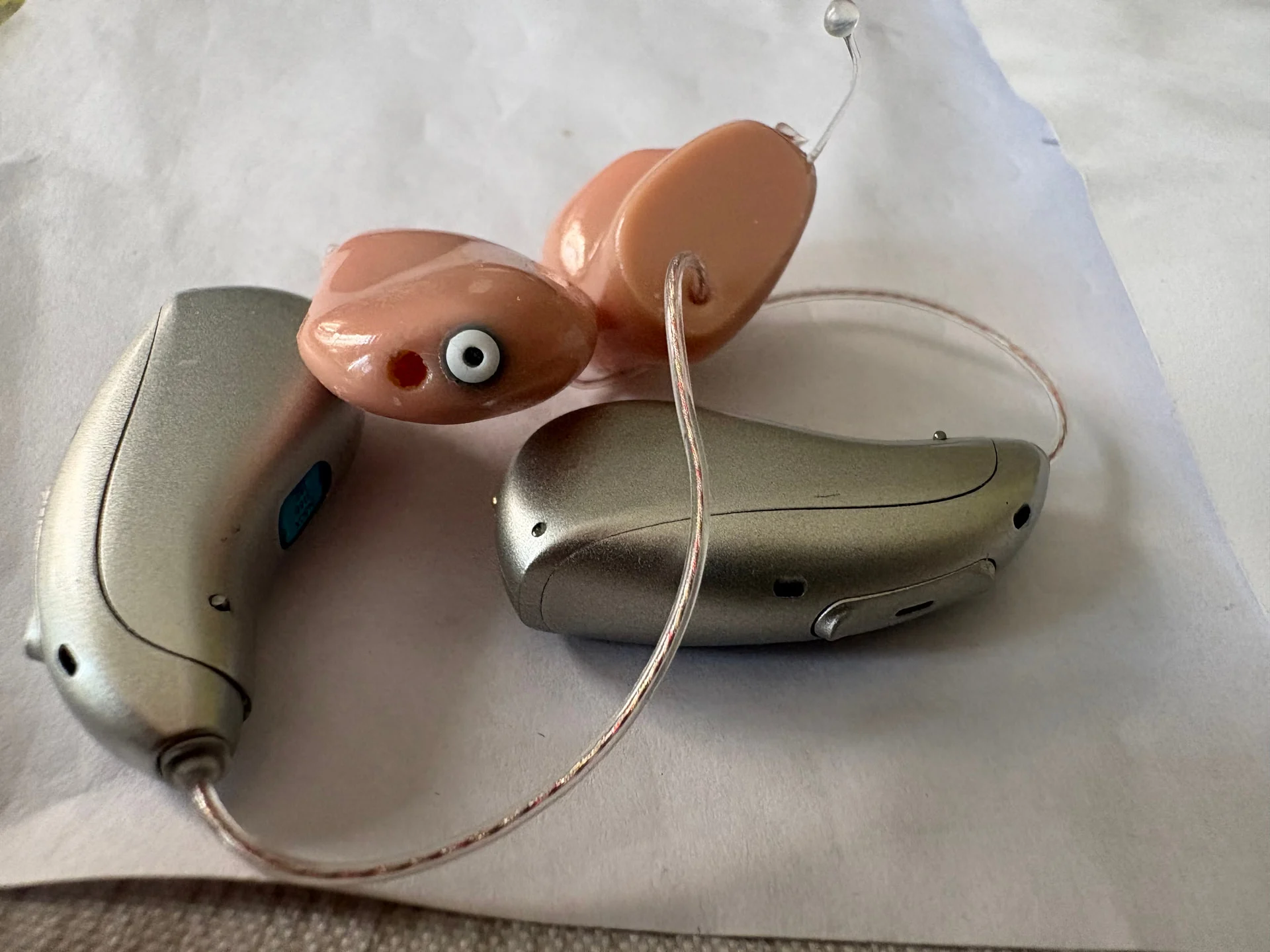
Phonak Infinios I90. Up receivers in c shells, NAL NA 1mm vents but audio set them to power vents with plastic adapters, the compression ratios above 2 Khz are all flat and have the same numbers, they supposed to be different and to amplify the not so loud sounds more than the laud sounds? Thanks
You’re ignoring this member’s posts.
the compression ratios above 2 Khz are all flat and have the same numbers,
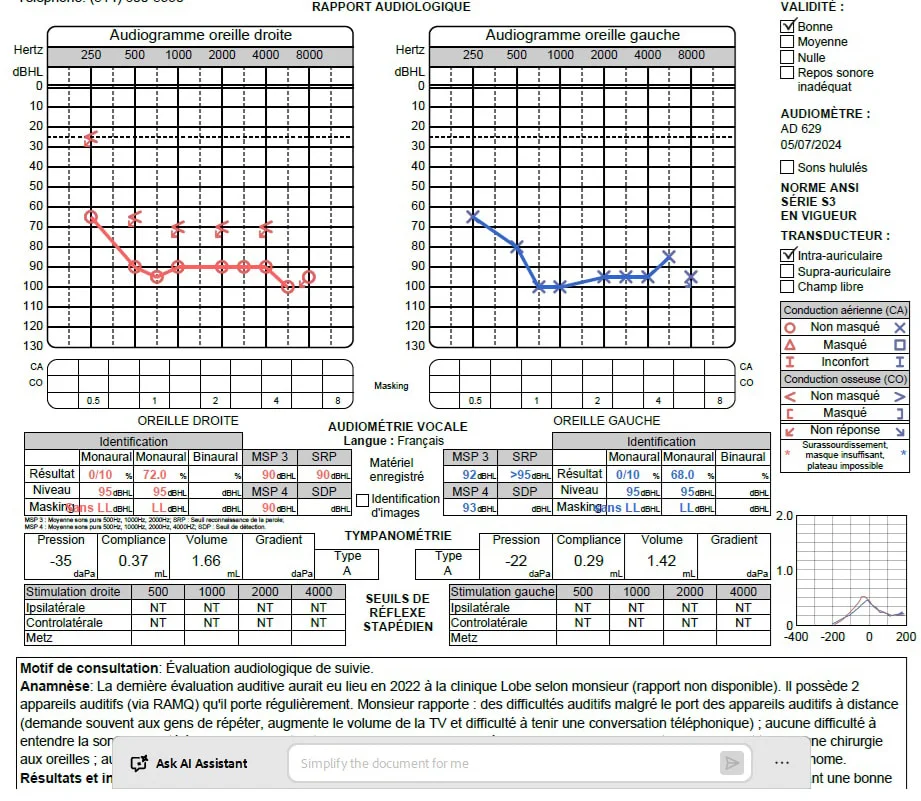
Yeah so your audogram shows a flat loss, that’s quite a profound loss and occluded fit would be the way if you can handle/get used to occlusion, are you saying your moulds are pressure vent or something?
You’re ignoring this member’s posts.
c shells with UP receivers or speakers, pressure vent is very small vent just to allow air pressure out of the ear canal.
You’re ignoring this member’s posts.
the compression ratios above 2 Khz are all flat and have the same numbers, they supposed to be different …? Thanks
Where did you get this information from? This makes no sense to me.
to amplify the not so loud sounds more than the laud sounds
That’s what the G50, G65, G80 curves are for. Your G80 values are not above the G50 hence the loud sounds are not being amplified more than the soft sounds.
A normal person can have a hearing range of 0dB to XXXdB. You have a range of 90dB to XXXdB. So all the sounds from 0dB to 90dB have to be fitted in the 90dB to XXXdB. This is what compression is about (oversimplifying). In other words, a reduced hearing range requires squeezing a wide range of acoustic inputs into a much smaller usable hearing space .
One reason to attempt to modify the CRs is, when the compression is high, ,they can create sound distortion (e.g. listening to music) but sometimes they are needed depending on the person’s needs. As you can see, this has nothing to do with “flat” or “all values are not supposed to be the same”. There is a rationale behind all this.
See chapter 3, page 21, link below:
https://order.starkeypro.com/pdfs/The_Compression_Handbook.pdf2
I’m curious: your gain values are below the prescribed target (mostly), the aids are below the prescribed target at higher frequencies. How are the current settings working for you?
What would an optimal compression ratio be around? I read somewhere else that it shouldn’t be higher that 3.
You’re ignoring this member’s posts.
Hi,
thanks for the information, I didn’t know this, chatgpt told me about the CR and that they were flat and that because of that when I raise the and the G50, 65 and 80 the hearing aids sound tinny or like an old Chinese opera with a Japanese transistor radio from the 60s. Well I appreciate your help with this and yes the hearing aids are below prescribed targets, can you suggest the values for my prescribed target should be for 2Hhz and above or show me how to calculate or figure them out from my audio gram for G50, 80, 65 and MPOs The current settings work so, so or more or less OK for me but could sound better especially for the high frequencies, perhaps.
You’re ignoring this member’s posts.
Ah, , that explains everything.
Forget about and CRs for now.
Read the guides available here as @tenkan mentioned.
Target user guide:
Main - Target User Guide | Phonak3
This guide provides you with a detailed introduction to hearing instrument fitting with Phonak Target.
AudiologyOnline has good resources:
Phonak Target Software: Flexibility Meets Expertise | 42918 | Hearing Course...4
Target fitting software is an integral part of the fitting process and is being updated regularly. While much of the fitting software remains the consistent with previous versions, updates include new hearing performance features, programing options...
The thin red lines are the prescription targets, the thick lines are your gains. You need to match the thin lines with the thick lines. The documentation shows how to do it.
For the values >2Khz , you won’t be able to match the prescribed values due to the feedback limitations. Enabling SoundRecover2 at 2Khz may help.
You’re ignoring this member’s posts.
I’m not sure what your actually doing but you could get familiar with how target works before starting your projects, obviously you know how to set up a client and enter your audogram, so is start with a new one, just be sure you have set the correct acoustics and then let target set the default values, be sure you set your client as “experienced” from there you can experiment with the different formula’s, DSLv5 etc to see how you like this, remember target has a built-in auto adjustments, play around to see how target changes the gain curves, remember changing one gain handles makes automatic changes in the others, so a bit of trial and error to find the settings your happy with, but just going in blind is not gonna help.
You’re ignoring this member’s posts.
You’re ignoring this member’s posts.
You’re ignoring this member’s posts.
There is also a possibility that feedback test should be redone, perhaps previous one was performed in not quiet condition…
Did you tested that…?
You’re ignoring this member’s posts.
Log in to reply to this topic.
Hearing Aid Self-Fitting (DIY)5 replies
Fitting Software Requests869 replies
Hearing Aid Self-Fitting (DIY)298 replies
Hearing Aid Self-Fitting (DIY)80 replies
Fitting Software Requests181 replies
 San Francisco
 Poland