
I, too, wear Marvels and am in the process of ordering my Lumity. It would be interesting to compare notes once we receive them! 
You’re ignoring this member’s posts.
This topic is closed.
349 replies23.6k viewsLast reply
I, too, wear Marvels and am in the process of ordering my Lumity. It would be interesting to compare notes once we receive them!
You’re ignoring this member’s posts.
Still In trial with the L90s. Left isn’t where I want it and had issues in a restaurant today hearing my wife on my left side. All in all I’m pleased but will request adjustments when I go in this Friday. Leaning toward the L70.
You’re ignoring this member’s posts.
I have Phonak Marvel 70. And when I hot a new iPhone 12 Pro, I started getting static
On my calls. Audi just said it is a problem
Everyone has and to reboot each day.
Still have problem and have to talk through
The speaker function. My iPhone 8 worked
Fine. I’m thinking about getting the new
Lumity hearing aid and new iPhone if it
Would solve this problem
Any advice
You’re ignoring this member’s posts.

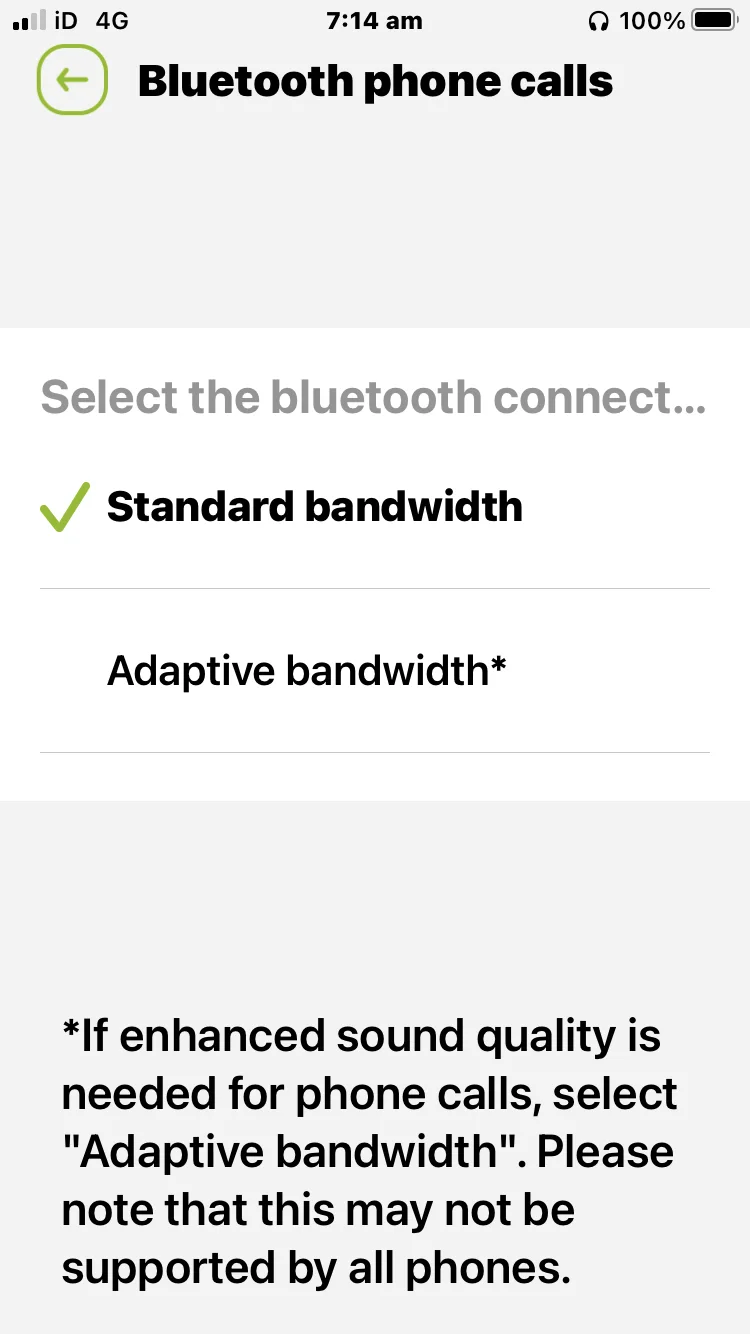
Certain phones don’t support certain Bluetooth Bandwidths.
Change it in the App and see if it solves the issue.
My old phone didn’t support Adaptive Bandwidth but my new phone does.
I got static until I changed the Bandwidth.
I have the Junior myPhonak App so will be slightly different to yours. Read the bottom of the picture.
You’re ignoring this member’s posts.

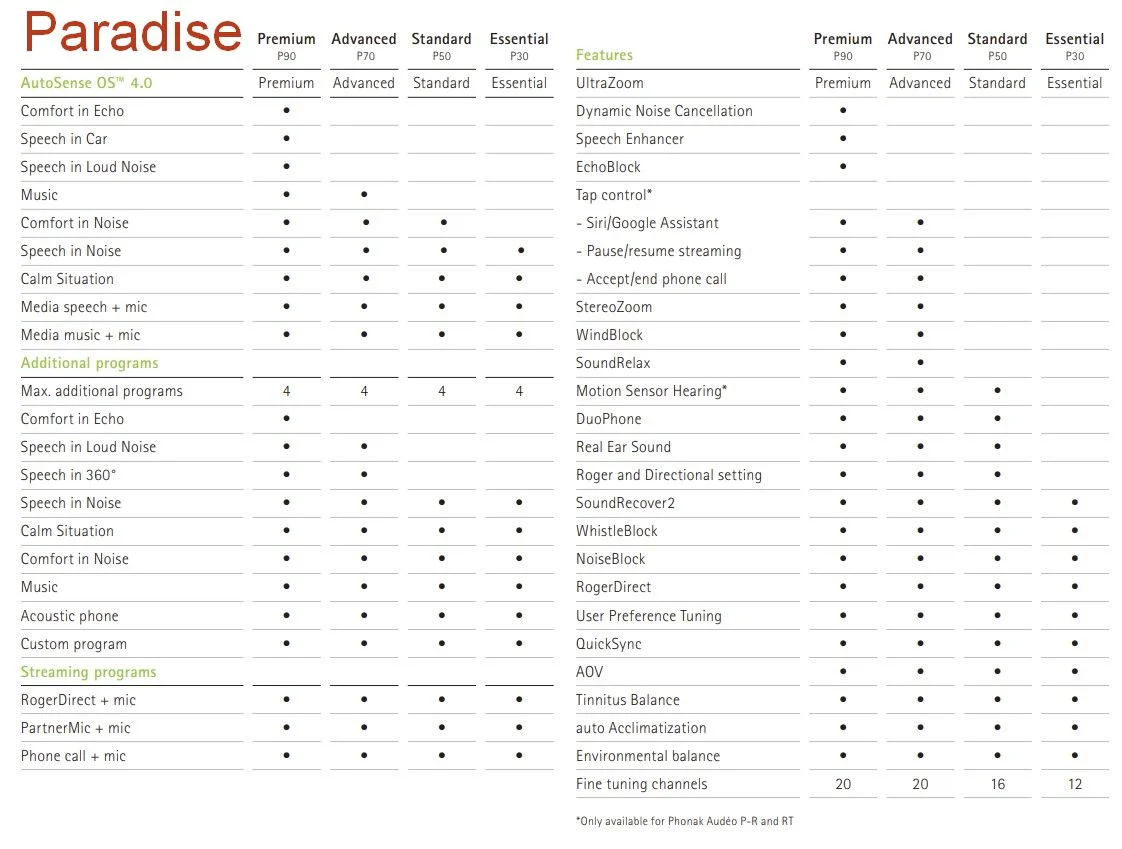
Comparison between Phonak Audéo P-Paradise/Autosense 4.0
Source Link; Phonak Audéo P-Paradise Product information PDF file7
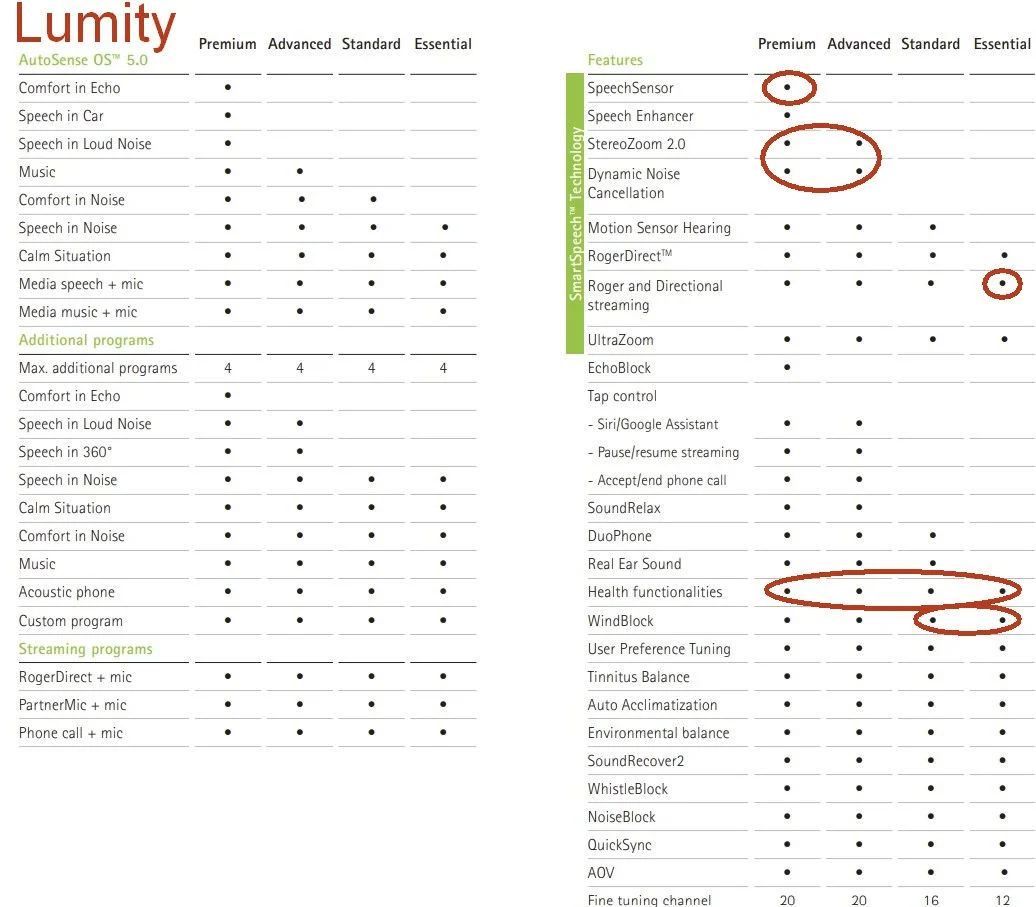
Phonak Audéo L-Lumity/Autosense 5.0
Source; Phonak Audéo L-Lumity Product information PDF file15
I have circled the new features/new technology.
You’re ignoring this member’s posts.

 Western Washington
What follows are a few anecdotal (but non-technical) observations based on wearing new Phonak Lumity (L90s) for the last week or so. Over the last four years I have been using both Phonak Marvels (M90s) and Phonak Paradise (P90s) aids with several issues, and all of these issues have disappeared since starting to use the Lumity aids … so I am thrilled!
In particular:
The daily battery life seems to be improved. I found that when using my previous rechargeable aids, the battery would die after about 12 hours of use. Admittedly, I stream either music or TV most of the day, so I was not really surprised. At about the 12 hour mark, I would just switch over to another pair of aids. With my Lumity aids, I have been able to go from 9 in the morning until midnight, and still have battery to spare!
When taking my daily walks with my previous aids and an iPhone, I would have Bluetooth music dropouts in front of certain neighbor’s homes, but with the Lumity aids this no longer happens. So far I have not had any music dropouts at all. Nice!
When watching TV using the TV Connector and previous aids, the aids would regularly drop into the AutoSense program, disconnecting the TV audio. I suspect that my Apple Watch and some sort of Bluetooth interference was to blame, but never resolved the issue. This interference has disappeared while using the Lumity aids and the same TV connector. Very nice!
Let me know if you are aware of any firmware/hardware improvements on the Lumity aids over previous models that may have solved my issues . Better Bluetooth receiver? Newer version of Bluetooth? Improved battery? The new operating system?
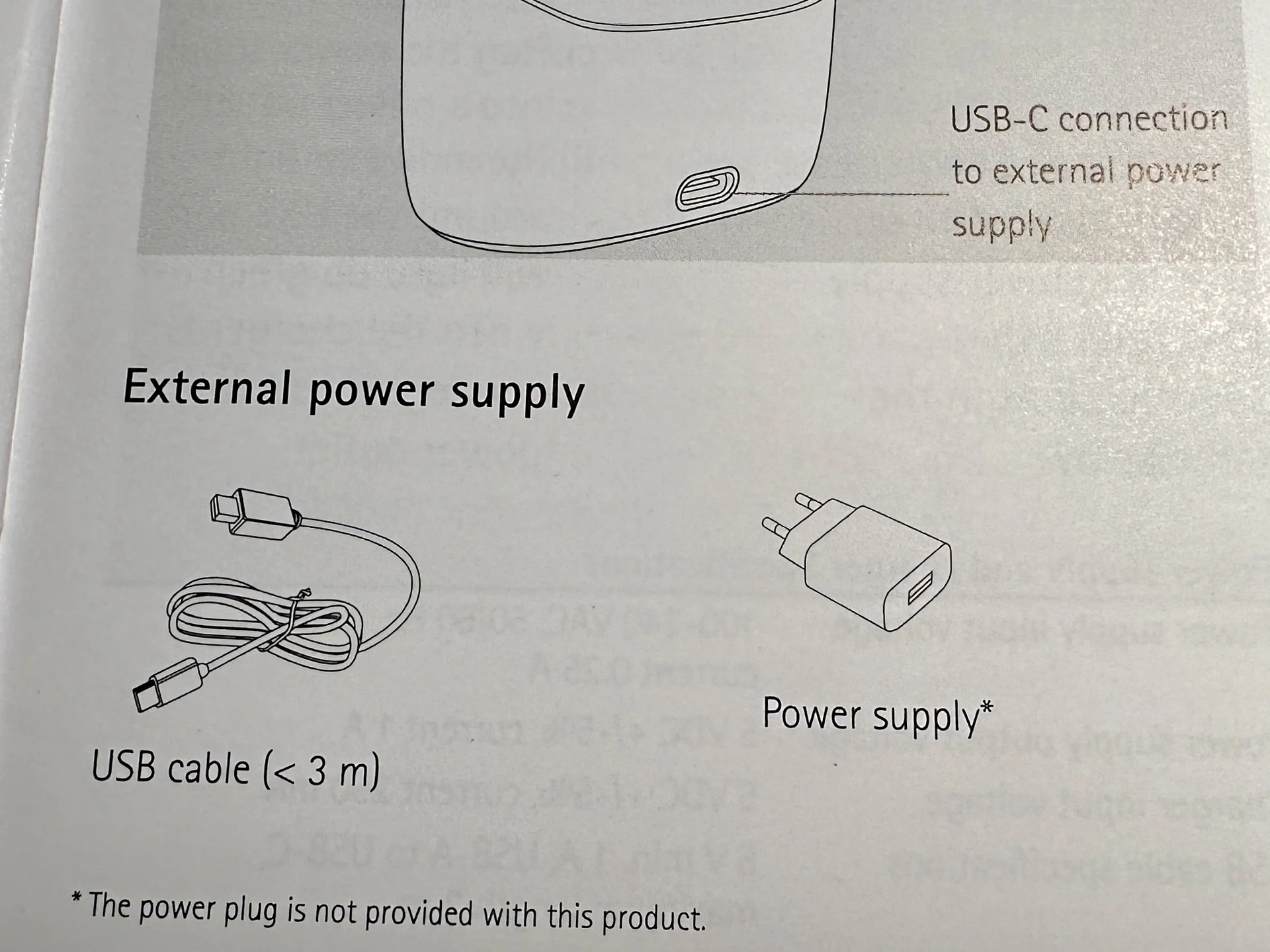
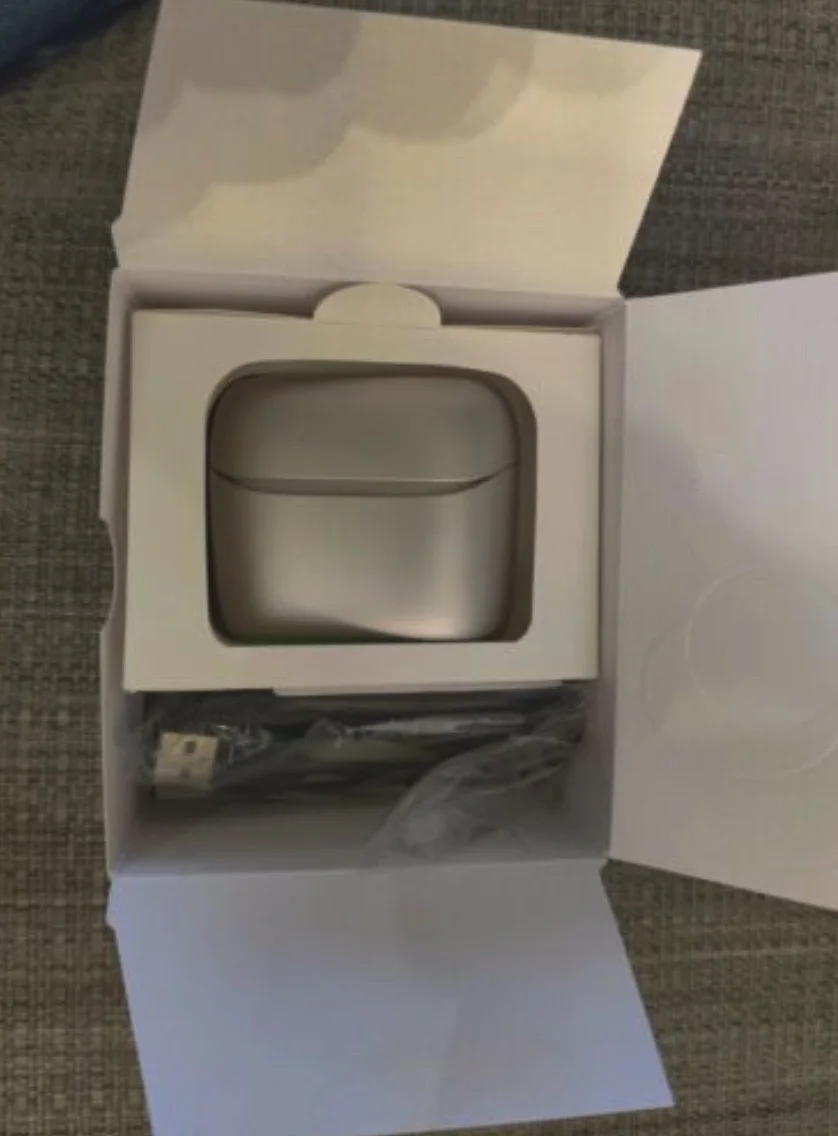
P.S. My only little gripe is that Phonak does not provide a power brick with its Lumity charger (see photo of page from the User Guide). So, see if your audi can provide you with one, if you need it.
You’re ignoring this member’s posts.
You’re ignoring this member’s posts.
Western WashingtonLucky you. I guess from Phonak’s point of view, eliminating a boxed adapter makes international sales much easier … same box worldwide. This is what the current Lumity Charger Ease box looks like now … no power brick:
You’re ignoring this member’s posts.
twilkins10 - Your last post that I see about your trial of the L90s was Oct. 8th. Did you decide to go with the L70s which you said you were leaning toward (https://forum.hearingtracker.com/t/phonak-unveils-lumity-hearing-aid-platform/70343/331?u=owl1)?
What stood out most for me in your postings about the L90 was your mention that you play acoustic guitar, and that for this you liked the sound of the L90. I also play acoustic guitar, so that do a good job in this way is important to me.
I’m new to HAs, and recently began with just entry-level Phonak Marvel G30s, knowing that they’d probably be poor (and they have been, especially for my guitar playing and listening to my wife’s playing on another instrument).
I’d love to know what you decided. A number of forum members have taken the trouble to point out that the features that come with the higher priced Lumities are not that different from what you get with Paradice HAs. Do you have any thoughts about the need for the new features from the standpoint of playing acoustic musical instruments?
Many thanks!
You’re ignoring this member’s posts.
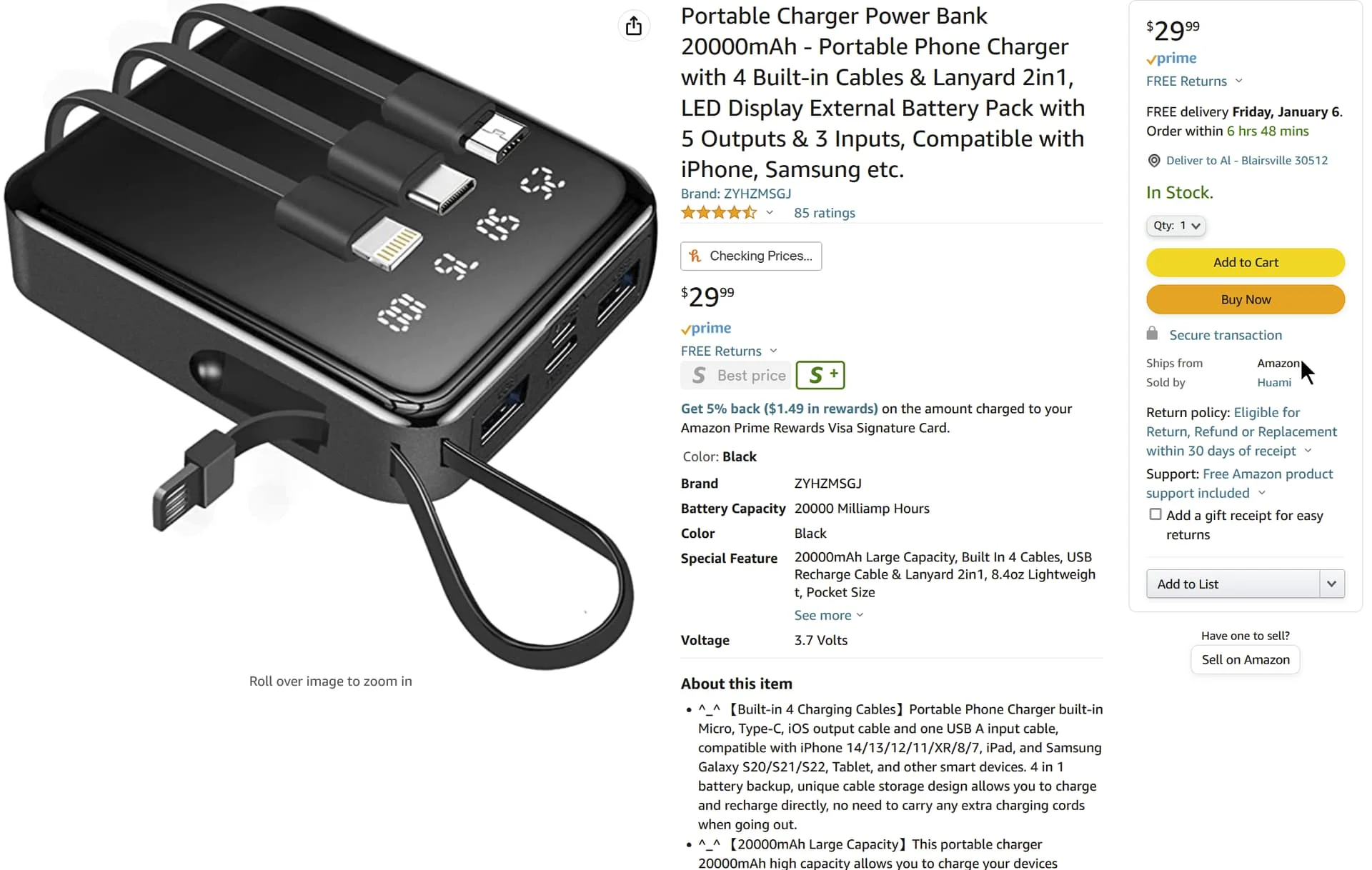
This power brick is really nice to use with the Charger and many other devices since it comes with all the built in cables you would need and the lanyard/charging cable:
You’re ignoring this member’s posts.
I too have worn the Paradise aids and recently upgraded to the Lumity L90-R. With regard to your comment about battery life, I have noticed that mine will be around 25% after 14 or 15 hours of wear. Also, the Lumity Model provides a noticeabe improvement in speech understanding, including in a noisy environment, which means less listening fatigue. I really love the Lumity aids!
You’re ignoring this member’s posts.
So the 150% wasn’t a mistake
I know this is a bit late but thought would add this for information.
It is all marketing BS. Human hearing is in and 10 dB higher means you perceive it as double the loudness. The human ear cannot easily differentiate level changes of less than 1dB. So while 4.5dB is not something to be ignored, you are not hearing 2.5 times better but perhaps just 1.3 times or 30% better compared to the previous version of the device.
You’re ignoring this member’s posts.

Connectivity/Streaming - I DO love that both my Lumity Life AND the Marvel aids are actively paired and connected to my Samsung Galaxy Flip4 phone!
@bluejay That’s great! I just got a Lumity hearing aid (cochlear implant, other ear) and I love it! I did trial a ReSound Omnia first because of the implant. To me not much better than my Quattro 9. Anyway, you mention you are able to stream/connect both your Marvel and Lumity to bluetooth on an Android phone, can this be done on an iPhone? I’m not saying at the same time when both are on, but while the Lumity is charging, for example. I would think this could be done with a KS9 and a Lumity aid.
I hate switching to my ReSound to andwer calls or stream while I charge the Lumity.
You’re ignoring this member’s posts.

Anyway, you mention you are able to stream/connect both your Marvel and Lumity to bluetooth on an Android phone, can this be done on an iPhone?
Hey debbie_o, glad you’re enjoying the Lumity aids! I’m sorry I am clueless about iPhones! I only have my Android cell phone, so perhaps someone else here will chime in?
I am indeed able to have both the Marvel & Lumity aids paired to my cell phone, but I only get ONE pair connected at a time when it streams. Works for me!
You’re ignoring this member’s posts.

can this be done on an iPhone?
The Lumity hearing aids can connect to any iPhone !
You have to pair the Phonak hearing aids via bluetooth ( 3 pairings ).
Phonak hearing aids use multiple versions of Bluetooth® for mobile devices (Bluetooth Classic for standard phone use e.g., phone calls and streaming music and Bluetooth LE or “Low Energy” for the app). Some phones recognize each version of Bluetooth as a separate device. In that case, three devices may be displayed when pairing two Phonak hearing aids (one connected via Bluetooth Classic, and two using Bluetooth LE to connect to myPhonak).
Important notes:
Only one hearing aid is connected to the phone via Bluetooth Classic. This is normal.
The names R-Phonak / L-Phonak may be different depending on the settings made by the hearing care professional.
Android™ phones:
The two Bluetooth devices LE_R- Phonak and LE_L- Phonak are for the myPhonak app. They connect automatically when the user starts using the app. Never delete these as this would disable communication between the app and the hearing aids.
iPhone®:
The Bluetooth devices LE_R-Phonak and LE_L-Phonak displayed as “Not Connected” are connected to the myPhonak app. They will automatically connect when the app is opened.
You’re ignoring this member’s posts.
can this be done on an iPhone?
See here
I have two Naida M70 aids (NHS UK issue) and they are brilliant, particularly for TV/PC with the Phonak connector. I’ve had them for just over a year. Until recently I haven’t tried to use them consistently with my mobile although I do know they work as somehow I once ended up receiving a call (ages ago) which streamed directly to my HAs. Recently I decided to try to set things up so I could use my phone in this way - i.e. direct to my HAs. I currently need to make more phone calls and this…
First, be aware that on the phones Bluetooth section you should have three paired connections for your Phonak Audeo aids. Two are LowEnergyBT for controlls , and one is classicBT for audio streaming/phone conversation.
Check in the phones BT settings.
During the pairing process you should get permission questions for each of the three BT devices. Accept each pairing question for each of the three BT connections. The pairing process need only done once…
You’re ignoring this member’s posts.
Okay I did get the Marvel paired back to the phone and use the aid for calls and streaming while my Lumity charges. When I look in , it has both my KS9 and my Lumity aid are now in the BT list of debices. So. Incan switch back and forth easily. So glad I don’t need to put my calls on speaker anymore.
Now, the tough question. On the Phonak app can I have the Lumity and KS on the app, not at the same time. I’m stuck in Auto Sense on the KS9 and don’t want to stay in Auto Sense on the KS 9 while wearing that aid. I’d like to access the profams in the KS 9 when wearing that aid and when I turn off the KS9 and put in the Lumity programs when on the app. You can’t download two copies of the My Phonak app and can’t create a second account or profile. I think I’m going to be stuck on Auto Sense on the KS9’s while my account is only tied to the Lumity and only have the flexibility to .change programs.
You’re ignoring this member’s posts.

Maybe this is a possible solution?
https://www.makeuseof.com/run-two-copies-of-app-android/
Found here:
What also work is the app cloning on Android phones. If you have an Android phone than you can use the feature: Dual Apps / Parallel Apps / Clone Apps etc…, each manufacturer have differnet name for this feature. On my Xiaomi phone it is called Dual Apps, and you can go to settings and search Dual Apps then select MyPhonak , it creates a copy of the app (twin instance) with a slight different symbol on the start screen. The cloned app have the yellow clone symbol. [grafik] Each instance is …
You’re ignoring this member’s posts.

Now, the tough question. On the Phonak app can I have the Lumity and KS on the app, not at the same time. I’m stuck in Auto Sense on the KS9 and don’t want to stay in Auto Sense on the KS 9 while wearing that aid. I’d like to access the profams in the KS 9 when wearing that aid and when I turn off the KS9 and put in the Lumity programs when on the app. You can’t download two copies of the My Phonak app and can’t create a second account or profile. I think I’m going to be stuck on Auto Sense on the KS9’s while my account is only tied to the Lumity and only have the flexibility to .change programs.
I understand the app will only allow one pair of hearing aids. If, like me, you don’t wish to use Autosense, it can be removed/disabled in the fitting software. Since I’ve done this, I rarely feel the need to use the app at all. I have my P90s installed on my main phone. I also have both my P90s and M70s set up for streaming/calls on this, and a second phone. Only one set will connect at any particular time however. I have the app on my 2nd phone for the M70s, but rarely use it.
Peter
You’re ignoring this member’s posts.
First, be aware that on the phones Bluetooth section you should have three paired BT connections for your Phonak Audeo aids. Two are LowEnergyBT for controlls , and one is classicBT for audio streaming/phone conversation.
WOW I never knew that. I’m still debating whether to just download the myPhonak app, but I appreciate this helpful tip for if/when that happens. I doubt my audi would’ve told me so,
You’re ignoring this member’s posts.
What the forum has been talking about this week.
Fitting Software Requests1.1k replies
Fitting Software Requests513 replies
Fitting Software Requests419 replies
Hearing Aid Self-Fitting (DIY)301 replies
Hearing Aids104 replies
 London
 Switzerland
![[grafik]](/uploads/original/04fde37adca30a72215565cdce8054a894fd63c6.jpeg)