
 San Francisco
This is VERY useful information, I was looking for this and I couldn’t find it. Thanks for sharing
You’re ignoring this member’s posts.
This topic is closed.
40 replies873 viewsLast reply
This is VERY useful information, I was looking for this and I couldn’t find it. Thanks for sharing
You’re ignoring this member’s posts.
6.1.113 is the latest firmware. There’s no recent update.
Maybe some kind of app bug or Compass disconnect issue from when you last connected? Hopefully the audiologist can reinstall the firmware and recover them.
You’re ignoring this member’s posts.

I’m going to try this first before getting the Pro-Link.
Makes perfect sense, $60 is a lot cheaper then ProLink.
You’re ignoring this member’s posts.
Sometimes, just need a Micro USB to USB A cable. 
2 Widex Pro Link Wireless Fitting Device #2A (LVRC) | eBay5
Functionality -F3 – Key Functions Working. Zero defects. A subset of the original functions of the device that an. ordinary user of the device expects to function are. Hardware required for key functions to be tested may.
You’re ignoring this member’s posts.
The weird thing is if it’s a firmware issue the would be bricked, you say it actually still works just not connecting through , any “broken” firmware update has usually bricked the HAs, so this has ment in most cases that they had to be sent to the manufacturers to reflash, hopefully you’ll get this sorted for the quoted $60.
You’re ignoring this member’s posts.
You’re ignoring this member’s posts.
Million dollar question. If I were to guess, give it a charge off the USB cable from a computer, might be slower, but should work. I don’t think it would work without at least a little bit of an existing charge before performing any fitting with the software. Wouldn’t want to brick any hearing aids.
Edit: I found the user manual online. Here’s a copy/past quote, note the bold portion:
You’re ignoring this member’s posts.
This is great information , now I want to buy to play with it and give you guys a report . If the audiologist can’t do anything tomorrow, I’ll get one
You’re ignoring this member’s posts.

Have you tried the following steps?
Update the firmware of Noahlink Wireless. If its firmware is already the latest version, please reinstall the firmware several times.
Replace the USB cable of Noahlink Wireless.
Create 2 new client profiles in Widex Compass GPS, and connect each profile to one of the hearing aids respectively.
Replace the receiver of the hearing aid that you cannot connect to. Note that the receiver of some hearing aids also functions as its antenna.
You’re ignoring this member’s posts.
You also need to turn off Bluetooth in your iPhone’s Settings, as the Bluetooth turned off from the screen’s dropdown interface (Control Center) does not actually disable it completely.
You’re ignoring this member’s posts.
You’re ignoring this member’s posts.
You’re ignoring this member’s posts.
Thank guys for all the recommendations. I got the issue fixed.
I went to a local biz here in San Francisco. Here is the report:
1.- couldn’t connect the HAs using Noahlink . Widex Pro-link worked.
2.- Compass didn’t report any firmware issues. Why the app kept trying to re-install the firmware: No clue.
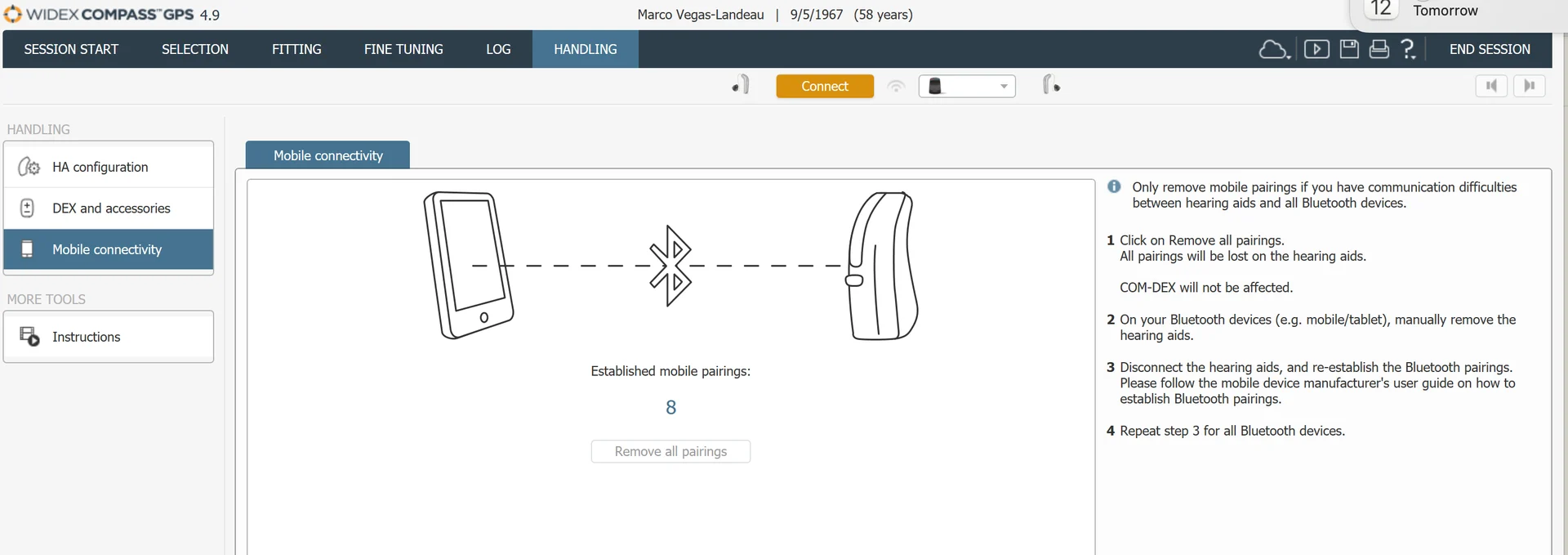
3.- I asked her to remove all connections in Compass. Compass showed I have 8 BT connections (I have 4 devices, so no clue where the 8 came from). Widex Compass has a section that says “Press this button if the HAs are having BT connectivity issues. The button deletes all BT connections stored”.
4.- Issue fixed.
HIS told me they usually charge $500 for new patient intake but that she was going to charge me $25. She saved my info and added me to Noah database. I am not sure if this means they are now my provider in the Widex database (I bought the devices on eBay)..
I’m definitely going to use these people if I need help in the future.
So here we see a disadvantage of not having buttons. I believe with Phonaks, you can reset the BT connections by long pressing the volume buttons.
If I see a Pro-Link on eBay cheap, I’ll buy it.
You’re ignoring this member’s posts.
Fantastic news, and only $25 and not the intended $60, a really good deal, as they’ve added you as a patient in NOAH it’s a good idea to stick with them now 
You’re ignoring this member’s posts.
Wow, your visit to the biz turned way better than I could have hoped for you!
I had a look in Compass GPS and see where to disconnect the bluetooth devices. I had noticed it when I first installed the software, but never thought too much about it. After your experience, it’s seared into my memory?
Edit: I too have 8 bluetooth devices showing as connected in Compass GPS, but only have 4.
Happy Friday!
You’re ignoring this member’s posts.
Yes, they had to use the Pro-Link, Noahlink didn’t work. Yes, if I see a cheap one on eBay, I’ll buy one. I’m so relieved and happy that it did not have to go to Widex.
You’re ignoring this member’s posts.
The problem was with the Bluetooth stack and not firmware at all? You should let Widex know as it sounds like they need a firmware update to fix this glitch.
Should we clear out the pairings in Compass from time to time?
You’re ignoring this member’s posts.
My plan is that — don’t let the stack get full.
For some reason, the problem was triggering the firmware update process everyday. No clue why.
You’re ignoring this member’s posts.
Thanks for sharing the findings and solutions! Even though I’m not a DIYer (at least, not right now), it’s still interesting to me to see what was wrong and what took care of the problem. No doubt active DIYers will be interested!
You’re ignoring this member’s posts.
You’re ignoring this member’s posts.
Hearing Aids4 replies
Hearing Aids7 replies
Hearing Aid Self-Fitting (DIY)47 replies
Hearing Aids95 replies
Hearing Aids12 replies

 China
China