You’re ignoring this member’s posts.
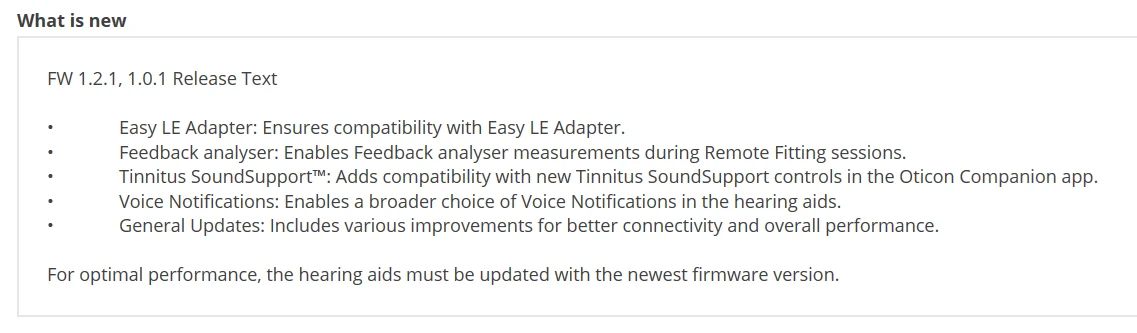
Oticon Intent Firmware 1.2.1
This topic is closed.
43 replies3.1k viewsLast reply

 Hot Springs Village, Arkansas
You’re ignoring this member’s posts.

You’re ignoring this member’s posts.
You’re ignoring this member’s posts.

 Hertfordshire, UK
You’re ignoring this member’s posts.
Here too, no issues so far. Perhaps it responds faster to any command I give on my iPhone? For example, when I hit the play button on my audiobook, it starts immediately. It seems quicker, though I’m not entirely sure…
You’re ignoring this member’s posts.
Perhaps it responds faster to any command I give on my iPhone? For example, when I hit the play button on my audiobook, it starts immediately.
It’s been a couple of days and I haven’t really noticed any difference other than this.
You’re ignoring this member’s posts.

You’re ignoring this member’s posts.

Be careful about getting the firmware update there seems to be an issue with it breaking the connect clip connectivity.
You’re ignoring this member’s posts.
You’re ignoring this member’s posts.
The connect clip is essential for a number of uses in my life. Not as many now as in the past. I stream audio books with it from my Fire tablet and Android tablet now only. In the pass it was my lifeline to the world for calls.
You’re ignoring this member’s posts.
Do you have more info on this? do you just have to re-pair the with the clip? does the clip also need an update i.e. should I bring it with me? I have an AUD appointmetn next week to get the update.
You’re ignoring this member’s posts.

Just upgraded. So far so good. Crackling has been reduced when streaming from my M1 Mac. Connecting to iOS devices seems a bit faster. I haven’t used the ConnectClip since Apple improved on the handover features and now i can stream from different devices without fiddling with bluetooth (currently running 18.4 RC but the improvements happened earlier). Will report back after testing with the ConnectClip… ymmv
You’re ignoring this member’s posts.
I have had my connect clips, I have 2, for about 6 years. They haven’t been updated to my knowledge since I got them. I do a hard reset of the clip sometimes when i am having issues with connectivity or sound. Below is a process that i follow, it was given to me by the Oticon rep.
How to pair aids to connect clip
Oticon suggested pressing all three buttons and holding them…the light will turn white, then red. Then place the aids in the charger and turn the connect clip on and take the aids out of the charger. The connect clip will pulse yellow looking for the aids and then green when it finds them. Then they suggested to forget the pairing on the phone and re pair it through bluetooth. Once repaired they suggested to turn on the (hold large button till the light turns pink). If the remote mic works with no problem and keeps the connection it rules out the connect clip being the problems and then we could assume its an aid problem. If the aids are connected to the phone and the connect clip is the two will fight and usually the aids will win so there is a known struggle but we can start by seeing if the connect clip is working
Yes this works
You’re ignoring this member’s posts.

 Egypt
EgyptYou’re ignoring this member’s posts.
I used the programming software. Did not think to check the app so don’t know if the option was there or not.
You’re ignoring this member’s posts.
That app is actually useless, Oticon hasn’t ever done firmware updates by the app. And my aids are firmware 1.1.0 and the app says my aids are up to date.
You’re ignoring this member’s posts.
Both my app and Genie2 say mine are up to date yet the version I have is 1.1.0. Any ideas or suggestions ?
You’re ignoring this member’s posts.
You’re ignoring this member’s posts.
You’re ignoring this member’s posts.
Related discussions
Hearing Aids0 replies
Hearing Aids115 replies
Hearing Aids138 replies
Uncategorized451 replies
Hearing Aids18 replies