You’re ignoring this member’s posts.
Oticon Intent Firmware 1.2.1
This topic is closed.
43 replies3.1k viewsLast reply

 Wales, UK
I noticed that between the different fitting systems we run, the W10 machines haven’t downloaded the Genie 2025, which is quite a facelift. The W11 machines are running the graphically clearer version (2025), but the older machines aren’t even calling for it using the Genie updater.
You’re ignoring this member’s posts.

 Hot Springs Village, Arkansas
From my experience that more than likely means the older system are compatible with the latest updates. It has always been a sore point for individuals that can’t afford newer systems. Microsoft and Apple as well as Google Android ilare all guilty if forcing people to buy new hardware.
You’re ignoring this member’s posts.

Maybe Oticon is sunsetting support for Windows 10? I wonder if most providers are rushing to upgrade their systems… I am a MAC user but have a Windows11 system for this.
You’re ignoring this member’s posts.
You’re ignoring this member’s posts.
My Intent firmware upgrade problem was associated with running Genie 2024 instead of 2025. It took several restarts of my computer for Genie Updater to open. Once it did, everything upgraded. Hope this helps someone else
You’re ignoring this member’s posts.

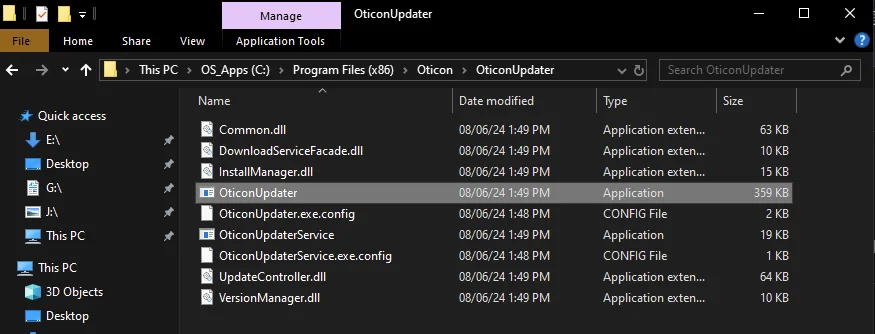
I’ve found that if the updater icon in the system tray doesn’t start that opening the udater directly from Genie program does the trick:
You’re ignoring this member’s posts.
Since I get my aids from the , I’m not going to update my Intents, because the VA won’t get 2025.1 until May.
You’re ignoring this member’s posts.
You’re ignoring this member’s posts.
Yeah, it sort of needed to be pushed through, whereas the W11 machine just got on with it.
You’re ignoring this member’s posts.
I had trouble updating on Win 11. I could see the update and click to download and then nothing happened. The solution was to turn automatic downloads back on within the updater. Then it started downloading immediately.
You’re ignoring this member’s posts.
I have experienced this cvkemp (see separate post) and am looking for a solution do you have any thoughts or resources?
You’re ignoring this member’s posts.
A email I got a while ago from Oticon.
Thank you for your interest in the Intent ability to receive transmissions! As we now have more examples for us to interact and research, we are doing extensive testing to insure the best possible interface. At this time we do not have a release date but it will be offered in a firmware update to the aids when the ability is ready. We do not want to push this out without knowing it will be a consistent and successful ability and that requires testing with as many different interfaces that we can.
Best Regards,
Susan Gonzalez
Oticon Support Team
You’re ignoring this member’s posts.
As an addendum to this, all newer DeMant product that’s now been programmed by the latest iterations of Oasis and Genie cannot be ‘seen’ by older versions of the software. I’ve programmed a new set of Encanta and Intents today on an older W10 machine, but I had to force the update through (Windows notifications had been turned off).
In both instances the SW could not ‘see’ the aids until the update had taken effect.
Might be an issue for those self-programmnig (or intending to go that way) from older versions of Genie/Oasis, coupled with recently purchased Encanta/Intent/Philips aids.
(This has always happened to an extent, but I’ve not seen the aids listed as ‘incompatible with the software’ before.)
You’re ignoring this member’s posts.
PaulThomas Huddersfield
HuddersfieldI’ve just upgrade my firmware to 1.2.1 on my Intent 1 ’s and it has had a negative impact on the Easy LE Adaptor I was using. The first point on the Release Text states “Ensures compatibility with Easy LE Adaptor” but in my experience this has made it worse. I have a Samsung S24+ phone which connects via Bluetooth and I use the Easy LE Adaptor on my HP laptop. Prior to the firmware upgrade I used to switch seamlessly between the two (phone & laptop), but after the upgrade the Easy LE Adaptor drops connectivity to only one HA when switching and I have to reboot (re-pair) the HA’s to get both HA’s connected. Definitely a backward step.
You’re ignoring this member’s posts.

I just upgraded my Intents to firmware 1.2.1 last night, and now Bluetooth LE doesn’t work at all with my Pixel 9 phone. So for now I have “” disabled to make streaming work. That sucks.
Curious if anyone else is using a recent Pixel phone with Intents and 1.2.1 firmware.
You’re ignoring this member’s posts.
Curious if anyone else is using a recent Pixel phone with Intents and 1.2.1 firmware.
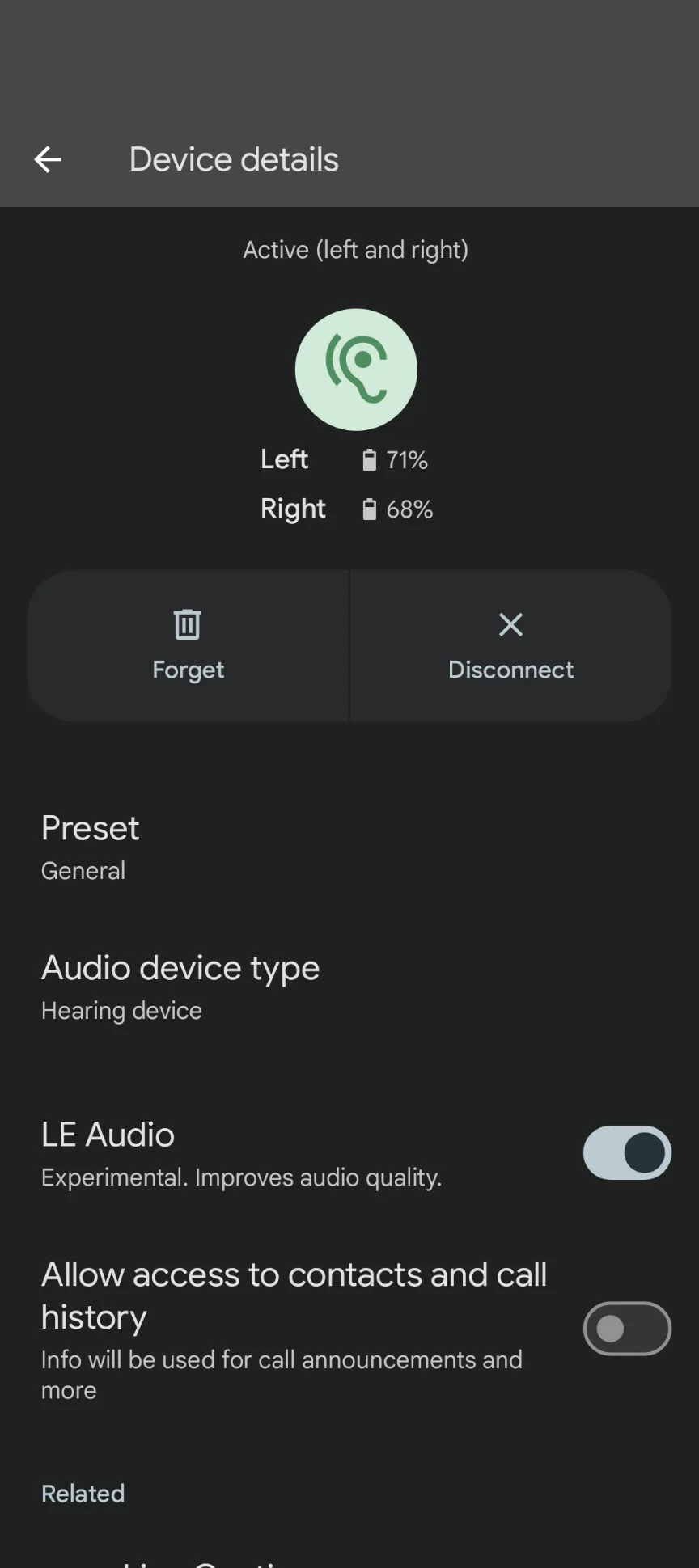
Yes and yes, but LEA is stable as a rock, and hands-free calls + streaming is great.
I decided after updating to 1.2.1 to forget my Intents, and repair with my Pixel 9, and than I paired the aids with Companion.
You’re ignoring this member’s posts.
Yes and yes, but LEA is stable as a rock
I decided after updating to 1.2.1 to forget my Intents, and repair with my Pixel 9
Good idea! I tried forgetting and repairing them, then enabling , and it worked! But only for a little while. Once I tried playing game (“Bejeweled Classic”, if anyone want to try reproducing the behavior), there was no sound until I disabled LE Audio.
So I guess that’s a clue, but I’m still having problems. I’ll have to experiment more to see if other apps cause the audio to stop.
You’re ignoring this member’s posts.
My intent 1 work fine with my Pixel 9A (Android 16 beta).
I have same problem with some old games but work fine for newer game. Perhaps it is the way how Pixel 9A (or Android 16) handle Bluetooth LE audio. Switch to companion apps and check the lower right button (Stream setting button) of Companion apps. If it is on that’s mean some apps running in background and is connecting the hearing aid. Try shut down down suspicious apps and see if it help.
You’re ignoring this member’s posts.
You could ask your audi to reset the connections in Genie 2, then forget them on your phone, and connect the to your pixel again.
You’re ignoring this member’s posts.
Related discussions
Hearing Aids0 replies
Hearing Aids115 replies
Hearing Aids138 replies
Uncategorized451 replies
Hearing Aids18 replies