
PhoebeYAuthor
Great! Thank you very much! We already received positive feedback from Voyager user. I will post it soon.
You’re ignoring this member’s posts.
42 replies3.2k viewsLast reply
Great! Thank you very much! We already received positive feedback from Voyager user. I will post it soon.
You’re ignoring this member’s posts.
Update on Oticon Intent and Avantree Devices Compatibility
We’ve received positive feedback regarding the use of Avantree Voyager with Oticon Intent hearing aids. Here are the steps that made everything work smoothly:
Updated Oticon Intent Firmware to version 1.3.0.
Updated Oticon Companion App to version 1.6.1 (uninstalled and reinstalled the app).
Bluetooth pairing between the smartphone and hearing aids was deleted and re-paired.
In the Companion app, the option appeared and was selectable.
Once selected, the connection was active and the user was able to hear the audio through Auracast.
Everything is working as expected, and the user can now enjoy a seamless audio experience with his hearing aids.
You’re ignoring this member’s posts.

a regular church member who has an Auracast hearing aid, might just buy one and donate it.
Exactly my plan when they ever turn it on in the Phonaks.
WH
You’re ignoring this member’s posts.
Wanted to share another data point for Widex users exploring solutions.
We recently received confirmation that the Widex Allure hearing aids (firmware 5.1.20) work well with the Avantree C82 Aura transmitter. After updating the Allure firmware, the user was able to choose the Auracast audio stream directly on his Pixel 8 Pro and reported a smooth, stable connection.
The first dongle he received couldn’t complete a firmware update, but once replaced, the system performed as expected. Overall, he was very satisfied with the result.
Hope this helps anyone considering Widex Allure + Auracast setups. If you’ve tried similar combinations, would love to hear your feedback!
You’re ignoring this member’s posts.
Phoebe,
Does Avantree have a plug-and-play device which will allow me to pipe my MacBook Air M1 audio into my Rexton Reach hearing aids? I bought the Floogoo but the configuration instructions are too complicated for me at age 89 and it seems to require access to a Windows computer for configuration which I don’t have access to.
You’re ignoring this member’s posts.
Hi Nate,
You can use our C82 LEA with your Rexton Reach hearing aids, leveraging their Unicast feature. This will allow you to stream audio directly from your MacBook Air M1 to your hearing aids. It supports both listening and talking in low latency mode with the codec, ensuring high-quality sound. No need for additional complex setup, and it doesn’t require a Windows computer. Let me know if you need further assistance!
You’re ignoring this member’s posts.
Thank you. I asked FlooGoo if they would exchange my original device for the preconfigured one they now sell for the same price I paid, but they haven’t replied. So I guess I will purchase your C82 LEA instead based upon your assurance that it works right out of the box.
You’re ignoring this member’s posts.
You’re ignoring this member’s posts.
Okay, my C82 LEA arrived today. I plugged it into my MacBook Air M1 and I pressed the little button on it and it began flashing. Then I picked up my Android Pixel 10 with latest update, went to Bluetooth, clicked on Pair new device but I don’t see the C82 LEA in list of devices on the phone nor do I see it in the Bluetooth dropdown menu on my Mac. Where do I go from here? I also have Developer options turned on my Pixel.
TIA, NATE
Okay, my C82 LEA arrived today. I plugged it into my MacBook Air M1 and I pressed the little button on it and it began flashing. Then I picked up my Android Pixel 10 with latest update, went to Bluetooth, clicked on Pair new device but I don’t see the C82 LEA in list of devices on the phone nor do I see it in the Bluetooth dropdown menu on my Mac. Where do I go from here? I also have Developer options turned on my Pixel.
TIA, NATE
You’re ignoring this member’s posts.
PS - I replaced the Rextons in the charger, ut them back in my ears, selected Unicast on the phone under Bluetooth mode but audio is still coming out my Mac speakers and not my Rextons.
You’re ignoring this member’s posts.

You need to pair the aids with the device, not the phone. Turn off Bluetooth on the phone. Turn aids off/on.
You’re ignoring this member’s posts.
Thank you. I tried that. Still coming thru Mac speakers. Only change is that the phone list under Pair New Devices has grown in length to many pages. I must be overlooking something very obvious but so far not obvious to me. I wonder if an instruction video exists somewhere.
You’re ignoring this member’s posts.
Here is the link to your C82LEA instructions. I would pay attention to the Mac settings in the instructions.
Setup, Accessories & Warranty | Avantree3
Find all you need for your Avantree product: setup guide, FAQs, accessories, firmware updates, and warranty – all in one place.
You’re ignoring this member’s posts.
Not sure what you want to achieve. C82 is a transmitter. You pair it with your hearing aids, not your phone or Mac.
You’re ignoring this member’s posts.

Only change is that the phone list under Pair New Devices has grown in length to many pages. I must be overlooking something very obvious but so far not obvious to me. I wonder if an instruction video exists somewhere.
As others have said, you pair the C82 with your aids.
The C82 does not natively support , so use the C82 Aura updater for your C82 LEA.
Follow the steps, and you’ll be up & running!
Click on the link, and use the Interactive set up guide:
Setup, Accessories & Warranty | Avantree5
Find all you need for your Avantree product: setup guide, FAQs, accessories, firmware updates, and warranty – all in one place.
You’re ignoring this member’s posts.
Your instructions state to set the C82 to in input and output device in the Mac settings menu. I suspect that is the step that is being skipped.
You’re ignoring this member’s posts.
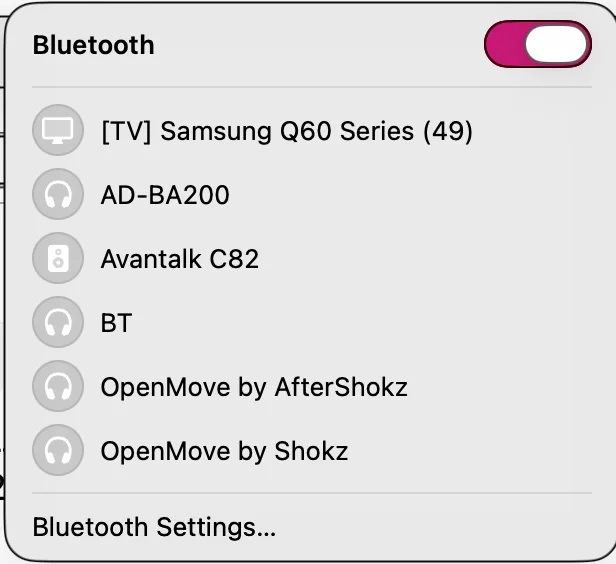
Update: I learned from Support that the device arrived without the latest update; I installed the update - see 3d item in Mac dropdown menu; now they are working on fact that device will not flash green (only blue) on 3 clicks nor turn on in dropdown.
You’re ignoring this member’s posts.
Correct - I was on the wrong track re phone; still encountering installation problem but your co. is providing great support.
You’re ignoring this member’s posts.
HI Nate, Do you want to book a quick call with me here and I will help you. https://go.oncehub.com/venucastsupport2
You’re ignoring this member’s posts.
Thank you, PhoebeY. I will be delighted to do that to problem solve with you. Last night I was on Zoom for an hour with Jenny and brief folloup today but unable to get green flashing on 3 clicks. Took my order no. etc. down but may I still accept your invitation to try to get this one to work?
You’re ignoring this member’s posts.
Log in to reply to this topic.
Hearing Aids18 replies
Question and Answer25 replies
Hearing Aids174 replies
Hearing Aids51 replies
Hearing Aid Self-Fitting (DIY)11 replies
 Rural New England