program change tone is played as the aids switch from the BT streaming program for the navigation voice command back to the Automatic program.
I don’t get the tones when music or podcast streaming ends. I do get tones when I change programs manually. I get tones when a phone call ends. I’m not aware of any special changes for this. I could see that being friggen annoying.
. So the verdict is still out on how well I think AutoSense 7 works. I think it’s not bad, but I didn’t see any “Wow, this thing is smart” enough. But I’ve only had a couple of days playing with it. And again, it’s an absolute DRAG each time to have to go through the stupid steps just to see what program is being chosen. Phonak really should just display the chosen program on the fly on the top page, and update it automatically every time it changes, instead of making users go through 3 or 4 clicks to find out what it is.
I think you should just disable AutoSense in Target, and get on with life!
I trust my audiologist, I have seen him take so so hearing aids any make them work like the best top of the line aids. And he doesn’t shy away from spending hours on the phone with the company reps and experts.
Looking forward to your impressions (Not earmold) of the Spheres.
I do hope you achieve a successful outcome!
But you should have a deep discussion with your audi re: AutoSense. Knowing your preference for a single general program, I’d think the transitions it creates when it thinks it needs to change programs would be jarring to you. I’m sure Phonak has improved it since I trialed the Marvels, but just read some of @Volusiano’s outcomes.
Well I know my audiologist, he has been my audiologist 7 years. He has taken me from just wanting to be a hermit to being back in society again. From a word recognition score of less than 75% with my aids to over 90%. He would not have recommended the Spheres if he didn’t think he could set them up correctly. And he fits a lot more Phonak aids than he does Oticon aids.
I don’t get the tones when music or podcast streaming ends. I do get tones when I change programs manually. I get tones when a phone call ends. I’m not aware of any special changes for this. I could see that being friggen annoying.
WH
Are you using an iPhone? Also, do you use Google Maps? That’s the specific condition that causes the program change back to Automatic to chime right after a navigation command. I wonder if Android phone users or maybe the Google Maps app or a combination of those 2 things would trigger the chime. I don’t remember hearing that chime when using another app like YouTube on my iPhone.
I’d think the transitions it creates when it thinks it needs to change programs would be jarring to you
The transitions have been much smoother with v6, and v7 is even better. The paradise version is like cars before they had springs, in comparison. But Chuck needs to find out what works best for him.
I think you should just disable AutoSense in Target, and get on with life!
When Auto Sense is set up right it’s bumpless. Too big of gain changes between programs can be an issue. My thoughts are those who complain about Auto Sense do not have the aides set up properly.
Are you using an iPhone? Also, do you use Google Maps?
Yes on the iPhone. 26.1 on a 14 pro max. Don’t generally use audio turn cueing, and I most often use Waze. There is a switch in Google Maps to use as a phone call. Wondering if you have that on. That would probably do it. But those switches didn’t change anything for me as far as the tones. I enabled (“unmuted”) navigation, enabled voice over BT and play as BT phone call. Also did access assistant with “ok google”. None of that generated tones when I started navigating to places and nit started initial directions and warning the business would probably be closed by the time I got there. Two separate notifications, the activevents clicking at the beginning and end of each message. But no tones. Switched off phone call, no tones. Not sure what else I can try for you.
When Auto Sense is set up right it’s bumpless. Too big of gain changes between programs can be an issue. My thoughts are those who complain about Auto Sense do not have the aides set up properly.
I don’t have an issue with AutoSense 7 being bumpy or seeming like it “hunts” around at all. It transitions very smoothly. And like @raudrive said, if you notice a change, it’s because you have the common parameters between the built-in programs set too differently, which would cause you to notice the change. For example, in Calm Situation you set the NoiseBlock parameter to minimum, and in Speech in Noise, you set it to maximum, then the transition between these two programs will be more noticeable because you can hear from more noise to less noise back to more noise if AutoSense transitions from Calm to back to Calm.
But in between the 6 built-in programs that AutoSense 7 has (Calm Situation, Speech in Noise, Comfort in Noise, Speech in Car, Spheric and Music), 4 of them (other than Spheric and Music) have almost the same default values for SoundRelax, NoiseBlock, Soft Noise Reduction, and WindBlock. So if AutoSense transitions because these 4 programs, you won’t notice much bumpiness because the amount of background noise remains pretty much the same.
The transition to either Spheric or Music might be more noticeable because those common parameters maybe set differently in those programs (especiall for Music where they’re all turned OFF). But generally people don’t get annoyed or notice the “bumpiness” when switching to these programs despite the switch being noticeable, because it’d be a welcomed and desirable switch to them.
So I don’t really have an issue with AutoSense being annoying, because I have those common parameters set the same between them (in my case, they’re maxed out to reduce noise), so their transitions are not noticeable. In fact, I have the opposite desire, I want to know when AutoSense changes program so I can check and see what the new program is (just because I’m curious to see if the new program selected is appropriate for what I think that new environment is).
It’d be so cool if the top page of MyPhonak app dynamically displays the actual built-in program that AutoSense selected at that moment, so we can continuously monitor and know what it is without having to do several clicks in and clicks out and back to clicks in again to find out if there’s been a change. Maybe in the old days AutsoSense wasn’t good enough so Phonak kinda wanted to hide this info. But nowadays, if Phonaks thinks that AutoSense 7 is so good now, then maybe they should want to show off this new prowess in program selection by making this information displayed prominently on the main page of the MyPhonak app. Phonak, I challenge you to do this, haha!
There is a switch in Google Maps to use BT as a phone call. Wondering if you have that on. That would probably do it. But those switches didn’t change anything for me as far as the tones. I enabled (“unmuted”) navigation, enabled voice over BT and play as BT phone call. Also did access assistant with “ok google”. None of that generated tones when I started navigating to places and nit started initial directions and warning the business would probably be closed by the time I got there. Two separate notifications, the activevents clicking at the beginning and end of each message. But no tones. Switched off phone call, no tones. Not sure what else I can try for you.
WH
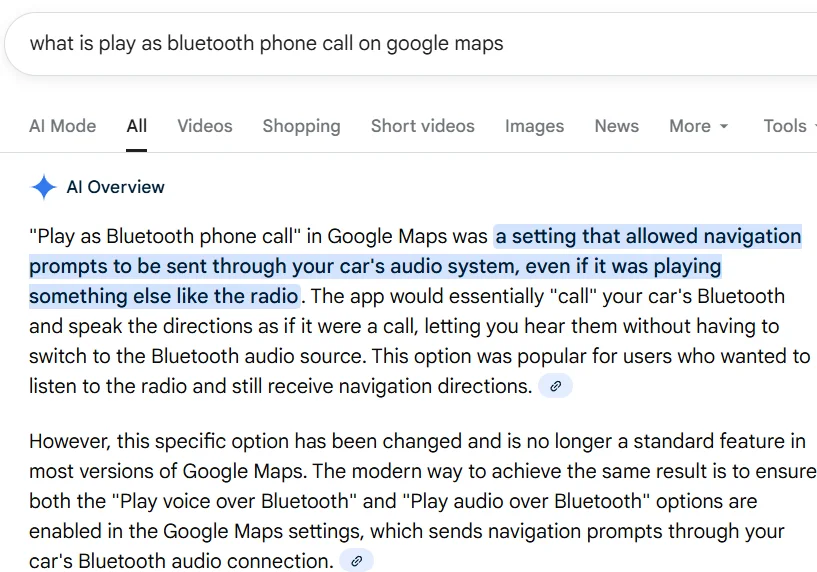
Thanks for this tip! I learned that I need to have “Play voice over ” enabled to get the voice to play through the Phonak. But if I have “Play as BT phone call” enabled, then it would cause that program chime to sound after each voice command. So all I have to do is to disable that option. Not sure why you don’t get any chime with this option turned on in your case. But I’m happy that I’m now able to solve this problem thanks to your help. Cheers!!!
Below is what Google says about this “Play as BT phone call” means. It says it’s obsolete in newer versions of Google Map and has been replaced with a new option called “Play audio over BT”. I don’t have this new option in my version of Google Maps, only the old option (Play as BT phone call”.
For some of you who know me well enough on this forum, I’m kind of a technical nerd who likes to read the technical whitepapers for the brands to determine whether they can explain in well enough details their advertised technologies in the implementation and execution of their design or not. If I can at least find the whitepaper more understandable and with enough details, at least I can form a better opinion of whether the technology they claim is more believable, or harder to believe (if their content is too wishy washy and too vague and sounding more like marketing-speak).
Anyway, of course I’ve read the Oticon papers on their a while back, and found the explanation of their DNN technology making sense enough to allow me understand it. I didn’t read the Phonak papers on their DNN until recently, but now I do because I now own the Sphere and so of course it makes me curious to know how they do it. I found the Phonak paper on their DNN well written as well (compared to the Oticon one). Their explanation of how they train the DNN is pretty much standard and similar. But one thing I picked up on the Phonak DNN paper that’s different than the Oticon DNN paper that’s interesting enough to share here, is about how Phonak “evaluated” the validity of the DNN models they tested to arrive at the best DNN model for final selection. Of course Oticon did the same thing. However Oticon didn’t share what they did for their evaluation, while Phonak shared a lot about what they did.
For folks who are the TLDR type, I’ll just say here that Phonak shared that they built ANOTHER DNN in their labs, based on human inputs, to do the evaluation of their various DNN models for them. I thought that this is pretty clever, because it would have been a daunting task to try to do so exhaustively. Oticon didn’t share how they did their evaluation work, they simply said that they did it (of course) and it was a crucial critical step to choose the best DNN model amongst several that they tried out. But Oticon might have done it mathematically without massive human inputs, while Phonak could have done it both mathematically, but also with human inputs like they advertised in their paper.
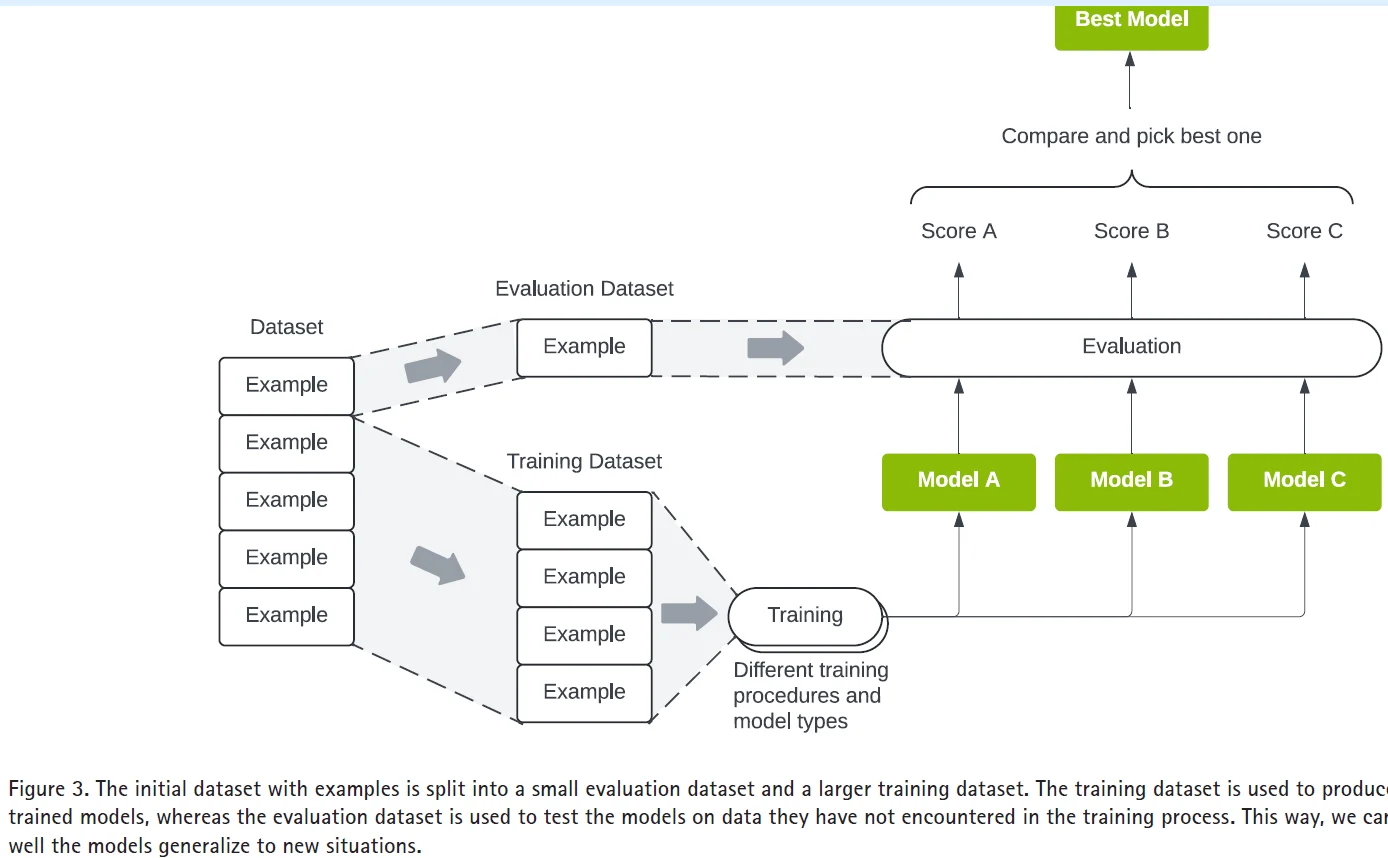
OK, now for the folks who are interested in seeing some more details, below are some more charts just to show the point. The first chart below is from the Phonak paper. It shows how you have many sound samples that are grouped in datasets. Most of it is used to train the 3 DNN models A, B, and C, but they reserved a smaller datasets that is not used for training the model, but only used for evaluating how well the models perform after they’ve been trained by the training datasets. Based on the outcome of the evaluation dataset, you pick out the best model that does the best job “generalizing” the outcome.
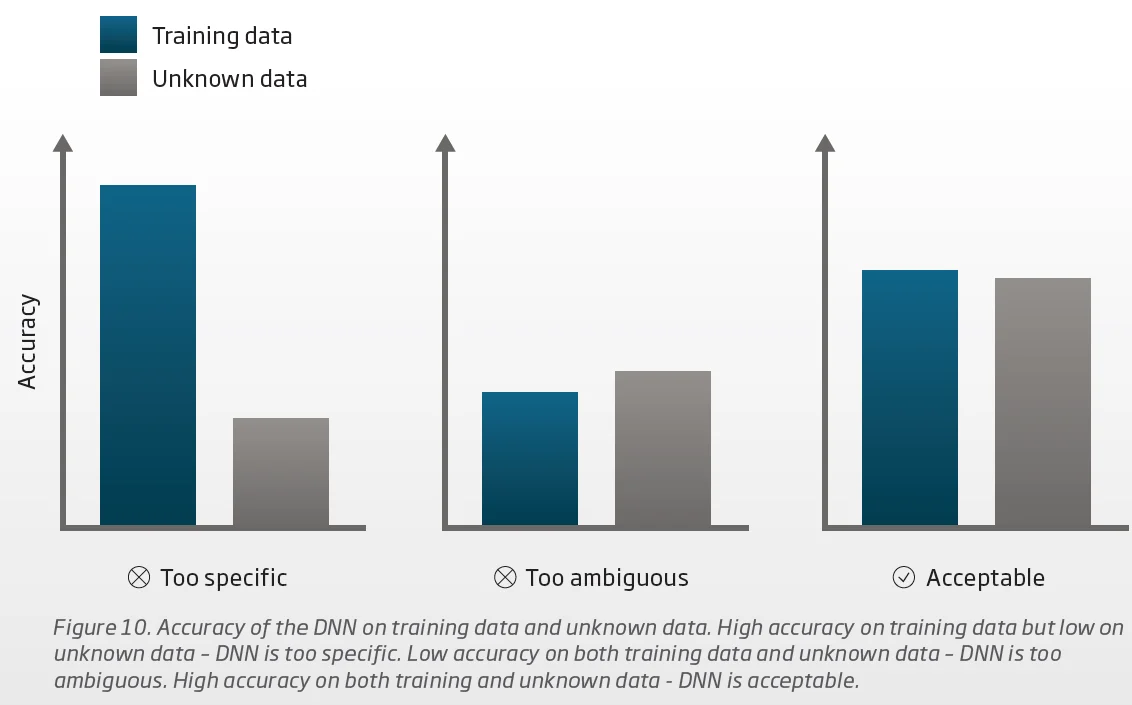
You might wonder what that means? “The model that does the best job GENERALIZING the outcome”. Below is a chart from the Oticon paper, explaining how they have 2 sets of data, one set used to train the DNN models (called the Training data), and another set used to test the DNN model (called the Unknown data, because this data is unknown to the models because it was not used to train the models). Phonak calls this Unknown data the Evaluation data, same thing.
The leftmost DNN model is poorly generalized because it provides a too accurate outcome for the trained data, but inaccurate outcome for the unknown data. The middle DNN model is also not a good DNN model either because neither the trained data nor the unknown data yields accurate outcome. The right most scenario is the best “generalized” DNN model because it gives an accurate enough outcome for both the trained data set and the unknown data set.
Ideally if you can come up with a model that gives the most accurate outcome on either the Training data or the Unknown data, then you’re golden. But the reality is that you’re probably not going to be able to come up with such a “golden” model. So the best you can probably come up with is a model that is somewhere in between, meaning that this model can “generally” (hence the word “generalize”) provide an accurate outcome for ANY sound sample you can throw at it, at least as accurate enough as the outcome of the Training data. And the ANY sound sample here is validated using the Unknow (or Evaluating) data. But if neither the Training data or the Unknown (evaluating) data can yield sufficient accuracy, then that model (the middle one in the chart below) is still no good and you gotta come up with a better one.
Now the question then is what determines how accurate enough the outcome is? And when is it accurate enough? Looking at the chart above, it’s obvious that the left DNN model provides a poor outcome, because the difference in the outcome accuracy is obviously significant enough between the Training data and the Unknown data, and you want both sets of data to have about the same accuracy, like the middle or the right DNN model. So once the left DNN model is eliminated, the remaining model with more accuracy (the right model) would win.
But how is this accuracy calculated? I guess it can be calculated mathematically. Afterall, the whole DNN training is a mathematical manipulation anyway. You put in the first set of training data, compare the outcome to the reference result, mathematically measure the discrepancy between these 2 results, then propagate backward to tweak the parameters on the neural nodes to find a new mathematical minimum for this discrepancy. Then rinse and repeat for the second set of training data, and so on until after millions of sets, hopefully the discrepancy grows small enough mathematically to be good enough. So the final accuracy each model yields can probably be calculated easily and done so efficiently because it’s all mathematical calculations anyway, from calculating the discrepancies to tweaking the mathematical parameters of the neural nodes through backward propagation to minimize this discrepancy with math.
But in the end, the question is, can you solely depend on what the math tells you to pick out which the best DNN model should be, without any human input? And if you do use human input as part of your selection criteria (and I’m sure they all do), how extensive is this human input applied to the final selection? Oticon didn’t address this human input evaluation aspect in their paper, but Phonak did, in a big way. Phonak basically said that because they want to do extensive and exhaustive evalution using human inputs, but of course nobody has unlimited human resources to apply to this task. So they cleverly came up with a SECOND off-the-chip in-the-lab DNN model to model the human input response to evaluate what a human thinks of how well the DeepSonic DNN model performs.
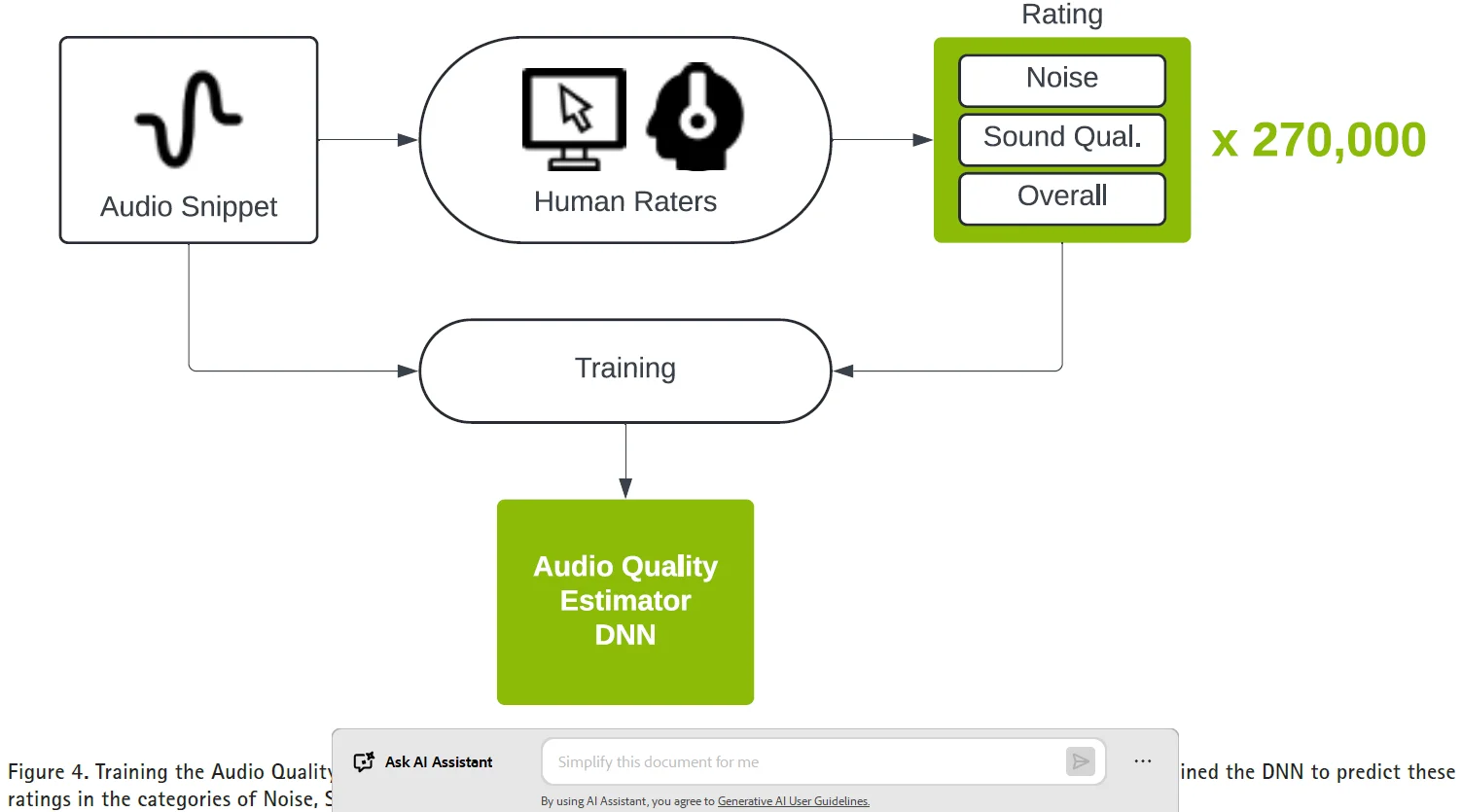
Below is a chart of what Phonak did. They recruited 350 human raters and compiled 30,000 files of audio snippet, and had each file rated by 9 different human raters. And between the combination of files rated by human raters, they came up with almost 1 million human ratings. What they did was to come up with a DNN model (called the Audio Quality Estimator) and trained it with this almost 1 million ratings. They then incorporated the use of this AQE DNN to help evaluate and generate the accuracy scores for the potential DeepSonic DNN candidate models. So now, not only do the DeepSonic DNN candidate models have a mathematical score for accuracy, they also have a human rating component for that accuracy score as well.
Needless to say, the genius here is that Phonak solved the issue of limited human resources by using 1 million human rating samples to train an Audio Quality Estimator DNN to perform and represent the human rating component of the audio quality of the DeepSonic DNN. Basically, this AQE DNN can then represent a virtual human to provide exhaustive and unlimited (virtual) human ratings for any amount of (virtual) human evaluation as needed by the evaluation part, when it comes time to choose the best DeepSonic DNN model.
It’s pretty cool that is not only used to duplicate what a good set of ears can sound like for damaged human hearing via these DNN chips in hearing aids, now the same principle can be used, as a next step, to use DNN to duplicate what a human thinks about the quality of the sound as well. Of course 1 million human ratings still requires a lot of human resources, but when it boils down to a combination of 350 human raters dealing with 30,000 sound files, to turn it into a limitless generator of (virtual) human opinions, that’s a very doable amount of human resources to turn it into an unlimited amount of (virtual) human opinions. It reminds me of the story of Jesus turning bread and wine enough to feed thousands of followers and hundreds of wedding guests. Except that in the case of the bible, it wasn’t virtual bread and wine, but real ones, LOL
I’m on Android rather than Apple, so I’m not sure how applicable my own approach will be… and also I’m a Tasker (and Macrodroid) nerd, which means I’m doing stuff that may be impossible for anyone remotely normal.
That said, here’s what I do: As part of my “begin navigation” script (“OK Google, do Navigate with Tasker”), I do a Bluetooth Connect to my car’s sound system, and a Bluetooth disconnect from “R-Phonak hearing aid”. This disables streaming to my Spheres, but does not appear to disrupt the command-and-control connection. Now phone audio, including music, phone calls, and alerts, does not go direct to my Spheres, so they don’t have to switch from Automatic to Streaming mode. When I’m done driving, my “arrived” script does the reverse - so within a few seconds of saying “OK Google, do Arrived with Tasker” I’m back in normal communication between my phone and my Spheres. (There’s a lot of other stuff in my scripts, like auto-answering phone calls when I’m driving, reading incoming text messages out loud and sending an auto response, switching between my normal Twilight mode and a driving-specific color-neutral mode… I did mention the part about being a scripting nerd, didn’t I?)
Could any of this be useful to anyone else? Mmmmaybe. If someone could work out some convenient way to disable the Spheres’ Bluetooth Classic connection while driving and restore it afterwards, that would solve the main problem. Anyone here know how to do stuff like that on iPhones?
But nowadays, if Phonaks thinks that AutoSense 7 is so good now, then maybe they should want to show off this new prowess in program selection by making this information displayed prominently on the main page of the MyPhonak app. Phonak, I challenge you to do this, haha!
Have you contacted Phonak about this? They didn’t seem very receptive when I suggested it, but mmmmaybe if they hear the same thing from a whole bunch of us they’ll start taking the idea seriously.
Your detailed explanations and analysis is awesome! Keep sharing this info. Curious to get your perspective on the Spheric program when you spend some decent time in a very noisy place like a restaurant. What’s interesting to me is that I have been posting my real world observations but you are providing the detailed technical explanation for what I’m experiencing. Kinda closes the gaps for me.
But nowadays, if Phonaks thinks that AutoSense 7 is so good now, then maybe they should want to show off this new prowess in program selection by making this information displayed prominently on the main page of the MyPhonak app. Phonak, I challenge you to do this, haha!
Have you contacted Phonak about this? They didn’t seem very receptive when I suggested it, but mmmmaybe if they hear the same thing from a whole bunch of us they’ll start taking the idea seriously.
No, I haven’t. But I doubt that Phonak would be receptive to doing this, simply because it might open up a new can of worms and expose AutoSense 7 to being criticized for not picking out the right built-in program for a particular environment. AutoSense obviously operates on very objective and algorithmic reasoning, while the users will have subjective opinions of which program should have been picked for the environment they’re in. For example, AutoSense might pick out Speech in Car if a user sits outside a cafe in front of a busy street where there’s a lot of road noise. But the user may question that choice because they say “Hey, I’m not in a car driving, so why did AutoSense pick the Speech in Car program? Maybe it should have picked Comfort in Noise”. But in reality, the Speech in Car program may still be appropriate enough for that, even though the name of the program doesn’t exactly match with the real environment.
I doubt that Phonak would be receptive to doing this, simply because it might open up a new can of worms and expose AutoSense 7 to being criticized for not picking out the right built-in program for a particular environment.
Good point - although one could point out to them that making a big deal in their marketing about AutoSense and the wealth of automatic programs it supports is kinda contradictory to hiding its actions in real life.

 Rural New England






 Toronto, Canada