I look forward to trying the successor to the Oticon Intent and upgrade from the Oticon More miniRITE 312 with T Coils. I hope the sound clarity will be significantly improved across multiple generations especially in noisy environments louder than 70 DB.
Also I’m curious to understand why @Volusiano is now on Phonak. Just trying or a formal switch? I valued his analyses amongst others when self programming the More, OPNs and others. It’s been a while so I’m catching up on recent forum updates
I sincerely hope there will be disposable battery versions, or at least a version where I can take a pin and replace rechargable batteries myself with spare ones without having to wait 30m, as I’m often on the go and streaming often and in athletic/outdoors with limited access to power.
Also I’m curious to understand why @Volusiano is now on Phonak. Just trying or a formal switch? I valued his analyses amongst others when self programming the More, OPNs and others.
Hi @gkumar , to me it’s not really a switch. It’s really just having an opportunity to own 2 different brands that I consider to be top brands by popularity. I don’t intend to relegate my Oticon Reals into backup status and wear the Phonak Sphere full time going forward. Maybe only in the first few months so I can get the full experience and understanding of how the Sphere perform to me. Then after that, I’ll chose which pair to wear depending on the application of the environment that I’ll be in so that I’d get the most appropriate performance for that environment.
The only difference is that I’d rather choose the Phonak Sphere over the Oticon Intent, but that’s because I already own the Real and I feel that I’m quite satisfied with the Real already. It doesn’t mean that I value the Sphere performance over the Intent.
In my opinion, upgrading to the Intent would be just an incremental change for me from the Real, but acquiring the Phonak Sphere would allow me to get quite a different kind of performance just based on how the 2 companies differ in their design philosophy.
Just a new update about the Phonak Sphere charger. I’ve tried using the charger without being plugged in to see how many charges I can get out of it. Phonak claims that it can do 3 full charges. Other users here have shared that usually because they have about 30 to 50% left over charge at the end of the day, their Phonak Sphere charger can last up to 4 or 5 or 6 times of partial charges on the hearing aids.
Well, I don’t see that kind of capacity. I do partial charges as well since I don’t use up the whole charge by the end of the day. Yet I seem to only be able to do about 3 partial charges before the charger stops charging. The funny thing is that the light in the charger is only blinking green and not even blinking yellow or red yet, and when I put the aids in, the aids seem to blink yellow like they’re charging. But in the morning when I take them out, they still have the same SOC that they were in the night before when I put them into the charger.
It’s hard to think that I have a defective charger because this is supposed to be a brand new system I received just a few weeks ago from Phonak. But I expected more partial charges than just 3.
I walked around a busy Costco for quite a while yesterday. I manually forced on the Spheric SILN program for the whole time on purpose just to see how it sounds. As expected, I heard voices jump out at me, even from afar, as long as the voice was loud enough to trigger the Sphere’s attention. But I must say that the quality of the voices were not that clear. Sometimes they are, sometimes they aren’t. And the sound quality of the voices also didn’t seem that natural. It seems like the speech is synthetically reproduced (probably by the ), which is to be expected anyway. The weird thing is that it seems to burst into the scene, then goes away just as quickly after the speaker is done. Probably because the noise suppression is already aggressive enough, so the voices seem to jump out more suddenly. I’d have to say that even though I heard the voices, I don’t always understand what was said, especially when voices were from further away.
Yesterday evening, I had some family members come over to the house. I also forced on the Spheric SINL mode. In a close face to face environment, with people just sitting a few feet away from me at the table, their voices sound more natural compared to the voices I heard at Costco several feet away. It’s funny, the kids were nearby talking away and my sister-in-law tried to have a conversation with me. She was having a problem hearing me with them being noisy, so she shooed them away into the bedroom so she can talk with me without all their chatters going on. I didn’t say anything but inside, I was like “Oh my, there goes my opportunity to test out the Spheric SILN mode with the chatters going on.” But of course I didn’t want to tell them to stay in place and chatter away just because I have an ulterior motive that would impose on my sister-in-law’s ability to hear in noise.
By the way, their chatter was not suppressed by the Spheric mode as noise, however. I could hear their voices just as clear, because I guess the conversations were all sequential with 1 voice at a time anyway. I think only overlappying conversations would cause the Spheric mode to choose which voice to suppress and which voice to be heard. And the louder voices would probably be heard first. I wonder if a speaker at a table behind you would have his voice prioritized or not if his voice is louder than a speaker at your table. Maybe at that point, the Spheric mode might give priority to the voices in front of you over the one from behind. I wonder if the Spheric mode has any smart to determine how far away (in any direction) a voice is to determine which overlapping voice to give priority to (namely the voice closer to you would get higher priority). Or whether it’s only based on loudness and not distance or position (behind or in front, for example).
Here is what I have noticed. The Spheric program tends narrow the microphones to focus forward onto the speech from the speaker that you are looking at. When there is no person in front of you speaking, the microphones open up and the Sphere program seems to lock onto the loudest voice from any direction. The microphones change very fast and very dynamically so that is why sometimes speech seems to fade in and out as the hearing aids try to decide which speaker is the dominant one. The voices can sound a bit synthetic when you are in very noisy environments and this is something that you do have to get a bit used to. The good news is that you can understand speech quite well. The bad news is that sometimes everything sounds a bit odd. An interesting thing you can do is flip into an unfiltered program like the Music program if you want to actually hear how much noise is being filtered out. If you are in a really noisy place, this switch to the Music program can be a be startling at times because the Sphere program really cuts down on all this noise.
My advice is to always look at the person who is speaking to get the best clarity in the Sphere program.
The voices can sound a bit synthetic when you are in very noisy environments and this is something that you do have to get a bit used to. The good news is that you can understand speech quite well. The bad news is that sometimes everything sounds a bit odd.
What about non sphere Speech in Noise or Car program. Will auto sense override the directionality setting of the microphones?
Everything that @JordanK said in his previous post is consistent with my experience. Especially about the voices sounding synthetic, and the more noisy it is, the more synthetic they sound.
Actually the one thing I don’t like most about the Spheric mode, now that I’ve been able to try it a bit more (today in a physical therapy room where there are problably a couple of dozens people around, for a good hour) is that the Spheric mode no longer gives you a good spatial sense of sound balance anymore. What I mean is that if you hear a voice from your side, you will hear most of it coming from that side, but almost nothing of that voice comes through at all on the other side, at least for a noticeable span of time.
With the Speech in Noise mode, I can hear the voice from its side, but I can also hear a little bit of that same voice on the other side, albeit at a lower volume and with a slight but perceptible delay to give me a sense of balance and a sense of the direction of where the voice comes from. And that gives me a sense of spatial balance, and I will know where the voice comes from, and it will sound very natural because the voice would “surround” me like it should.
But with the Sphere, there’s no normal and natural “surround sound” effect like with any of the other AutoSense programs. The Sphere makes the voices on your side sound very unidirectional. Sure, it can pick up a voice on my left 20 feet away easily and it would pop into my left ear if it’s loud enough (louder than anything else at that time). But I hear NOTHING of that voice in my right ear. So not only is it not a “surround sound” feeling, it’s not even a “stereo” feeling. It’s a one-dimensional feeling. So it makes it VERY unnatural because there’s no more spatial balance preserved anymore.
I’m critical of this probably because I come from the Oticon world, where the open paradigm preserve sounds all around 360 degrees for you and maintains very good spatial awareness as well as broadband. And they designed the around this open paradigm philosophy as well, so the DNN, even when reproducing the synthetic sounds at the output, are made very well balanced. So anything sounding unnatural, especially if it affect sthe surround sound balance, just throws me off guard very easily.
In that physical therapy room, or the same at Costco, voices from as far away as 20-30 feet jump at me if the guy is loud enough, but I don’t really want to have voices from afar jump into my hearing zone because I don’t care about what those people from that far away say anyway. It’s actually very disconcerting to me. I don’t really know how some people say they prefer to be in the Spheric SILN mode all day long. It sounds very unnatural and artificial and one dimensional in a big room (like at Costco or in my big PT room). You feel like you’re in a coocoon with one dimensional voices jumping at you left and right. If it’s a voice in front of you or from behind, then at least both aids would pick up the voice and it’s not as bad. But hearing a voice jumping at you from one side only and nothing comes through on the other aid on the other side becomes disconcerting after a while.
In the PT room, I would alternate back and forth between the Spheric SILN mode and the Auto program which usually picks out Speech in Noise for that situation, and I vastly prefer to be in the Speech in Noise instead. It’s much more natural and effective and spatially balance with a full binaural feeling.
Don’t get me wrong, I’m not really dissing the Spheric SILN mode at all here. I think it still has its place, in an extremely noisy and crowded place where your ability to hear becomes so overwhelmed by surrounding noise and babbles that you can no longer understand the people in front of you. That’s when Spheric SILN will shine, and you will be thankful to have it. Yeah, there are tradeoffs to pay, but any amount of tradeoffs are worth it at that point. But those occasions are probably few and far in betweens, at least for me.
In moderately noisy places, but not yet extremely noisy places (like at Costco, an doctor’s office waiting room, a fairly full PT room, a gym, the grocery stores), I think that the AutoSense’s normal selection would give you better results, rather than forcing and using the Spheric SILN mode all day long in any environment. But that’s just my opinion.
Now I understand more why the Activation Level option for the Spheric mode is set at a rather aggressive level initially, so that it would kick on until you’re actually in an “extreme” environment. I remember watching audis on YouTube video saying that when reviewing the datalogs of their patients, they hardly see the Spheric mode ever kick in, because those patients are probably very rarely are in an extreme environment bad enough for the Spheric mode to get triggered anyway. So their patients complain that why they pay a premium for the Spheric mode but AutoSense hardly ever activated it for them? So those audis have to dial down the Activation Level to enable the Spheric mode to be activated more often at their patients’ request. Not sure if that’s an effective strategy. But I guess it can be a psychological boost for patients to think that they get to use the Spheric mode more often than not, even if they might actually get better results in moderately noisy environments with the other AutoSense programs rather than with the Spheric program.
So in hindsight, I think Phonak had a good reason to set the Activation Level for Spheric at such a high default level in the first place. It would be consistent with my opinion of when Spheric should be used and when it should not. But hey, that’s just my personal opinion. If any folks who really like the Spheric mode well enough to want to use it all day long, then hey, that’s good for them because they’re actually able to get the most out of their investment in the Phonak Sphere aids if the star of the show, the Spheric mode, can be useful for them out for a majority portion of their daily usage.
Now that I’ve had more experience about what the Spheric mode can be helpful for me, do I regret picking it over the Intent? Probably not, only because I think the Real is already good enough for me for normal uneventful daily usage. If I ever get pulled into those occasional situations where it’s going to be super noisy, then the Sphere will come to the rescue. So it’s really just having the best of both worlds for me. I’d rather have the Sphere instead of the Intent in an extreme noisy environment anyway.
I also probably will still use the Sphere a lot during my day when I’m at home streaming, so I wouldn’t have to deal with the Connect Clip for the Real, because my ConnectClip battery has worn out and doesn’t hold a charge very long anymore. Even though the Sphere hasn’t done a firmware upgrade to LE and/or AuraCast support yet, I can see why because it’s going to take a while for AuraCast to catch on anyway. Meanwhile, until then, the universal BT legacy support by Phonak without needing an intermediary streaming device is simply very handy for me when I stream from multiple laptops or actuall any legacy BT supported devices I have in the house.
Even though the Sphere hasn’t done a firmware upgrade to BT LE and/or AuraCast support yet, I can see why because it’s going to take a while for AuraCast to catch on anyway
has been a game changer for many users, already Mr. V.
Just check out @glucas on the Floogoo FMA 120 vs Avantree C82 thread. His CClip battery died, but using the C82 Aura he’s still able to stream from his PC. Phonak has dropped the ball on that front, because all the mfgs are implementing it.
Auracast allows streaming from PC, Tablets, newer TVs, and streamers plus shared broadcasting with other users using LEA/Auracast earbuds, or headphones. It works great, uses low battery, and provides near CD quality sound at low bitrates with the codec.
Oticon even came up with the Easy LE Adapter which is great with my laptop.
Your write ups on the Sphere are very interesting, and exactly what I imagined as far as the sound quality, and directionality issues. Digital processing at its finest. The very reason I keep MSI turned off. It seems you’re already leaning towards keepin’it REAL!
Thank you for your response, but my question is slightly different. For instance, in Target, select Speech in noise in Auto programs. Under Program Options, you can set Hearing Aid Microphone directionality. My question is how does this affect the systems ability to pick the best microphone directionality for a specific environment. I believe it uses the selection under Hearing Aid Microphone as a starting point and deviates according to its algorithm. I also think if you have a specific setting under a manual program, it retains that setting. But all of this is my best guess upon reading less than complete information. Any other ideas.
I will take seriously when it is widely available in the venues that I frequent, until then it is actually useless to me. And I am waiting for the complaints when companies and hackers start using it to blast every one with ads and other useless garbage. It is coming marketing my word on that.
The person with the enabled hearing aid/earbuds chooses what Auracast Broadcast they listen to. The only control the party sending the Broadcast has is an option to add a password. So, no need to worry about listening to something you don’t want to.
Whilst there are relatively few Auracast Broadcasts available in commercial/public settings at the moment, I believe these will grow exponentially very quickly.
In the meantime, there are a number of Auracast adapters (with more being releaseD regularly) that enable those with Auracast enabled hearings aids/ear buds to connect to TVs, Tablets, PCs, Laptops with a stable connection, low battery usage, excellent sound quality at fraction of the price of those produced by hearing aid manufacturers.
I have no desire to buy more adapter. My goal in life is to simplify my life. I am a retired IT professional that to be honest is totally burnt out with gadgets. I seldom watch TV either. Modern day TV is worse than the R rated movies we slipped into at teens.
Thank you for your response, but my question is slightly different. For instance, in Target, select Speech in noise in Auto programs. Under Program Options, you can set Hearing Aid Microphone directionality. My question is how does this affect the systems ability to pick the best microphone directionality for a specific environment. I believe it uses the selection under Hearing Aid Microphone as a starting point and deviates according to its algorithm. I also think if you have a specific setting under a manual program, it retains that setting. But all of this is my best guess upon reading less than complete information. Any other ideas.
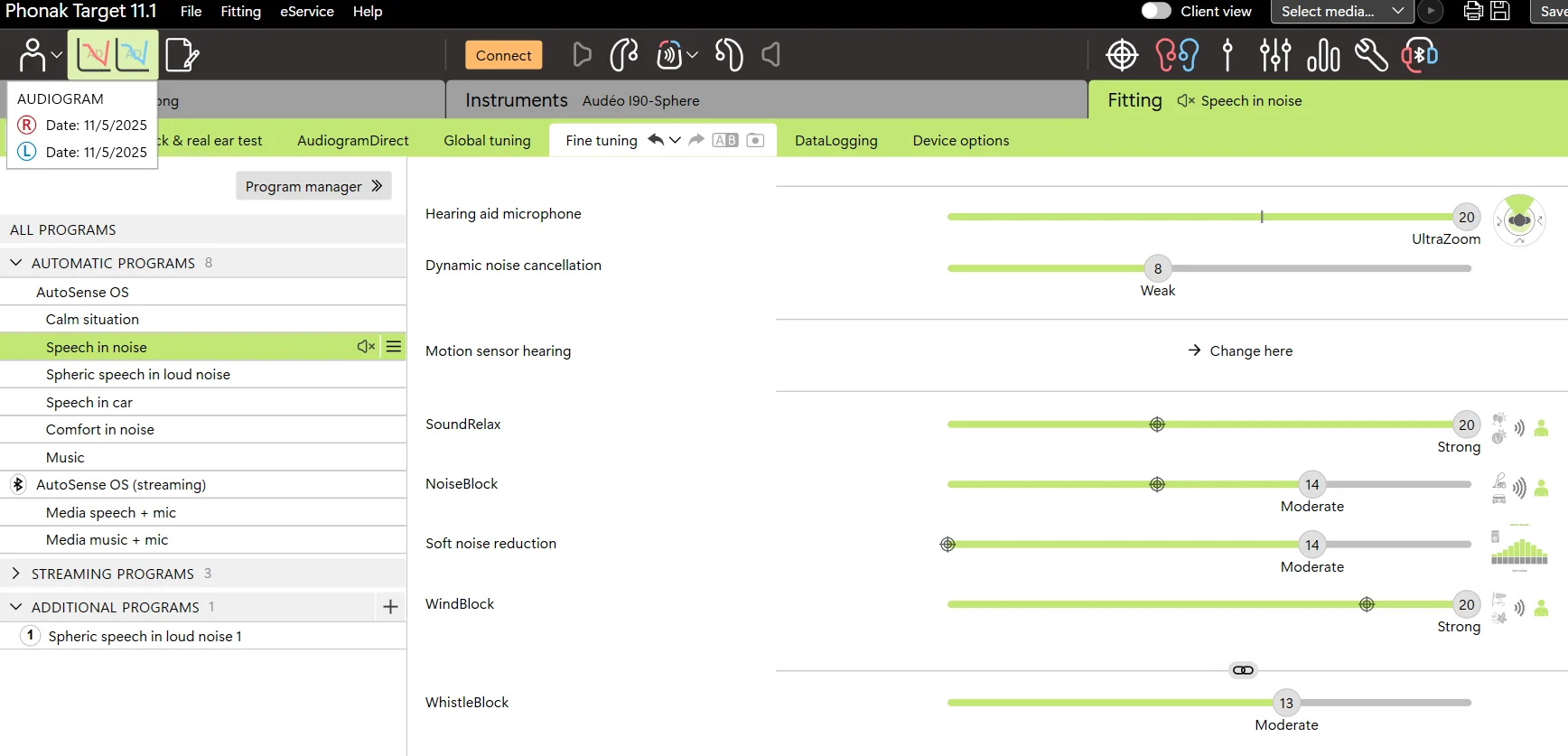
It seems like you have access to Target and know exactly what the Hearing Aid Mic options for Speech in Noise already. So I’m not clear on what you’re asking → you asked: “How does this (what is “this”? this “setting”???) affect the system’s ability to pick the best mic directionality for a specific environment?”. What does it even mean? Below is the screenshot of the program’s features for reference.
If your question is about what the values on the sliding scale of that setting means, I can tell you that the left most selection is for Omni directional, and the setting at the line in the middle is for Fixed directional with the focus in front. Anything to the right of the middle line is the UltraZoom feature. So if you want to have ultimate control of the directionality setting, then pick it yourself between Omni or Fixed directional. If you want to let Phonak select it for you depending on the situational environment, then pick a range of UltraZoom option from weak to strong UltraZoom. That’s how it works with this setting. Hope this answer your question, although I’m unclear on what your question means in the first place.
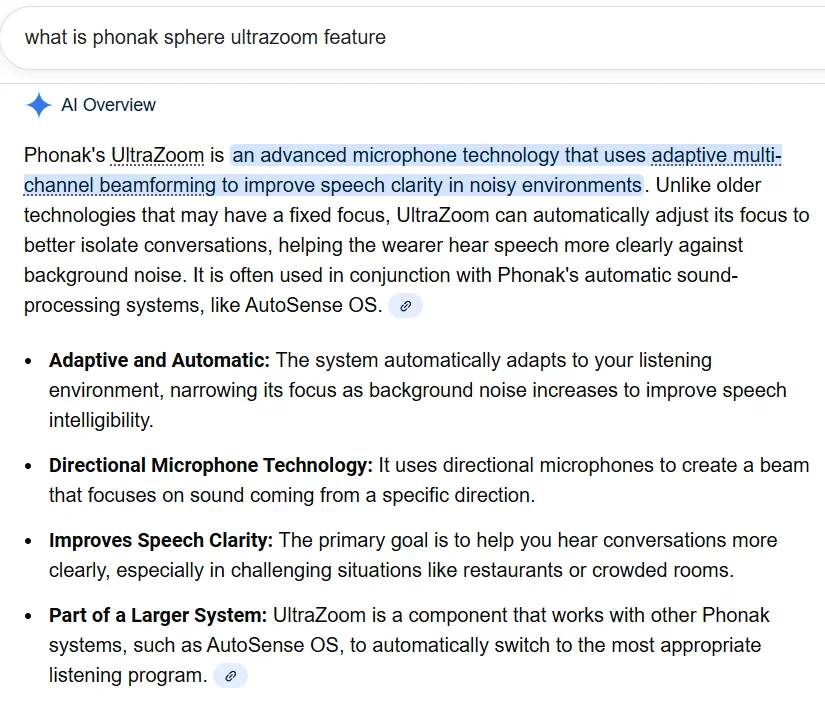
Below is the Google ’s description of what the UltraZoom feature in Phonak Target means. The default that Target sets for this Hearing Aid Mic parameter in the Speech in Noise setup for my is the highest setting for UltraZoom in my case. I suspect that it’s probably the same for almost everyone else, unless you want your audi/ to not use the UltraZoom feature and set it to fixed directionality instead, for either a range between omni directional to fixed (front focus) directional.
Sorry for not being clear. Let me try again. It is my understanding that these aids will analyze the environment and adjust the directionality of the mics to fit that environment. For instance, if voices are on my right side, the aids will focus on that. Yet in Target, I might have the mics set to ultra focus only in front. I believe that the software in the aids override the Target setting (in this instance ultra focus in front) to adjust to the environment setting. In the case, focusing on the voice to the right. Just looking for understanding of how the Target setting of the directionality of the mics relate to the software analysis of the environment. Hope this is clearer
I wonder if the Spheric mode has any smart to determine how far away (in any direction) a voice is to determine which overlapping voice to give priority to (namely the voice closer to you would get higher priority). Or whether it’s only based on loudness and not distance or position (behind or in front, for example).
Supposedly Spheric mode can be set for different levels of directionality. The default is moderately directional, but if you have a custom Spheric program you can create wider and narrower clones to be used at need.
And I am waiting for the complaints when companies and hackers start using it to blast every one with ads and other useless garbage. It is coming marketing my word on that.
Unless I’ve misunderstood something, doesn’t work quite like that. You have to choose to connect to an Auracast source, which means (if I’ve got it right) that nobody can start blasting stuff into your head without your consent.
I have no desire to buy more adapter. My goal in life is to simplify my life. I am a retired IT professional that to be honest is totally burnt out with gadgets.
No. You must have more gadgets. You must have all the gadgets. The gadgets are goooood. They are your friends!



 Toronto, Canada
 SoCal
SoCal


 London