
 SoCal
SoCalYes, Mark, I mentioned the vast possibilities available with in post 228, but Chuck isn’t receptive to change it seems.
Your points on passwords, and selection are also relevant.
You’re ignoring this member’s posts.
310 replies11.4k viewsLast reply
Yes, Mark, I mentioned the vast possibilities available with in post 228, but Chuck isn’t receptive to change it seems.
Your points on passwords, and selection are also relevant.
You’re ignoring this member’s posts.

I wonder if the Spheric mode has any smart to determine how far away (in any direction) a voice is to determine which overlapping voice to give priority to (namely the voice closer to you would get higher priority). Or whether it’s only based on loudness and not distance or position (behind or in front, for example).
Supposedly Spheric mode can be set for different levels of directionality. The default is moderately directional, but if you have a custom Spheric program you can create wider and narrower clones to be used at need.
The directionality of the Spheric mode is not any different than that of the other programs. It’s the Hearing Aid Microphone setting on the top of the programming options menu shown in the screenshot of my last post. Its default for my Spheric setting is Fixed Directional. I slide it all the way to the UltraZoom level to take full advantage of this feature (also see my previous post for a Google description on it).
But that’s not relevant to my statement that you quoted me above. That statement I had is about “depth” sensing, not about the different level of directionality. Directionality is just how to adjust the mics to adapt the channel beamforming to where the speech is found in the 360 degrees environment to help improve speech clarity (which is what UltraZoom does). But my statement was NOT about directionality, but about the DEPTH of the voice source, not about the direction of the voice source.
For example, I’m at Costco, in the Spheric mode, standing in the departing lane near the food court, waiting for my wife to go to the bathroom. And there’s a guy to my left standing at a checkout line way back about 20 feet away (that’s the “depth” I’m talking about). He has a big voice, so when he started talked, Spheric picked up on his voice (20 feet away) and popped it in my left (not the right HA, hence I complained before about the lack of spatial balancing).
At any rate, I don’t care to hear what a guy who’s 20 feet away from me says. I’d rather that Spheric not pick it up and dump his voice into my left aid. But Spheric doesn’t know better and Spheric did it anyway. That shows that Spheric lacks the smart to have any depth/distance perception when it’s trying to pick out voices. What if there’s another voice closer to me, but not as loud as that guy, but has more relevance to what I want to hear? If Spheric chooses an irrelevant voice further away for me to hear, at the expense of suppressing a more relevant (but not as loud) voice closer to me to hear, then it’s not good. Hence my question about Spheric’s ability to discern the depth of the voices and factor that into the equation. Apparently not based on my personal experience.
You’re ignoring this member’s posts.
Sorry for not being clear. Let me try again. It is my understanding that these aids will analyze the environment and adjust the directionality of the mics to fit that environment. For instance, if voices are on my right side, the aids will focus on that. Yet in Target, I might have the mics set to ultra focus only in front. I believe that the software in the aids override the Target setting (in this instance ultra focus in front) to adjust to the environment setting. In the case, focusing on the voice to the right. Just looking for understanding of how the Target setting of the directionality of the mics relate to the software analysis of the environment. Hope this is clearer
First of all, you don’t just take for granted that these aids will analyze the environment and adjust the directionality of the mics to fit that environment. That ONLY depends on your setting in Target. If you set the Hearing Aid Mic setting (the top parameter in the screenshot of my previous post) to Omni for a particular program (like Music for example), then you will have already forced the through Target to only stick to Omni and not do any fixed directionality anywhere. Else, if you set it to Fixed Directional, it’ll probably forced it to beamform more to just the front of you. And in between these 2 extremes is what Phonak Target calls Real Ear Sound, where Phonak will use an algorithm to filter the sound to simulate the acoustical characteristics of the pinna.
Then to the right of the Fixed Directional is another scale for the UltraZoom feature. It’s very confusing to join this scale with the other scale on the left on 1 line. I think it would have been better to have 2 separate scales and make them mutually exclusive to each other. At any rate, I won’t repeat what UltraZoom does here because I’ve already included the Google description of it in a previous post. But it’s a smart adaptive directionality feature to seek out where the voices are and set the directional focus to where those voices are dynamically.
Your statement I highlighted in bold above, about “the software in the aids overriding the Target setting”, is not correct to the way you’re thinking. The software in the aids (actually the firmware) is controlled by what you set in Target. And YOU (or the audi) control how Target is set, which in turn will control how the firmware inside the aids will behave. So it’s not possible for the firmware in the aids to “rebel” and “override” what Target has “instructed” it to do. There’s no software/firmware in the aids that’s “independent” from the controls imposed from the Target software. The adjustability is done inside of Target, nothing can be adjusted further inside the firmware of the aids.
So in your example, if the voice comes from your right, and you have set Target to control the aids to focus only the beamforming to the front, then that’s what the aids will do, and no software or firmware in the aids will override this front beamforming setting by Target. If you want the aids to have the smart to beamform to whereever it detects a voice coming from, then use Target to use the UltraZoom feature to activate this “smart” and adaptive beamforming technology.
You’re ignoring this member’s posts.
You’re ignoring this member’s posts.
This is only my second day with Sphere Ultra’s. Keep in mind i am wearing them with vented domes as my custom vented slim tips are arring next week. I expect even more performance. I used them in almost every environment but a loud restaurant, that comes tonight. I wore the Spheres for 16 hrs. Streamed, tried several program scenarios and they are hands down phenomenal. Looking forward to retuning with the custom molds, meantime after 16 hrs of use I have 65% of my battery’s left. Wow.
Regards
T
You’re ignoring this member’s posts.
Thank you Volusiano. Your reply as always is very interesting. See below from Chatgpt, but without source so take it for what it is worth:
n Phonak Sphere hearing aids (including L90 Sphere), microphone directionality is still very important, but AutoSense OS 5.0 decides when and how it is used.
You can set directionality in Target, but the moment AutoSense decides a different pattern is better, its adaptive algorithms override your manual setting.
So the function of the microphone directionality is to provide the building blocks (omni, fixed directional, adaptive directional, ultra-zoom, etc.), while AutoSense chooses which block is active at any given moment.
So let me take a real world example. I am in noisy restaurant in Sphere mode with Ultra Zoom selected inTarget. There is a person beside me talking but I am looking forward (but no one is talking directly in front of me), will the aids beam form to the person beside me or still focus forward?
You’re ignoring this member’s posts.

The only thing I would add is that the Sphere’s have two processors. When you are in an extremely noisy environment and the Spheric program is activated, the Deepsonic AI chip is activated and is the first to receive and process the signal. I believe that the only thing that the Deepsonic chip does is removes the noise. Once the signal has been stripped of noise, it is passed along to the regular sound processing chip which handles all the regular hearing aid type processing functions that you can adjust in Target. I suspect that the loss of depth and/or directionality that some people are noticing (along with any other weird behaviour) is a result of the hearing aids processing a stripped down signal from the Deepsonic chip.
Good example would be a not so loud voice coming from your left side. The speech will be much louder on the left so the Deepsonic chip recognizes the speech, removes the noise and passes it along to the main processor. On the other hand, the speech that the right hearing aid picks up is quite a bit softer and it gets stripped out by the Deepsonic chip as noise. The end results is that you hear the voice really clearly on the left side but there is nothing on the right to give you a sense of depth or direction. Net result is that it feels odd because you only hear it on the left and you have no idea where it is coming from.
I am sure there are more examples. The good news is that you can hear the speech whereas with non AI hearing aids, you would not. I’m happy with the weirdness because my brain ignores it as I focus on the speech plus…it only happens when I am in extremely noisy places which only happens a few times a week.
Jordan
You’re ignoring this member’s posts.
What you explained makes sense about how the DeepSonic chip is causing the weird spatial imbalance. And I also agree that in an extreme environment where you can’t understand things, it’s better to hear something than not be able to hear anything and put up with the weirdness. But I just wouldn’t want to be in that mode all day long in any environment vs the regular mode as processed by the other ERA chip. So if it’s activated automatically in an appropriate environment occasionally as needed, then that’s fine.
I just wonder about those patients who ask their to lower the Activation Level of the Spheric mode so that they’d be using the Spheric mode more often than they should, whether they find that adjustment actually more satisfactory for them in the long term or not, once they’ve passed the honeymoon phase with that mode.
You’re ignoring this member’s posts.
I just wonder about those patients who ask their HCP to lower the Activation Level of the Spheric mode so that they’d be using the Spheric mode more often than they should, whether they find that adjustment actually more satisfactory for them in the long term or not, once they’ve passed the honeymoon phase with that mode
I totally agree with what you said about only using the Spheric program in very noisy environments and keeping the trigger point at the default setting (i.e. not lowering it). It’s really good for speech in a noisy restaurant but I wouldn’t want to be in that program all the time. You really lose environmental awareness and directionality. It’s kinda like the afterburner on a fighter jet. It’s useful for short durations.
Jordan
You’re ignoring this member’s posts.
Thank you Volusiano. Your reply as always is very interesting. See below from Chatgpt, but without source so take it for what it is worth:
n Phonak Sphere hearing aids (including L90 Sphere), microphone directionality is still very important, but AutoSense OS 5.0 decides when and how it is used.
You can set directionality in Target, but the moment AutoSense decides a different pattern is better, its adaptive algorithms override your manual setting.So the function of the microphone directionality is to provide the building blocks (omni, fixed directional, adaptive directional, ultra-zoom, etc.), while AutoSense chooses which block is active at any given moment.
So let me take a real world example. I am in noisy restaurant in Sphere mode with Ultra Zoom selected inTarget. There is a person beside me talking but I am looking forward (but no one is talking directly in front of me), will the aids beam form to the person beside me or still focus forward?
My answer is based on common sense, not based on any intimate of knowledge of whether AutoSense would really muck around with your Target settings or not. If it actually does, that’d be a negative thing to me, instead of a positive thing. If you already specifically assert a manual adjustment to how you want things to be and AutoSense goes in there unsolicited and take away your control of the settings and muck around with what YOU really wants, then it’s a bad thing and nothing to crow about.
No wonder many people say they don’t like what AutoSense does at all and divert to other brands because they can’t stand AutoSense. A case in point is the Music program. If you set it to be Omni directional and AutoSense detects speech and changes the HA mic directionality from Omni like how you have set it in Target, then that would be a bad unsolicited move by AutoSense that’s not welcomed by anybody. Most people want Music to be 100% omni directional all the times.
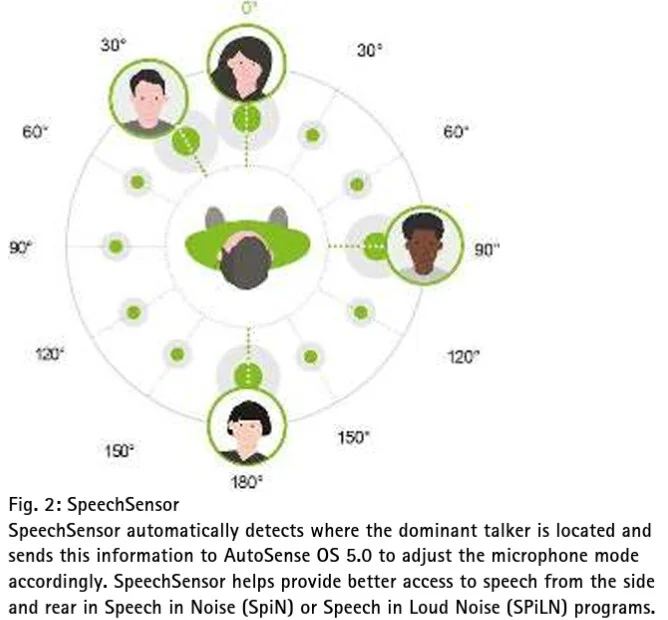
In your real world example, if you selected Ultrazoom, then the aids should stick with the Ultrazoom setting and should not divert from it. But in the Lumity technical paper (see link below) that talked about AutoSense 5.0, they talk about UltraZoom being a slightly wider front focus beam forming. Then they talk about Stereo Zoom being a much more narrow focus beam forming compared to Ultrazoom. Then they talk about Speech Sensor which can determine the direction on the speech and redirecting the beam to that direction. They did mention that Speech Sensor is fed into the AutoSense to have AutoSense adjust the direction to the Speech Sensor data in and SILN. But there’s no option on how to control Speech Sensor at all in Target. Again, they should really allow an option for the Speech Sensor in Target for users to decide how to set it, instead of just have AutoSense overtly take this Speech Sensor data and do whatever AutoSense wants to do with this without giving what the user wants (through Target) any consideration.
You’re ignoring this member’s posts.
By the way, the technical paper on AutoSense 5.0 for Lumity above is quite informative about how the various speech improvement features are combined together, so I thought it’d be worth a summary below.
Basically, the paper introduces a new technology that Phonak calls the SmartSpeech Technology in AutoSense 5.0. It’s a combination of older technologies plus some newer technologies that Phonak developed and added at the time to it.
Older technologies:
Newer technologies:
StereoZoom 2.0 (2022): this is the solution Phonak came up with that would address the disadvantage of such a narrow beam in the original StereoZoom. It’ s really nothing revolutionary that I can tell, however. It’s basically a combination and blend between the UtraZoom and the StereoZoom (1.0) technologies. If it’s less noisy, then they gravitate toward UltraZoom. If it’s more noisy, then they gravitate toward StereoZoom 1.0, and now the combination is called StereoZoom 2.0. They put this SZ 2.0 on the MyPhonak app for users to control by way of the Speech Focus slider (in the Adjust button of the Auto program). The paper claims that SZ 2.0 is also available inside of Target for the audi to control, but I really can’t find any such SZ 2.0 (or Speech Focus) parameter inside of Target AT ALL.
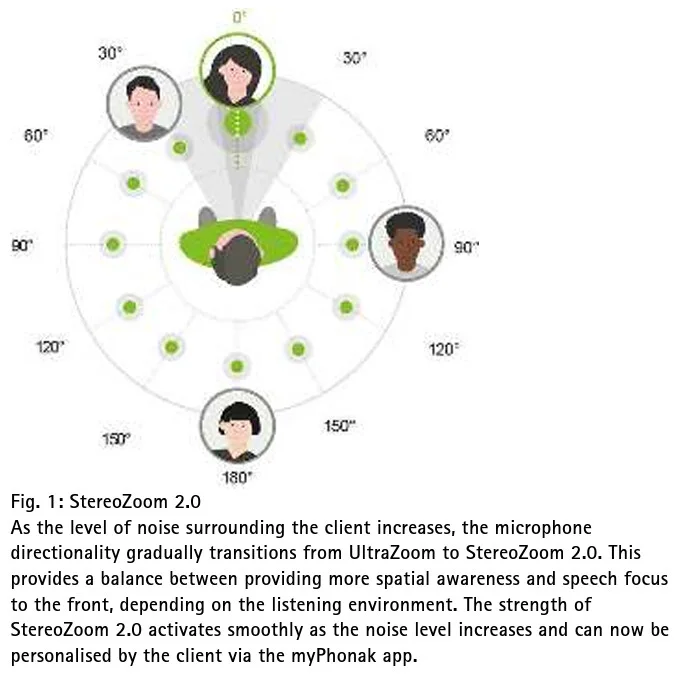
Speech Sensor: studies found that although a user has a tendency to face the sound such that 80% of the sound he/she wants to hear is from the front, there is still 20% of the sounds coming from the sides or back that the user might miss but wants to hear. For example, cooking in the kitchen facing the stove but chatting with somebody behind them. So Phonak developed the Speech Sensor technology to determine where the dominant voice is coming from, and send this information to AutoSense. AutoSense will then adjust the directionality to pick up where this speech is in the SIN or SILN programs. But AutoSense doesn’t actually really do any new groundbreaking beam forming technology to adjust the directionality, however. If Speech Sensor tells AutoSense that speech is from the sides, then AutoSense will activate the omni directional setting. If Speech Sensor says speech is from the rear, then AutoSense will do Real Ear Sound mode (simulate the pinna) to pick up speech from the rear better. And if Speech Sensor says speech is from the front, or if no dominant direction is detected, then AutoSense will go to StereoZoom.
The new Phonak Smart Speech technology:
So the new Smart Speech technology in Lumity for AutoSense 5.0 is really just a collection of all the above technologies combined, specifically the latest 2, which are Stereo Zoom 2 and Speech Sensor. It also collects some older technolgies like
You’re ignoring this member’s posts.
You’re ignoring this member’s posts.

question for you because you have experience with oticon intent and now phonak audeo sphere. Sphere still uses bluetooth clasic, does bluetooth LE bring better sound quality? that because of that, speech understanding would be better when we listen to a YouTube podcast?
You’re ignoring this member’s posts.
Sorry, I don’t have the Oticon Intent. I only have the Oticon Real, which does not support LE like the Intent does. So I don’t have any experience with BT LE to compare against the Phonak Sphere. But I have no issue at all with speech understanding in a streaming environment, and legacy BT audio quality are honestly good enough for me at this moment, so I really have no burning desire that I must have BT LE and/or AuraCast at this point. It’s good enough to know that there is a forward path in the future when the Phonak Sphere will be upgraded to BT LE and AuraCast support. So that’s good enough for me now if Phonak is making me wait a little longer for this support.
You’re ignoring this member’s posts.

Sphere still uses bluetooth clasic, does bluetooth LE bring better sound quality? that because of that, speech understanding would be better when we listen to a YouTube podcast?
The sound quality of the Infinios over Bluetooth Classic should be basically identical to what we’ll see when (we should live so long…) Phonak enables ; in both cases, the actual Bluetooth protocol is, I would think, not the limiting factor in terms of the sound quality you will hear, particularly for sources like podcasts.
Where LE Audio will give a perceptible improvement is (A) lower latency, meaning that the delay between what you see and what you hear will decline from something like 250-350 milliseconds down to 1/10 that (or maybe even a little better); and (B) equivalent sound quality with significantly lower battery drain, since LE Audio gets the same effective resolution with a lower bitrate. Of course, both of these expectations are only expectations - we won’t know exactly how good the Phonak implementation of LE Audio is until we get our hands (ears?) on it. One would hope the fact that Phonak is taking so long to release LE Audio means they’re being super careful to do a fantastically wonderful job with it…
You’re ignoring this member’s posts.

One would hope the fact that Phonak is taking so long to release LE Audio means they’re being super careful to do a fantastically wonderful job with it…
They were doing user testing of the ui last spring. I had hopes they were almost done then. But no…..
WH
You’re ignoring this member’s posts.
Thx @flashb1024 for your advice!
Actually, this problem didn’t bother me too much. so I left it as it was 
You’re ignoring this member’s posts.
@Volusiano Regarding flat hearing loss as you mentioned, your assessment is correct. The audiologist who fitted my hearing aids shared the same perspective, indicating that Phonak would be more suitable for me. My experience testing the Phonak Sphere aligns with yours, yet after weighing the pros and cons, I opted for Oticon.
The high latency in Phonak Sphere mode (17ms, as measured by an audio engineer on the forum and also noticeably perceptible to me) combined with abrupt jump among speakers made spatial localisation extremely challenging. (Though the comb filtering effect didn’t significantly affect me, given I use custom ear moulds.). Situation awareness is absolutely crucial for my work.
Intent not only preserves spatial localisation but also appears to retain some acoustic cues, allowing me to intuitively discern the speaker’s orientation: even when they are not directly in front of me, I can still gauge whether they are facing me or seeking my attention through acoustic cues and (partial) dialogue content. Of course, this persumes I can hear the sound.
In addition to Starkey’s omega , another thread mentioned a new brand called Fortell that appears worth considering: it claims to reduce latency to 10ms and features unique Spatial AI…
You’re ignoring this member’s posts.
FWIW I just got my Spheres yesterday from the with custom molds. I asked about the active vent ones as recently for reasons unknown I have been having more the previous wax build up. Anyway he said if I cam Ok with and able to replace the wax traps those are better because if the active vent ones get stopped up it requires a visit to clear them
You’re ignoring this member’s posts.
I just got my Spheres yesterday so I am still learning. The Sheres have 4 mikes. But after your comment I looked at the MyPhonak app and there is an adjustment to change focus from wide to front . This might have worked for you as you could look at your SIL. I wish there was also a manual setting for rear or side.
You’re ignoring this member’s posts.
Log in to reply to this topic.
Hearing Aids3 replies
Hearing Aids7 replies
Hearing Loss6 replies
Hearing Aid Self-Fitting (DIY)23 replies
Hearing Aids14 replies

 Toronto, Canada
 Croatia