It almost feels like a really overly hard limiter effect. When it happens, I can use my app to switch sound profile, and volume comes back, and then returning to the original sound problem resolves the sound - but only for a short amount of time.
I asked my audiologist, who talked to Resound specialist. They came back and recommended ear moulded receivers. Which just doesn’t strike me as the correct solution. Could I be wrong?
My hearing aids are Resound Omnia.
Anyone have any ideas or have experienced similar?
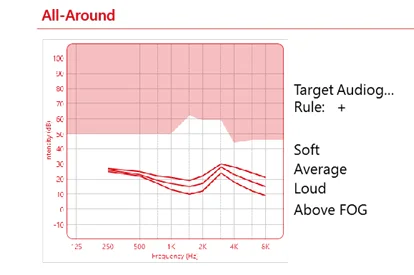
I’ve attached an image my audiologist sent in her replies in case it means something to someone!
This a bit odd. Most people complain that they are overwhelmed by their when things get noisy, and hate indiscriminate amplification, not the opposite (hence those graphs). Your graphs say that your HAs already produce almost the same amplification no matter the ambient noise- so one would even have to squeeze them closer to help you. If a car engine shuts your HAs off you might take the two lower graphs all the way up in the section until 1 kHz.
It is important to know that the shape of these graphs is not sacrosanct- it is not dictated by your hearing loss, but is very personal. I tweaked mine considerably (Target, Phonak) until I was happy with my HAs.
I’m very much in the early days of trying o understand, and have started watching some videos.
And so I must admit, some of what you’re saying has gone over my head!
Hopefully it will make more sense as I learn.
The comments my audiologist got back rom resound Specialist were as follows:
The gain in the low frequencies is significant, we would advice to use a custom tip instead of domes.
This will explain the “limiter” the patient is talking about when there is more noise.
A custom tip should allow a bit more gain to reduce the compression between the 65 and 80 output, allowing more clarity and less artefacts.
Does that make any sense to you, and do you think there might be some truth in it? Custom moulds might be the solution?
Looking at that response, there’s potentially a reverse slope loss happening. Most wind/Machinery filters apply low frequency reduction, as will switching to directional mics. LF cuts are very obvious in terms of perceived loudness - most of which is sensed around 250-500Hz.
Occluding the canal makes some sense in this regard as the aid will ‘govern’ all of the sounds in the canal, rather than a mix of the aid output and the ambient.
When you say wind/machinery filters - is that something that is built into my Resound Hearing Aids? I’ve not even had my audiologist confirm that the profiles have any sort of automated response to different environments.
Is there any other clues in the fact that switching profiles and switching back seems to ‘solve’ the issue to some extent? Almost feels like a software glitch. Like it tries to correct, over corrects and gets stuck, until I do something to manually unstick it.
I’ve my wife’s head turned about this. And yet, with the nature of hearing aids, we are very much isolated in our experience and it’s hard to show, and it’s hard to adequately describe with words when something isn’t right.
wind/machinery filters - is that something that is built into my Resound Hearing Aids?
All aids use discrete compression during high input situations, the amount of reduction and subsequent output will be editable through the software. Also when the aids switch to a directional pattern, the low frequencies ‘roll-off’ as a function of the directional pattern response. The degree to which the aids utilise the directional settings can be reduced in the fitting SW too.
As I’ve said, improving the coupling to the canal could potentially let the aid govern the situation better, but I’d be tempted to try a few changes in the software while playing a background track in the audologist’s chair. Preferably while doing to observe the performance change.
My almost 4 year old (< 1 year out of warranty) Resound Ones did similar last year after being serviced by my Audi’s Tech. They would mute out after road noise hit a moderate level around 30 mph. I use custom molds and have for years, btw.
I was already debating on what and when to get new . The Resound Vivia 9s with full warranty from the Audi were going to run ~$6K. I went the Costco route with the Jabra 20s and then the Jabra 30s a few months later.
Is there any other clues in the fact that switching profiles and switching back seems to ‘solve’ the issue to some extent? Almost feels like a software glitch.
This is interesting - I had a similar issue with my Resound Nexias (Jabra EP20) last year. I use MRIE receivers that have an additional microphone in the receiver.
As long as the used that extra microphone (All Around program) everything was fine. But as soon as I switched to a program that used the on-board microphones (Hear in Noise), I would experience the same thing: normal loudness for 10-15 seconds, then everything became very quiet. This was totally repeatable every time I switched profiles.
I went to Costco to do - the audi there knows that I do . In All Around mode everything was fine. In Hear in Noise mode she could clearly see how REM would show normal amplification at first, and then the HAs would decrease gain dramatically.
We were both puzzled - since I do DIY, I tried factory resetting the HAs and reprogramming them from scratch, etc. Nothing helped. Eventually they were sent to ReSound and I got working ones back.
So yeah, very likely you experience the same glitch as I did. Unfortunately the only solution in my case was to send them in for repair.
To be honest I was wondering if my frequent DiY reprogramming efforts might have triggered this bug, but unless you do DIY as well, that probably wasn’t the case.
I should also add that my ‘All Around’ program is setup so that it always uses the MRIE microphones. The default setting is that the HAs will use MRIE in quieter environments and switch to the built-in microphones when it’s louder.
@Clivemcl, If you also use MRIE receivers, then I’m 100% sure you experience the same thing. Since your ‘All Around’ will likely use the default settings, your HAs would switch to built-in microphones when it’s louder and that’s when you experience the muting.
But unfortunately, not exactly the same. Firstly I do not have MRIE receivers. And my issue does happen in All Around. In fact, the other sound profiles seem to bring the volume levels back.
how many built in mics are available on my Omnias? I wonder if the auto adjust for low rumble noise is actually switching off some of the mics, and relying on other ones which may be faulty, but I’ve never noticed when they’ve all been active.
Or, is it possible that mine are setup as if they’re MRIE, but none are attached? Could my profile be switching to in-canal mics, that do not exist?
I’ll be honest, I was trying to save money and bought these used. So I’m not going to be super mad if they turn out to be faulty.
But still, they seemed fine initially but this problem has developed over time.
I’ll be honest, I was trying to save money and bought these used.
Well you should be because that’s the main reason for buying used, doing this would allow you to understand how your work within the software.
Impulse Noise Reduction,
Environmental Optimizer
NoiseTracker are the things to check in SmartFit fit.




 San Francisco
 Geneva, Switzerland
 Wales, UK