PVC,
Thanks again for your help. That whitepaper from Oticon was excellent and just what I needed to help understand why the feedback analyzer should be run. Probably the key part of the paper for me was this:
“It is crucial to perform this analysis at every new fitting and every time the acoustic properties of the hearing aid change (dome type, ear wax) or there is an update to the audiogram.”
So basically they are saying that you should run the analyzer every time you make any changes to your programming because it then calibrates the anti-feedback system (AFBS) which enables the AFBS to monitor accurately situations where feedback might occur and then take measures to eliminate it.
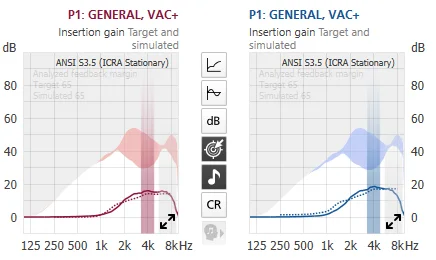
For others who might be reading this, what I did when I ran the feedback analyzer was to connect my aids to the Genie 2 program in the fitting section of the software. Then while wearing the aids I clicked on “Feedback Analyzer” and then on the “Start” button. What then happens is that a noise is generated in both aids for 10 seconds which enables the Genie software to determine if any feedback is occurring. After the 10 seconds the noise stops and a graph is displayed for each aid (left and right) showing the feedback margin and insertion gain levels (these terms are defined in the white paper). That’s all there is to it.
Note: There is a background noise level indicator on the feedback analyzer screen - if the background noise where you are located is above the red line then you should take action to reduce the noise (close the door, window etc.).
I received conflicting information about running the feedback analyzer for the Genie 2 software on the OPN. Obviously this white paper says that you should run it every time something changes. I did have my audi run it on my OPN1 originally when I was fitted with 85dB receivers on bass dome with single vent fitting. And that was because I experienced feedback if I didn’t run it.
HOWEVER, if you go on audiologyonline.com138 and viewed one of the Oticon seminars on Genie2 programming, the presenter said that if there’s no feedback issue, they don’t encourage the feedback analyzer to be run and have feedback control turned on because it’ll take away some of the headroom gain which is one of the trade-offs of using the feedback analyzer.
When I mentioned this on this forum, one of the fitters who frequents the forum (maybe Um_bongo and Neville) said that this is old advice and the new advice from Oticon is to run it always.
Then when I recently changed my fitting with 105dB receivers using custom hard acrylic molds (still has a vent in it), I asked my audi about running the feedback analyzer again (because the new setup wiped away the old settings) and she asked if I experience any feedback. I said actually no I don’t (maybe the custom molds help in this regard, so she said that if I don’t have any feedback issue then she doesn’t want to run the feedback analyzer and enable feedback control, for the very same reason cited by the Oticon seminar I mentioned above, because it would require the tradeoff of losing some headroom if enabled.
I think that makes sense. If you have feedback issue then by all means run the feedback analyzer and enable feedback control. But if it’s not an issue then why run it?










 Wales, UK