I thought that if the ear is not closed up enough, that low frequency can get out, unlike high freq? And what do you mean by coupling? Do you think its the structure of my left ear that is creating the feedback?
You’re ignoring this member’s posts.
This topic is closed.
32 replies2.7k viewsLast reply
I thought that if the ear is not closed up enough, that low frequency can get out, unlike high freq? And what do you mean by coupling? Do you think its the structure of my left ear that is creating the feedback?
You’re ignoring this member’s posts.

Which B90 aids do you have?
Have you ran feedback manager?
Did you use direct to set the aids up?
You may consider starting fresh using a new client. Reset the aids using the factory setting and go from there.
Have you read the Phonak tutorials?
You’re ignoring this member’s posts.

My understanding is that most feedback is caused by sound produced by the hearing aid “leaking” back to be picked up by the microphones on the hearing aid. The leaked sound then gets reamplified setting up a loop that locks in at some frequency and creates the feedback whine or whistle. I believe it typically happens in the 3-4 kHz range. By controlling the size of the vent you can control this effect to some degree. However if the fitting leaks around the dome then it is uncontrolled and you can get feedback. That is why I think it may be simply the way your dome fits in one ear. My thoughts would be to try the power dome in the problem ear to see if that helps.
You’re ignoring this member’s posts.
Custom molds help a lot, or go back to your fitter and turn up feed back control, or lower the volume in the ear that’s feeding back. Phonak feedback control might work since I have Phonaks and no feedback, but I will have to go with a powered up receiver with molds.
You’re ignoring this member’s posts.
Hey, could you share a link for the phonak tutorials? Haven’t ran a feedback test. And do you know where the feedback control option is?
You’re ignoring this member’s posts.
You’re ignoring this member’s posts.
Do you have any links for tutorials on how to use phonak target? I saw you posted a link on an old thread, but it didn’t work
You’re ignoring this member’s posts.
Have you checked your ears for earwax build up? I have Phonak B90’s and began getting feedback in one ear then the other as well. I use open domes and tried closed ones without success. It turned out the earwax was the cause. I had my ears syringed and now have no feedback at all.
You’re ignoring this member’s posts.
You’re ignoring this member’s posts.
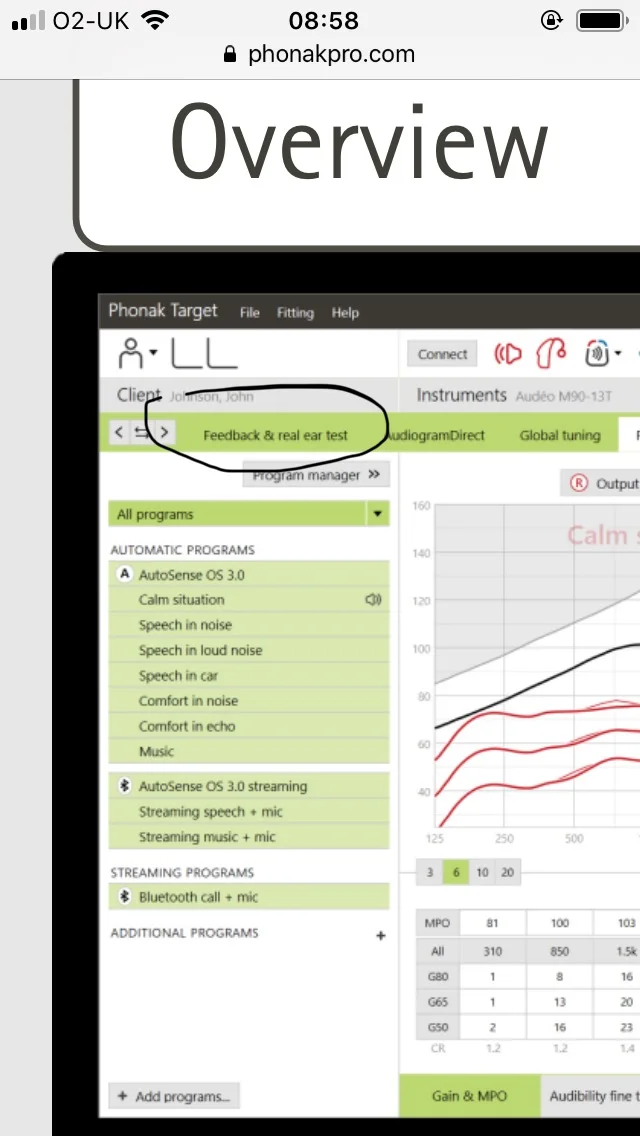
I suspect the feedback issues you are having is due to not setting your aids up correctly in the Target software.
When you open Target in the upper left corner you will see file, service and help.
Click the help. In the drop down menu click desktop fitting guides. Then click standard. That should be enough to get you going in the right direction.
You’re ignoring this member’s posts.
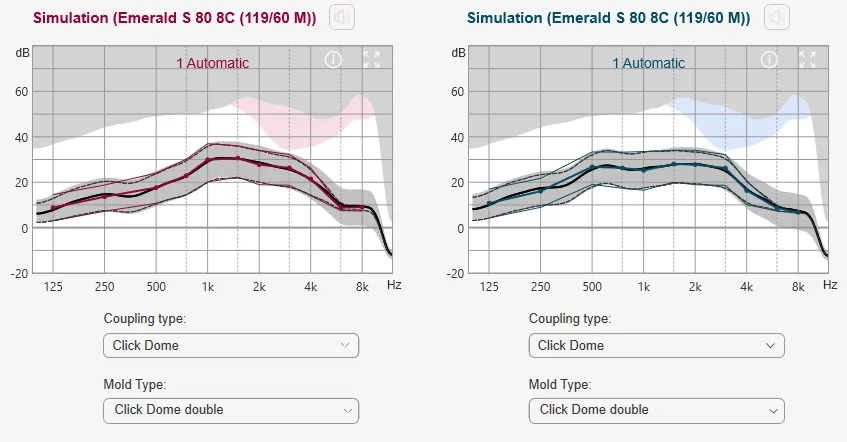
Each manufacturer is different but the current Connexx software used for Rexton and Signia aids would suggest you are probably too close for comfort in the 3 kHz area. The computer highlights potential feedback zones in red and blue. Here is what it shows for double domes:
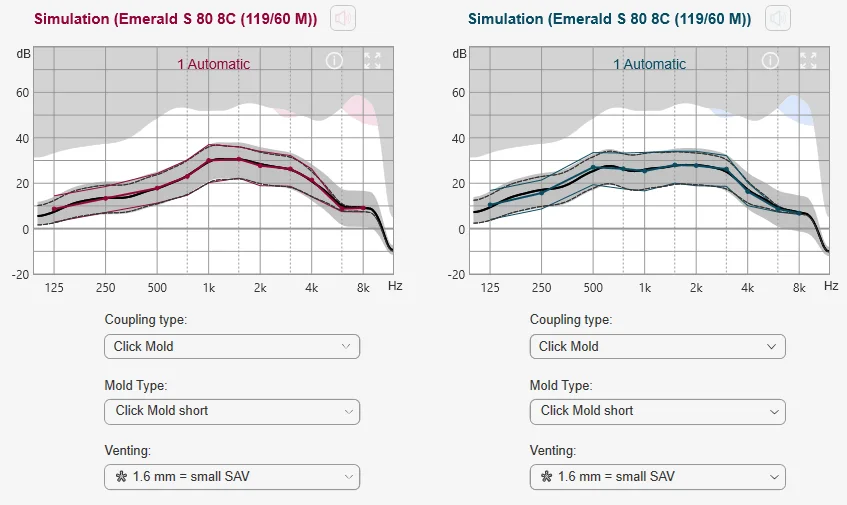
Here is what it changes to using custom molds with 1.4 mm small vents. Much better, but from personal experience it still all depends on how good a fit the molds are.
You’re ignoring this member’s posts.
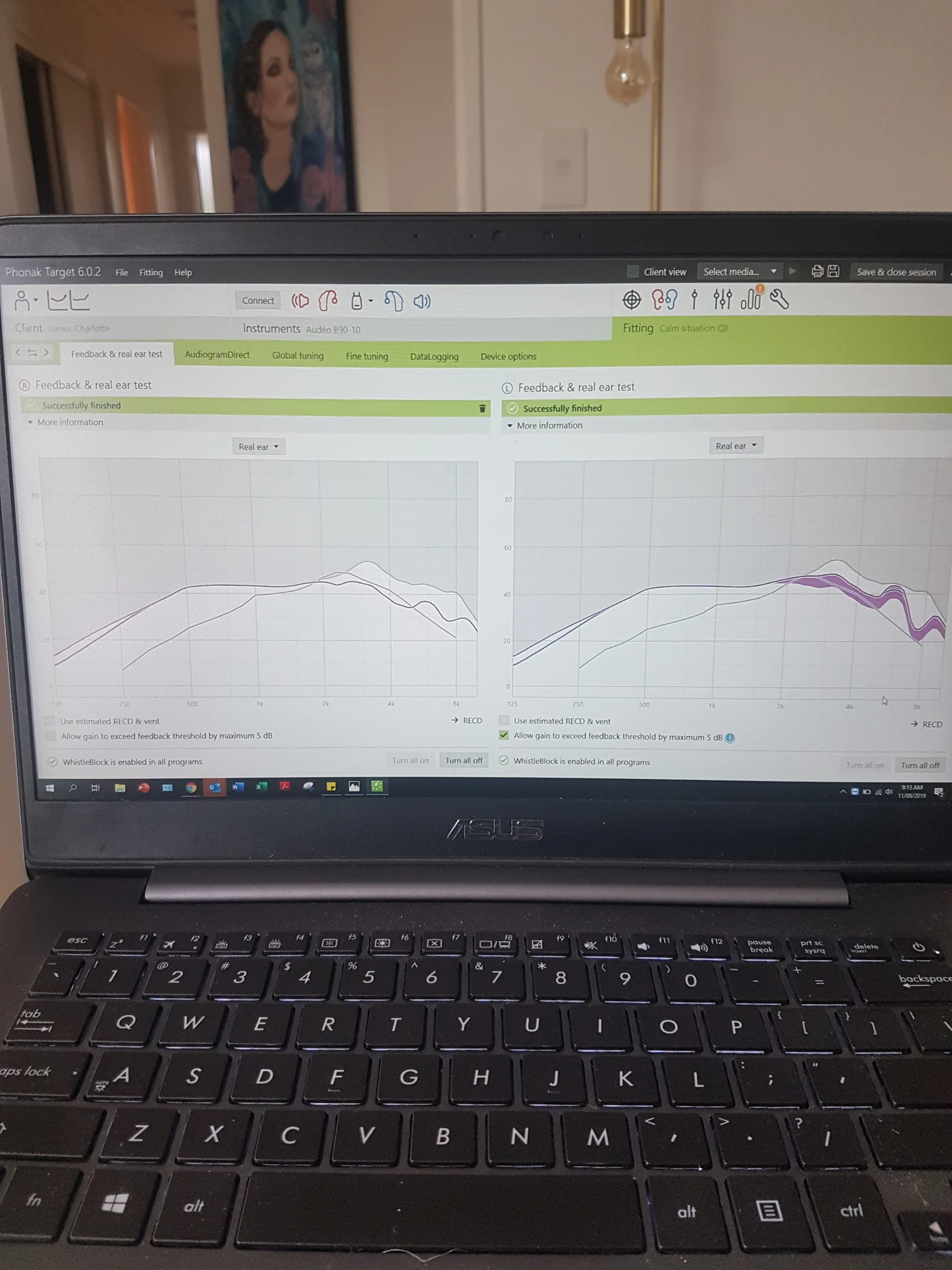
It’s actually my right ear that cause the feedback. I have since changed domes since having this test. Is there anyway if resetting the test?
You’re ignoring this member’s posts.
You should run feedback manager any time your acoustics are changed.
Your left side allowing gain to go above feedback threshold is not good. Un-click that.
Show us the /Gain page.
Have you ran direct? Give it a shot. Most folks like it best.
You’re ignoring this member’s posts.
Hearing Aid Self-Fitting (DIY)3 replies
Hearing Aids5 replies
Hearing Aid Self-Fitting (DIY)12 replies
Fitting Software Requests1.1k replies
Hearing Aid Self-Fitting (DIY)302 replies
 Texas Hill Country