 New York, USA
@rossthewatson I’m reaching here, but do you have another usb cable you can swap out and try with the Noahlink Wireless?
You’re ignoring this member’s posts.
This topic is closed.
52 replies3k viewsLast reply
@rossthewatson I’m reaching here, but do you have another usb cable you can swap out and try with the Noahlink Wireless?
You’re ignoring this member’s posts.

Oh I didn’t know Oticon does that, but it was more about updating the Noahlink wireless firmware should not wipe any programming in the ,
As a side note, ReSound,Signia and Widex have firmware updates from the App now as well, but I get what your saying, it wipes then restores the settings,so you shouldn’t get the issue the OP got, as in his fitting had been overwritten and not restored as they were, all because he did a firmware update on the Noahlink, actually I wonder if he’s using the ReSound Airlink2 or the actual Noahlink wireless device?
You’re ignoring this member’s posts.

Airlink2 would be recognized as an Airlink2 device up until the (Airlink Updater) is run and then it would no longer be an Airlink2 device because it becomes a Noahlink Wireless device with a Noahlink Wireless driver. Both devices are exactly the same device.
ETA: Oticon also restores/keeps pairings after reconnecting.
You’re ignoring this member’s posts.
Yes I know they are the same thing, I use both myself on different PC,but was just curious as to which one he was using, good to know the Oticon situation.
One thing I have found a small difference, is that the Airlink2 doesn’t like a USB hub, but my Noahlink doesn’t mind at all when programming.
You’re ignoring this member’s posts.

In the case of Resound hearing aids, if you do a firmware update of the aid through the app, the current hearing aid settings are not lost. Apart from it being obvious that this must be true for the facility to be offered to end users in that way, I have myself done Resound hearing aid firmware upgrades that way and the settings in the aids were always retained.
There is no reason why updating the hearing aid firmware should lose the settings. They will be held in a small database in an area of memory that would not be touched during the firmware update. This is normal for any computer firmware update process, for example a phone or laptop.
You’re ignoring this member’s posts.

I’ve tried another cable and i’m also able to program my KS9 using the same NOAHLInk box on the same PC
You’re ignoring this member’s posts.
HI Tenkan,
It’s a NOAHLink (native) and not a Airlink2 device, I’m also able to connect and update my KS9 on the same PC.
I’ve contacted the seller and hoping to come to a resolution shortly.
Thanks for all your help
You’re ignoring this member’s posts.

It’s a NOAHLink
This is a NOAHlink. Does it work with your Aids? Thought you had to use a Noahlink Wireless?
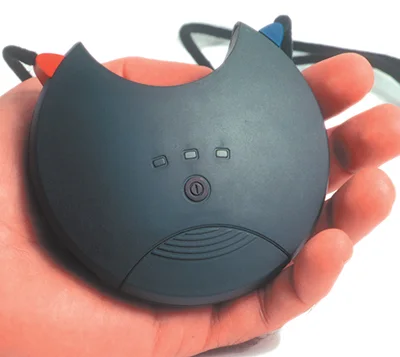
Hace you updated the firmware of the Noahlink Wireless as you’re previously mentioned that a pop up says to update it?
You’re ignoring this member’s posts.
That NOAHLink won’t work at all with Resound One, so I think he does mean a NoahLink Wireless.
If you are looking for aids in a patient fitting in SmartFit and SmartFit isn’t seeing something it recognises, it offers you any other compatible Resound aids it finds, but you have to tick the tiny box next to each of the two you are trying to connect to. Then tell it to connect. At that stage SmartFit will ask for the two selected aids to be restarted, so as to make sure it connects to the right two.
I’m wondering whether you have ticked one of those boxes and not the other.
Also an earlier post from our resident experts (sorry I forget which one of you it was) suggested choosing an earlier (rather than last) session. What happens then is that SmartFit opens that session, but the hearing aids aren’t connected and you have to do so by clicking on connect in the left hand pain. Then SmartFit goes through the normal connecting routine. I think that could be worth trying.
And I come back to my earlier suggestion of setting up a new patient and connecting to these aids from that.
Oh and definitely accept to update the firmware on the NoahLink Wireless if it’s suggested.
You’re ignoring this member’s posts.
I think the issue is that SMartFit updated your hearing aids to an incorrect firmware version. V9.0 is not for the REsound One. I had this issue and had to have mine sent back to Resound for repair
You’re ignoring this member’s posts.
Don’t think that’s possible, it’ll only show a firmware update for the that are connected, if ReSound One is connected then only firmware available for that model will flash.
You’re ignoring this member’s posts.
I’ve had to send the aids back to the seller after all the issues and I’ve been given a refund.
Wont be updating to a new version of firmware on my aids without more research
Thanks for all your info everyone
You’re ignoring this member’s posts.
actually, this is a valid firmware version. as it turns out, My mistake… but it did wipe out my connection to Resound Assist and other things. I think in the end it was a mismatch between the hearing aid firmware version and Smart-fit and the Smart 3d app. Resound has some partnership with Jaba and software is in flux between the two. The jump in version numbers is due to the Jaba transition.
You’re ignoring this member’s posts.
Hearing Aid Self-Fitting (DIY)3 replies
Hearing Aid Self-Fitting (DIY)13 replies
Hearing Aids4 replies
Fitting Software Requests1.1k replies
Hearing Aid Self-Fitting (DIY)302 replies
 Surrey, UK
 Aberdeenshire