Thanks @Um_bongo - I confess I don’t understand the technicalities of your post but will take it with me next time I see the audiologist.
You’re ignoring this member’s posts.
64 replies3.2k viewsLast reply
Thanks @Um_bongo - I confess I don’t understand the technicalities of your post but will take it with me next time I see the audiologist.
You’re ignoring this member’s posts.

The (maximum power output) puts a soft limit on the output.
If the aid is going into saturation - full output - with over amplified speech, it’s either hitting a hard limit (the physical output of the receiver) or a software limit from the output limiting compression on the chip/feedback manager. Whichever way, it’s going to sound rubbish.
You’re ignoring this member’s posts.
I had a lot of clipping when I first got my . The solutions was to change the receivers from standard to medium.
You’re ignoring this member’s posts.
All I have to add to this is that I have also received Bolero M70 from the NHS here in Essex recently and I have not experienced the issue described here. I have my hearing aids connected to a Xiaomi Android phone and I tried it with some Spotify podcasts.
You’re ignoring this member’s posts.
Still no improvement here. The audiologist doesn’t really want to see me for 3 years - at least I’m 18+ months into that time 
Does anyone within the UK NHS system know if we can ever take some control ourselves to use software to make adjustments? Or are we stuck with being grateful and not allowed to mess with them ‘cos they’re free?
You’re ignoring this member’s posts.
Re NHS i think the answer is no but check out the diy section on here if you. want to risk it.
Assuming you don’t diy you didn’t try adjusting streaming music to voice settings as recommended?
You’re ignoring this member’s posts.
Thanks for your reply. I have tried all the adjustments the MyPhonak App allows - hardly anything really, mainly the streaming/ambient balance but they make no difference.
I’m tempted to go diy, but traveling a lot with mac portables means I can’t easily handle it. Plus the fact that the are not mine but remain the property of the NHS.
You’re ignoring this member’s posts.
When .your frustration gets the better of you get a cheap windows laptop and have a go.
My clinic manager just accepted it as they are so busy. She had previously refused to give me the code.
Download the Target user guide and see if you think you can handle it. It’s not physics like photoshop isn’t chemistry.
You’re ignoring this member’s posts.
I spoke too soon. I was listening to the radio today and it was like someone was gently tooting a recorder in the background. Very quiet but noticeable.
You’re ignoring this member’s posts.
Yup! That’s another description of what I hear. The ‘note’ follows the rise and fall of the presenter’s voice. It appears to be news to all but a select few of us 
You’re ignoring this member’s posts.
I encounter a similar issue Bluetooth streaming music - a ‘rattle’ sort of distortion .
I refer to my recent post on Bluetooth feedback which includes a link to a good discussion a couple of years ago about this same issue.
Phonak ignoring the problem? Refusing to acknowledge it?
When I next see my audiologist I might ask to try a pair of ‘power’ receivers which may behave better, but as this effect occurs at moderate and low volumes logic says it’s not an amplifier clipping issue
This problem only appears to affect a small number of users and is therefore not being reported back up the chain to the manufacturers for them to tweak their software. Hmm.
You’re ignoring this member’s posts.
I discovered something today. Listening to podcasts whilst using power tools during a spot of and decorating I looked around for some ear defenders, instead I popped some of the very soft memory foam ear protectors in carefully so that they filled my ear but didn’t push on the hearing aid receiver.
A definite absence of the buzzing distortion!
The sound is quite different of course, volume appears to have gone up and sound balance is all wrong, no doubt because I’m set-up for vented domes and putting foam ear protection over is the equivalent of now having ? If I take the earplugs out and return the volume setting to its normal level the buzzing is back.
The last time I was with my audiologist she updated to latest software, and tweaked a number of settings at my request, turning off the microphones and fancy software features for the Bluetooth program in an attempt to cure/reduce this buzzing problem. No change.
I’ve now contacted my audiologist again, whom is being ever so patient and willing to fix the problem, to take this new information to a Phonak technician and (hopefully) some solutions from them now I can demonstrate a cause and effect producing this problem.
Updates to follow, thinking positively 
You’re ignoring this member’s posts.

Read PeterH’s post above: try setting Adaptive Bandwidth in the app (or have audi do this).
You’re ignoring this member’s posts.
If I take the earplugs out and return the volume setting to its normal level the buzzing is back.
It sounds like its the fit or “seal” of your speakers that could be an issue. You have leakage and the sound quality is distorted. I get the same effect wearing the squishy silicone power tips on my speakers. The speakers would work their way out of my ear canal ALLLLLLL day long, so I’d have to keep pushing them in or I’d get distorted sound.
I just switched to custom molded, “roughed-up” titanium tips that keep the speaker snug in the ear canal. Sound quality is rock solid, no leakage, no distortion.
You’re ignoring this member’s posts.
Thanks @RobFen - a good thought. However I’ve just tried soft foam earplugs as you suggested and sadly no difference. I’m now convinced that the bluetooth setting is simply ‘blasting’ too high. My NHS audiologist did not seem to be particularly interested in the bluetooth/phone/speech field. I guess I’ll just have to be more pushy on my next visit. @1Bluejay 's suggestion of the speakers being too small is another idea to for me to pursue.
You’re ignoring this member’s posts.
Thanks @1Bluejay that’s a good thought. Blocking ears with foam pads didn’t work, but the speakers being incorrect is one for me to pursue. My current ones are Medium Open domes. I’ll see if I can try larger at my next volunteer clinic visit.
You’re ignoring this member’s posts.
Yes, @Um_bongo I’m coming to the opinion that this is exactly my problem. My NHS Audiologist seemed uninterested in the Bluetooth/phone/speech area - I guess I’ll have to be more demanding on my next visit.
You’re ignoring this member’s posts.
My current ones are Medium Open domes. I’ll see if I can try larger at my next volunteer clinic visit.
For SURE trade up to the size L (that was the size I wore before going custom-mold). Also, if you want to watch an EXCELLENT video (that you should FORWARD to your audio), check this out:
(link courtesy of MarkS) I watched the video and learned a LOT about the difference between Bluetooth versions (e.g., 5.0, 5.2, etc.) and Bluetooth standards, which consist of: 1.) Classic Bluetooth (used in Phonak and Kirkland aids), 2.) Bluetooth LE (low energy used in Oticon) - or , and 3.) Bluetooth . I posted a summary of the video at the thread HERE.
This video clearly illustrates why setting up hearing aids + Bluetooth + phone + remote mics = Rocket Science.
You’re ignoring this member’s posts.
A bit of progress…I found comments from Jim Lewis on this forum regarding Bluetooth settings on your phone.
(NB: blocking my ear with soft foam ear buds was maybe simply masking the issue by increasing the volume generally)
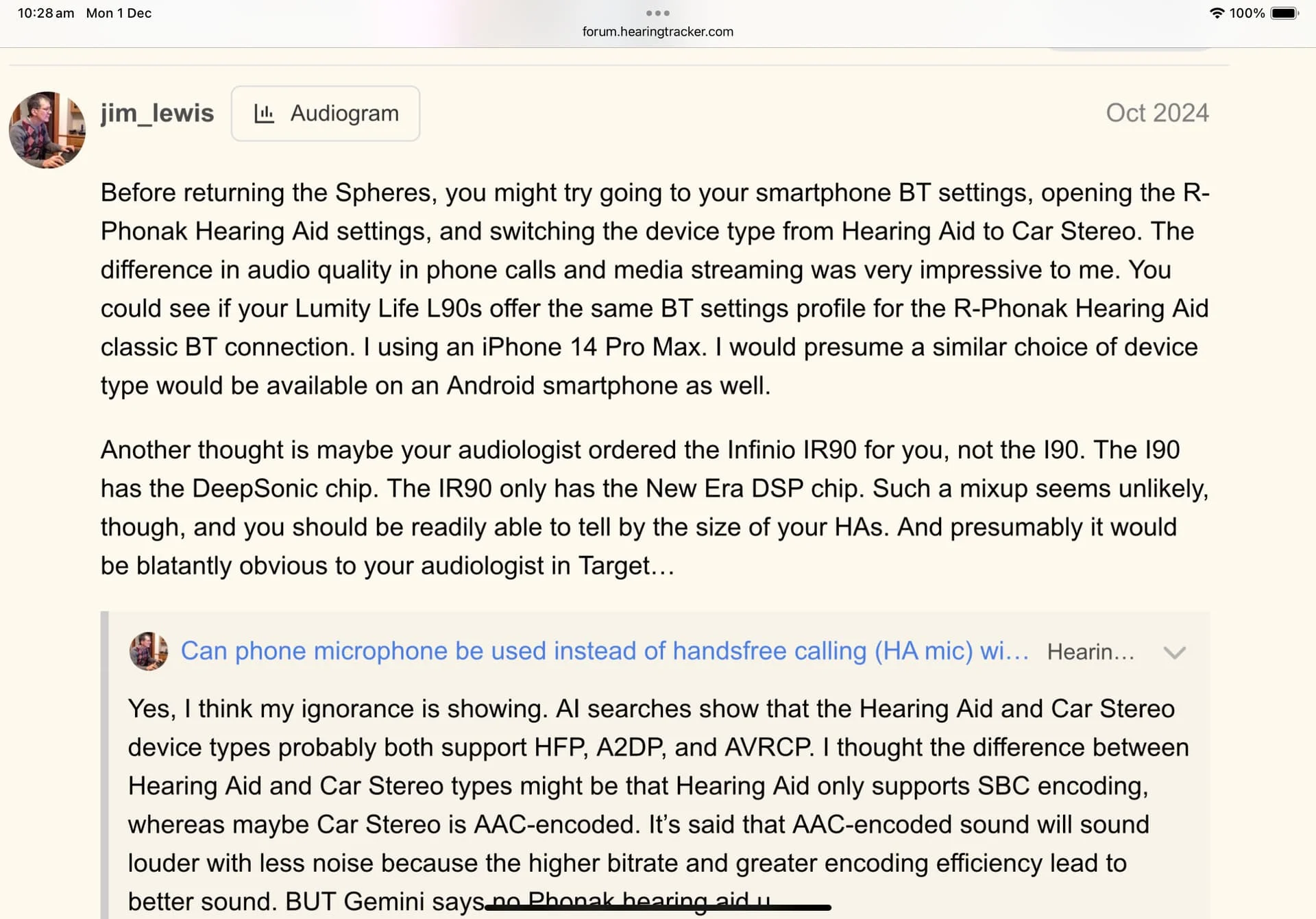
I found the classic Bluetooth connection ‘RxPhonak hearing aid’ in settings, press the i icon and from there select the ‘Device Type’, changing from hearing aid to Car Stereo.
This made an improvement, I can still hear the buzzing type of distortion but less intrusive, mainly on piano or ambient calm type music, but it is better at least. [Test track: London Paris Cardiff, Dominic Miller].
I attach a screen-shot of the forum discussion to this post hopefully if my technical skills allow.
I’m still trying to encourage my audiologist to get someone with true technical knowledge within Phonak to tackle this problem, as it is clearly a software issue
You’re ignoring this member’s posts.
NB: blocking my ear with soft foam ear buds was maybe simply masking the issue by increasing the volume generally)
The distortion could be from activation of active to prevent acoustic feedback. Another cause could be comb filtering although much less probable. Seeing your I suppose you have probably open or vented domes, which could be a cause of the problem. Perhaps closing more could solve a problem.
You’re ignoring this member’s posts.
Log in to reply to this topic.
Hearing Aids65 replies
Classifieds0 replies
Question and Answer9 replies
Hearing Aids12 replies
Hearing Aids168 replies
 Wales, UK
 Southern England
 Doncaster UK
 Poland