
tenkanProvider
I can’t see how for steaming, it’s for live situations, so using the built-in microphones.
You’re ignoring this member’s posts.
999 replies59.8k viewsLast reply
I can’t see how for steaming, it’s for live situations, so using the built-in microphones.
You’re ignoring this member’s posts.

You can mute the mics while streaming (From the my Phonak app or from the HA button if setup this way). You will hear only the sound streaming from the TV but you will lose your hearing of the surrounding.
You’re ignoring this member’s posts.
I explained myself badly, I was referring to situations of noise in the speech of the TV. For example, watching a movie, there are often scenes of dialogues in the middle of surrounding noises such as traffic, parties, etc.
It would be interesting if the Sphere mode, in addition to activating in live situations, also activated during streaming
You’re ignoring this member’s posts.

P90’s too.
I’ve taken speech in noise.
Pushed the Clarity button
It increases mid and high frequencies.
So I saved it as a saved custom program in myPhonak
Now I’m changing other settings.
Hope this helps
Edit. Your hearing loss is worse than mine. You have more high-frequency loss.
You’re ignoring this member’s posts.

It would be interesting if the Sphere mode, in addition to activating in live situations, also activated during streaming
I doubt it does. Streaming is a separate programme
You’re ignoring this member’s posts.

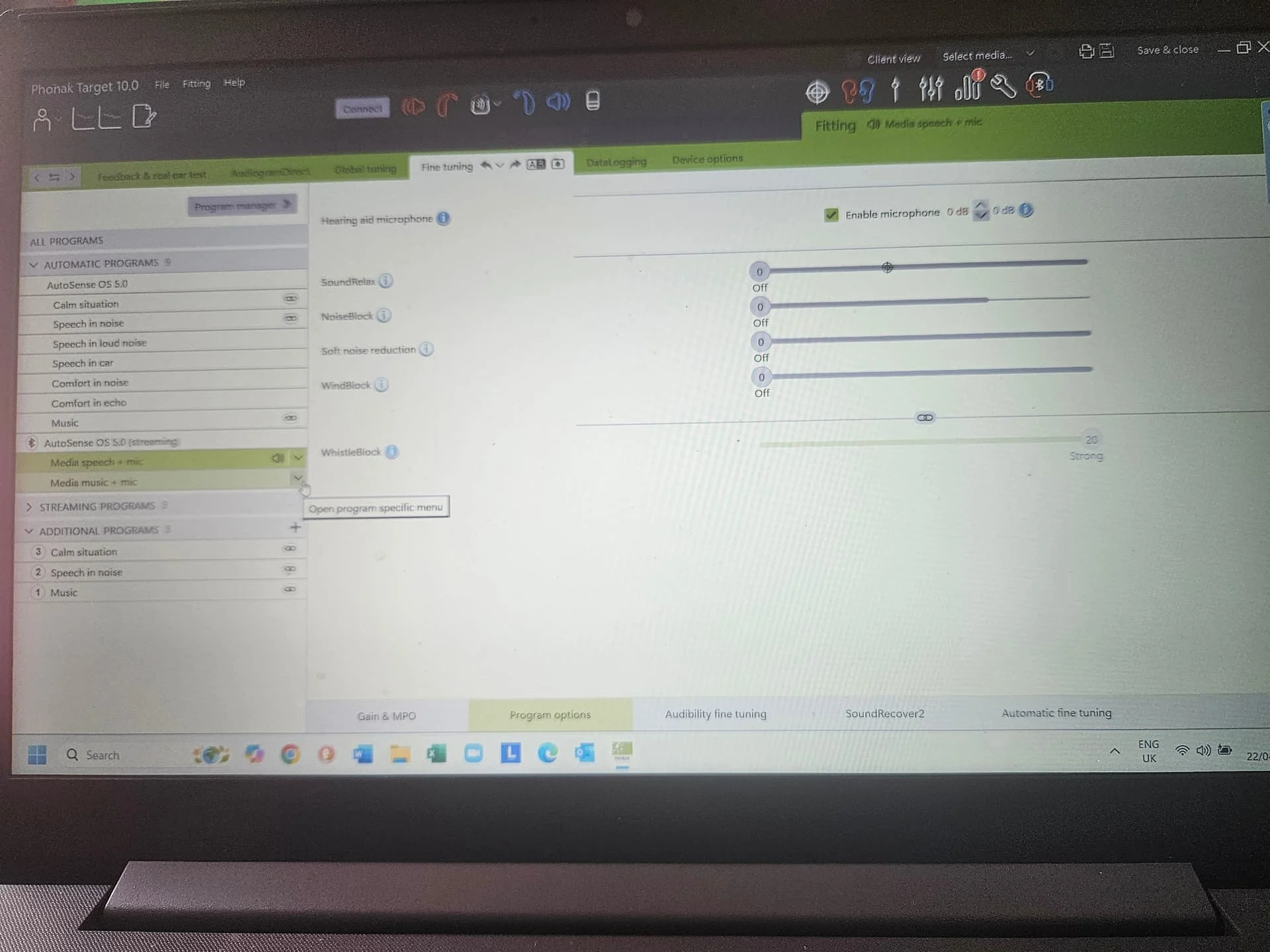
I believe there are two streaming programs available. One for music and one for voice. I recall seeing that in Target when my audiologist was setting up my Sphere’s. Should allow you to make adjustments to improve speech clarity while streaming.
Jordan
You’re ignoring this member’s posts.
This is the Program Options page for my Lumity 90’s Speech Streaming. There are some adjustments. Obviously I don’t know the details of the Sphere equivalent, but I doubt the Sphere chip will be included in the options?
You’re ignoring this member’s posts.
You’re ignoring this member’s posts.
One for music and one for voice. I recall seeing that in Target when my audiologist was setting up my Sphere’s
One point on this Jordan is that the gains and are totally different with streaming, as the sound is originating in the ear canal, not from outside. The bass frequencies are massively boosted to compensate for loss through domes and vents.
You’re ignoring this member’s posts.
I must adjust that streaming program because it can be dangerously loud for my hearing. This is one reason I don’t like using streaming for my hearing aids.
For clarity, I wanted to adjust them earlier, but was exhausted from trying to optimize my non-streaming programs.
You’re ignoring this member’s posts.
Hearing Aids are medical equipment.
Yeah. Sure. (Edit: it should be easy to get hearing aids setup so we hear our best. Let’s hope brings better performance and setup.)
It’s a good thing I didn’t have to do it myself when I got 3 stents.
You’re ignoring this member’s posts.
I use ChatGPT 4.5 to suggest solutions to my “small” problems.
It can read and analyze the file produced by the audio and give useful suggestions (IMHO).
If s/o is interested I can PM a link to the chat…
You’re ignoring this member’s posts.
You’re ignoring this member’s posts.

@al1 Are you happy with the result? There has been some discussion of ChatCPT in the section of the forum.
You’re ignoring this member’s posts.
Can you PM a link to the chat? Are the suggestions different than what some of the fitting software suggests to address various issues.
You’re ignoring this member’s posts.
The suggestions are more detailed and much better explained than those in the Target S/W.
They are also based on the provided.
The level of audiological knowledge displayed in analysing the REM is impressive.
The Target S/W is excellent but gives no explanation or show the downside of an action.
These recommendations were tried and have made a difference.
You’re ignoring this member’s posts.
But you couldn’t actually know the details or any difference to what some bot is telling you, it’s scraping information from the interwebs as fact, I can say for sure that I wouldn’t recommend or use anything that it feels is what your needing in a successful fit, it’s too far fetched at the moment to be of any use mainstream, in the not too distant future I’m sure it will be “helpful” oh and yes I tried it myself, but sorry it just seemed “mashed” together sounding like…well like an intellectual who thinks they know so much, it wasn’t even close, and this is a problem I see, hearing is so very subjective and the reason is important for some of us, more so then just advice from AI bots…hang on a minute, how do we know your not a bot?
You’re ignoring this member’s posts.
Haha. How do you want to prove I am not a bot?
If you look at your old messages you will find we corresponded and you gracefully PMed me the SW for the Starkey Evolv in September 24 then the Phonak Target SW in Dec 24.
Nobody said this analysis is perfect (or error free) but it is very useful in understanding the and provided recommendations which might or might not work.
Have a look at the analysis first then form your opinion. If you do, you will certainly find some errors, but it is certainly not a mashed text.
You’re ignoring this member’s posts.
I’m a recovering Phonak Audeo Paradise P90R user.
After parting ways with my dispensing Audi
I tried asking questions of .
I am truly impressed!
Good answers!
DaveL
You’re ignoring this member’s posts.
Had an issue with my Sphere’s last night. I was watching the live Canadian Election results on TV and I suddenly noticed that there was no sound coming through the right hearing aid. I wasn’t streaming…just listening via the hearing aids. I tried rebooting the right hearing aid multiple times and still no sound. I then did a hard reset by holding down one of buttons until the right hearing aid rebooted and still nothing. Weird thing is that the myPhonak app showed a live connection to the dead hearing aid, battery level was good and I could change the programs and volume on the other hearing aid by pressing the buttons on the dead hearing aid. Seemed like the hearing aid was functioning correctly and communicating with both the other hearing aid and my iPhone but the receiver was dead…so no sound. I then removed the right receiver and put it back in to confirm a good connection. Still dead.
I then dropped the two Sphere’s into their charger and put on my old Lumity hearing aids on so that I could continue watching the election coverage. After an hour, I went back upstairs and tried the Sphere’s again. They both booted up and the right hearing aid was working and back to normal. I put the Sphere’s back on and the right hearing aid died again after about 30 minutes. Dropped them back into the charger and finished the evening wearing the Lumity hearing aids.
This morning the right Sphere was once again back to normal. Drove over to my audiologist to get them checked. He replaced both receivers and did a firmware update to 1.0.13.0 (while his next patient waited in the waiting room…I felt so guilty making an elderly person wait like that). Strategy was to replace the receivers to see if that fixed the issue or whether the actual hearing aids had to be sent back for a hardware repair. It’s been 3-4 hours since the visit and both hearing aids are working perfectly. The only clue is that everything seems a bit louder. I’m wondering if the right receiver was starting to degrade and that’s why everything is louder/clearer this afternoon.
Couple of points to highlight. These Sphere’s are excellent and wearing the old Lumity hearing aids last night confirmed that sound quality is definitely superior on the Sphere’s. That being said, hearing aids are not without issues and having a really good audiologist who can quickly get you back up and running when there are issues…is a huge benefit. This is why I will never do the self programming thing. Luckily my audiologist is a superstar.
That’s my update for today. Life is good when you can hear…haha.
Jordan
You’re ignoring this member’s posts.
Log in to reply to this topic.
Hearing Aids3 replies
Forum Support7 replies
Hearing Aids6 replies
Hearing Aids104 replies
Hearing Aids13 replies
 Italy
Italy Canada (Toronto) YYZ
 North West UK
 Poland
 New Jersey