 Poland
You’re ignoring this member’s posts.
Sphere Programs
This topic is closed.
42 replies2.2k viewsLast reply
You’re ignoring this member’s posts.
You’re ignoring this member’s posts.

tenkanProvider
Just updated our page for adding hearing tests to the forum. Make sure you are logged in Go to My Hearing Tests You will see the page below Enter your audiogram and click the save button When you come back to the forum, you should have a headphone icon on your avatar and an audiogram on your profile. Thanks! [image] If you already have a hearing test on file, you will see the page below. Edit your current test or click the button “Add Hearing Test” to add a new test. [image]
Just click on dashboard.
You’re ignoring this member’s posts.
got it, abit convoluted, as your link still took me to home page, but I figured it out. Not sure how I did it, but finally got it 
You’re ignoring this member’s posts.
You’re ignoring this member’s posts.

I have a surround sound and when there was a music scene myPhonak switched to the music setting. I was delighted to see the switch.
Were you tracking that on the myPhonak app? If you wear Spheres, do you find they automatically switch to music if there is background music in a show that you’re streaming?
You’re ignoring this member’s posts.
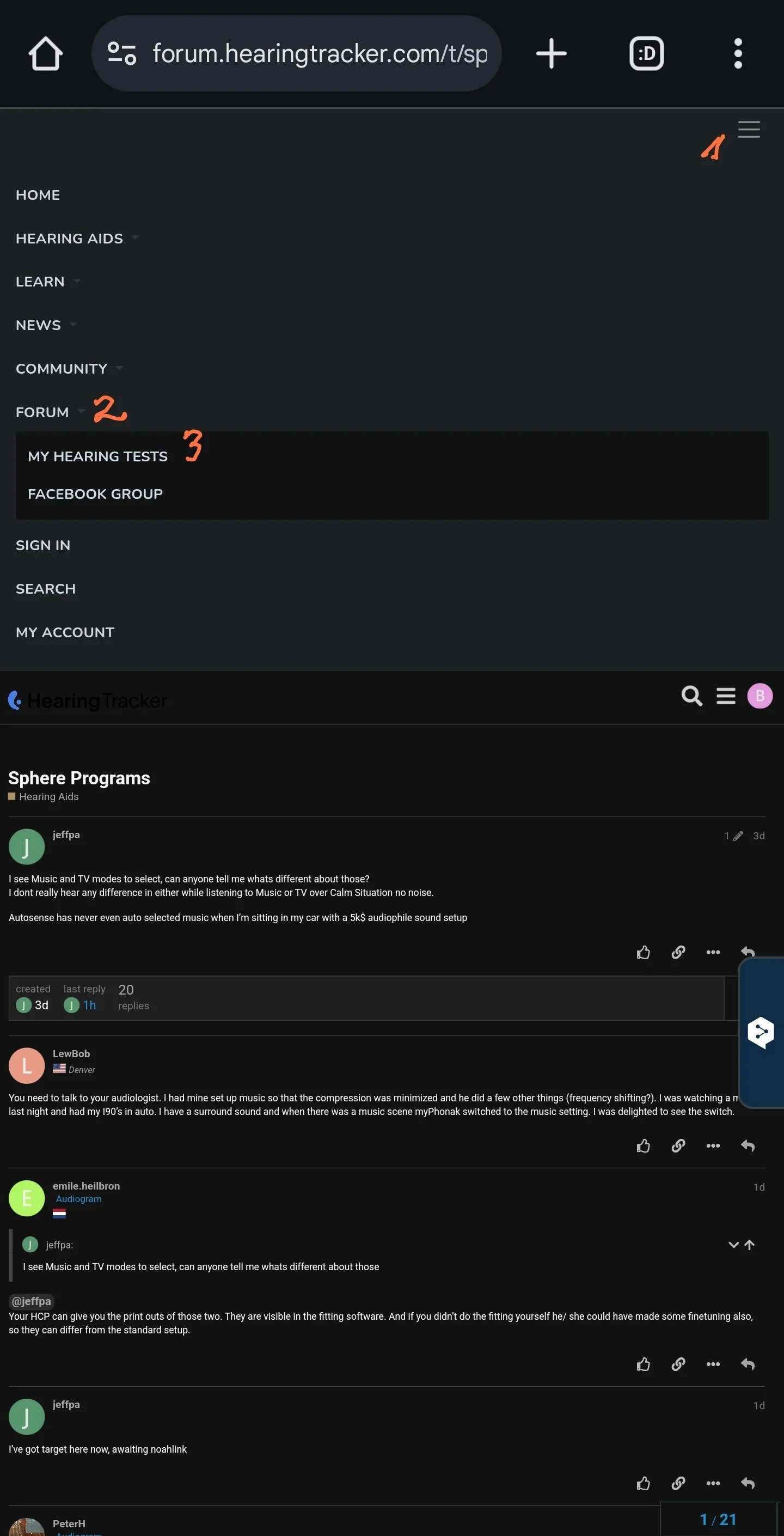
Hum! had it exactly right. So when I’m at the Forum home page, I select “Forum” in the menu options at the top as shown here:
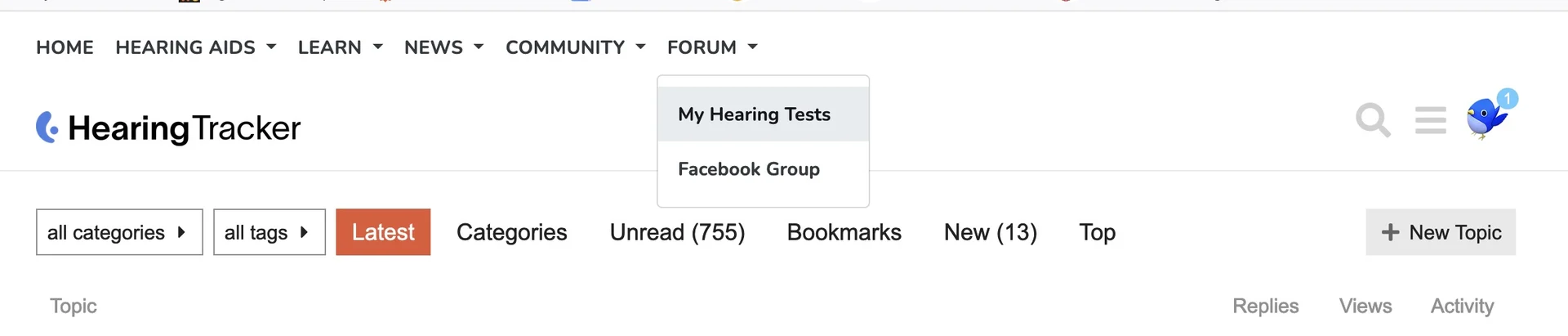
In the drop-down menu, I select “My Hearing Test” and am taken to this page:
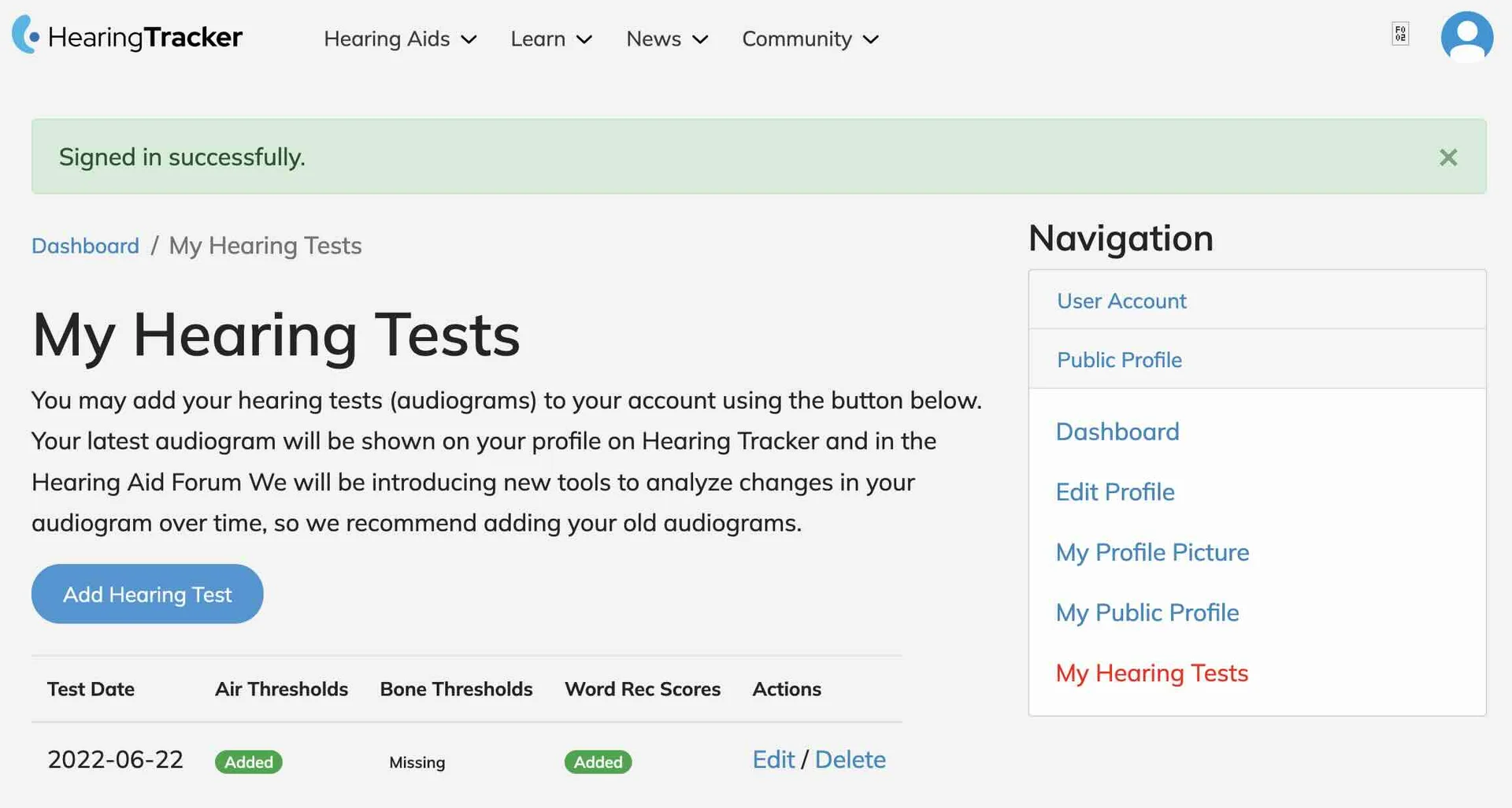
I click on the BLUE button that reads “Add Hearing Test” and see this page where I manually enter the data:
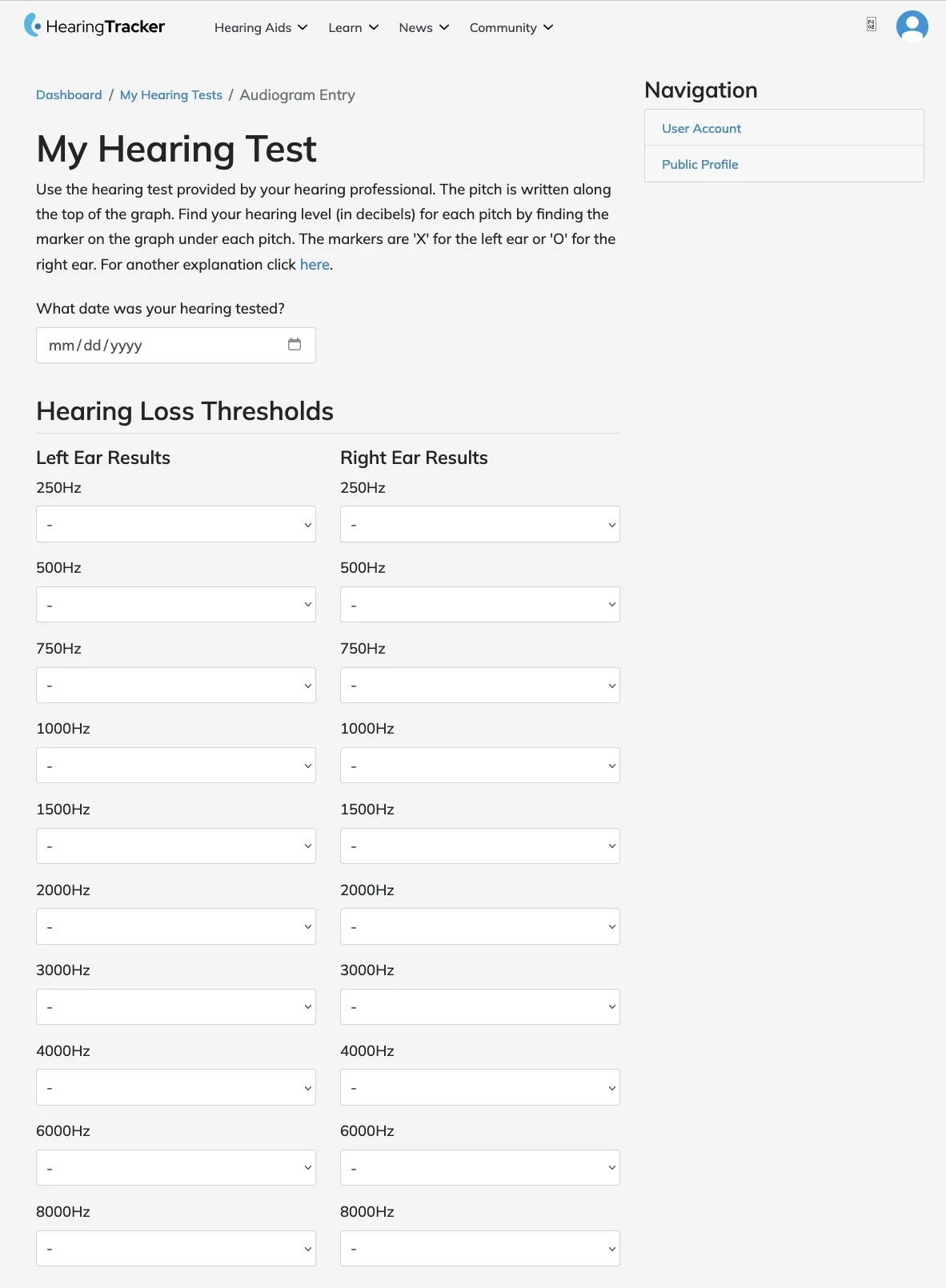
That’s the part that takes TIME and patience as you copy the numbers from your to this form.
You’re ignoring this member’s posts.
You’re ignoring this member’s posts.
Yes, I have Spheres. They switched when someone started performing on a show. That is the only time I tracked what it was doing. Lew
You’re ignoring this member’s posts.

You’re ignoring this member’s posts.

As I recommended today in @JordanK’s Sphere Lumity Shootout thread, taking the following two Audiology Online courses for free will really help you understand how AutoSense programs work and the relative importance of many of the adjustments, and whether any control over the adjustments is available for any particular AutoSense program in the MyPhonak app. Although the courses are intended to orient to using Target fitting software if you’re able to follow along from what you’ve learned on this forum, it will give you a lot of additional insight into how the Autosense programs work, what can be adjusted, and whether you need to ask your HCP to do it or not. Also, what some of the comparative differences are between AutoSense programs that seem similar on the surface, e.g., Media speech + mic vs. Media music + mic. The first course listed by Erika Porter is particularly good. She’s an excellent instructor and emphasizes that there is often more than one way to address any particular problem.
For example, with soft background noise like refrigerators, blowers, etc., that @jeffpa had a problem with in this thread, she cites raising the threshold for blocking background base-level noise is one of several approaches that can be used (some might not want a gross increase in noise reduction of all levels of noise loudness-might interfere with speech understanding, etc.).
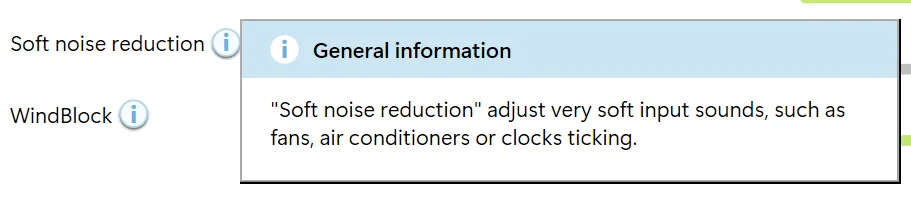
After posting, I see @Bimodal_user has also pointed out the soft noise reduction option (Sphere Programs - #12 by Bimodal_user), but it’s still something Erika Porter used in her talk to illustrate Phonak flexibility and many options.
There are further details in the post to which my self-quote is linked: My Phonak Sphere Infinio I90 vs Lumity L90 Shootout - #416 by jim_lewis
The first course is a little obsolete in that it only covers Phonak development up through the Lumity. However, it’s still very relevant in discussing the various AutoSense programs and the adjustable features in each and whether the user can control any feature in MyPhonak or needs their HCP to do so. Hopefully, an updated version to cover the Spheres and Target 10.0 will be released soon.
Phonak Target Software: Flexibility Meets Expertise | 42918 | Hearing (audiologyonline.com)
(although the course date is 10/28/24, it’s already been given before and available for ON DEMAND viewing to registered folks. Although it discusses how Target fitting software works, it reviews important aspects of the different AutoSense programs, what’s only controlled in Target and what the user can control in MyPhonak: HIGHLY RECOMMENDED and still very relevant to the Infinio line and the Spheres).The second course is more of a promo for the Infinio line and the Sphere in particular, but it brings the user up to date on what’s changed between the Lumity and the Infinio lines. In particular, it discusses the controls for Spheric Speech in Loud Noise and the control options.
Welcome to a New ERA | 39815 | Hearing Aids - (audiologyonline.com)
You’re ignoring this member’s posts.
My audiologist had suggested changing windblock for my noise issue. I figure I’ll try that once I get NoahLink in.
You’re ignoring this member’s posts.
Sounds like the Spheres truly DO know what to do!
I am late getting back to you Bluejay. I have a nice stereo and sat down to listen carefully a few days ago. They did not go into music mode automatically. I had to use the program.
You’re ignoring this member’s posts.
You’re ignoring this member’s posts.
Hi All
After returning my Jabra’s to Costco, I “bit the bullet” and purchased the Phonak Sphere I90 hearing aides. I had not read any comments about how the spheric feature gets activated, and initially did not feel it was activating at all. After a third adjustment with my audiologist recommended by Zip hearing, I am now experiencing the benefit of the Spheric speech clarity.
My audiologist reduced the threshold for spheric speech to “kick-in”, in both “calm” situations and in noisy situations. That seemed to do the trick. Like others who have commented, I can now hear and understand soft spoken speech in calm situations and in setting with noisy backgrounds. The audiologist also set an option for me to activate the spheric speech on my android phone in the phonak app… But, check the app after you no longer need the boost, or your battery will deplete. A couple of days ago, I activated the program on my phone it did not deactivated automatically. By the end of the day the battery was down to 15%
You’re ignoring this member’s posts.

 New Jersey
![[image]](/uploads/original/5268375177002fb5a4a60d69605caa72189b4974.png)
![[image]](/uploads/original/ab7f26de891d389bdb4eab35e3158161f109b6fd.png)
If your audiologist created a manual spheric program, you can activate it manually but you also need to deactivate it when it is no longer needed. The manual program will not deactivate automatically. On a couple of occasions I have forgotten to deactivate but fortunately there was still enough battery to get me through the remainder of the day.
You’re ignoring this member’s posts.
I havent lowered my threshold for activated Spheric Speech yet, but my hearing loss isnt bad…
But since I have open vented domes, I get much less out of Spheric Speech, its very subtle.
I just activate mine manually if it gets real noisy around me.
I can also tell when mine is on because of the hissing. I have the noise reduction turned up on everything else
You’re ignoring this member’s posts.
My audiologist reduced the threshold for spheric speech to “kick-in”, in both “calm” situations and in noisy situations. That seemed to do the trick. Like others who have commented, I can now hear and understand soft spoken speech in calm situations and in setting with noisy backgrounds.
When you have a chance, maybe you could ask your audiologist if the Calm situation adjustments were just to increase the Speech Enhancer effect or to some other Calm settings. I’ve read that noise threshold/reduction settings in Calm vs. Speech in Noise can affect when AutoSense switches from Calm to Speech in Noise. Other than the general AutoSense threshold for when Spheric Speech in Loud Noise should kick in, I don’t see where (my ignorance) any Calm situation settings change will make Spheric Speech kick in at a lower noise level. It’s too bad there aren’t sliders somewhere to define the noise level range the user wants each AutoSense program to operate in. In other words, say turn Speech in Noise off and always have the Spheres go from Calm to Spheric Speech in any noise above the Calm situation level. I’d like that since I probably spend 90 to 95% of my time in Calm situations, but when there’s annoying noise, I’d like to get rid of it well before I can hardly hear what someone else is saying.
You’re ignoring this member’s posts.
I believe the adjustments related to adjustments to the speech enhancer in calm situations. He I was having a problem understanding soft speech in both quiet small room settings and in quiet settings with high ceilings. This was an adjustment he made to the settings that transition automatically depending on the environment I am in. He got some help with the adjustments from Zip Hearing, as that is who I bought the ’s from. He also adjusted the spheric speech settings to a lower noise threshold and added it as a separate program fthat I can activate on my own, using my phone, if it does not automatically switch in noisy environments. He also changed out the hearing aid tips to a smaller one so it could reach further into my ear canal. The benefit for me was being able to hear folks during college visits with my grandson. I just have to remember to switch the spheric program on my phone off, if I activate the program, otherwise, it drains the battery.
You’re ignoring this member’s posts.
Related discussions
Hearing Aids3 replies
Hearing Aids0 replies
Hearing Aids3 replies
Fitting Software Requests892 replies
Hearing Aids144 replies