I can’t connect the TV adapter to Intent 1. I turn on the TV adapter and the two LEDs flash, I turn on Intent 1.
But not pairing the two led flash Always
You’re ignoring this member’s posts.
This topic is closed.
12 replies797 viewsLast reply
I can’t connect the TV adapter to Intent 1. I turn on the TV adapter and the two LEDs flash, I turn on Intent 1.
But not pairing the two led flash Always
You’re ignoring this member’s posts.

Have you tried to do a power reset of the TV adapter
Remove the power from the adapter, give it about a minute to fully drain off the power. On the back of the adapter there is a small button, hold it down and repower the adapter. This should reset the adapter. Then try pairing the aids again.
My INTENT1 aids work great with the TV adapter.
You’re ignoring this member’s posts.
You’re ignoring this member’s posts.
Do you have more than one adapter in the house powered on?
That can cause issues.
My adapter is 6 years old and i have used it since i got my Oticon OPN1 aids. So I know they last.
You’re ignoring this member’s posts.
You’re ignoring this member’s posts.
I haven’t gotten anything else that can help then, maybe an issue with the adapter or aids. Get them all checked by your audiologist.
You’re ignoring this member’s posts.
You’re ignoring this member’s posts.
Maybe you can find something that may help here How to connect Oticon hearing aids to wireless accessories25
I originally forgot that once I was ready to pair my rechargeable aids I had to put them back in the charger and then move directly to the pairing process before they would pair properly. They only give you 3 minutes to get from the charger to complete the pairing process. If you take longer you must start over.
You’re ignoring this member’s posts.
You don’t have to put them back in the charger. You just have to power them off then back on. The first 3 minutes after power on they are at the point they can be paired to compatible devices.
You’re ignoring this member’s posts.
Reboot (turn off and on) your hearing aids, then place them on top of TV adapter - and wait for about one minute.
You’re ignoring this member’s posts.
From what I was told that hasn’t worked. I even explained how to reset the TV adapter.
You’re ignoring this member’s posts.
You’re ignoring this member’s posts.
 Spain
SpainIn addition to this problem, I also have an interesting pairing issue that I like to share with you, hoping one of you has a solution.
I have Oticon More 1 (2024) for regular use and OPN S1 as a backup, which I use for sports. I also have a TVA 3.0 adapter and a remote control 3.0, which work flawlessly with both HAs.
Except for the More 1, which I bought new, everything was bought secondhand.
I recently bought a Connect Clip also second-hand. The deal also included a TVA 3.0 adapter and a remote control 3.0.
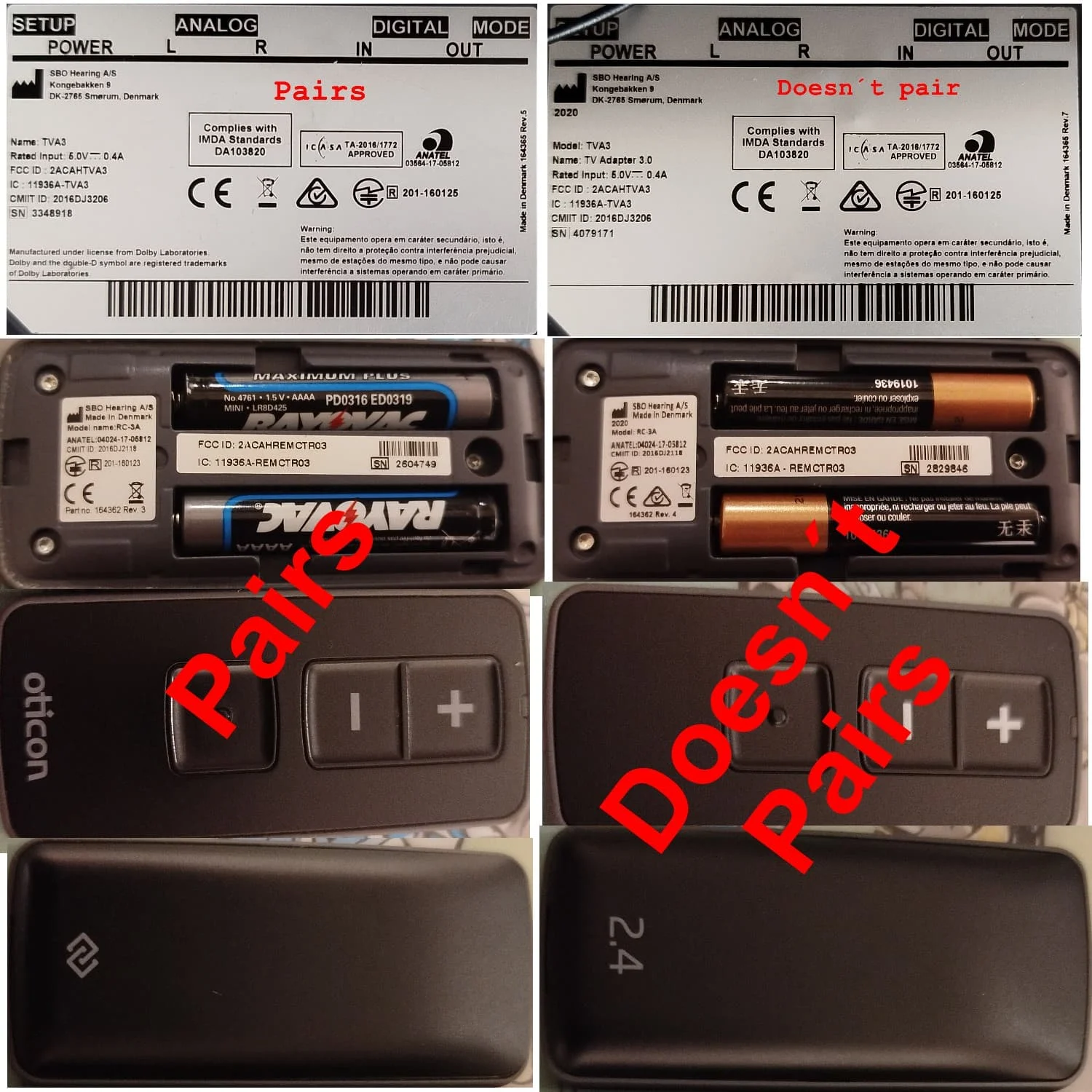
Now comes my problem: none of the three devices will pair with my HAs, no matter what I try.
I compared the specification labels of the remote controls and the TV adapters, and they are identical except for the year and serial number.
I connected the Connect Clip and the new TV adapter to the PC with Genie 2, and it recognizes both and displays the serial number with the message that the firmware is up to date. The strange thing is that none of the three devices or their manuals show the Oticon brand name. Only a reference to SBO Hearing, the Danish company.
Unlike the devices that do pair, the new ones have 2.4G marked on every device.
I hope someone recognizes this problem and can offer me a solution.
And please, no comments about the risks of buying secondhand.
You’re ignoring this member’s posts.
Hearing Assistive Technology2 replies
Uncategorized5 replies
Uncategorized451 replies
Hearing Aids50 replies
Hearing Aids102 replies
 Hot Springs Village, Arkansas