
tenkanProvider
Awesome, fantastic I look forward to this, always good to read about someone’s successful projects.
You’re ignoring this member’s posts.
This topic is closed.
390 replies27.4k viewsLast reply
Awesome, fantastic I look forward to this, always good to read about someone’s successful projects.
You’re ignoring this member’s posts.

@pvc
Interesting information. Yesterday was my first connection test with hearing aids.
I started the session using the hearing aids configuration, I wanted to make a backup copy of the data that is in the hearing aids.
The next time I will do it as you indicate if it gives me the same results.
You’re ignoring this member’s posts.

List of newley published School PDF Files that replaced the all-in-one file that was named (Choose a Hearing Aid Programming Device.PDF). Tip: You can access DIY School atop this topic in the OP/Original Post or by Clicking any PVC Avatar.
You’re ignoring this member’s posts.

Same background as you and starting to search for hearing aids, I would be interested in learning about your journey so far.
You’re ignoring this member’s posts.
You’re ignoring this member’s posts.
You’re ignoring this member’s posts.
Suggested reading; → School (Choose Hardware-Programming Device for Unitron.pdf)
Click any PVC Avatar to easily find DIY School again in the future.
You’re ignoring this member’s posts.
You’re ignoring this member’s posts.
Hello everyone,
new user trying to go -fitting route.
Can anyone provide me a link for Oticon Genius 2 and Phonak Target Software - that would be awesome!
Thank you very much everyone contributing to this fantastic forum. With the wealth of information I finally feel confident to tackle my hearing loss.
Have a great day!
You’re ignoring this member’s posts.
Hiya guys. I am following you now since some time and I was wondering if you could help me to get the Phonak Target software (latest release or upgradeable) for my Lumity . Would be most appreciated 
You’re ignoring this member’s posts.
@pvc
In Compass Widex, it does the same if I start a session with data from the database or from hearing aids.
The program directly records the changes in the hearing aids and asks if you want to save the session when it ends.

You’re ignoring this member’s posts.
Thanks for that?
I am assuming that prior to starting a session from (the database or from hearing aids) the settings were the exact same settings.
But I am also curious to know if Widex Compass does the same thing when starting with mismatched settings? For example; What if you were to create a new empty client, Joe Blow, male, birthday 1/1/1950 and then use the hearing aid settings to begin Joe Blow’s first session.
You can just “Cancel” at the End session Step after peeking at what Compass says about saving Joe Blow’s settings.
You’re ignoring this member’s posts.
Noahlink
I made a backup copy of the hearing aids with a blank client and at the end of the session it asks me if I want to save the data in the database, and in the hearing aids it is always marked.
This is what I did when I sent my first post.
And today is when I start a session with the same data in the database and the hearing aids, I make a modification and it is automatically recorded in the hearing aids, when finished it never asks if you want to record in the hearing aids.
When I make a change in Compass I automatically see in Noahlink that it is recording it in hearing aids.
You’re ignoring this member’s posts.
I made a backup copy of the hearing aids with a blank client and at the end of the session it asks me if I want to save the data in the database, and in the hearing aids it is always marked.
Thanks for that, just double checking.
You’re ignoring this member’s posts.
When I make a change in Compass I automatically see in Noahlink that it is recording it in hearing aids.
Yes, I believe that all brands work like that. That is, any settings changes you make are immediately made to your hearing aids.
But then the question arises; What if you don’t want to save your changes? What if you made a mistake? Even though your Widex Compass GPS (End session step) says
“The fitting has already been saved in the hearing aids”
that can’t the end of the story! It cannot (or at least should not) force you to accept unwanted changes. So I suspect that if you click Cancel at the Widex Compass (End session step) then the session will be removed from your hearing aids and not recorded in your database.
In other words, Widex Compass GPS works the same as other manufacturers except that the (End session Step) defaults to saving session settings in the hearing aids as opposed to giving you a choice.
And, that choice is cool because it’s the usual choice (save in both) for session settings (and for all manufacturers).
You’re ignoring this member’s posts.
Thanks @ramonqly @tenkan
I have rewritten the (Step 4 – Save your Original Professional Settings) section of School PDF file (02 How to Program Your Hearing Aids) to account for fitting software that automatically defaults to save session changes in the hearing aids. It should be less confusing now.
Though whether by automatic default action, or by optional selection criteria which are also automatically defaulted, saving session changes to both the hearing aids and the database is the usual/normal/desired outcome.
You’re ignoring this member’s posts.
“The fitting has already been saved in the hearing aids”
that can’t the end of the story! It cannot (or at least should not) force you to accept unwanted changes.
I have performed the following test:
I have the hearing aid button programmed to increase and decrease volume.
I have started a session and connected the hearing aids, I have changed the function of the button to program change, it has been recorded in the headphones and I have closed the session without saving data in the Compass database.
I have put on the headphones and the button changes the programs.
Conclusion, what is recorded in the hearing aids can only be changed by modifying in Compass with them connected, whether or not you save the session.
You’re ignoring this member’s posts.
When you say “I have closed the session without saving data in the Compass database” Does that mean that you chose to “Cancel” the session?
The default is to save it. Did you override the default by Cancelling the session?
You’re ignoring this member’s posts.
No, wait. Sigh, --deleted text–
Nope, Wait Part2;
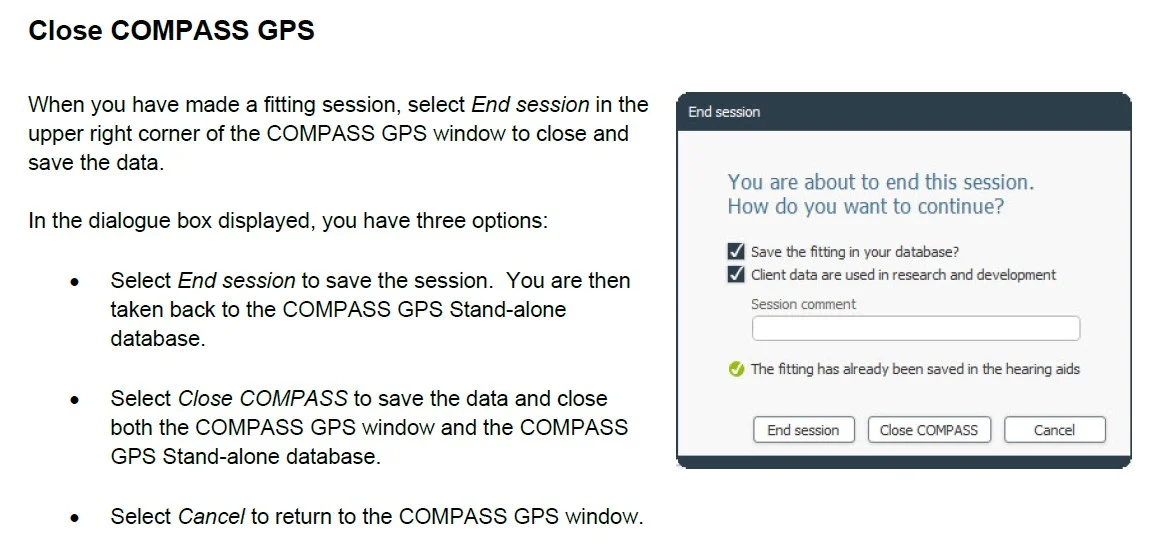
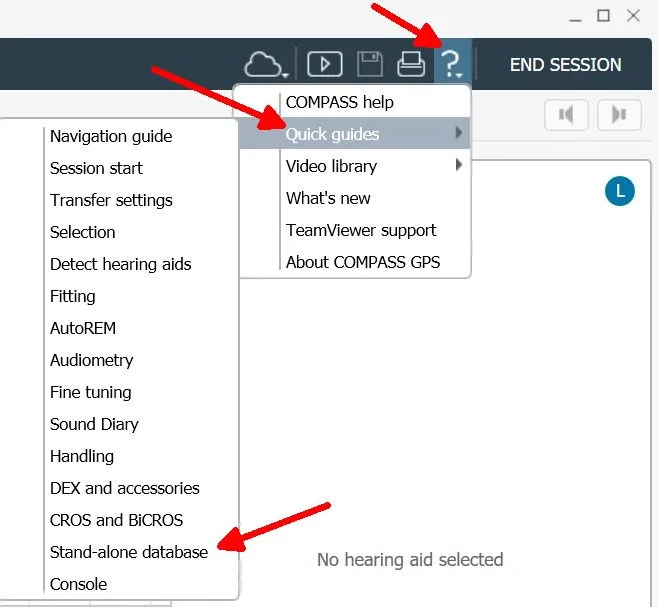
I found a PDF file (QUICK GUIDE / COMPASS GPS / THE COMPASS GPS STAND-ALONE DATABASE) and it says End Session saves the session, and Close COMPASS saves the data, and Cancel just takes you back into the fitting Session.
So I guess it always saves the settings in the hearing aids, no matter what happens, even a power failure, just like @ramonqly said. That’s really sucky! But it you inadvertently screw up a session you can always start again from the last good session to set it right.
You’re ignoring this member’s posts.
Oticon Genie2 2022.2
Hello everyone, does anyone have a link for * Oticon Genie2 2022.2 please? Thank you for starting this thread and for all the really helpful information!
You’re ignoring this member’s posts.
Hearing Aid Self-Fitting (DIY)10 replies
Hearing Aid Self-Fitting (DIY)322 replies
Hearing Aid Self-Fitting (DIY)4 replies
Fitting Software Requests1.1k replies
Hearing Aid Self-Fitting (DIY)302 replies


 Germany