
NOTE: I finally badgered my dear hubs into figuring out true ROCKET SCIENCE: how to get around Roku’s audio streaming limitation (i.e., only ONE person in the room can use Roku phone app and stream audio). Here is his morning’s work to come up with the answer:
- Type the following into https://gemini.google.com/10
Is there an app that allows streaming Roku audio to HDMI and a cell phone?
2. Answer returned:
This is a very common request, often coming from people who are hard of hearing or watching with others who want quiet audio.
The short answer is No, the official Roku app does not allow simultaneous audio output to both your HDMI/TV speakers AND the mobile phone’s headphones/speakers.
Here is a breakdown of how the Roku app works and the limitation you face:
Roku’s Private Listening Limitation
Roku’s feature for streaming audio to your cell phone is called Private Listening and is available in the free Roku Mobile App.
How Private Listening Works: When you start Private Listening in the app (by tapping the headphone icon), the Roku device sends the audio stream over your Wi-Fi network to your phone.
The Limitation: When Private Listening is activated, the Roku system mutes or disables the primary audio output, which is the signal going over the HDMI cable to your TV/Soundbar.
This design choice has been a long-standing point of frustration for many users, especially those needing separate volume controls for a hard-of-hearing family member. Roku has stated that the device only allows sound output through one primary audio source at a time.
Workarounds to Get Simultaneous Audio
Since the Roku device itself won’t do this simultaneously, you have to find a solution that splits the audio outside of the Roku player.
1. The TV’s Feature (Easiest, If Available)
Your best solution depends on your TV model, as some TVs do support multiple simultaneous audio outputs:
Look for Dual Audio or Multi-Output Audio: Check your TV’s sound settings for features like “Simultaneous Sound Out,” “Dual Audio Output,” or “TV Speaker + Optical/Bluetooth.”
TV Speaker + Bluetooth Headphone: Many modern smart TVs (Samsung, LG, Sony) can output sound to their internal speakers and a Bluetooth device (like a pair of headphones) at the same time. If your TV supports this, connect your headphones directly to the TV (not the Roku app).
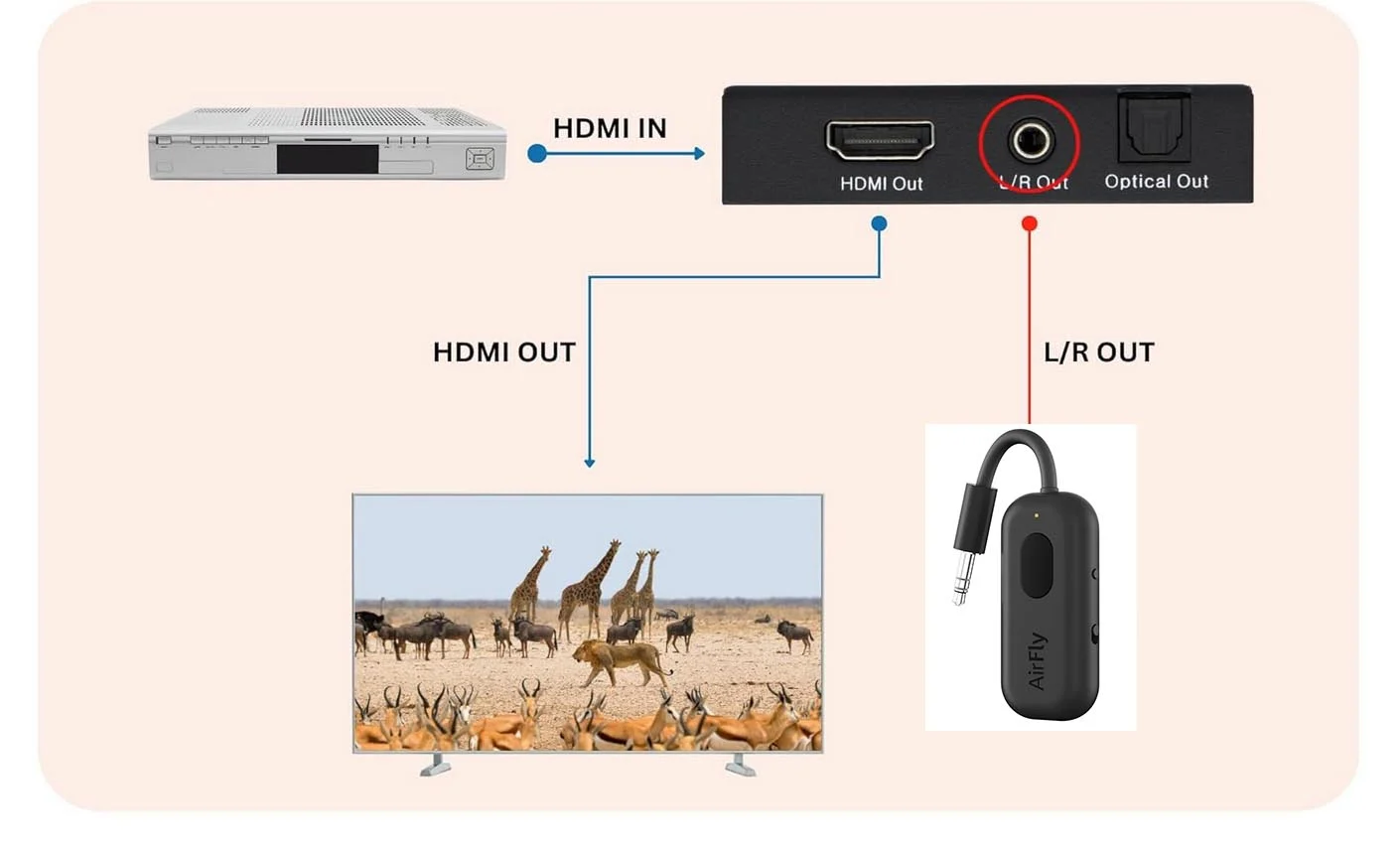
Folks here without a video receiver will need:
-
HDMI Audio Extractor, something like J-Tech Digital5
-
-
Bluetooth wireless transmitter, like Twel1ve South AirFly Pro 3
connect this to the L/R Out in the picture above. Note has a battery, which can be charged by Type C USB (or you can leave the charger plugged in all the time). -
Pair your hearing aid Bluetooth to the transmitter above
NOTE: We have not yet tested this at home because we have a more robust solution that works for our setup.
EDIT: to clarify the workaround above with the diagram photo of HDMI audio extractor as shown
You’re ignoring this member’s posts.



 Rural New England
 Philippine